
Running a 27-billion-parameter model on one consumer GPU is a packing problem. The weights, a cache that grows with every token of context and the runtime's scratch buffers all share the same 16, 24 or 32 GB, and on most models the cache is what overflows first.
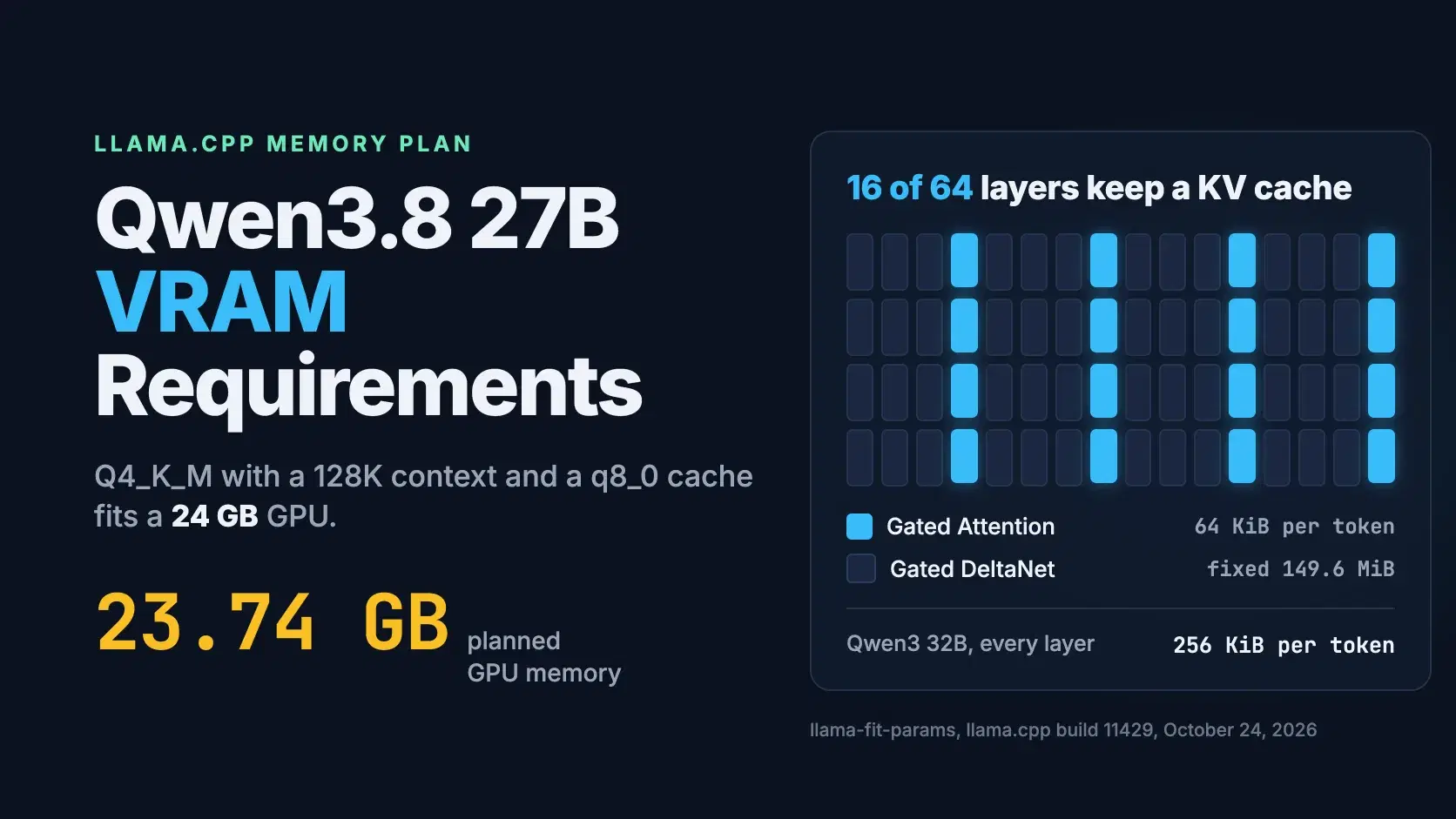
Qwen3.8 27B breaks that pattern. At the Q4_K_M quant, llama.cpp's own memory planner puts the model at 23.74 GB of GPU memory for a 131,072-token context with a q8_0 cache, which fits a 24 GB RTX 4090, and its context costs a quarter of what the dense Qwen3 32B needs at the same length. Every memory figure in this post comes from llama-fit-params in llama.cpp build 11429, run on October 24, 2026 against the real GGUF files on Hugging Face.
How Much VRAM Does Qwen3.8 27B Need?
A 16 GB card runs a 3-bit quant with up to 64K tokens of context, a 24 GB card runs the standard Q4_K_M with up to 128K tokens, and a 32 GB card holds Q4_K_M with the model's full 262,144-token context. In every case that assumes a q8_0 KV cache; the default F16 cache halves the reachable context.
The table counts a setup as fitting when llama.cpp's plan for the GPU stays at least 1,024 MiB under the card's memory, which is the free margin llama.cpp itself keeps by default (--fit-target). Contexts were measured at 8K, 32K, 64K, 128K and 256K, so each cell is the largest of those that fits, with the planned GPU memory in brackets.
| GPU memory | Weights file | Longest context, F16 cache | Longest context, q8_0 cache |
|---|---|---|---|
| 16 GB (RTX 4080, RTX 5080, RTX 5060 Ti) | UD-Q3_K_XL, 13.15 GB | 32K (15.14 GB) | 64K (15.29 GB) |
| 24 GB (RTX 3090, RTX 4090) | UD-Q3_K_XL, 13.15 GB | 128K (21.77 GB) | 256K (22.97 GB) |
| 24 GB (RTX 3090, RTX 4090) | Q4_K_M, 18.97 GB | 64K (23.32 GB) | 128K (23.74 GB) |
| 32 GB (RTX 5090) | Q4_K_M, 18.97 GB | 128K (27.78 GB) | 256K (28.98 GB) |
| 32 GB (RTX 5090) | Q8_0, 28.60 GB | 64K (32.30 GB) | 128K (32.73 GB) |
| 48 GB (RTX 6000 Ada, L40S) | Q8_0, 28.60 GB | 256K (46.03 GB) | 256K (37.96 GB) |
GB here means 10^9 bytes, the unit Hugging Face uses for file sizes. Graphics cards are sold in GiB, so a "24 GB" card actually holds 25.77 GB in these units, which is why 23.74 GB still leaves the 1 GiB margin.
Why 128K Tokens Cost 8.75 GB Instead of 34 GB
Only 16 of the model's 64 layers keep a KV cache. The Qwen3.8-27B model card gives the layout as 16 × (3 × (Gated DeltaNet → FFN) → 1 × (Gated Attention → FFN)): three linear-attention layers, then one ordinary attention layer, repeated 16 times.
The ordinary attention layers work like any transformer's. For every token they store a key and a value per KV head, and Qwen3.8 has 4 KV heads of 256 dimensions on each of those 16 layers. At 2 bytes per value in an F16 cache, that is 64 KiB per token. You can derive it from the model's own config.json:
Pythonimport json, urllib.request url = "https://huggingface.co/Qwen/Qwen3.8-27B/resolve/main/config.json" cfg = json.load(urllib.request.urlopen(url))["text_config"] full = cfg["layer_types"].count("full_attention") # K and V, per KV head, per head dimension, 2 bytes each in an F16 cache per_token = full * cfg["num_key_value_heads"] * cfg["head_dim"] * 2 * 2 print(f"{full} of {cfg['num_hidden_layers']} layers keep a KV cache: {per_token // 1024} KiB per token") print(f"{per_token * 131072 / 2**20:,.0f} MiB at 131,072 tokens")
text16 of 64 layers keep a KV cache: 64 KiB per token 8,192 MiB at 131,072 tokens
The other 48 layers use Gated DeltaNet, the linear-attention design from the Gated Delta Networks paper by Songlin Yang, Jan Kautz and Ali Hatamizadeh (December 2024). Instead of appending a key and a value for each new token, every head keeps one fixed 128 by 128 state matrix and updates it in place. llama.cpp stores those states in 32-bit floats: 144 MiB across the 48 layers, plus 5.62 MiB of convolution state, for 149.62 MiB per conversation whether the context holds 8 tokens or 262,144.
That is the whole trick. The same context costs roughly four times as much on Qwen3 32B and five times as much on Llama 3.3 70B, both of which keep a KV cache on every layer:
| Model | Layers with a KV cache | KV cache per token | Context memory at 32K | Context memory at 128K |
|---|---|---|---|---|
| Qwen3.8 27B | 16 of 64 | 64 KiB | 2.30 GB | 8.75 GB |
| Gemma 4 31B | 10 of 60 full, 50 sliding-window | 80 KiB on full layers | 3.94 GB | 12.00 GB |
| Qwen3 32B | 64 of 64 | 256 KiB | 8.59 GB | 34.36 GB |
| Llama 3.3 70B | 80 of 80 | 320 KiB | 10.74 GB | 42.95 GB |
All four rows are llama.cpp's plan with an F16 cache for one conversation; Qwen3.8's figures include the 149.62 MiB DeltaNet state. Gemma 4 31B gets its savings differently: 50 of its 60 layers only attend to the last 1,024 tokens, so llama.cpp caps their cache at 1,536 tokens (the window plus one 512-token batch). Qwen3 32B is natively a 32,768-token model, and its model card reaches 131,072 only with YaRN scaling, so the fair comparison is the 32K column: 2.30 GB against 8.59 GB.
What the Weights Cost Before Any Context
The weights are the fixed part of the bill, and for Qwen3.8 27B they decide which card you need. The two GGUF repos most people pull from are llama.cpp's own ggml-org/Qwen3.8-27B-GGUF and Unsloth's unsloth/Qwen3.8-27B-GGUF, whose "UD" files are Unsloth's dynamic quants, which vary the quant type from layer to layer.
| Quant | Repo | File size |
|---|---|---|
| UD-Q3_K_XL | unsloth | 13.15 GB |
| UD-Q4_K_XL | unsloth | 17.56 GB |
| Q4_K_M | ggml-org | 18.97 GB |
| Q8_0 | ggml-org | 28.60 GB |
| BF16 | ggml-org | 53.81 GB |
Not all of the file lands on the GPU. For Q4_K_M, llama.cpp plans 17,402 MiB (18.25 GB) on the GPU and keeps 682 MiB in system RAM, which shows up as the Host row in its plan. Two optional files add their size on top if you load them: the vision projector mmproj-Qwen3.8-27B-BF16.gguf (931 MB, or 629 MB as Q8_0) for image input, and mtp-Qwen3.8-27B-Q4_0.gguf (1.68 GB), the multi-token prediction head used for speculative decoding.
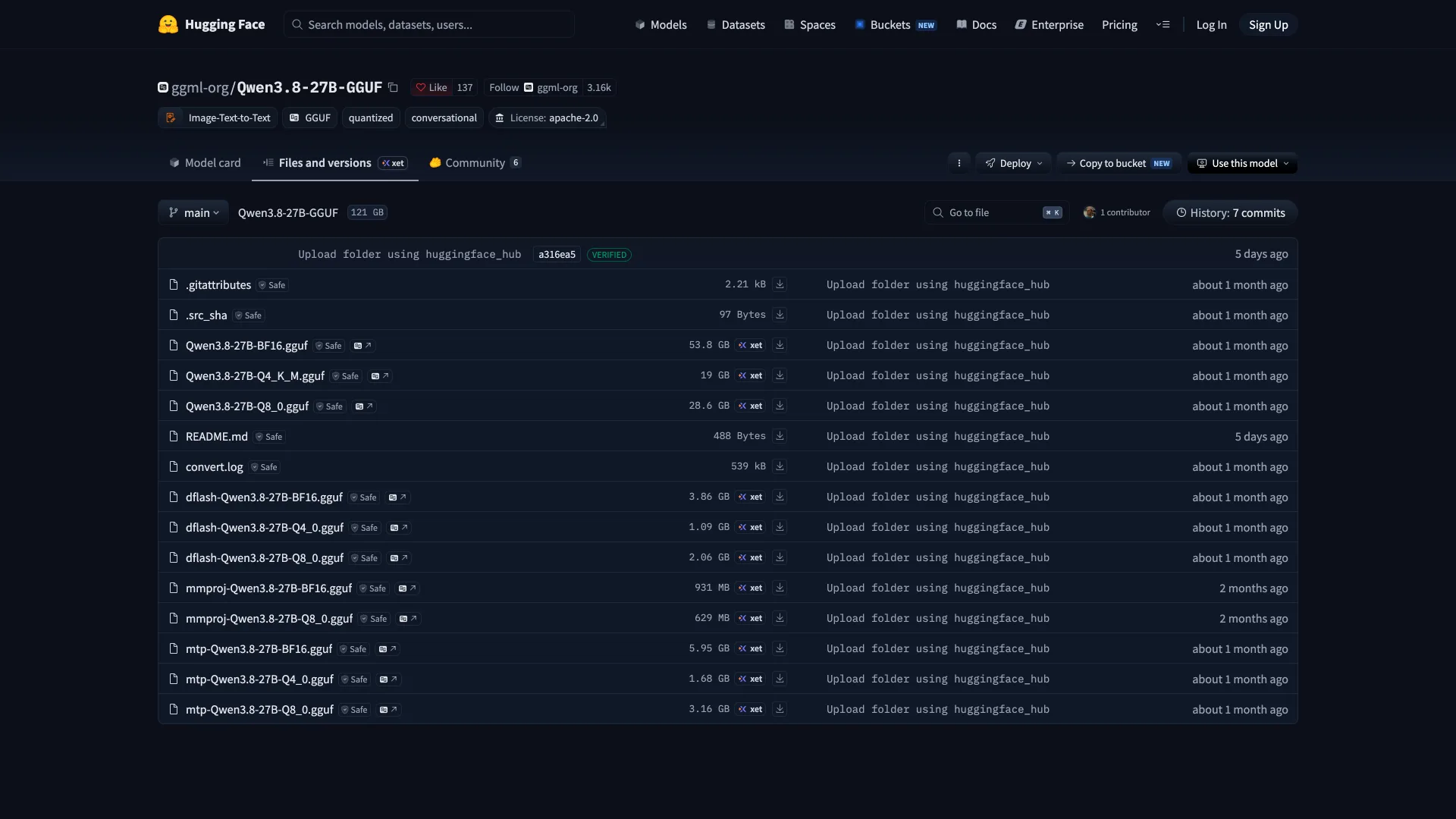
Ollama lists its qwen3.8:27b tag at 18GB with a 256K context window, qwen3.8:27b-q8_0 at 30GB and qwen3.8:27b-bf16 at 56GB (checked October 24, 2026). Ollama's memory use was not measured here.
The Memory Plan at Every Context Length
Context memory grows linearly, but the compute buffers grow too, and they are what a flat "add 1 GB for overhead" rule gets wrong. Here is llama.cpp's full GPU plan for the Q4_K_M file:
| Context | GPU plan, F16 cache | GPU plan, q8_0 cache | Compute buffers on the GPU | Host RAM |
|---|---|---|---|---|
| 8,192 | 19.51 GB | 19.25 GB | 0.57 GB | 0.82 GB |
| 32,768 | 21.15 GB | 20.13 GB | 0.59 GB | 0.87 GB |
| 65,536 | 23.32 GB | 21.30 GB | 0.62 GB | 0.93 GB |
| 131,072 | 27.78 GB | 23.74 GB | 0.79 GB | 1.07 GB |
| 262,144 | 37.05 GB | 28.98 GB | 1.46 GB | 1.34 GB |
The compute buffers, the scratch space for one 512-token batch of prompt processing, are 0.57 GB at 8K and 1.46 GB at 256K. Switching the cache from F16 to q8_0 saves 4.04 GB at 128K and 8.07 GB at 256K, which is why every row of the first table that reaches a long context uses it. The q8_0 format stores 32 values in 34 bytes, so it is 53% of the F16 size rather than exactly half.
Check Any GGUF Before You Download It
You do not need the 18.97 GB file to get this plan. llama-fit-params reads only the GGUF header, where the architecture and every tensor's size and offset live, so the first 24 MB of the file padded out to its real length is enough. This script does that for the Q4_K_M file and asks for a 131,072-token context with a q8_0 cache:
BashURL=https://huggingface.co/ggml-org/Qwen3.8-27B-GGUF/resolve/main/Qwen3.8-27B-Q4_K_M.gguf SIZE=$(curl -sIL "$URL" | grep -i '^x-linked-size' | tr -dc '0-9') curl -sL -r 0-25165823 "$URL" -o qwen3.8-27b.gguf # first 24 MB: metadata and tensor index truncate -s "$SIZE" qwen3.8-27b.gguf # pad to the real size; sparse, so no disk used llama-fit-params -m qwen3.8-27b.gguf -c 131072 -ctk q8_0 -ctv q8_0 -v 2>&1 \ | grep -E 'kv_cache: size|recurrent: size|- (MTL0|CUDA0|Host)|MiB used' \ | sed -E 's/^[0-9.]+ [IDW] //' | awk '!seen[$1 $3 $4]++'
On our 18 GB M3 Pro MacBook Pro it took 14 seconds and printed:
textllama_kv_cache: size = 4352.00 MiB (131072 cells, 16 layers, 1/1 seqs), K (q8_0): 2176.00 MiB, V (q8_0): 2176.00 MiB llama_memory_recurrent: size = 149.62 MiB ( 1 cells, 64 layers, 1 seqs 0 rs_seq), R (f32): 5.62 MiB, S (f32): 144.00 MiB, P (f32): 0.00 MiB common_memory_breakdown_print: | - MTL0 (Apple M3 Pro) | 13639 = 13489 + (22644 = 17402 + 4501 + 740) + -22494 | common_memory_breakdown_print: | - Host | 1018 = 682 + 0 + 336 | common_params_fit_impl: - MTL0 (Apple M3 Pro): 33 layers, 12198 MiB used, 1291 MiB free
Read the GPU row as total = weights + context + compute: 22,644 MiB = 17,402 + 4,501 + 740. This Mac's GPU can use 13,639 MiB, so llama.cpp would put 33 of the 64 layers on the GPU and run the rest on the CPU. On an NVIDIA card the row says CUDA0 instead of MTL0, and the numbers are your backend's own, which matters because ours came from Metal. The trick works for any GGUF, not just this one.
Running It on a 16, 24 or 32 GB Card
These commands pull the file with llama.cpp's -hf option and set the context and cache type from the first table. They were not run here, because the full files do not fit this Mac; the flags were checked against llama-server --help in build 11429.
Bash# 16 GB card: 3-bit dynamic quant, 64K context llama-server -hf unsloth/Qwen3.8-27B-GGUF:UD-Q3_K_XL -c 65536 -ctk q8_0 -ctv q8_0 # 24 GB card: Q4_K_M, 128K context llama-server -hf ggml-org/Qwen3.8-27B-GGUF:Q4_K_M -c 131072 -ctk q8_0 -ctv q8_0 # 32 GB card: Q4_K_M, the full 262,144-token context llama-server -hf ggml-org/Qwen3.8-27B-GGUF:Q4_K_M -c 262144 -ctk q8_0 -ctv q8_0
Leaving -ngl unset is deliberate. With --fit on, which is the default, llama.cpp moves layers to the CPU when the plan does not fit instead of failing to load, as it did on the Mac above. That is slower, but you get an answer instead of an out-of-memory error.
Two settings change the math. -np 2 serves two conversations, and llama.cpp splits -c between them, so each gets half the context while the 149.62 MiB DeltaNet state is kept once per conversation. And thinking is on by default: the model card suggests a reasoning budget of up to 262,144 tokens for agentic tasks, so a long coding session reaches the large contexts in these tables faster than chat does.
On Apple Silicon, the GPU and Host rows both come out of unified memory, and macOS lets the GPU use only part of it by default. On our 18 GB machine llama.cpp reported a 14,302 MB working-set limit, about three quarters of the RAM.
What These Numbers Do Not Tell You
They are memory, not speed. Tokens per second depend on memory bandwidth and on how many layers spill to the CPU, and none of that was measured. They also say nothing about quality: whether a 3-bit Qwen3.8 is good enough for your code is a question for your own evals, not a file size. Production servers are a separate case too. The model card recommends vLLM, SGLang or TokenSpeed for high throughput, and those reserve GPU memory up front by their own rules, so this table does not carry over to them.
Which Setup to Pick
- 16 GB card: UD-Q3_K_XL with a q8_0 cache, up to 64K tokens. No 4-bit file fits; UD-Q4_K_XL needs 17.75 GB even at 8K.
- 24 GB card (RTX 3090 or 4090): Q4_K_M with a q8_0 cache gives 128K tokens at 23.74 GB. Drop to UD-Q3_K_XL only if you need the full 262,144.
- 32 GB card (RTX 5090): Q4_K_M with a q8_0 cache holds the full context at 28.98 GB, or Q8_0 weights fit up to 128K.
- 48 GB and up: Q8_0 with an F16 cache at the full context, 46.03 GB.
- Any other model: run the header-only check first. It costs 24 MB and 15 seconds, against downloading an 18.97 GB file that may not fit.
Conclusion
For most local models, context length decides whether you need a bigger GPU. Qwen3.8 27B mostly removes that problem: only 16 of its 64 layers keep a KV cache, at 64 KiB per token, and the other 48 hold a fixed 149.62 MiB state. So the weights file sets the floor, and a q8_0 cache does the rest. That is how Q4_K_M plus a 131,072-token context lands at 23.74 GB on a 24 GB card, and how a 32 GB card holds the full 262,144 tokens at 28.98 GB.
Treat the tables as llama.cpp's plan on Apple's Metal backend, not a guarantee for your machine. Compute buffers differ by backend, and speed and output quality were not measured at all. The check that settles it for your own GPU costs a 24 MB download: run the script above with your card, your quant and the context you actually use, and read the result before you pull 18.97 GB.
Related DevToolLab Tools
- LLM VRAM Calculator - pick Qwen3.8 27B or 19 other models, set the context and cache type, and see which GPUs and Macs hold it, using the same KV math as llama.cpp.
- GGUF Viewer - open a GGUF header in the browser to read its layer count, KV heads and quant types before you plan memory around it.
- Safetensors Viewer - inspect the BF16 release's tensor names and dtypes if you serve the original weights with vLLM instead of a GGUF.
- Data Storage Converter - convert between the GiB on a graphics card's spec sheet and the GB on a Hugging Face file listing.
Related Guides
- Local LLM VRAM Requirements explains why a Q4_K_M file is 23% larger than 4 bits per weight suggests, using Llama 3.1 8B.
- Local LLM Hardware: GPU vs Mac compares NVIDIA cards with Apple Silicon unified memory for running models like this one.
- Best Offline LLM Models and Tools covers Ollama and LM Studio, the desktop apps that load these GGUF files for you.
- Open Source AI Coding Models vs Fable 5.1 compares the open-weight models developers run for coding with a frontier API model.