

Picking hardware for a local LLM usually starts with a rule of thumb, something like half a gigabyte of VRAM per billion parameters, and that rule holds right up until the model loads fine and then runs out of memory partway through a long conversation. The gap between "the model fits" and "the model runs at the context length I need" is where most local setups go wrong.
Two numbers explain it. A Q4_K_M quant of an 8B model is not 4 bits per weight, it is 4.90, so the file is 23 percent larger than the arithmetic suggests. And at 128k context that same model's KV cache is 17.18 GB against 4.92 GB of weights, which is three and a half times the model itself.
Both figures below were computed from a script you can run, checked against the actual file sizes on Hugging Face.
Weights: the Quant Name Is Not the Bit Count
The naive calculation is parameters times bits divided by eight. For Llama 3.1 8B at Q4 that gives 4.01 GB. The file you actually download is 4.92 GB.
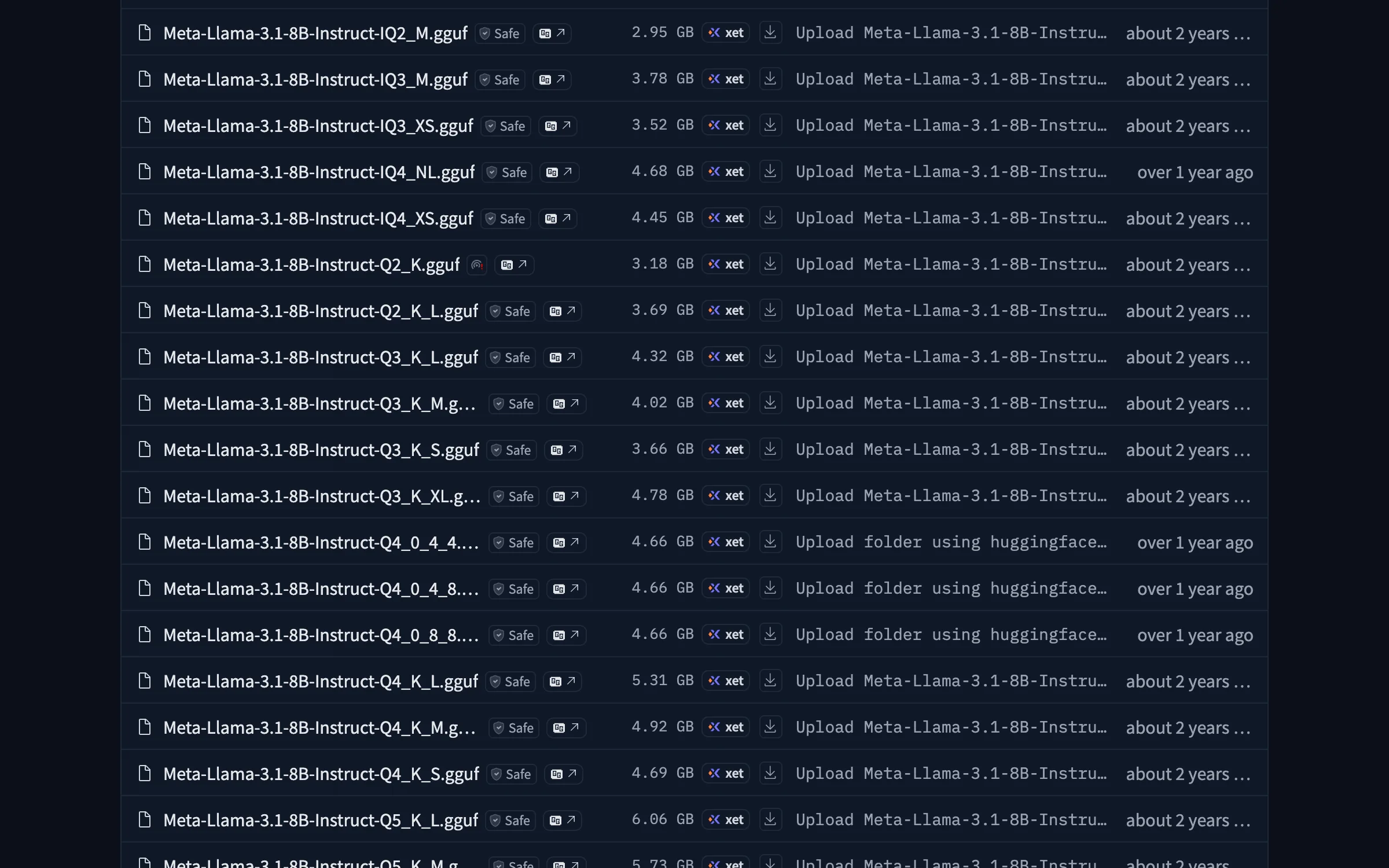
The difference is not rounding. K-quants store per-block scale and minimum values alongside the quantized weights, and the mixed variants keep sensitive tensors, typically the embedding and output layers, at higher precision than the name suggests. The suffix tells you the dominant format, not the average.
JavaScript// What a local LLM actually costs in memory, checked against real GGUF files. const GB = 1e9 const pad = (s, n) => String(s).padStart(n) // Llama 3.1 8B Instruct, from its config.json const M = { params: 8.03e9, layers: 32, kvHeads: 8, headDim: 128 } // Real bartowski/Meta-Llama-3.1-8B-Instruct-GGUF file sizes, in bytes. const REAL = { Q4_K_M: 4.92e9, Q5_K_M: 5.73e9, Q6_K: 6.60e9, Q8_0: 8.54e9 } const NOMINAL_BITS = { Q4_K_M: 4, Q5_K_M: 5, Q6_K: 6, Q8_0: 8 } console.log("weights: naive guess vs the file you actually download\n") console.log("quant naive real error real bits/weight") for (const [q, real] of Object.entries(REAL)) { const naive = (M.params * NOMINAL_BITS[q]) / 8 const bits = (real * 8) / M.params const err = ((real - naive) / naive) * 100 console.log( `${q.padEnd(9)} ${pad((naive / GB).toFixed(2), 6)} ${pad((real / GB).toFixed(2), 6)} ` + `${pad("+" + err.toFixed(0) + "%", 6)} ${bits.toFixed(2)}`, ) } // KV cache: 2 tensors (K and V) per layer, per token. const kvPerToken = (bytesPerElem) => 2 * M.layers * M.kvHeads * M.headDim * bytesPerElem console.log(`\nKV cache = ${(kvPerToken(2) / 1024).toFixed(0)} KB per token at fp16\n`) console.log("context KV fp16 KV q8 total (Q4_K_M + fp16 KV)") for (const ctx of [4096, 8192, 32768, 131072]) { const kv16 = kvPerToken(2) * ctx console.log( `${pad(ctx, 7)} ${pad((kv16 / GB).toFixed(2), 6)} GB ${pad((kvPerToken(1) * ctx / GB).toFixed(2), 5)} GB ` + `${pad(((REAL.Q4_K_M + kv16) / GB).toFixed(2), 8)} GB`, ) }
textweights: naive guess vs the file you actually download quant naive real error real bits/weight Q4_K_M 4.01 4.92 +23% 4.90 Q5_K_M 5.02 5.73 +14% 5.71 Q6_K 6.02 6.60 +10% 6.58 Q8_0 8.03 8.54 +6% 8.51
The overhead shrinks as precision rises, from 23 percent at Q4_K_M down to 6 percent at Q8_0, because the block metadata is a fixed cost spread over more bits of payload. If you want one number to plan with, use 0.61 GB per billion parameters at Q4_K_M, which is what 4.90 bits works out to. That is where the familiar "0.6 GB per billion" rule comes from, and now you know why it is 0.6 rather than 0.5.
KV Cache: the Part That Actually Kills You
Weights are a fixed cost you pay once. The KV cache grows linearly with context length, and every token you feed the model adds to it permanently for that conversation.
The formula is two tensors, K and V, for every layer, for every token:
2 x layers x kv_heads x head_dim x bytes_per_element
For Llama 3.1 8B that is 2 x 32 x 8 x 128 x 2 bytes at fp16, which comes to 128 KB per token. Note kv_heads is 8, not 32. Grouped-query attention shares key and value projections across query heads, and without it this model's cache would be four times larger.
textKV cache = 128 KB per token at fp16 context KV fp16 KV q8 total (Q4_K_M + fp16 KV) 4096 0.54 GB 0.27 GB 5.46 GB 8192 1.07 GB 0.54 GB 5.99 GB 32768 4.29 GB 2.15 GB 9.21 GB 131072 17.18 GB 8.59 GB 22.10 GB
Read the last row again. The model weighs 4.92 GB and the cache for its advertised 128k context weighs 17.18 GB. An 8B model, the size everyone calls "runs on anything", needs 22.10 GB to use the context window it ships with. That does not fit on a 16 GB card and leaves nothing spare on a 24 GB one.
This is why a setup that loads fine dies mid-conversation. You sized for the weights.
Serving More Than One Person Multiplies It
Everything above assumes a single conversation. The moment you put a local model behind an API that two people hit at once, the KV cache multiplies by the number of sequences held in flight, because each one keeps its own keys and values.
Four concurrent 8k sessions on Llama 3.1 8B is 4 x 1.07 GB, so 4.29 GB of cache against 4.92 GB of weights. Sixteen concurrent sessions is 17.2 GB and you are out of memory on a 24 GB card while every individual conversation looks modest. This is the difference between running a model for yourself and serving one, and it is why inference servers such as vLLM spend so much engineering on paged attention and cache reuse: the naive allocation wastes memory reserving space for tokens nobody generated yet.
If you are sizing for a team rather than a laptop, multiply the cache column by peak concurrency, not average, and quantize the cache before you do anything else.
What This Means for Real Hardware
| VRAM | Comfortable at Q4_K_M | Realistic context |
|---|---|---|
| 8 GB | 7B to 8B | 8k to 16k |
| 12 GB | 8B to 13B | 16k to 32k |
| 16 GB | 13B to 14B | 32k, or 8B at 64k |
| 24 GB | 24B to 32B | 32k comfortably, 8B at full 128k |
| 48 GB | 70B at Q4 | 32k |
| 96 GB+ | 70B at Q6 or above | long context on large models |
Apple Silicon changes the arithmetic because memory is unified rather than dedicated, so a 32 GB M-series machine can hold a model and cache that would need a 32 GB discrete GPU. It is slower per token than an equivalent NVIDIA card, but the ceiling is set by total RAM rather than by what fits on a board.
Four Ways to Buy Headroom
Quantize the KV cache. The q8 column above is the single biggest lever available: half the cache memory for a quality cost most people cannot detect in chat. llama.cpp exposes this as --cache-type-k and --cache-type-v, and Ollama has an equivalent setting. Halving 17.18 GB to 8.59 GB is the difference between fitting on a 24 GB card and not.
Set context deliberately. Runtimes often allocate the full advertised window whether you use it or not. Dropping from 131072 to 32768 on this model frees 12.9 GB. Most chat and coding sessions never approach 32k.
Drop a quant level before dropping a model size. A 13B at Q4_K_M usually beats an 8B at Q8_0 at similar memory. Bigger model, cheaper weights, is generally the better trade until you reach Q3, where quality starts to visibly degrade.
Offload layers rather than giving up. llama.cpp splits layers between GPU and CPU. Performance falls off, sometimes sharply, but a model that runs slowly is more useful than one that does not load.
Measure Instead of Guessing
The estimate tells you what to buy. Once the model is loaded, check the real number rather than trusting the arithmetic, because runtimes add allocator overhead, CUDA context and fragmentation on top of what you calculated.
On an NVIDIA card, nvidia-smi --query-gpu=memory.used,memory.total --format=csv prints used against total, and running it while a long conversation grows shows the cache filling in real time. On Apple Silicon the equivalent view is the memory tab in Activity Monitor, watching for the point where the machine starts swapping, which shows up as tokens per second collapsing rather than as an error.
The signature of a cache problem is specific and worth recognizing: generation is fine for the first few exchanges and then slows sharply or crashes as the conversation lengthens. Weights are allocated once at load, so a failure that arrives later is almost always the cache growing into memory you did not budget.
Sizing a Model You Have Not Downloaded
The script above is specific to Llama 3.1 8B, and adapting it is a matter of reading four numbers out of the model's config.json on Hugging Face: num_hidden_layers, num_key_value_heads, hidden_size and num_attention_heads. Head dimension is hidden_size divided by num_attention_heads.
Watch num_key_value_heads in particular. When it equals num_attention_heads the model uses full multi-head attention and its cache is several times larger per token than a grouped-query model of the same parameter count. Two 8B models can differ by 4x on cache memory for that reason alone, which no parameter-count rule of thumb will ever tell you.
For weights, multiply parameters by the real bits per weight from the table above rather than the number in the quant name, or just check the file size on the repo, which is the ground truth this whole post is calibrated against.
Conclusion
Sizing a local LLM is two calculations, not one. Weights cost parameters times real bits per weight, which for Q4_K_M is about 4.9 rather than 4, giving roughly 0.61 GB per billion parameters. Cache costs 2 x layers x kv_heads x head_dim x bytes per token, and at long context it can dwarf the weights entirely.
The practical takeaway is that context length, not parameter count, is what decides whether a model fits. An 8B at 8k needs 6 GB and the same model at 128k needs 22 GB. Before buying a card or blaming a runtime, run the numbers for the context you actually intend to use, and quantize the cache before you compromise on the model.
Related DevToolLab Tools
- Data Storage Converter - Convert between GB, GiB, MB and MiB, since model cards and GPU specs do not always use the same one.
- File Size Converter - Check a downloaded GGUF against the size the repo advertises.
- Scientific Calculator - Run the cache formula for a model whose config you just looked up.
- Percentage Calculator - Work out how much headroom a quant or cache change actually buys.
Related Guides
- Top 5 Local LLM Tools and Models - the runtimes and models to point this math at
- Best Embedding Models and APIs - the other model type you may want running locally
- Best AI Code Execution Sandboxes - isolating what a local model writes
- LLM Evals Guide - checking that a lower quant did not cost you quality
Model files and quantization formats change. Check the file size on the repository before committing to hardware.