
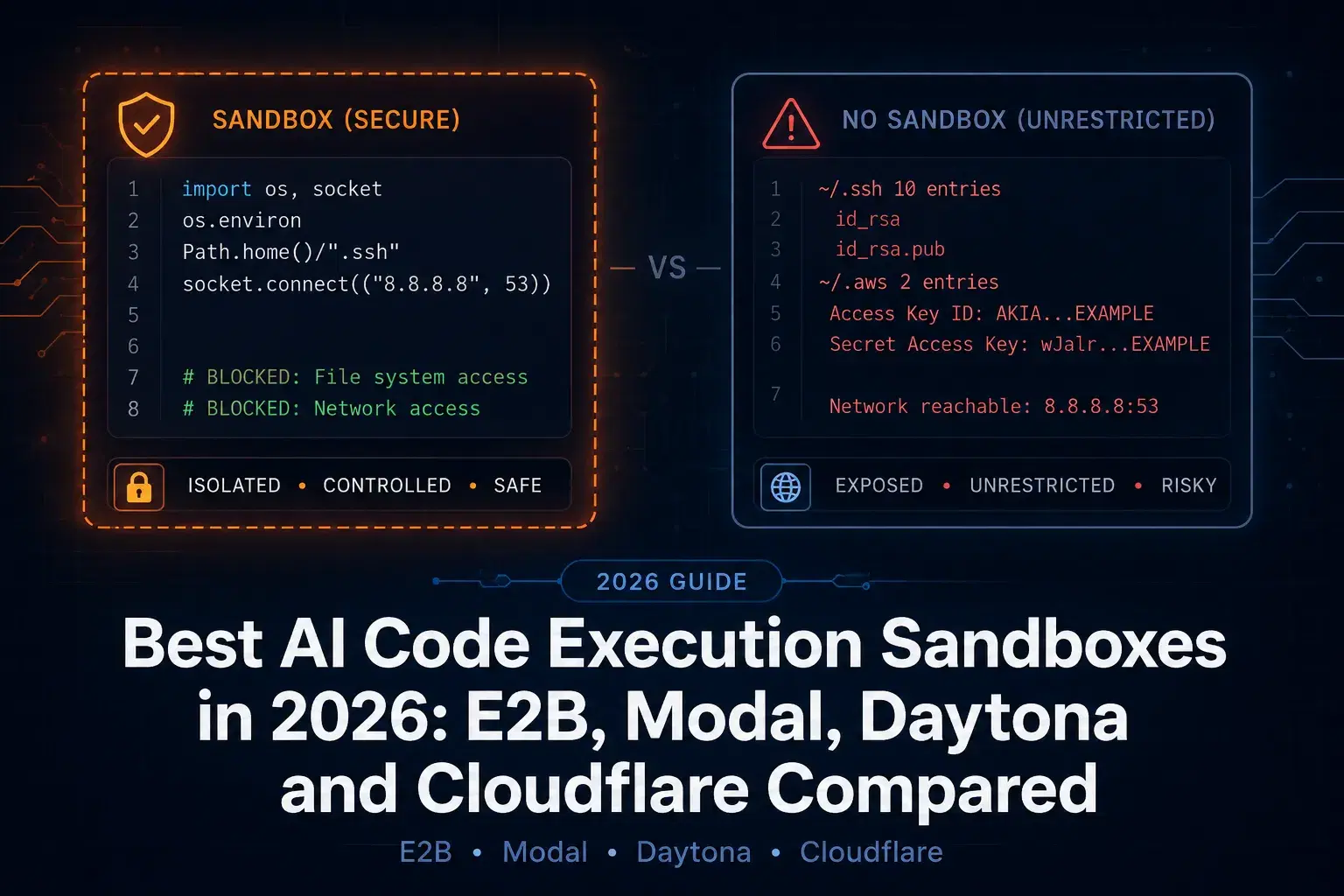
Your agent writes a Python snippet and you run it. Here is what that snippet can reach on the machine that ran it, measured rather than imagined: 60 environment variables, a readable ~/.ssh directory, a readable ~/.aws, working outbound network, and write access outside its own folder. It collected all of that in 78 milliseconds.
That number is the whole argument for this category. The usual first guard is a timeout, and a timeout bounds how long code runs while doing nothing about how far it reaches. Five seconds is roughly 64 times longer than the reconnaissance above needed.
There is also a fact worth knowing before you compare vendors: one of the four platforms every roundup calls open source stopped being open source in June 2026. Every price and license below came from the vendor's own page or repository in August 2026.
What a Sandbox Has to Actually Isolate
Four dimensions, and a tool that covers three of them is not a sandbox.
Filesystem. The code should see its own working directory and nothing else. Not your home folder, not the credential files sitting in it.
Network. Egress should be off by default or allowlisted. An agent that can read secrets and also make outbound requests is an exfiltration pipeline with extra steps.
Process and kernel. Sharing a kernel with the host means a container escape is a host compromise. This is why the serious platforms run microVMs rather than plain containers.
Resources. CPU, memory and runtime caps, so a runaway loop costs you a few cents instead of a node.
Measure Your Own Blast Radius First
Run this before you decide isolation is somebody else's problem. It counts exposure and never prints a secret value or sends anything anywhere.
Python"""What agent-generated code can reach when you just run it.""" import os import socket import tempfile from pathlib import Path SECRET_HINTS = ("KEY", "TOKEN", "SECRET", "PASSWORD", "CREDENTIAL", "API") # 1. Environment: this is where API keys live. env_total = len(os.environ) env_secretish = [k for k in os.environ if any(h in k.upper() for h in SECRET_HINTS)] # 2. Filesystem: can it see the paths that hold long-lived credentials? home = Path.home() sensitive = { "~/.ssh": home / ".ssh", "~/.aws": home / ".aws", "~/.config": home / ".config", "~/.gitconfig": home / ".gitconfig", } readable = {} for label, p in sensitive.items(): try: if p.is_dir(): readable[label] = f"{len(list(p.iterdir()))} entries" elif p.exists(): readable[label] = f"{p.stat().st_size} bytes" else: readable[label] = "absent" except PermissionError: readable[label] = "permission denied" # 3. Network: can it reach the internet to send what it found? try: s = socket.create_connection(("1.1.1.1", 443), timeout=4) s.close() net = "reachable" except OSError as e: net = f"blocked ({type(e).__name__})" # 4. Write access outside its own directory. try: p = Path(tempfile.gettempdir()) / "agent_was_here.txt" p.write_text("x") p.unlink() write = "yes" except OSError: write = "no" print(f"env vars visible : {env_total}") print(f" ...that look like creds : {len(env_secretish)} {sorted(env_secretish)[:4]}") print("credential paths reachable:") for k, v in readable.items(): print(f" {k:<14} {v}") print(f"outbound network : {net}") print(f"write outside cwd : {write}")
On my laptop, in a shell with reasonably clean hygiene:
textenv vars visible : 60 ...that look like creds : 0 [] credential paths reachable: ~/.ssh 10 entries ~/.aws 2 entries ~/.config 20 entries ~/.gitconfig 109 bytes outbound network : reachable write outside cwd : yes
Zero credential-shaped environment variables, which is the good news and also proves the script is not rigged. The filesystem is where the exposure actually lives: ten entries in ~/.ssh and two in ~/.aws, both readable, with the network available to move them. Wrap it in the usual guard and the point sharpens:
completed in 78ms under a 5000ms timeout
The One That Quietly Went Private
Daytona is in every comparison of this category, usually described as the open-source option, and it has 72,000 GitHub stars to back that reputation up. Open the repository today and the root contains a README and an images folder. The code is gone.
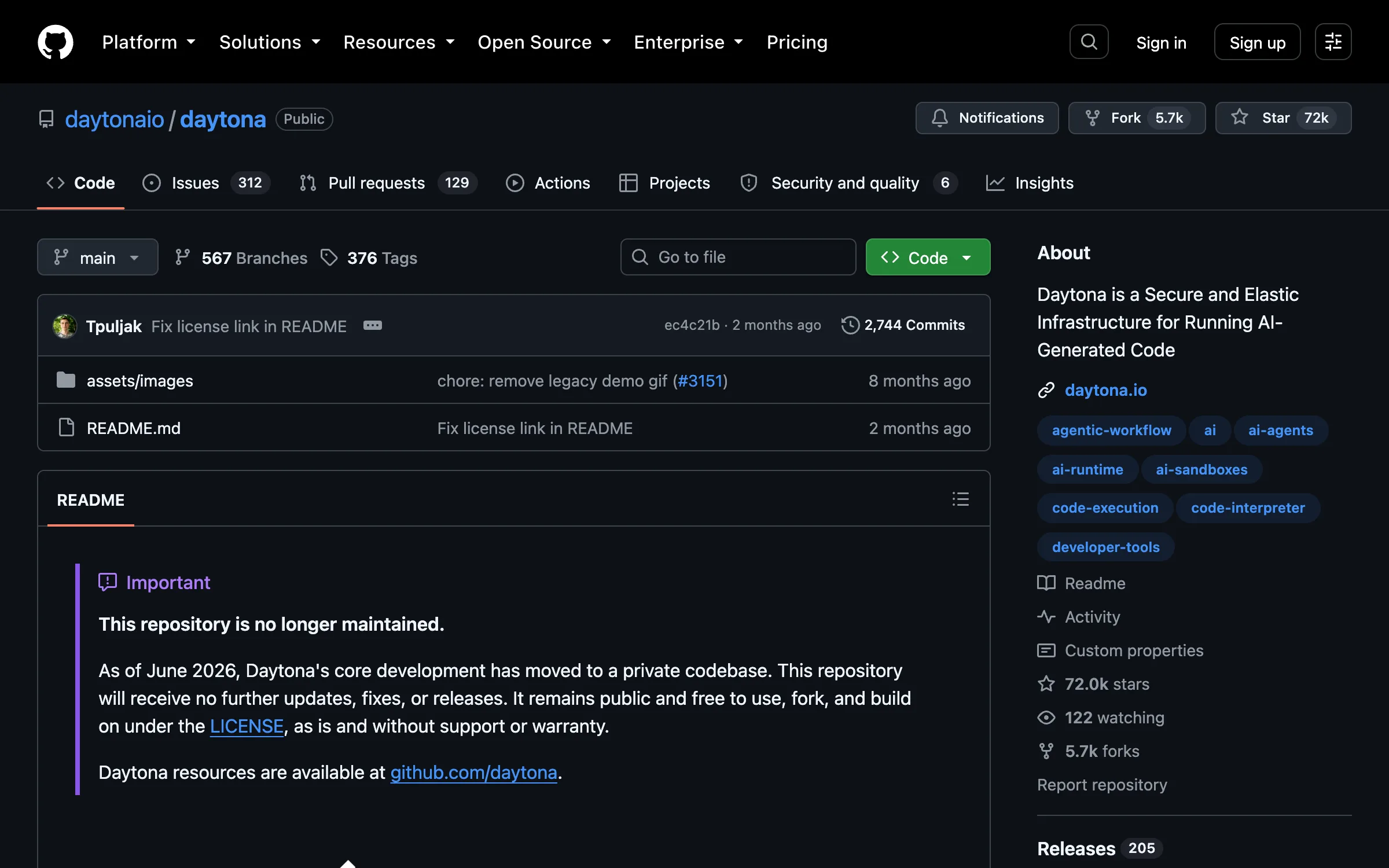
The notice at the top is unambiguous: the repository is no longer maintained, and as of June 2026 core development moved to a private codebase, with no further updates, fixes or releases. The last public code remains AGPL-3.0, frozen at tag v0.190.0. Further down that same README, unchanged from before the pivot, it still says "our open-source platform."
The product is fine and the technology is interesting: OCI-compatible sandboxes with a dedicated kernel, Python, TypeScript and JavaScript, and a claimed sub-90ms start. Note that the 90ms figure quoted everywhere traces back to Daytona's own README, not an independent benchmark. Just price it as the proprietary service it now is, and do not plan on forking it.
The Platforms
E2B is Apache 2.0 with about 13,400 stars and active commits on e2b-dev/E2B, and it was built for agent code execution rather than adapted into it. Compute runs $0.0504 per vCPU-hour and $0.0162 per GiB-hour with storage free. The free Hobby tier gives a one-time $100 in credits, caps sessions at one hour and allows 20 concurrent sandboxes. Pro is $150 a month plus usage, which buys 24-hour sessions and 100 concurrent sandboxes, expandable to 1,100. No GPUs.

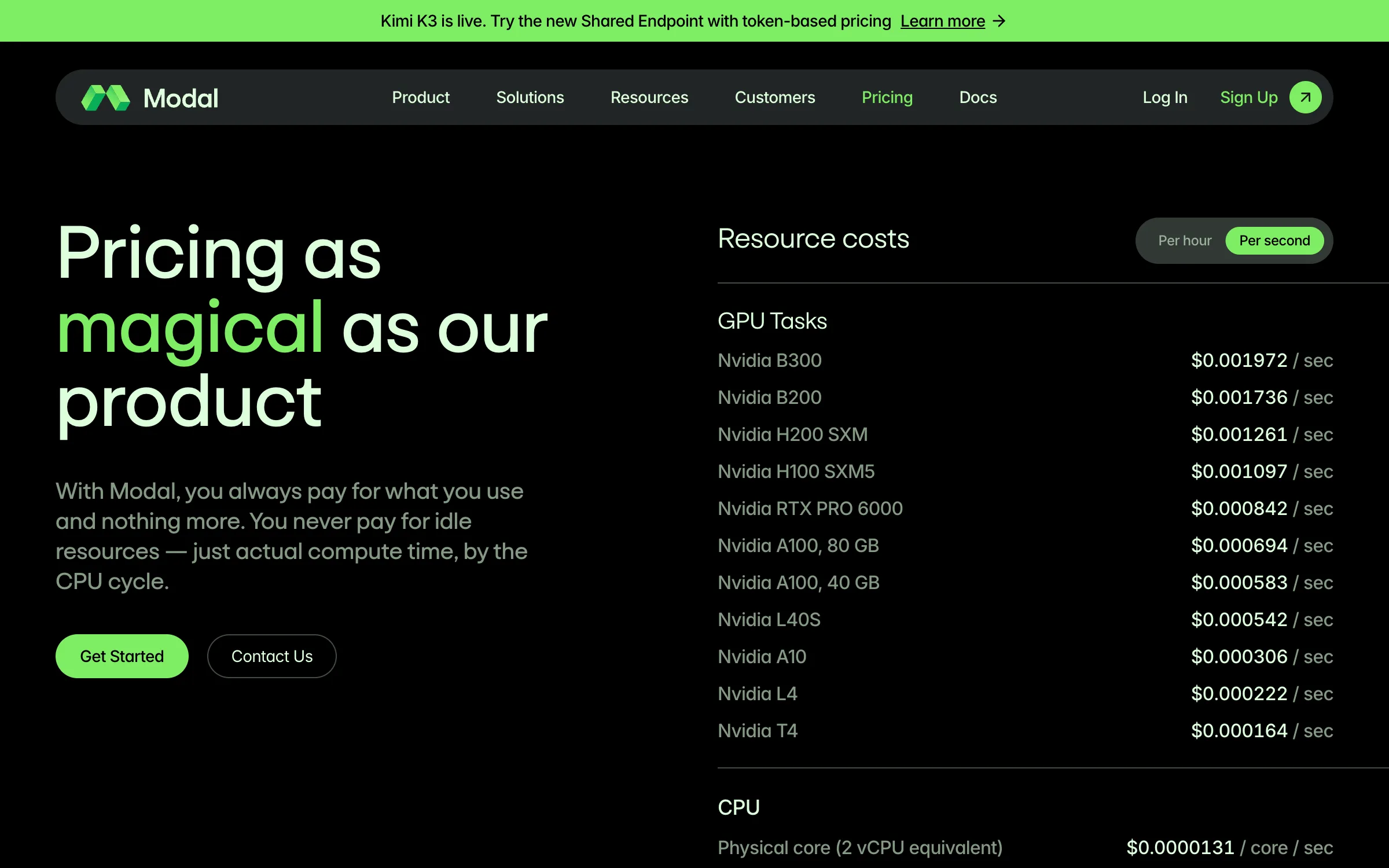
Modal is the one to pick when the workload touches a GPU: H100 SXM5 at $3.95 an hour, A100 80GB at $2.50, with no quota approval to get through. It bills nothing while idle, which genuinely matters for bursty agent work.
Two details worth reading twice here, because both make it easy to quote the wrong number. First, Modal's Sandbox pricing is not its general compute pricing: Sandboxes cost $0.142 per core-hour against $0.047 for standard compute, almost exactly three times the rate people usually cite. Second, Modal bills per physical core, which its own pricing page defines as two vCPU. Normalize it and a Sandbox core is about $0.071 per vCPU-hour, which puts Modal alongside Cloudflare rather than at the top of the price list. Starter is free with $30 in credits, Team is $250 a month with $100.
Cloudflare Sandboxes put the container next to the user at the edge, which is the right shape when per-call latency dominates. Active CPU is $0.072 per vCPU-hour. The caveat is that this is not one line item: you also pay Workers requests and Durable Objects, on top of a $5 monthly Workers Paid plan that is required before any of it runs.
Vercel Sandbox is the ecosystem play, and worth it mainly if you are already deployed there. Active CPU is $0.128 an hour, creations are $0.60 per million, network is $0.15 per GB and snapshots are $0.08 per GB-month. The line that catches people is memory at $0.0212 per provisioned GB-hour, billed on what you provisioned for the entire time the sandbox exists rather than on what it used. An idle sandbox left open is still billing memory.
What It Costs
| Platform | License | vCPU-hour | Idle billing | GPU |
|---|---|---|---|---|
| E2B | Apache 2.0 | $0.0504 | Yes, while alive | No |
| Cloudflare Sandboxes | Commercial | $0.072 active CPU | Plus Workers and DO | No |
| Vercel Sandbox | Commercial | $0.128 active CPU | Memory billed provisioned | No |
| Modal | Commercial | $0.071 (bills $0.142 per 2-vCPU core) | No | H100, A100 |
| Daytona | Closed since June 2026 | Quote | Quote | Yes |
Normalized to vCPU-hours, E2B is cheapest at $0.0504, Modal and Cloudflare land together around $0.071 and $0.072, and Vercel is the most expensive at $0.128. Watch the units when you check this yourself: Modal quotes per physical core, so its $0.142 headline is two vCPUs, not one, and comparing it directly against the others doubles it.
The ranking flips fast anyway. Modal charging nothing while idle beats a lower hourly rate for spiky workloads, E2B's cheap compute sits behind a $150 monthly floor once you need sessions longer than an hour, and Cloudflare's number looks mid-range until you add the three other meters.
How to Pick
Agent that runs short bursts of untrusted code, no GPU: E2B, and stay on Hobby until the one-hour session cap or the concurrency limit actually bites.
Anything touching a model or a GPU: Modal, budgeting the Sandbox rate rather than the compute rate.
Latency-sensitive execution close to users: Cloudflare, with all four billing dimensions in the spreadsheet.
Already on Vercel and want one bill: Vercel Sandbox, with a hard cap on sandbox lifetime because provisioned memory bills the whole time.
Long-lived workspaces an agent lives inside: Daytona, priced as proprietary software.
Wiring One Up Without Surprises
- Run the script above against your own machine first. If
~/.sshand~/.awscome back readable, you have your business case. - Define the base image deliberately. These platforms are OCI-compatible, so the sandbox is only as minimal as the image you hand it. Our Dockerfile Generator scaffolds one, and the Dockerignore Generator keeps
.env,.sshand.awsfrom being copied into it in the first place, which is the most common way a "sandboxed" build ships its own secrets. - Test the isolation flags locally before you pay for them. Options like
--network noneand--read-onlyare free to try on your own machine, and our Docker Run Command Builder assembles the flags so you can watch the script above fail properly. - Audit what you inject as environment variables. Whatever you pass in, the code inside can read. Run the file through our Dotenv Linter and pass only the keys that sandbox genuinely needs.
- Set a lifetime, not just a timeout. A timeout bounds a single call; a sandbox left alive bills until something kills it, and on Vercel it bills provisioned memory the entire time.
- Turn egress off by default. Allowlist the few hosts the task needs. This is the single control that turns a credential leak into a non-event.
Conclusion
The measurement at the top is the part worth keeping: unsandboxed agent code reached credential directories and open network in 78 milliseconds, and the timeout most people rely on is 64 times too slow to matter. Isolation is not a nice-to-have once you let a model write code that you then execute.
For picking a platform, the honest summary is that E2B is the cheapest per vCPU-hour and the only genuinely open-source option left, Modal wins on GPUs and idle billing while charging triple its advertised compute rate for Sandboxes specifically, Cloudflare wins on latency across four meters, and Vercel is the priciest per hour but the easiest if you are already there. Daytona is a good product that is no longer open source, whatever the roundups and its own README still say.
Related DevToolLab Tools
- Dockerfile Generator - Scaffold the minimal base image your sandbox actually runs.
- Dockerignore Generator - Keep credential files out of the image before they ever reach the sandbox.
- Docker Run Command Builder - Assemble isolation flags like network none and read-only to test locally.
- Dotenv Linter - Audit the environment variables you inject, since the code inside can read all of them.
Related Guides
- Best LLM Guardrails Tools - filtering what goes into the model, before it writes the code you execute
- Best AI Browser Automation Tools - the other capability agents need isolating
- Best AI Agent Frameworks - the orchestration layer deciding when code runs at all
- Developer Security Toolkit - scanning the code itself, once it is written
Prices, licenses and repository status change quickly here. Check each vendor's own pricing page before committing.