

Buying hardware to run models locally usually starts from parameter counts, which is the wrong unit. A "27B model" tells you nothing you can act on; the file you have to hold in memory is what decides whether the machine works.
So we measured it. Pulling real download sizes from Ollama's library on September 14, 2026 and applying a stated headroom rule, an 8 GB GPU fits none of the models in this list, not even the smallest. A 16 GB card fits two. The jump that actually buys you something is 24 GB, and after that the interesting question stops being GPU versus GPU and becomes GPU versus Mac.
Parameters Lie, File Sizes Do Not
A model's parameter count is a spec-sheet number. What you load is a quantized file, and the relationship between the two is not fixed: quantization level, MoE versus dense, and vocabulary size all move it.
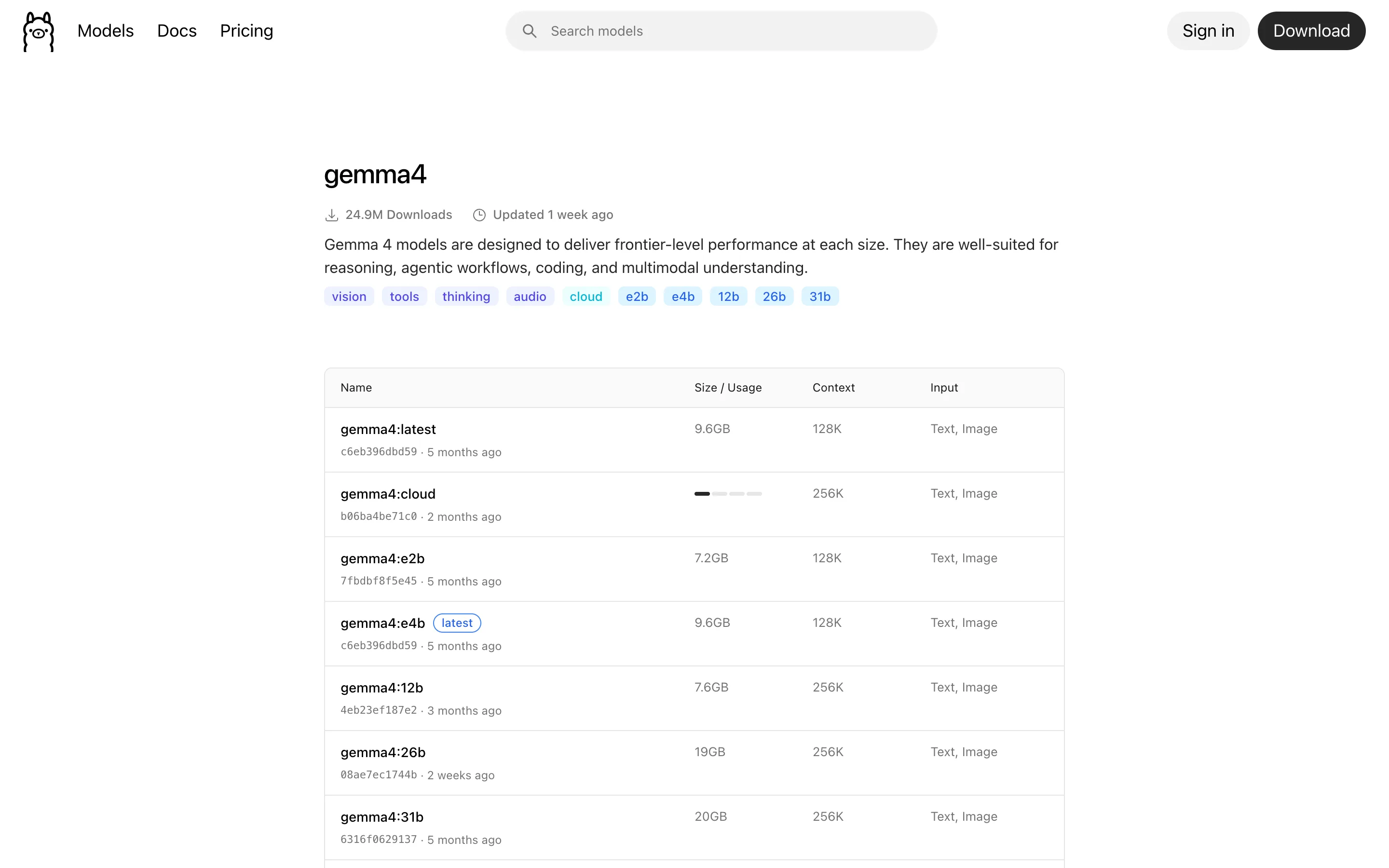
Gemma 4 makes the point on one page. The 12b tag is 7.6 GB and the 26b tag is 19 GB, so roughly double the parameters costs two and a half times the disk. Meanwhile e2b is 7.2 GB despite a much smaller parameter count, because it is a different architecture. Buy for the file size.
Measuring What Fits
This script reads current sizes from Ollama and works out which machines can hold each model with room left to actually run it. Node 18 or newer, no dependencies.
js// fit-matrix.mjs - Node 18+, no dependencies. Run: node fit-matrix.mjs const MODELS = [ ["gemma4", "12b"], ["phi4", "14b"], ["mistral-small3.2", "24b"], ["qwen3.8", "27b"], ["gemma4", "26b"], ["gpt-oss", "20b"], ["gpt-oss", "120b"], ] // Apple figures are unified memory from apple.com; NVIDIA figures are card VRAM. const MACHINES = [ ["laptop iGPU / RTX 3050", 8], ["RTX 4060 Ti 16GB", 16], ["RTX 4090", 24], ["RTX 5090", 32], ["Mac Studio M5 Max (base)", 36], ["Mac Studio M5 Max (max)", 128], ["Mac Studio M5 Ultra (base)", 96], ["Mac Studio M5 Ultra (max)", 512], ] // Headroom rule, stated so you can disagree with it: // - the OS and desktop need room, so reserve 2 GB (Macs share memory with the display) // - KV cache and activations at a moderate context add roughly 20% on top of weights const OS_RESERVE_GB = 2 const RUNTIME_OVERHEAD = 0.20 async function sizeOf(model, tag) { // Sizes live on the model's /tags page, next to each tag link. const html = await fetch(`https://ollama.com/library/${model}/tags`, { headers: { "user-agent": "Mozilla/5.0" }, signal: AbortSignal.timeout(25000), }).then((r) => (r.ok ? r.text() : "")) for (const block of html.split(`href="/library/${model}:`).slice(1)) { const name = block.match(/^([a-z0-9._-]+)/) const size = block.match(/([0-9.]+)GB/) if (name && size && name[1] === tag) return Number(size[1]) } return null } const rows = [] for (const [model, tag] of MODELS) { const gb = await sizeOf(model, tag) if (gb) rows.push({ name: `${model}:${tag}`, gb, need: gb * (1 + RUNTIME_OVERHEAD) }) } rows.sort((a, b) => a.gb - b.gb) for (const [name, mem] of MACHINES) { const usable = mem - OS_RESERVE_GB const cells = rows.map((r) => (r.need <= usable ? " yes" : " no").padStart(8)).join("") console.log(`${name.padEnd(28)}${String(mem).padStart(5)}${cells}`) } for (const r of rows) { const min = MACHINES.filter(([, m]) => r.need <= m - OS_RESERVE_GB).sort((a, b) => a[1] - b[1])[0] console.log( `${r.name.padEnd(24)} ${String(r.gb).padStart(5)} GB weights -> needs ${r.need.toFixed(1).padStart(5)} GB usable` + `${min ? `, cheapest machine here: ${min[0]} (${min[1]} GB)` : ", nothing in this list fits it"}`, ) }
Run on September 14, 2026:
textmodel sizes read from ollama.com on 2026-09-14 fit rule: weights + 20% runtime overhead + 2 GB for the OS machine GB gemma4 phi4 gpt-oss mistral qwen3.8 gemma4 gpt-oss 7.6GB 9.1GB 14GB 15GB 18GB 19GB 65GB ----------------------------------------------------------------------------------------- laptop iGPU / RTX 3050 8 no no no no no no no RTX 4060 Ti 16GB 16 yes yes no no no no no RTX 4090 24 yes yes yes yes yes no no RTX 5090 32 yes yes yes yes yes yes no Mac Studio M5 Max (base) 36 yes yes yes yes yes yes no Mac Studio M5 Max (max) 128 yes yes yes yes yes yes yes Mac Studio M5 Ultra (base) 96 yes yes yes yes yes yes yes Mac Studio M5 Ultra (max) 512 yes yes yes yes yes yes yes gemma4:12b 7.6 GB weights -> needs 9.1 GB usable, cheapest: RTX 4060 Ti 16GB phi4:14b 9.1 GB weights -> needs 10.9 GB usable, cheapest: RTX 4060 Ti 16GB gpt-oss:20b 14 GB weights -> needs 16.8 GB usable, cheapest: RTX 4090 (24 GB) mistral-small3.2:24b 15 GB weights -> needs 18.0 GB usable, cheapest: RTX 4090 (24 GB) qwen3.8:27b 18 GB weights -> needs 21.6 GB usable, cheapest: RTX 4090 (24 GB) gemma4:26b 19 GB weights -> needs 22.8 GB usable, cheapest: RTX 5090 (32 GB) gpt-oss:120b 65 GB weights -> needs 78.0 GB usable, cheapest: Mac Studio M5 Ultra
What the Matrix Says
8 GB is not an entry point, it is a wall. The smallest model here needs 9.1 GB usable. An 8 GB card leaves 6 GB after the OS, so it cannot hold even Gemma 4 12B. This is the single most common mistake in local LLM buying advice: 8 GB cards get recommended constantly, and they force you into models small enough that you would have been better served by an API.
16 GB buys exactly two models. Gemma 4 12B and Phi-4. Both are genuinely good, and if your use case is code completion or classification, a 16 GB card is a reasonable stopping point.
24 GB is the real threshold. It adds gpt-oss:20b, Mistral Small 3.2 and Qwen3.8 27B, which is the first point where a local setup covers general assistant work as well as coding.
The 19 GB cliff is instructive. Gemma 4 26B is only 1 GB larger than Qwen3.8 27B, and that 1 GB moves it from a 24 GB card to a 32 GB card. Margins this tight are why you check the file size rather than the parameter count.
Where Macs Change the Argument
Beyond 32 GB, discrete GPUs get expensive per gigabyte and Apple's unified memory becomes the pragmatic answer. Apple's published Mac Studio specs put the M5 Max at 36 GB of unified memory at 460 GB/s, configurable to 128 GB at 614 GB/s, and the M5 Ultra at 96 GB at 1.2 TB/s, configurable to 256 GB or 512 GB at the same bandwidth.
That 512 GB figure has no consumer equivalent in GPU land. A 65 GB model like gpt-oss:120b simply runs on a Mac Studio, where matching it with cards means multiple GPUs, a motherboard that can host them, and a power supply to match.
The honest counterweight is bandwidth. An RTX 5090's GDDR7 memory is substantially faster than 614 GB/s, and generation speed scales with memory bandwidth once the model fits. So the tradeoff is simple to state: GPUs win on tokens per second for models that fit in VRAM, Macs win on which models fit at all. If your model fits in 24 or 32 GB, a GPU is faster. If it does not, a Mac runs it and the GPU does not run it.
Do Not Forget the Power Bill
A workstation GPU under sustained inference load is a continuous draw, not a spike, and a local setup that runs an agent all day is a 24/7 appliance. At a typical US residential rate a card pulling a few hundred watts around the clock is a real monthly line item, and it belongs in the comparison against an API bill you were trying to eliminate.
That is the actual break-even question. Local inference is not free, it is capital plus electricity instead of per-token pricing. Work out your current monthly API spend first; if it is under a couple of hundred dollars, the hardware may never pay back.
How to Choose
- Start from the model, not the machine. Pick the model you want to run, look up its real download size, add 20 percent and 2 GB, and that is your minimum.
- Do not buy 8 GB for LLM work. It does not clear the bar for anything current. If 8 GB is your budget, use a hosted API and spend the money on something else.
- Treat 24 GB as the default target. It covers the useful middle of the open-weight range in 2026 and leaves room for context.
- Cross the 32 GB line only for a specific model. Gemma 4 26B is the one that forces it in this list. If you do not need that model, the money is better spent elsewhere.
- Choose Mac when capacity beats speed. Above roughly 64 GB of model, unified memory is the only practical single-box answer, and you trade tokens per second for the ability to run it at all.
- Price the electricity before you commit. A 24/7 inference box has a running cost that changes the payback math against an API.
Conclusion
The buying decision for local LLM hardware compresses into one comparison: the file size of the model you want against the usable memory of the machine you are considering, with about 20 percent added for the runtime. On that basis 8 GB fits nothing, 16 GB fits two models, 24 GB fits most of the useful range, and past 32 GB you are choosing between raw bandwidth on a GPU and sheer capacity on a Mac. Run the script against the models you actually intend to use before you spend anything; the answer is usually cheaper than the spec-sheet argument suggests.
Related DevToolLab Tools
- Electricity Cost Calculator - turn a card's sustained wattage into a monthly figure and compare it honestly against the API bill you are replacing.
- Power Converter - move between watts, kilowatts and horsepower when a PSU spec and a GPU spec are quoted in different units.
- Data Storage Converter - reconcile the GB on a vendor page with the GiB your system reports, which is where a "just fits" model stops fitting.
- LLM Token Cost Calculator - price your current hosted usage so the hardware purchase has a payback period attached to it.
Related Guides
- Local LLM VRAM Requirements - the detailed memory math behind the 20 percent headroom rule used here, including KV cache growth with context.
- Best Offline LLM Models and Tools 2026 - which models are worth the download once you know what your machine can hold.
- Best GPU Cloud Providers for AI Workloads - the rent-instead-of-buy option, and when it beats a workstation.
- How LLM Tokenization Actually Works - why context length costs memory, and why that cost varies by language.