
Our inference platforms comparison covered the managed layer: you bring a model, someone else owns the GPUs. This is the layer underneath, for when you want the GPUs themselves: training runs, fine-tuning jobs, batch pipelines, or serving you operate yourself.
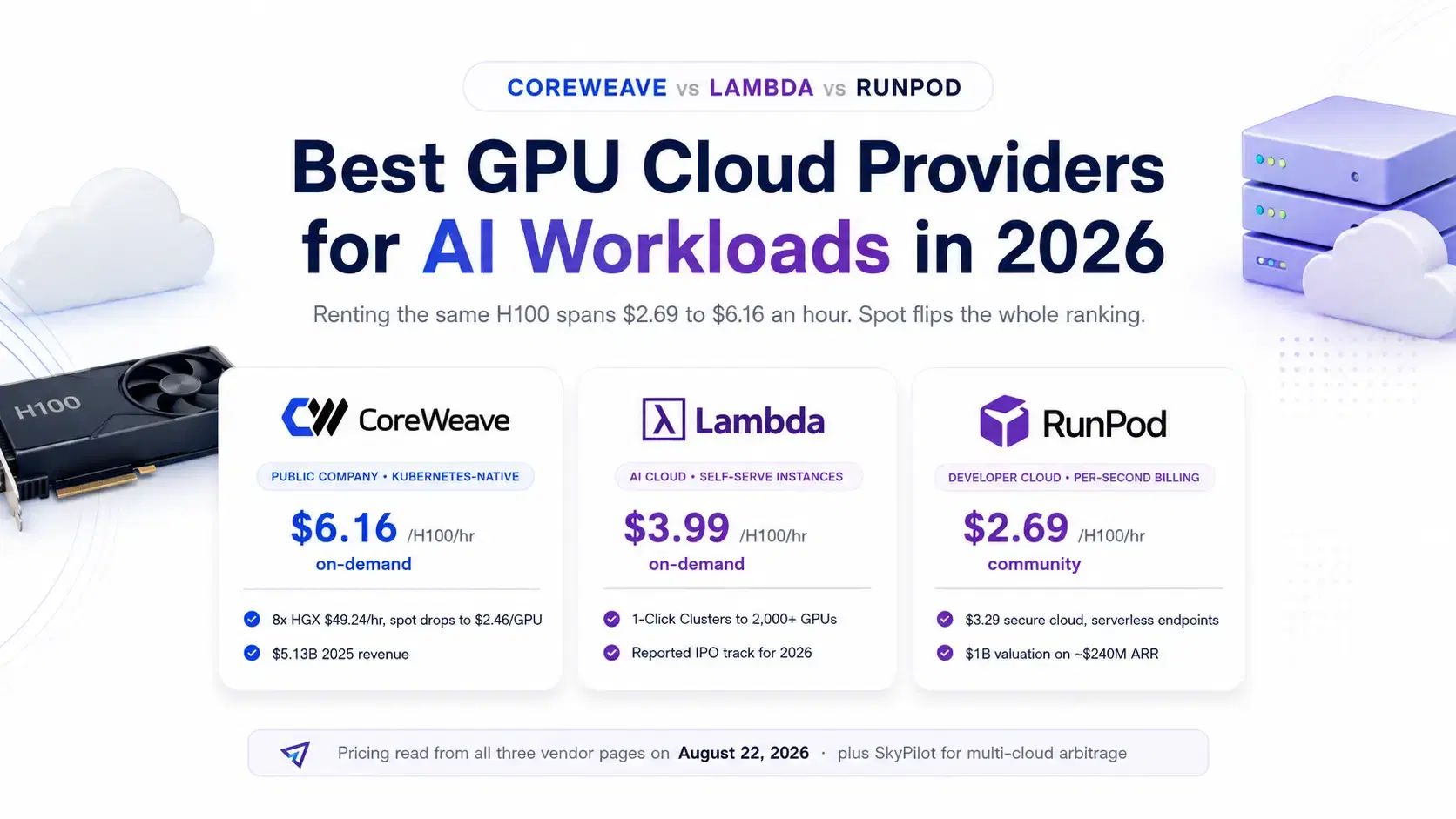
The pricing spread is wider down here. As of August 22, 2026, an H100 rents for $2.69/hr on RunPod's Community Cloud, $3.29 on its Secure Cloud, $3.99 on Lambda, and $6.16 on CoreWeave on demand, all read from the vendors' pages the day this was written. Then spot inverts the whole table: CoreWeave's 8x H100 node drops from $49.24/hr to $19.71 on spot, which is $2.46 per GPU, cheaper than anyone's on-demand rate. The companies are as unalike as the prices: CoreWeave IPO'd in March 2025 and reported $5.13 billion in 2025 revenue, Lambda is reportedly on an IPO track for late 2026, and RunPod raised $100 million at a $1 billion valuation in June after turning down buyouts.
Quick Comparison
| Provider | H100 per GPU-hr | Billing | Shape | Best for |
|---|---|---|---|---|
| RunPod | $2.69 community, $3.29 secure | Per second | Pods, serverless, clusters | Cheapest self-serve GPUs, bursty jobs |
| Lambda | $3.99 on-demand | Self-serve instances | VMs and 1-Click Clusters to 2,000+ GPUs | Straightforward training boxes |
| CoreWeave | $6.16 on-demand, $2.46 spot | Per-instance (8 GPUs) | Kubernetes-native fleets | Reserved scale, newest silicon |
| SkyPilot | Your cheapest cloud | Apache 2.0, 10,518 stars | Orchestrator across all of them | Chasing the lowest price automatically |
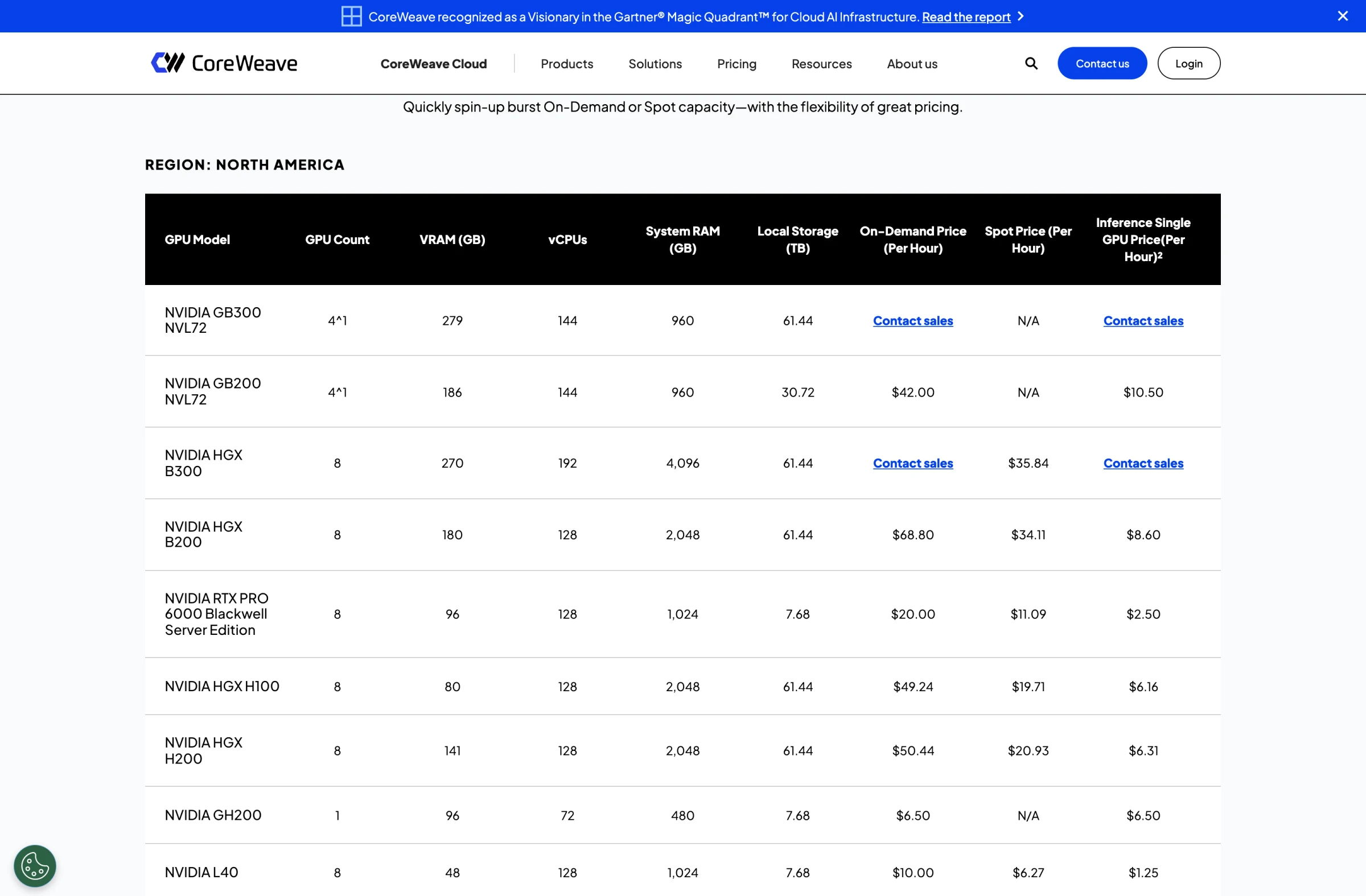
One trap before the details: normalize everything to price per GPU-hour. CoreWeave lists $49.24 for an HGX H100, which is an 8-GPU node ($6.16 per GPU, a figure its own table confirms in the single-GPU column), and its GB200 NVL72 instance at $42.00 is 4 GPUs ($10.50 each). Lambda and RunPod list per-GPU prices directly. Comparing a node price to a GPU price is the classic way this shopping trip goes wrong.
CoreWeave
CoreWeave is the incumbent challenger that grew up: it priced its IPO at $40 a share on March 28, 2025, raising about $1.5 billion at a roughly $23 billion initial valuation, and reported $5.13 billion in 2025 revenue, up 168% year over year. Its attempted $9 billion all-stock acquisition of data center operator Core Scientific died on October 30, 2025 when Core Scientific's shareholders voted it down, so the land-grab continues by contract instead of merger.
The platform is Kubernetes-native: you get managed clusters and node pools rather than a simple VM picker, which is exactly right for fleets and exactly wrong for a weekend fine-tune. On-demand North America prices per 8-GPU instance: HGX H100 $49.24/hr, HGX H200 $50.44, HGX B200 $68.80, A100 $21.60, with GB300 and B300 behind contact-sales walls. The interesting column is spot: the HGX H100 falls to $19.71/hr ($2.46 per GPU) and the B200 to $34.11 ($4.26 per GPU), undercutting every on-demand price in this post if your training job checkpoints well enough to tolerate preemption.
What to watch. The single-GPU on-demand rate ($6.16 for an H100) is the most expensive here, because CoreWeave's business is reserved fleets for AI labs, not hobby nodes. If you are not bringing Kubernetes experience or committed volume, the pricing and the platform both point you elsewhere.
Lambda
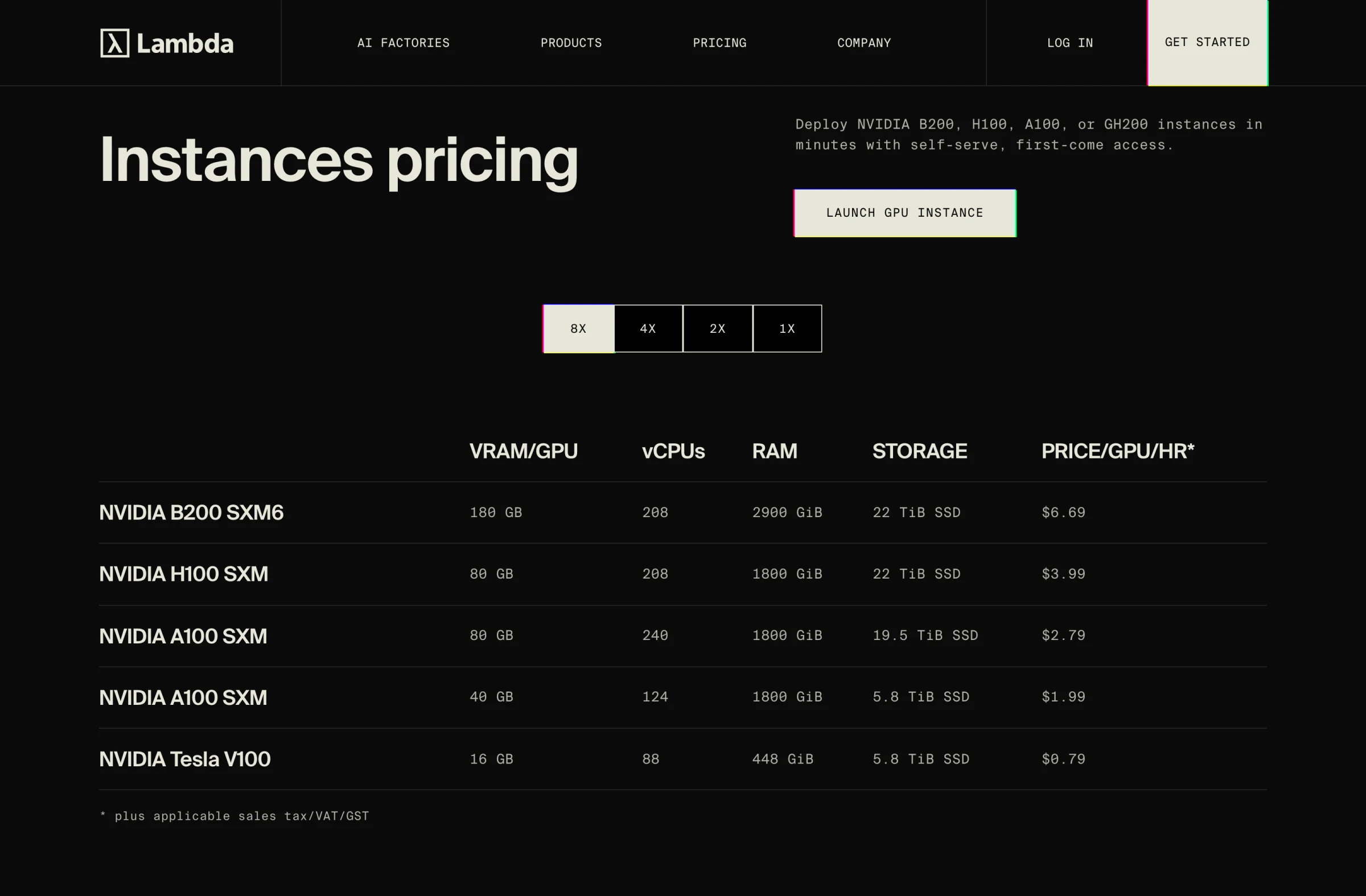
Lambda sells the simplest mental model of the three: pick an instance, get a price per GPU-hour, plus applicable sales tax. On-demand 8x instances run $3.99 per H100 SXM, $2.79 per A100 80GB, $1.99 per A100 40GB, $6.69 per B200 SXM6, and a nostalgic $0.79 per V100. Above self-serve sit 1-Click Clusters, production blocks of 16 to 2,000+ B200 or H100 GPUs on two-week to one-year terms: 16 B200s cost $9.86 per GPU-hour, dropping to $8.87 at 256+ GPUs.
The money story matters if you are signing a term: Lambda raised a Series E of more than $1.5 billion led by TWG Global in November 2025, has reportedly retained Morgan Stanley, J.P. Morgan, and Citi for an IPO now targeted at the second half of 2026, and was reported in January to be closing roughly $350 million in pre-IPO convertible notes led by Mubadala Capital. A provider heading into an IPO window tends to protect published pricing and uptime, which is quietly good news for customers.
What to watch. Capacity is first-come, first-served on popular instance types, there is no spot market to arbitrage, and no serverless layer: if you want per-request GPU billing, that is RunPod's or Modal's territory.
RunPod
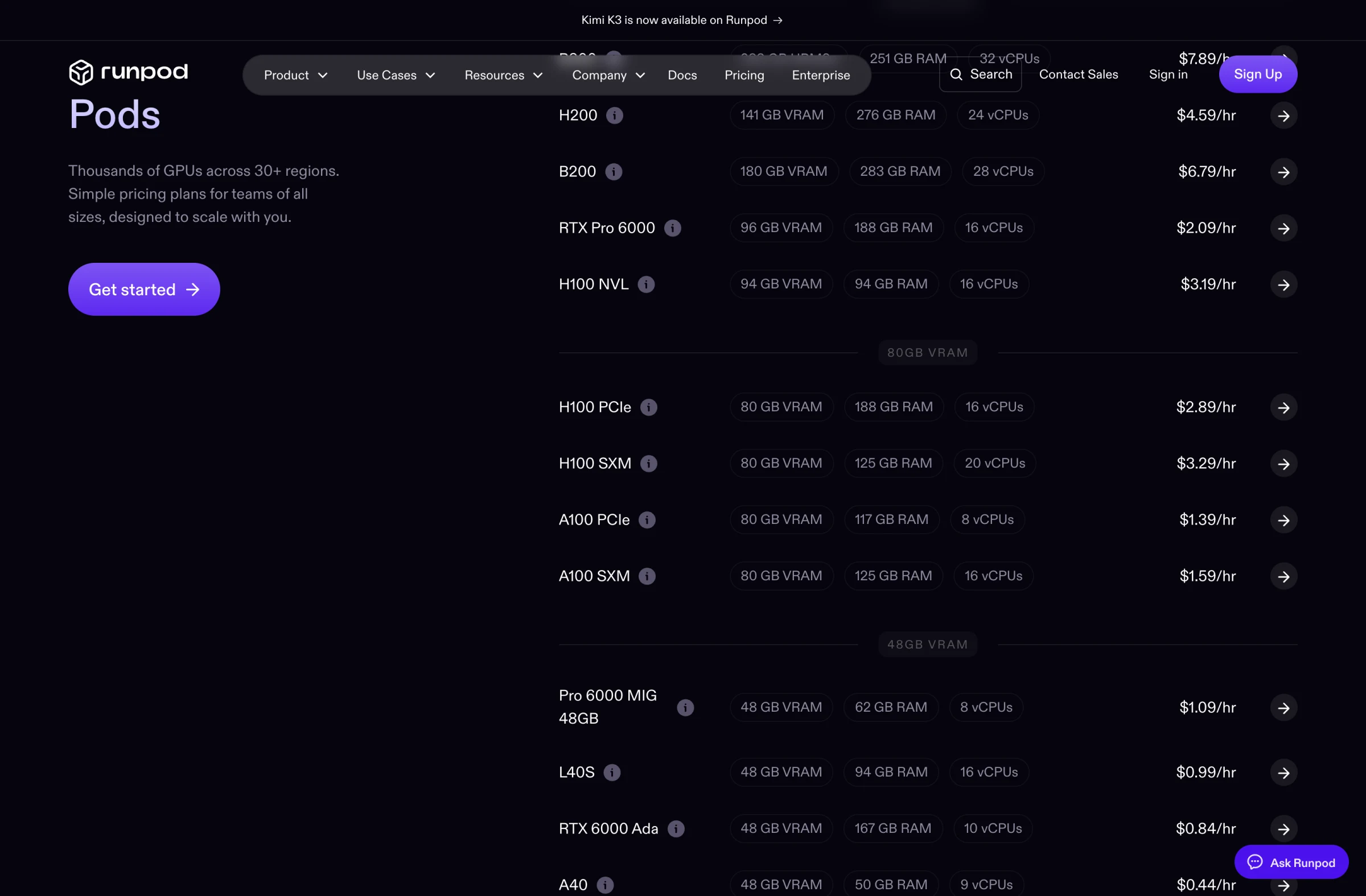
RunPod is the developer cloud of the three, and the only one with a two-tier market. Secure Cloud runs in vetted data centers: H100 SXM $3.29/hr, H100 PCIe $2.89, A100 SXM $1.59, H200 $4.59, B200 $6.79, L40S $0.99. Community Cloud runs on vetted third-party hosts and is the cheapest H100 in this post: we toggled the pricing page ourselves and watched the H100 SXM drop to $2.69 and an RTX 4090 fall from $0.74 to $0.34. Pods are billed by the second, and RunPod's docs add a line the big clouds would never write: no fees for data ingress or egress.
The company earned its independence the hard way: a $100 million growth round led by Summit Partners announced June 24, 2026 at a $1 billion valuation, with annualized revenue reported around $240 million, after reportedly rejecting buyout offers above $500 million. There is also a serverless tier (flex workers at $4.79/hr for an H100, $2.72 for an A100, billed per second of actual work) that overlaps the platforms from our inference post.
Spinning up a pod is one verified call (runpod SDK 1.12.0):
Pythonimport runpod pod = runpod.create_pod( "h100-box", "runpod/pytorch:2.4.0-py3.11-cuda12.4.1-devel-ubuntu22.04", gpu_type_id="NVIDIA H100 80GB HBM3", gpu_count=1, )
What to watch. Community Cloud's price comes with community-grade variance in host reliability and networking, so keep it for fault-tolerant work. Multi-node training clusters are newer here than at Lambda or CoreWeave, and enterprise compliance checklists will favor Secure Cloud or the other two.
The Multi-Cloud Escape Hatch
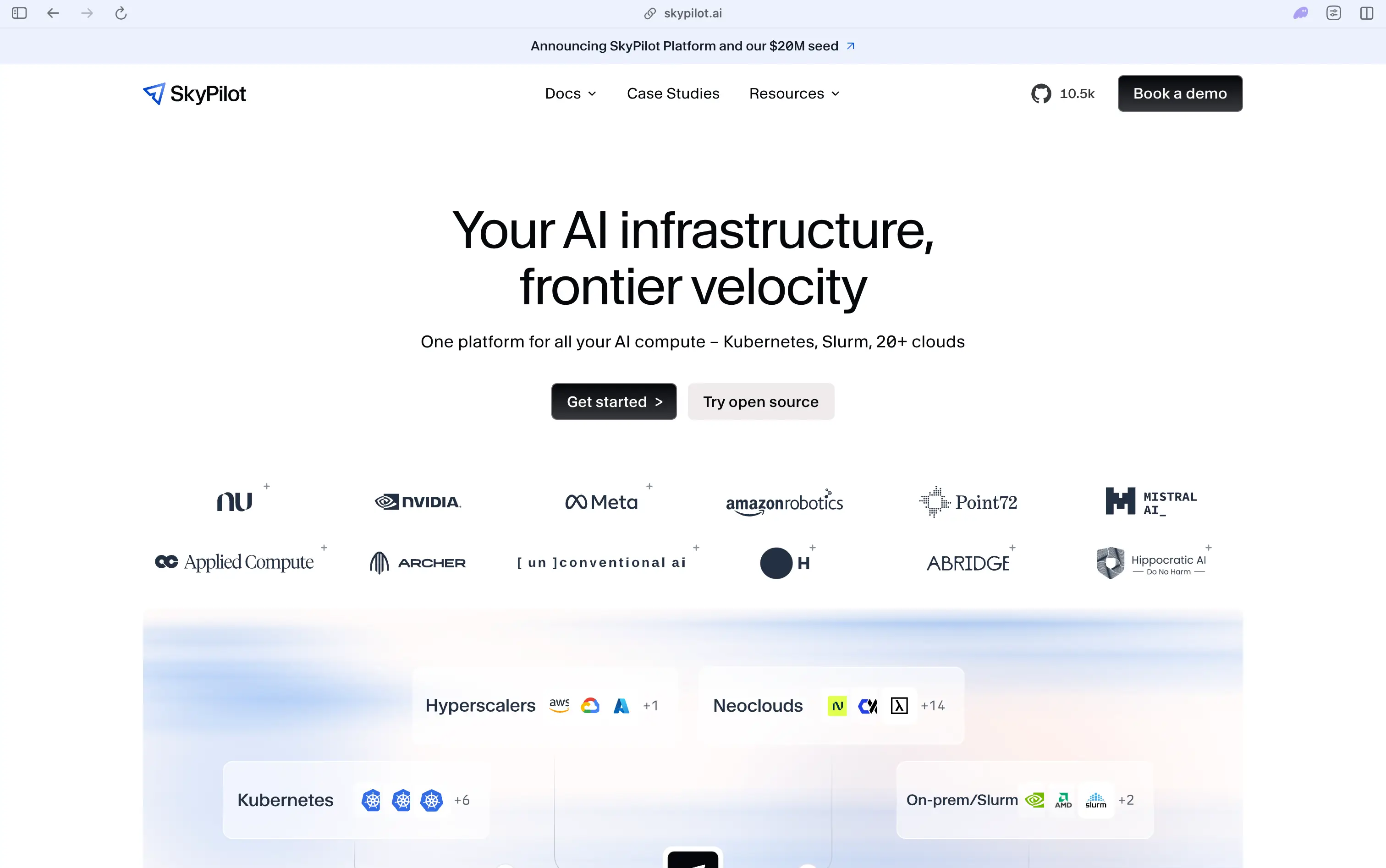
SkyPilot (Apache 2.0, 10,518 stars, pushed today) treats all of the above as one market: you declare the GPUs a job needs and it launches on whichever configured cloud is cheapest and has capacity, with managed spot recovery when a node is preempted. It is the practical answer to a table like this one changing every quarter, and it pairs naturally with CoreWeave-style spot pricing, where the discount is huge and the preemption risk is the product.
Running the Numbers
An 8x H100 node for a 730-hour month: RunPod Secure $19,214, Lambda $23,302, CoreWeave on-demand $35,945, CoreWeave spot $14,388. The most expensive on-demand provider is the cheapest of all on spot, which is the single most useful fact in this market. For a two-week fine-tune that checkpoints every 30 minutes, spot plus SkyPilot-style auto-recovery is close to free money; for a customer-facing endpoint, it is an outage generator.
Down a tier, the A100 80GB tells the value story: $1.39 to $1.59 on RunPod and $2.79 on Lambda buys a GPU that still fine-tunes 7B and 13B models happily (size your job with our VRAM guide) at a third of H100 pricing. The same normalization exposes the widest relative gap in this post: an L40S is $0.99/hr on RunPod and $2.25 per GPU on CoreWeave, a 2.3x difference on identical hardware. And workload shape changes the winner again, since CoreWeave's single GH200 at $6.50 exists for memory-bound jobs no L40S can hold.
What none of these prices include is worth a sentence: storage and data transfer. RunPod's docs commit to zero ingress and egress fees, Lambda's footnote adds sales tax, and every provider meters persistent storage separately, so a training pipeline that shuttles terabytes should price the disks, not just the silicon.
How to Pick
Solo developer or small team, cost-sensitive, bursty jobs: RunPod, with Community Cloud for fault-tolerant work and Secure Cloud when reliability matters. Training runs on clean 8x boxes with no Kubernetes in sight: Lambda, whose per-GPU pricing and 1-Click Clusters are the least surprising in the market. Reserved fleets, the newest silicon (GB200, B300), Kubernetes-native operations, or spot arbitrage at scale: CoreWeave. Refusing to marry any of them: SkyPilot across two or more.
Conclusion
Three habits make this market navigable. Normalize every quote to price per GPU-hour, because node pricing and GPU pricing are deliberately easy to confuse. Ask what the spot or interruptible tier costs, because the most expensive on-demand provider here is also the cheapest source of H100s once preemption is on the table. And check storage and egress before you park a dataset next to the GPUs.
The market itself is telling you it expects consolidation: one of these three is already public, one is reportedly heading to an IPO, and one turned down half-billion-dollar buyouts to stay independent. Prices this far apart on identical hardware do not last. Take the arbitrage while it exists, and keep your training jobs portable enough (checkpoints out, SkyPilot-style configs in) that you can follow the cheap GPUs wherever they move next.
Related DevToolLab Tools
- Unit Price Calculator - normalize an 8-GPU node price and a per-GPU price to the same unit before comparing providers.
- Electricity Cost Calculator - price the buy-your-own-GPU alternative: what a 700W H100 actually costs to run at your utility rate.
- Helm Chart Generator - scaffold the chart for deploying your training or serving workload on a Kubernetes-native cloud like CoreWeave.
- Terraform tfvars Generator - keep per-environment GPU counts and instance types out of your Terraform code and in tfvars where they belong.
Related Guides
- Best AI Inference Platforms - the managed layer above these clouds, where someone else owns the GPU
- Local LLM VRAM Requirements - size the model to the GPU before renting anything
- Best AI Fine-Tuning Platforms - the training workloads these GPUs exist for
- Top Local LLM Tools and Models - the fully local end of the same spectrum