
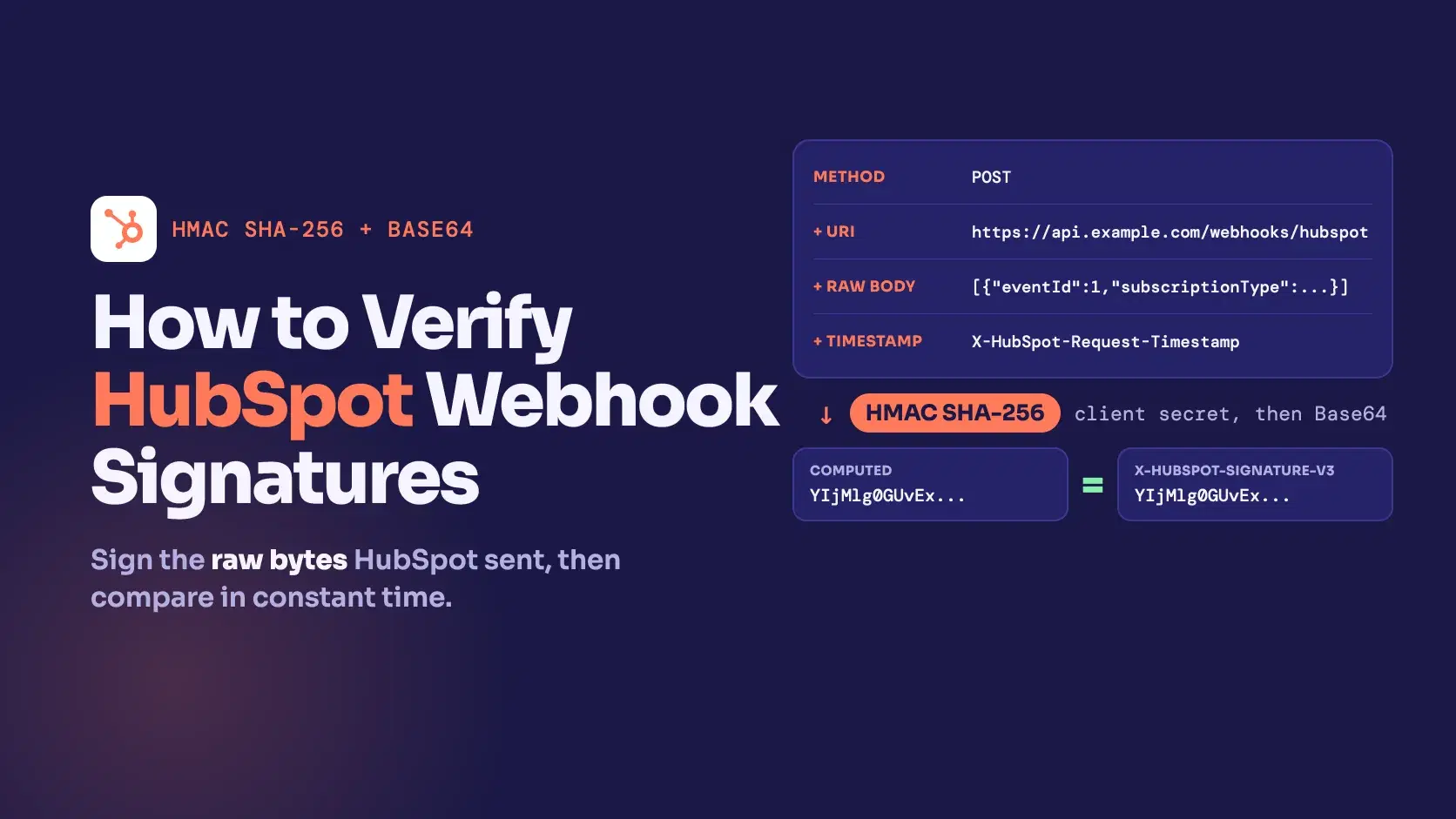
To verify a HubSpot webhook, concatenate the HTTP method, the full request URL, the raw request body and the X-HubSpot-Request-Timestamp header, compute an HMAC SHA-256 of that string with your app's client secret, Base64-encode it, and compare it to X-HubSpot-Signature-v3 using a constant-time comparison. Reject the request if the timestamp is older than 5 minutes.
The recipe is short and the failures are quiet: sign the wrong URL or a re-serialized body and the digest is simply different, so you get 401 with no hint why. Everything below was run locally against a Node.js verifier, with signatures produced by an independent Python implementation, and the sample payload is the CRM event shape HubSpot shows in its own docs.
The Fastest Way
Build the source string by hand (POST + URL + body + timestamp) and paste it into the HMAC Generator with SHA-256, your client secret and Base64 output. The result should equal the X-HubSpot-Signature-v3 header. The Webhook Signature Verifier has presets for Stripe, GitHub, Shopify and generic HMAC, but none for HubSpot, so the generic route needs that concatenated string as its payload. Both tools run in the browser, so the secret never leaves your machine.
Which Signature Version You Get
HubSpot's validating requests page (checked October 9, 2026) describes three signature versions, and the X-HubSpot-Signature-Version header tells you which older one a request carries. The newer developer platform has its own copy of the page with the same v3 steps.
| Version | Header | What is hashed | Sent for |
|---|---|---|---|
| v1 | X-HubSpot-Signature | SHA-256 of client secret + request body | CRM object event subscriptions via the webhooks API |
| v2 | X-HubSpot-Signature | SHA-256 of client secret + method + URI + body | Workflow webhook actions and custom CRM cards |
| v3 | X-HubSpot-Signature-v3 | HMAC SHA-256 of method + URI + body + timestamp, Base64 | The latest version, with X-HubSpot-Request-Timestamp |
Use v3 when the header is present. The rest of this post covers v3 only, because it is the one with a timestamp and a real HMAC.
Verify the v3 Signature in Node.js
HubSpot's steps add one detail that is easy to miss: before hashing, decode the percent-encoded characters %3A, %2F, %3F, %40, %21, %24, %27, %28, %29, %2A, %2C and %3B in the URI (the question mark that starts the query string stays as it is). Here is a verifier that does that and compares without leaking timing:
jsimport crypto from "node:crypto" const DECODE = { "%3A": ":", "%2F": "/", "%3F": "?", "%40": "@", "%21": "!", "%24": "$", "%27": "'", "%28": "(", "%29": ")", "%2A": "*", "%2C": ",", "%3B": ";", } export function decodeUri(uri) { return uri.replace(/%(3A|2F|3F|40|21|24|27|28|29|2A|2C|3B)/g, (m) => DECODE[m]) } export function verifyV3({ secret, method, uri, rawBody, timestamp, signature, now = Date.now() }) { if (!signature || !timestamp) return false if (Math.abs(now - Number(timestamp)) > 5 * 60 * 1000) return false const source = method + decodeUri(uri) + rawBody + timestamp const expected = crypto.createHmac("sha256", secret).update(source, "utf8").digest("base64") const a = Buffer.from(expected) const b = Buffer.from(signature) return a.length === b.length && crypto.timingSafeEqual(a, b) }
And the Express 5 route that uses it. The body is read as raw bytes with express.raw, because the signature covers the bytes HubSpot sent:
jsimport express from "express" import { verifyV3 } from "./verify.mjs" const app = express() app.post("/webhooks/hubspot", express.raw({ type: "application/json" }), (req, res) => { const ok = verifyV3({ secret: process.env.HUBSPOT_CLIENT_SECRET, method: req.method, uri: `https://${req.hostname}${req.originalUrl}`, rawBody: req.body.toString("utf8"), timestamp: req.get("X-HubSpot-Request-Timestamp"), signature: req.get("X-HubSpot-Signature-v3"), }) if (!ok) return res.sendStatus(401) const events = JSON.parse(req.body) res.sendStatus(200) }) app.listen(4040)
Cross-Check With an Independent Signer
A verifier that only agrees with itself proves little, so I signed test requests with Python's hmac module instead of Node's crypto:
pyimport base64, hashlib, hmac, sys secret, method, uri, ts = sys.argv[1:5] body = sys.stdin.read() for enc, dec in {"%3A": ":", "%2F": "/", "%3F": "?", "%40": "@", "%21": "!", "%24": "$", "%27": "'", "%28": "(", "%29": ")", "%2A": "*", "%2C": ",", "%3B": ";"}.items(): uri = uri.replace(enc, dec) src = (method + uri + body + ts).encode("utf-8") print(base64.b64encode(hmac.new(secret.encode(), src, hashlib.sha256).digest()).decode())
With the secret test-client-secret and a one-event contact.creation payload, the Node verifier results were:
Bash1 valid (python-signed, node-verified): true 2 tampered body: false 3 timestamp 6 min old: false 3b timestamp 4 min old: true 4 wrong secret: false 5 decoded uri: https://api.example.com/webhooks/hubspot?email=ann@example.com&tag=a,b
Over HTTP, curl with the same Python-computed header returned 200 for the valid request and 401 for a changed body, a missing header, and a request that arrived with the wrong Host.
Why You Get 401
A request fails at the first check it cannot pass, so the order below is the order to debug in.
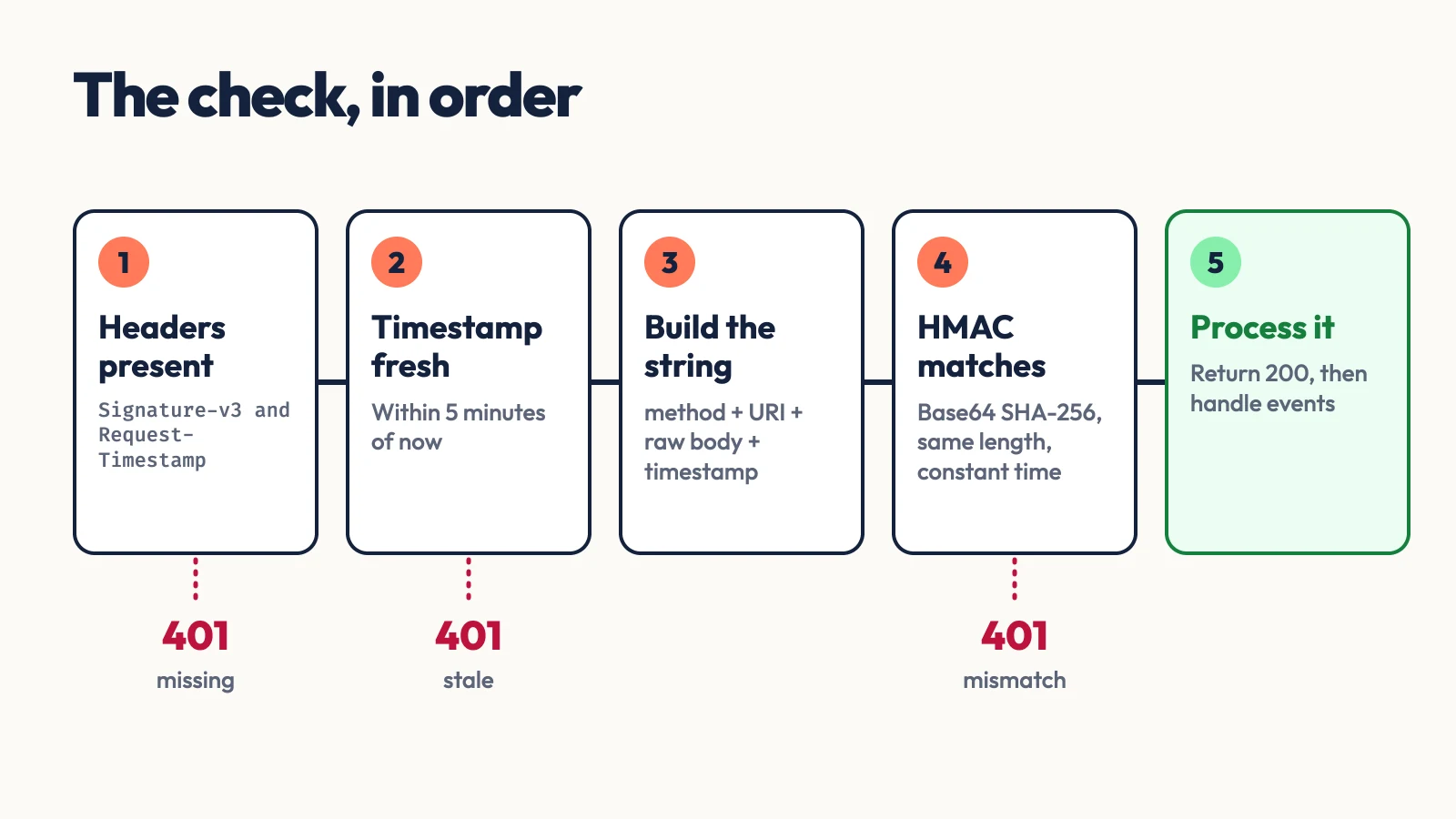
- You signed parsed JSON, not the raw body. HubSpot's documented Node.js example hashes
JSON.stringify(body)afterbodyParser.json()has parsed it. That only matches if the sender's bytes equal whatJSON.stringifyproduces. In my test, a body with spaces after commas verified astruefrom its raw bytes andfalseafter a parse and re-stringify. Read the raw body. - The URI does not match what HubSpot called. Build it from the public
httpshostname, as the docs example does. My test with the request arriving forlocalhostinstead ofapi.example.comfailed, which is exactly what happens behind a proxy that rewritesHost. - Encoded characters were not decoded.
ann%40example.comhas to becomeann@example.combefore hashing, and only the 12 listed sequences are decoded. timingSafeEqualthrew. HubSpot's example callscrypto.timingSafeEqualdirectly, and Node raisesRangeError: Input buffers must have the same byte lengthwhen the header is not the same length as the computed digest. A malformed or truncated header then crashes the handler instead of returning401. Compare lengths first, asverifyV3does.- The timestamp is stale. HubSpot says to reject anything older than 5 minutes. A server clock that has drifted by more than that rejects every request, so check NTP before debugging the signature.
When Not to Do This
A valid v3 signature shows the request came from HubSpot and was not altered, not that it is new. A captured request can be replayed inside the 5-minute window, so keep the eventId values from the payload you have processed and drop duplicates. And keep the client secret on the server: it is the only thing standing between your endpoint and anyone who can guess its URL.
Conclusion
Use the v3 header, hash method + decoded URI + raw body + timestamp with HMAC SHA-256, Base64 the result, and compare lengths before a constant-time compare. Read the body as bytes and build the URI from your public hostname. If a signature fails, reproduce it in the HMAC Generator from the exact string you hashed and compare it to the header; the difference in that string is the bug.
Related DevToolLab Tools
- HMAC Generator - compute the SHA-256 HMAC of the concatenated string and export it as Base64 to compare with the header.
- Webhook Signature Verifier - verify Stripe, GitHub, Shopify or generic HMAC signatures from a payload and secret in your browser.
- Webhook Receiver & Inspector - get a URL that captures a webhook so you can read the exact headers and body that arrived.
- URL Encoder Decoder - decode the percent-encoded characters in a webhook URL before you hash it.