
To check when an SSL certificate expires, run openssl s_client -connect example.com:443 -servername example.com </dev/null 2>/dev/null | openssl x509 -noout -enddate. It prints the notAfter date of the certificate the server is serving right now. Swap -enddate for -checkend 2592000 to get a yes-or-no answer for the next 30 days that a script can act on.
Running that once is easy. Running it often enough is what changed: since March 15, 2026, no publicly trusted TLS certificate may be valid for more than 200 days, and Let's Encrypt stopped emailing expiry warnings on June 4, 2025. Every output below checks one real host, devtoollab.com, on October 5, 2026.
The Fastest Way
Type a hostname into the SSL Certificate Checker and it shows the expiry date, days remaining, issuer, Subject Alternative Names (SANs), TLS version and whether the chain is trusted. A web page cannot read a TLS handshake, so unlike most DevToolLab tools, this one connects from our server, not your browser. It only checks port 443; for a mail server on 465 or anything on a private network, run openssl from a machine that can reach it.
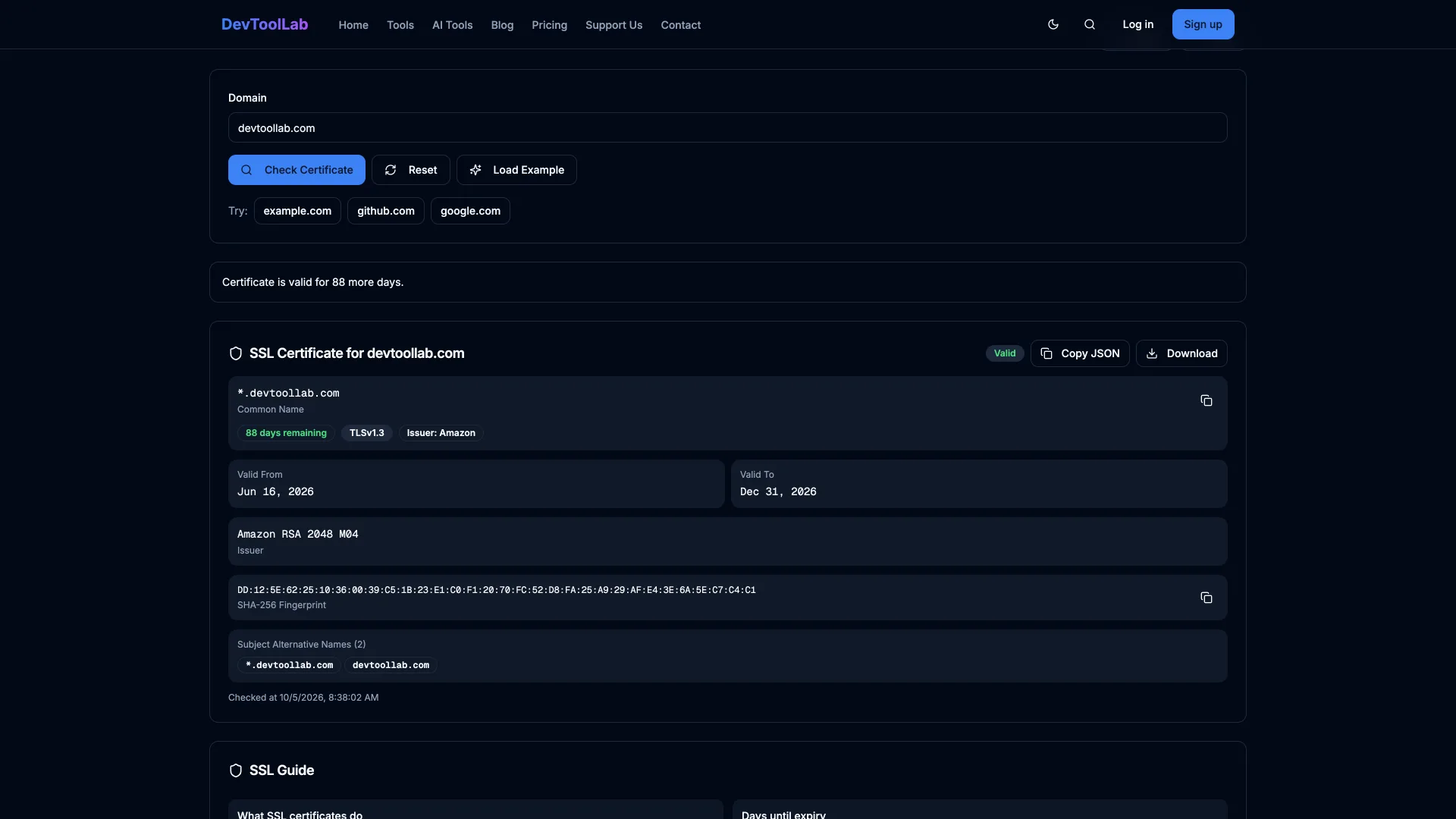
It reports 88 days; the commands below say 87 because the checker rounds partial days up.
Check a Live Server With openssl s_client
Bash$ openssl s_client -connect devtoollab.com:443 -servername devtoollab.com </dev/null 2>/dev/null \ | openssl x509 -noout -subject -issuer -dates subject=CN=*.devtoollab.com issuer=C=US, O=Amazon, CN=Amazon RSA 2048 M04 notBefore=Jun 17 00:00:00 2026 GMT notAfter=Dec 31 23:59:59 2026 GMT
</dev/null closes the input of s_client so it exits instead of waiting for you to type. -servername sends SNI (Server Name Indication), which tells a server hosting many sites which certificate to return. openssl x509 -noout parses the certificate without printing the Base64 blob. Use -enddate alone for just the expiry, or add -dateopt iso_8601 on OpenSSL 3.x for a date a script can parse: notAfter=2026-12-31 23:59:59Z.
June 17 to December 31 is about 198 days. devtoollab.com is served through AWS, and the AWS Certificate Manager (ACM) user guide says "ACM certificates are valid for 198 days," just inside the 200-day ceiling.
Get a Yes or No With -checkend
-checkend N asks whether the certificate expires within the next N seconds and sets the exit code: 0 means it will not, 1 means it will. Thirty days is 2,592,000 seconds.
Bash$ openssl s_client -connect devtoollab.com:443 -servername devtoollab.com </dev/null 2>/dev/null \ | openssl x509 -noout -checkend 2592000; echo "exit $?" Certificate will not expire exit 0 $ openssl s_client -connect expired.badssl.com:443 -servername expired.badssl.com </dev/null 2>/dev/null \ | openssl x509 -noout -checkend 0; echo "exit $?" Certificate will expire exit 1
-checkend 0 means "has it already expired?" The second host is one of the deliberately broken test sites at badssl.com; its certificate expired April 12, 2015.
Check a Certificate File (PEM, CRT or PFX)
For a file on disk, point x509 at it. Any Base64 file with -----BEGIN CERTIFICATE----- inside works, whether it ends in .pem, .crt or .cer:
Bash$ openssl x509 -in devtoollab.pem -noout -enddate notAfter=Dec 31 23:59:59 2026 GMT
A .pfx or .p12 bundle, the format Windows and IIS export, packs the certificate with its private key behind a password. Extract the certificate first:
Bash$ openssl pkcs12 -in devtoollab.pfx -nokeys -passin pass:changeit | openssl x509 -noout -enddate notAfter=Dec 31 23:59:59 2026 GMT
If OpenSSL 3 refuses an older export with unsupported, the fix is in Common Errors below.
Check With curl
curl -v prints the certificate it validated while connecting, and -I sends a HEAD request so nothing downloads:
Bash$ curl -svI https://devtoollab.com/ 2>&1 | grep -E 'start date|expire date|issuer' * start date: Jun 17 00:00:00 2026 GMT * expire date: Dec 31 23:59:59 2026 GMT * issuer: C=US; O=Amazon; CN=Amazon RSA 2048 M04
Unlike openssl, curl verifies the chain and hostname by default, so exit code 0 means the certificate is valid now, not just that its end date is in the future. Against expired.badssl.com the same request exits 60. curl 8.7.1 (the macOS build) and 8.11.1 (Homebrew) printed identical lines.
Check SSL Certificate Expiration in Python
The standard library covers it. getpeercert() returns the verified certificate as a dict, and ssl.cert_time_to_seconds() converts its notAfter string:
Pythonimport socket import ssl import sys from datetime import datetime, timezone def cert_expiry(host: str, port: int = 443) -> datetime: ctx = ssl.create_default_context() with socket.create_connection((host, port), timeout=10) as sock: with ctx.wrap_socket(sock, server_hostname=host) as tls: not_after = tls.getpeercert()["notAfter"] return datetime.fromtimestamp(ssl.cert_time_to_seconds(not_after), tz=timezone.utc) host = sys.argv[1] if len(sys.argv) > 1 else "devtoollab.com" expires = cert_expiry(host) days = (expires - datetime.now(timezone.utc)).days print(f"{host} expires {expires:%Y-%m-%d %H:%M} UTC ({days} days left)")
text$ python3 cert_expiry.py devtoollab.com devtoollab.com expires 2026-12-31 23:59 UTC (87 days left)
create_default_context() verifies the certificate, so an expired one raises ssl.SSLCertVerificationError before you see the date, which in a monitor is the alert. Tested on Python 3.13.0.
Check SSL Certificate Expiration in Node.js
jsimport tls from "node:tls"; const host = process.argv[2] ?? "devtoollab.com"; const socket = tls.connect({ host, port: 443, servername: host }, () => { const cert = socket.getPeerX509Certificate(); const days = Math.floor((cert.validToDate - Date.now()) / 86_400_000); console.log(`${host} expires ${cert.validToDate.toISOString()} (${days} days left)`); socket.end(); }); socket.on("error", (err) => { console.error(`${host}: ${err.code} ${err.message}`); process.exitCode = 1; });
text$ node cert-expiry.mjs devtoollab.com devtoollab.com expires 2026-12-31T23:59:59.000Z (87 days left)
getPeerX509Certificate() dates from Node.js 15.9.0, but validToDate needs Node.js 22.10.0 or 23.0.0 and later; on older versions, pass socket.getPeerCertificate().valid_to to new Date(). Node verifies by default, so an expired certificate lands in the error handler as CERT_HAS_EXPIRED. Tested on Node.js 25.5.0.
Check in Chrome or on Windows Server
In Chrome, click the icon at the left end of the address bar, then "Connection is secure", then "Certificate is valid" to open the certificate viewer with its validity dates. It shows only what your browser received, on your network, today.
On Windows Server, the certificates IIS uses live in the machine's My or WebHosting store, and PowerShell can filter them by expiration. This command is from Microsoft's about_Certificate_Provider documentation; we did not run it on Windows for this guide:
powershellGet-ChildItem -Path Cert:\LocalMachine\My -ExpiringInDays 30 | Select-Object Subject, NotAfter
The store shows what is installed, not what a site serves, so check the live endpoint too.
Why Certificates Expire Faster Every Year
The CA/Browser Forum, where certificate authorities and browser makers set the rules for public certificates, passed Ballot SC-081 on April 11, 2025 with no votes against; Apple, Google, Microsoft and Mozilla all voted yes. Section 6.3.2 of the Baseline Requirements (version 2.3.1, effective October 4, 2026) steps the maximum lifetime down on a fixed schedule, and Let's Encrypt is shortening its own default on top of that.
| Date | What changes | Source |
|---|---|---|
| June 4, 2025 | Let's Encrypt stops sending expiration notification emails | Let's Encrypt |
| March 15, 2026 | Maximum public TLS certificate lifetime drops from 398 to 200 days | CA/Browser Forum |
| February 10, 2027 | Let's Encrypt's default certificate drops from 90 to 64 days | Let's Encrypt |
| March 15, 2027 | Maximum lifetime drops to 100 days | CA/Browser Forum |
| February 16, 2028 | Let's Encrypt's default certificate drops to 45 days | Let's Encrypt |
| March 15, 2029 | Maximum lifetime drops to 47 days | CA/Browser Forum |
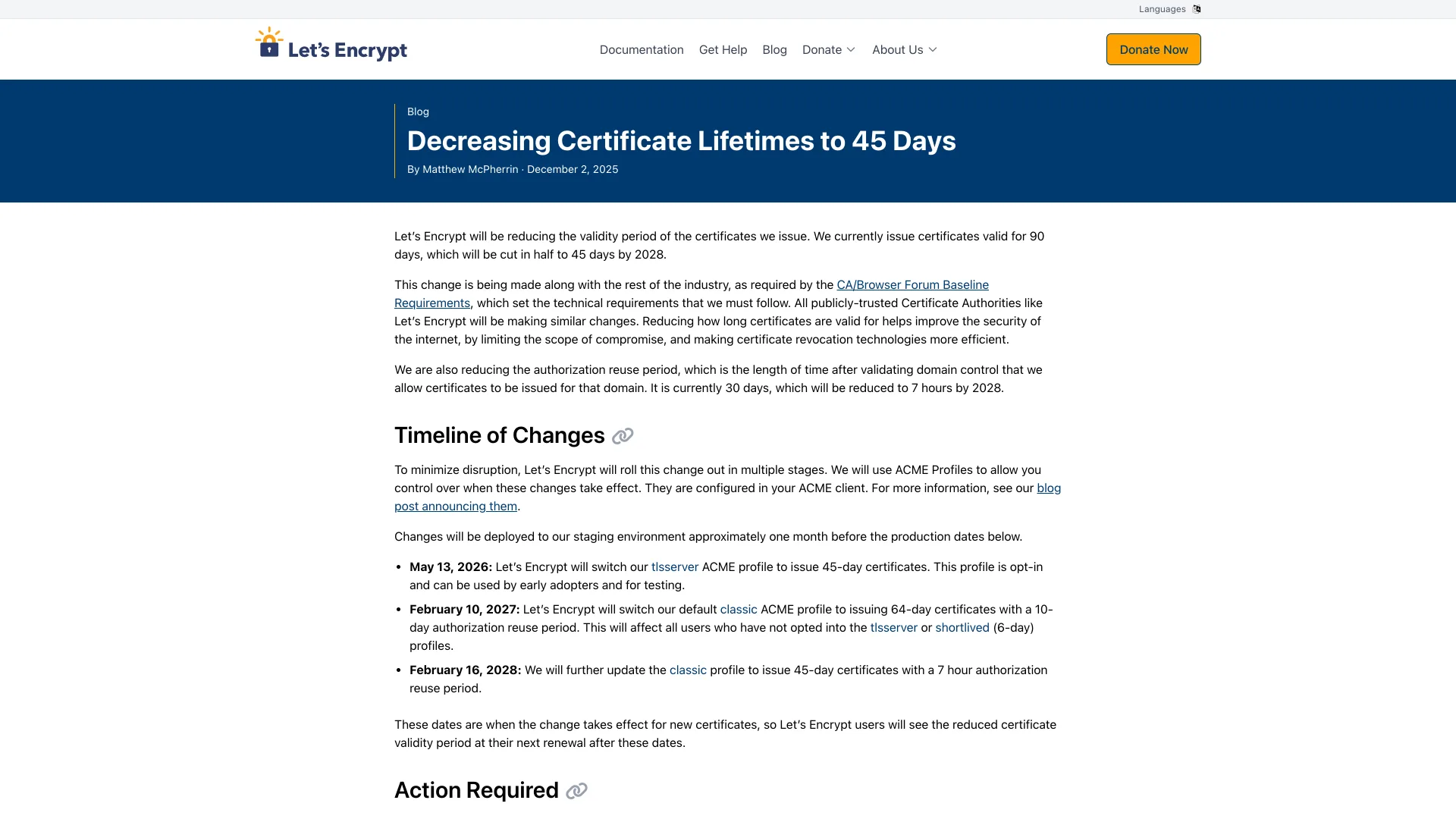
A 47-day certificate gets replaced at least eight times a year. Nobody runs a command by hand that often, so the check belongs on a schedule.
Monitor Every Certificate on a Schedule
This script wraps -checkend for a list of hosts. It runs on Linux and on the bash 3.2 that ships with macOS:
Bash#!/usr/bin/env bash # Usage: DAYS=30 ./check-certs.sh host1 host2 ... # Exit 1 if any certificate expires within $DAYS days, 2 if one cannot be fetched. DAYS=${DAYS:-30} status=0 for host in "$@"; do cert=$(openssl s_client -connect "$host:443" -servername "$host" </dev/null 2>/dev/null) if ! end=$(openssl x509 -noout -enddate <<<"$cert" 2>/dev/null); then echo "FAIL $host: no certificate returned" status=2 continue fi if openssl x509 -noout -checkend $((DAYS * 86400)) <<<"$cert" >/dev/null; then echo "OK $host ${end#notAfter=}" else echo "WARN $host ${end#notAfter=} (under $DAYS days)" [ "$status" -eq 0 ] && status=1 fi done exit $status
text$ ./check-certs.sh devtoollab.com www.devtoollab.com expired.badssl.com no-such-host.devtoollab.com OK devtoollab.com Dec 31 23:59:59 2026 GMT OK www.devtoollab.com Dec 31 23:59:59 2026 GMT WARN expired.badssl.com Apr 12 23:59:59 2015 GMT (under 30 days) FAIL no-such-host.devtoollab.com: no certificate returned $ echo $? 2
Run it daily from cron (0 9 * * * /usr/local/bin/check-certs.sh devtoollab.com www.devtoollab.com) or as a scheduled CI job, where the non-zero exit fails the run and the failure notice is your alert.
Pick DAYS from your renewal setup. ACM tries to renew a public certificate 45 days before it expires, so devtoollab.com should get a new one around November 16, 2026. A 30-day threshold fires only if that renewal failed, and still leaves a month to fix it. With DAYS=90 it warns about devtoollab.com today, a certificate behaving normally, and a threshold above the renewal window trains you to ignore alerts. Let's Encrypt's guidance is to renew about two thirds of the way through a certificate's life, so alert a little below the last third. For a hosted alternative to cron, Let's Encrypt lists services on its monitoring options page.
Common Errors
sslv3 alert handshake failure ... SSL alert number 40 usually means no SNI was sent. The /usr/bin/openssl on macOS is LibreSSL 3.3.6, which only sends SNI when you pass -servername, and CloudFront rejects the handshake without it. OpenSSL 3.x sends it by default. Keep the flag either way.
verify error:num=10:certificate has expired is the openssl version; curl says curl: (60) SSL certificate problem: certificate has expired, Python certificate verify failed: certificate has expired, and Node.js CERT_HAS_EXPIRED. Renew it. If a renewed file already exists, the server never loaded it (see the next section).
verify error:num=20:unable to get local issuer certificate means the server sends its certificate without the intermediate that links it to a trusted root; Node.js calls it UNABLE_TO_VERIFY_LEAF_SIGNATURE. It often "works in the browser" because Firefox pre-downloads every trusted intermediate, a feature Mozilla announced November 13, 2020. In our test, macOS's built-in curl also loaded incomplete-chain.badssl.com, while Homebrew's curl, Python and Node.js rejected it. Serve the full chain (fullchain.pem with Certbot).
Hostname mismatch (Python), no alternative certificate subject name matches target host name (curl) and ERR_TLS_CERT_ALTNAME_INVALID (Node.js) mean the certificate does not list the name you connected to. A wildcard covers one label: *.badssl.com matches www.badssl.com but not wrong.host.badssl.com. openssl only checks the name if you add -verify_hostname <name>, which reports verify error:num=62:hostname mismatch.
error:0308010C:digital envelope routines::unsupported while reading a .pfx means the file was encrypted with RC2-40, which OpenSSL 3 disables by default. Add -legacy to the pkcs12 command, or open it in the PFX to PEM Converter.
When Not to Trust the Check
Check the endpoint, never the file. nginx reads certificate files when it loads its configuration (its docs note that only a path built from variables gets loaded per handshake), so a renewed file on disk changes nothing until nginx -s reload. With Certbot, put the reload in a --deploy-hook, which runs only after a successful renewal.
Behind a CDN, a public check only sees the edge certificate. The origin's can expire unnoticed until Cloudflare starts returning Error 526 in Full (strict) mode. To check it, point -connect at the origin's IP address and keep -servername set to the public name.
Never switch verification off in a monitor (curl -k, rejectUnauthorized: false) to read a date. It will report green while every real visitor gets an error page.
Conclusion
For a one-off check, the openssl s_client pipe from the top of this guide or the SSL Certificate Checker answers in seconds. Anything you will need to check again belongs in a script built on -checkend, run daily against the live endpoint, with the threshold set below your renewal window: 30 days for a 198-day ACM certificate like the one on devtoollab.com, which renews 45 days out. If a CDN sits in front, check the origin as well. With the maximum lifetime dropping to 100 days in March 2027 and 47 days in March 2029, plan for the renewal that fails quietly, not the one you remember to run.
Related DevToolLab Tools
- SSL Certificate Checker - expiry, days left, issuer, SANs, TLS version and chain trust for any public site on port 443.
- Certificate Decoder - read the validity dates, SANs and fingerprint of a PEM someone sent you, decoded in your browser.
- OpenSSL Command Generator - the
opensslcommands around this check, from a new CSR to PEM to PFX, with every flag explained. - Cron Expression Generator - write the schedule for the daily
check-certs.shjob so it runs at 9:00 AM, not 9:00 PM.
Related Guides
- How to Use curl covers curl's certificate errors on development servers, and why
--cacertbeats-k. - Best Uptime Monitoring Tools compares hosted monitors if you would rather not run cron.
- Non-Human Identity Security Guide covers certificates as machine credentials nobody tracks.
- Post-Quantum Cryptography Migration Guide is the next change coming to TLS.