
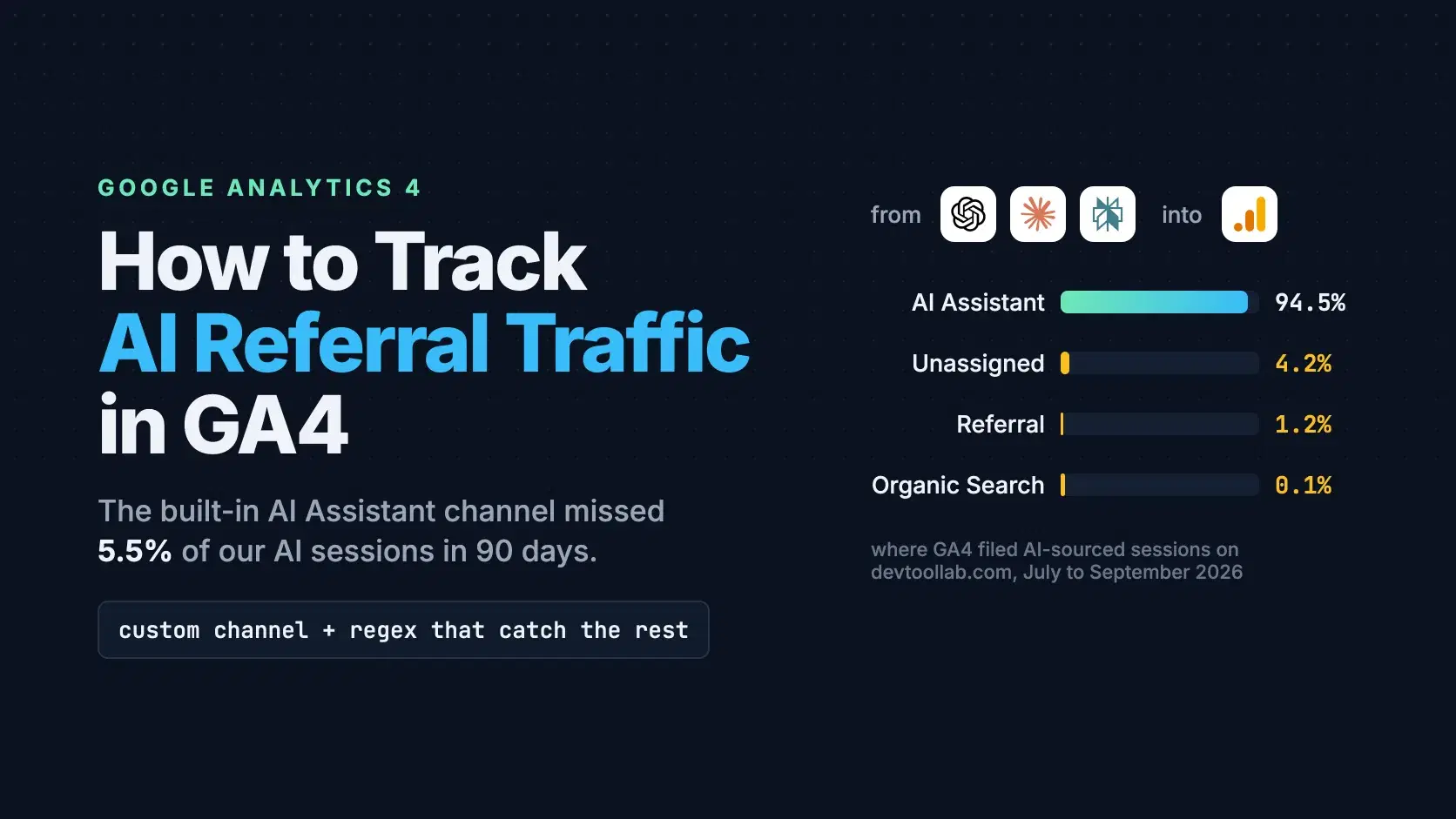
To track AI referral traffic in GA4, open Reports, then Acquisition, then Traffic acquisition, and group the table by channel. Since May 13, 2026, GA4 files visits from ChatGPT, Claude, Perplexity, Copilot and Gemini under a built-in AI Assistant channel. Add a custom channel group to catch the sessions it misses, and use Search Console for Google's own AI Overviews.
The built-in channel is a good start with three gaps: it matches referrers against a list Google has not published, it does not rewrite history, and visits that arrive with a bare tracking tag instead of a referrer fall through. On DevToolLab's own GA4 property, 5.5% of AI-sourced sessions in the 90 days to September 30, 2026 landed somewhere other than AI Assistant. This guide uses that property as the worked example throughout.
The Fastest Way
The fiddly part is the regex for the custom channel, so test it before you save it. Paste your list of session sources into the Regex Tester and wrap the pattern in ^(?:...)$, because GA4 matches a regex against the whole value, not a substring. The tester shows exactly which sources a pattern catches; it cannot tell you which sources your property actually receives, so pull that list from GA4 first (the script below does it).
How GA4 Decides a Session Is "AI Assistant"
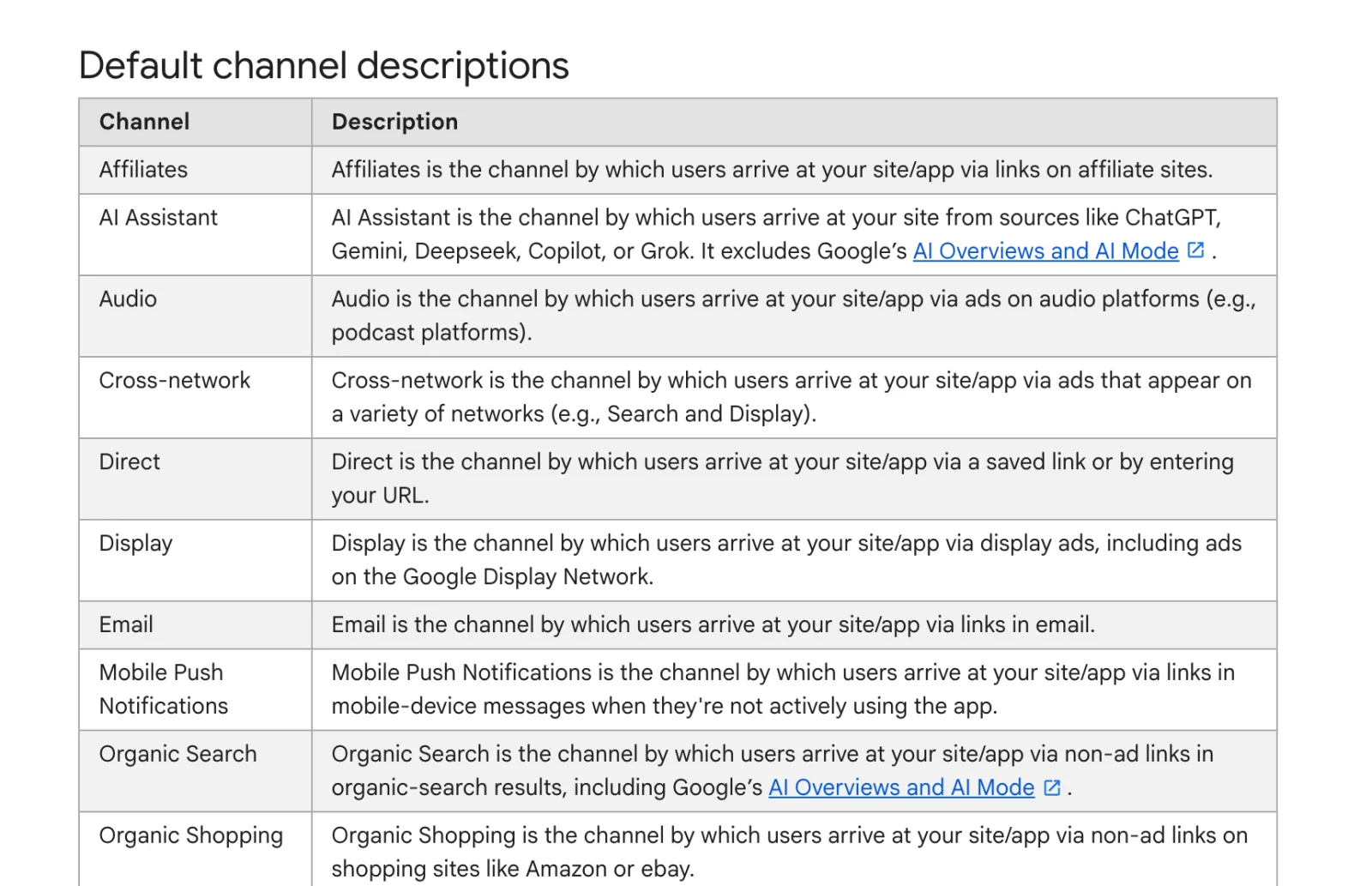
GA4 assigns the channel from the session's medium. Google's default channel group definitions say the AI Assistant channel is used when "the medium exactly matches 'ai-assistant'", and that GA4 sets the medium to ai-assistant and the campaign to (ai-assistant) "if the referrer matches a list of AI Assistants." The same page names ChatGPT, Gemini, DeepSeek, Copilot and Grok as examples and states that the channel excludes Google's AI Overviews and AI Mode.
Google announced the channel in its Analytics release notes on May 13, 2026. On DevToolLab's property the first ai-assistant sessions appeared in the week of June 1, 2026. Every earlier visit from chatgpt.com or claude.ai is still reported as Referral, so any comparison that spans early June is comparing two different labels.
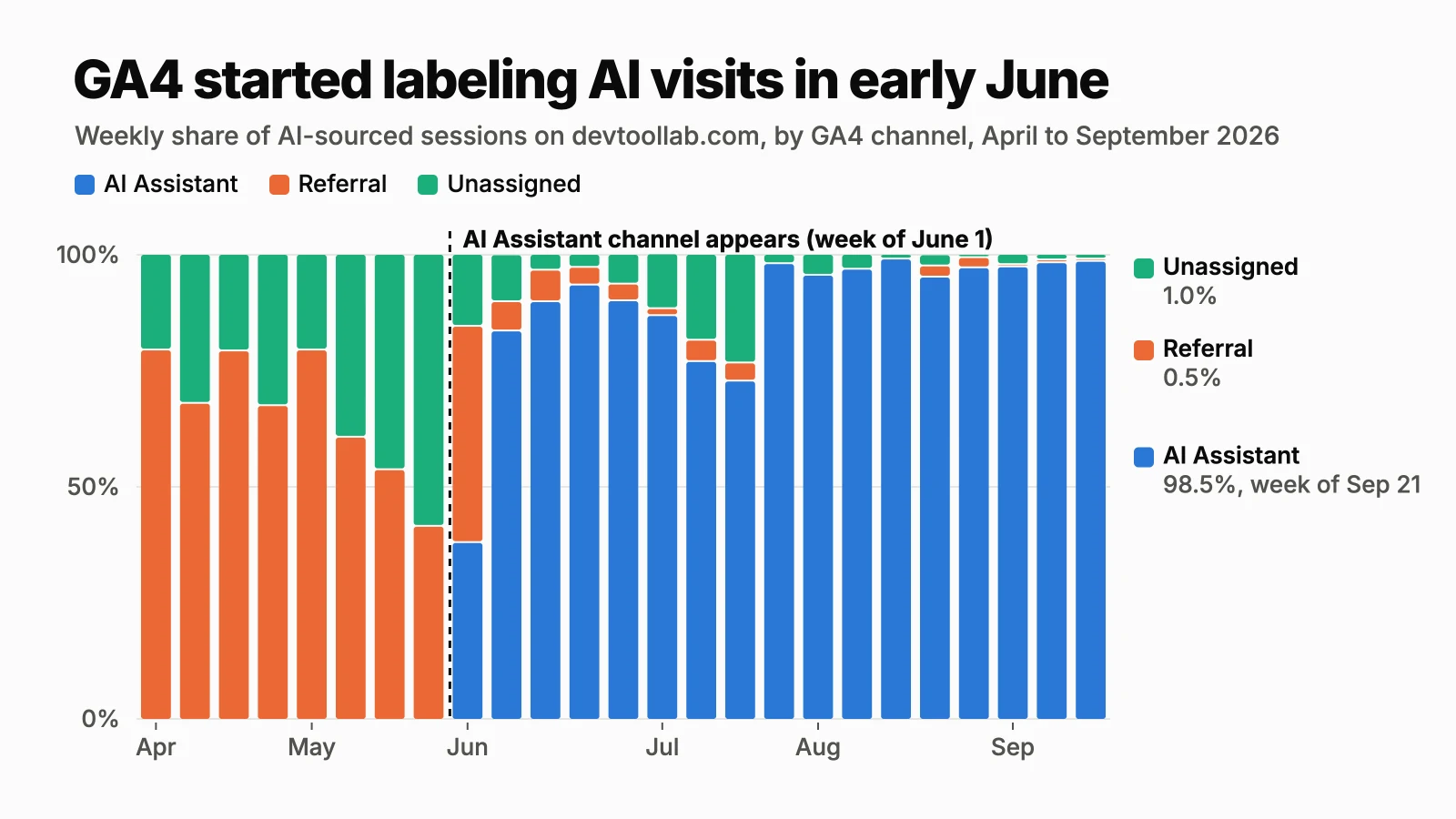
The chart also shows how much the old setup hid. In the eight full weeks before the switch, between 21% and 59% of AI-sourced sessions each week sat in Unassigned rather than Referral, so a pre-June "AI referrals" number built from the Referral channel alone undercounted by that much.
What counts as "a list of AI Assistants" is not public. Google's downloadable spreadsheet of default-channel sources, checked October 1, 2026, lists 819 sources in four categories (search, shopping, social and video) and no AI category at all. The only way to learn what GA4 recognizes is to look at your own data.
What the Built-in Channel Misses
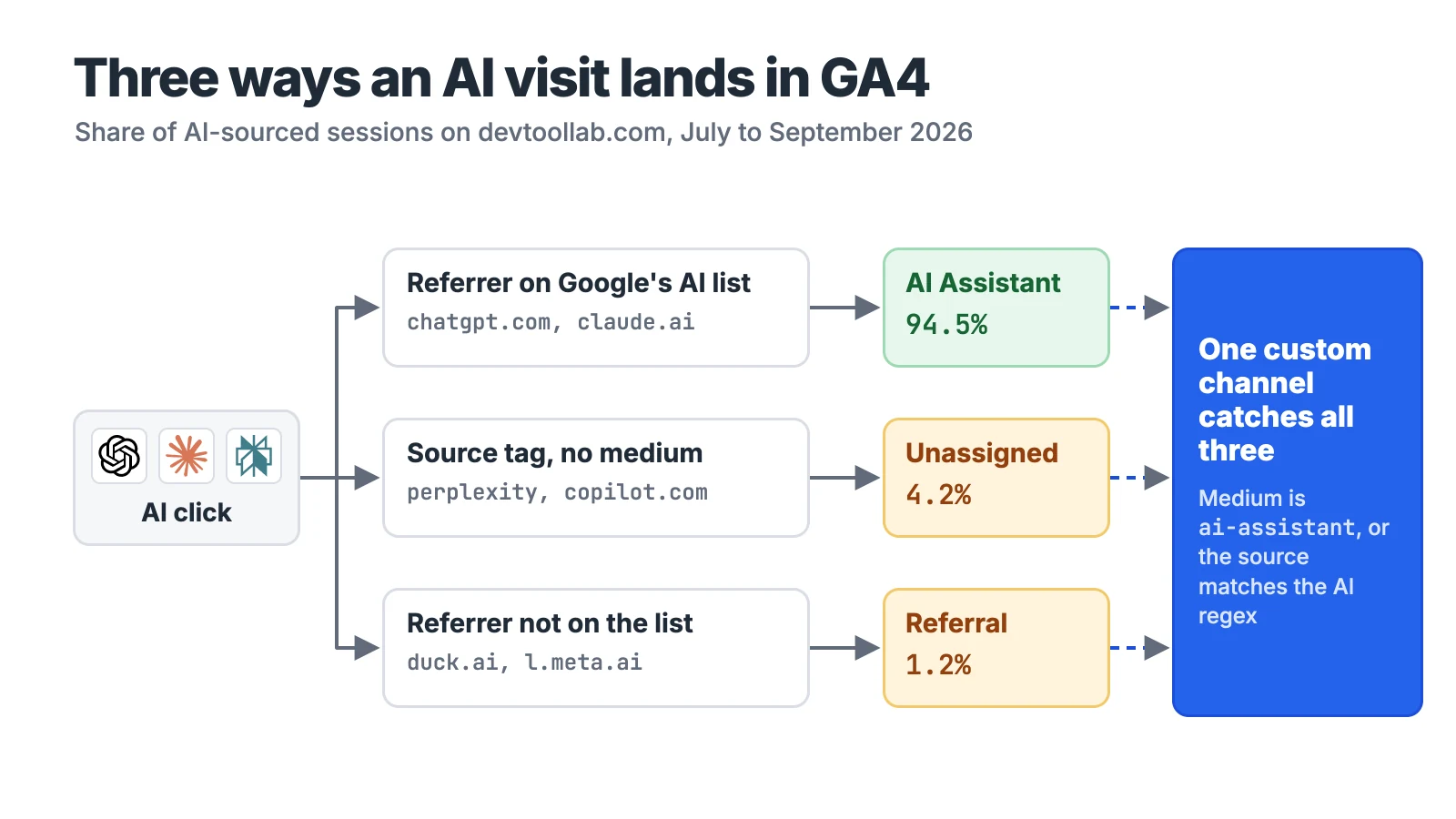
On DevToolLab, the AI Assistant channel caught 94.5% of AI-sourced sessions over the 90 days to September 30, 2026. This script pulls every session whose source looks like an AI tool and reports which channel GA4 put it in. It uses the GA4 Data API with a service account that has Viewer access to the property:
Python# Which channel did GA4 put your AI-sourced sessions in? (last 90 days) import os import google.auth.transport.requests import requests from google.oauth2 import service_account PROPERTY = os.environ["GA4_PROPERTY_ID"] creds = service_account.Credentials.from_service_account_file( os.environ["GOOGLE_APPLICATION_CREDENTIALS"], scopes=["https://www.googleapis.com/auth/analytics.readonly"], ) creds.refresh(google.auth.transport.requests.Request()) AI = r"chatgpt|openai|perplexity|claude\.ai|copilot|gemini|meta\.ai|duck\.ai|poe\.com|deepseek|grok" body = { "dateRanges": [{"startDate": "90daysAgo", "endDate": "yesterday"}], "dimensions": [{"name": "sessionDefaultChannelGroup"}, {"name": "sessionSource"}], "metrics": [{"name": "sessions"}], "dimensionFilter": {"filter": {"fieldName": "sessionSource", "stringFilter": { "matchType": "PARTIAL_REGEXP", "value": AI, "caseSensitive": False}}}, "limit": 1000, } resp = requests.post( f"https://analyticsdata.googleapis.com/v1beta/properties/{PROPERTY}:runReport", headers={"Authorization": f"Bearer {creds.token}"}, json=body, timeout=60, ) resp.raise_for_status() totals, missed = {}, {} for row in resp.json().get("rows", []): channel, source = (v["value"] for v in row["dimensionValues"]) n = int(row["metricValues"][0]["value"]) totals[channel] = totals.get(channel, 0) + n if channel != "AI Assistant": missed[f"{source} -> {channel}"] = missed.get(f"{source} -> {channel}", 0) + n all_ai = sum(totals.values()) for channel, n in sorted(totals.items(), key=lambda kv: -kv[1]): print(f"{channel:<16} {n / all_ai:6.1%}") print("\nlargest misses:") for key, n in sorted(missed.items(), key=lambda kv: -kv[1])[:5]: print(f" {key:<34} {n / all_ai:6.1%}")
Run against DevToolLab's property on October 1, 2026:
textAI Assistant 94.5% Unassigned 4.2% Referral 1.2% Organic Search 0.1% largest misses: perplexity -> Unassigned 2.0% copilot.com -> Unassigned 1.9% chatgpt.com -> Referral 0.5% duck.ai -> Referral 0.4% gemini.google.com -> Referral 0.1%
The two biggest misses are not referrer hostnames at all. A source of perplexity or copilot.com with a medium of (not set) comes from a tracking tag on the link that carries a source but no medium, and sessions like that land in Unassigned instead of AI Assistant. The perplexity tag was still arriving on September 24, 2026, so this is a standing gap, not rollout noise.
The Referral misses are a mix. duck.ai, DuckDuckGo's AI chat, is not on GA4's list as far as this property shows, and neither are l.meta.ai and copilot.cloud.microsoft. More surprising, every gemini.google.com session since June was filed as Referral, even though Google names Gemini as an example of the channel; the most recent arrived on July 5, 2026.
Build a Custom Channel Group That Catches the Rest
A custom channel group fixes both problems at once, and unlike the built-in channel it rewrites history: Google's custom channel group docs state that custom groups "can be applied to your reports retroactively." That means your pre-June 2026 chatgpt.com referrals move into the same bucket as the new ones. You need the Editor role, and a standard property allows 2 custom groups (360 properties get 5) with up to 50 channels each.
- In Admin, under Data display, open Channel groups and click Create new channel group. GA4 starts you with a copy of the default group.
- Click Add new channel and name it something like "AI assistants (all)".
- Add the condition Medium exactly matches
ai-assistant. - Add a second condition joined with OR: Source matches regex, with the pattern below.
- Click Reorder and drag the new channel to the top of the list. GA4 puts traffic "in the first channel whose definition it matches," so a channel below Referral never sees a chatgpt.com referral.
- Save, then pick the new group as the dimension in Traffic acquisition.
The source pattern, written for GA4's full-match rules:
text(.*\.)?(chatgpt\.com|chat\.openai\.com|openai|perplexity|perplexity\.ai|claude\.ai|gemini|gemini\.google\.com|copilot\.com|copilot\.microsoft\.com|copilot\.cloud\.microsoft|meta\.ai|duck\.ai|poe\.com|chat\.deepseek\.com|grok\.com|chat\.mistral\.ai)
The (.*\.)? prefix lets subdomains like l.meta.ai match while keeping each name exact. Add a line when a new assistant shows up in your sources, which the script above will tell you.
Why Not Use Google's Sample Regex
The custom channel group help page offers its own sample regex for AI assistants, and it is too loose to use as written. Google's regex documentation says that "by default, Google Analytics Regex is full regex and case sensitive," so the sample's first alternative, ^.*ai, matches every source that ends in "ai." This snippet compares the two patterns on sources from DevToolLab's property plus a few probes:
JavaScript// GA4's "matches regex" is a full, case-sensitive match, so test with ^(?:...)$. const sources = ["chatgpt.com", "claude.ai", "perplexity.ai", "perplexity", "copilot.com", "gemini.google.com", "l.meta.ai", "duck.ai", "poe.com", "chat.deepseek.com", "grok.com", "app.kime.ai", "sozee.ai", "gemini.com", "gptzero.me", "google", "bing"] const googleSample = String.raw`^.*ai|.*\.openai.*|.*chatgpt.*|.*gemini.*|.*gpt.*|.*copilot.*|.*perplexity.*|.*google.*bard.*|.*bard.*google.*|.*bard.*|.*.*gemini.*google.*$` const aiSources = String.raw`(.*\.)?(chatgpt\.com|chat\.openai\.com|openai|perplexity|perplexity\.ai|claude\.ai|gemini|gemini\.google\.com|copilot\.com|copilot\.microsoft\.com|copilot\.cloud\.microsoft|meta\.ai|duck\.ai|poe\.com|chat\.deepseek\.com|grok\.com|chat\.mistral\.ai)` const full = (p) => new RegExp(`^(?:${p})$`) console.log("source".padEnd(20), "google-sample", "ai-sources") for (const s of sources) { console.log(s.padEnd(20), String(full(googleSample).test(s)).padEnd(13), full(aiSources).test(s)) }
textsource google-sample ai-sources chatgpt.com true true claude.ai true true perplexity.ai true true perplexity true true copilot.com true true gemini.google.com true true l.meta.ai true true duck.ai true true poe.com false true chat.deepseek.com false true grok.com false true app.kime.ai true false sozee.ai true false gemini.com true false gptzero.me true false google false false bing false false
The sample misses DeepSeek and Grok, two of the assistants Google's own channel definition names, and it pulls in every .ai domain that links to you plus gemini.com, which is a cryptocurrency exchange. On DevToolLab it also matched five other .ai domains in 90 days, such as app.kime.ai and sozee.ai, that GA4's own channel did not count as assistants.
What GA4 Cannot Show You: AI Overviews and AI Mode
GA4's AI Assistant channel explicitly excludes clicks from Google's AI Overviews and AI Mode, so they sit in Organic Search with the rest of Google. Google's AI features documentation says sites appearing in those features "are included in the overall search traffic in Search Console," reported in the Performance report "within the 'Web' search type." So for Google's AI surfaces, Search Console is the only first-party view, and it blends them with regular results.
Check Server Logs for AI Fetches That Never Become Clicks
An answer engine can read your page, quote it and send nobody. Those reads show up in your access log under user agents each vendor documents. OpenAI uses ChatGPT-User when a ChatGPT user's question makes it visit a page, OAI-SearchBot for search and GPTBot for training. Perplexity uses Perplexity-User and PerplexityBot, and Anthropic uses Claude-User, Claude-SearchBot and ClaudeBot. The -User agents are the interesting ones: each hit means a person's question pulled that page into an answer.
On a sample log built from the published OpenAI and Perplexity user-agent strings:
Bash$ grep -oE 'GPTBot|OAI-SearchBot|ChatGPT-User|PerplexityBot|Perplexity-User|ClaudeBot|Claude-SearchBot|Claude-User' access.log | sort | uniq -c | sort -rn 2 ChatGPT-User 1 PerplexityBot 1 Perplexity-User 1 OAI-SearchBot 1 GPTBot $ grep -E 'ChatGPT-User|Perplexity-User|Claude-User' access.log | awk '{print $7}' | sort | uniq -c | sort -rn 3 /blog/how-to-generate-ssh-key $ grep -cE '"https://chatgpt\.com/' access.log 1
In this sample, three answer-time fetches of one post sit against one click with a chatgpt.com referrer, a ratio GA4 alone will never show you.
Common Errors
The AI Assistant row is missing or nearly empty. Your date range ends before the rollout reached your property (early June 2026 on DevToolLab). The built-in channel does not rewrite older data; build the custom group above to see the full history.
perplexity / (not set) sitting in Unassigned. A tracking tag without a medium. The source regex in the custom channel catches it, because it matches on source alone.
The custom channel shows zero sessions. It sits below AI Assistant, Referral or Organic Search, so those channels claim the traffic first. Reorder it to the top.
The regex matches in a tester but not in GA4. GA4 matches the whole value, not a substring. Test with ^(?:...)$ around the pattern. Google's regex docs also call matching case sensitive, so add capitalized variants if your own UTM tags use them.
When Not to Do This
Do not judge generative engine optimization work on the AI Assistant channel alone. It counts clicks, and most citations never produce one; pair it with Search Console for Google's AI features and with access logs for answer-time fetches. And keep the custom group as a reporting view rather than replacing your primary channel group, so the numbers you share stay comparable with Google's defaults.
Conclusion
GA4 now does most of the work: on DevToolLab, the built-in AI Assistant channel caught 94.5% of AI-sourced sessions in the 90 days to September 30, 2026, with no setup at all. If you only need a trend line from June 2026 onward, read that channel and stop there. If you report AI traffic to anyone, build the custom channel group: it picks up the bare perplexity and copilot.com tags and unlisted referrers like duck.ai, and because custom groups apply retroactively, it gives you one comparable series that runs back past the June switch. If your stakeholders ask about Google's AI Overviews and AI Mode, say plainly that GA4 cannot separate them and point to the Web search type in Search Console instead. And if the real question is whether answer engines read your content at all, the answer is in the access log, not in GA4: count the -User agents.
Related DevToolLab Tools
- Regex Tester - check the channel group pattern against your real source list before GA4 starts filing sessions with it.
- UTM Link Builder - tag the links you control with a source and a medium, so they never land in Unassigned the way bare tags do.
- User Agent Parser - paste a user-agent string from your logs to see whether it is a browser or an AI fetcher such as ChatGPT-User.
- Nginx Log Analyzer - summarize an access log by path and user agent to find which pages AI assistants read most.
Related Guides
- Generative Engine Optimization for Developers - how to get cited in the first place: crawler access, structured data and page structure.
- What Is llms.txt? - what the file does, who serves one, and who actually reads it.
- Best AI Search APIs for Agents - the search APIs behind many of the assistants that now send you traffic.
- Best Web Scraping APIs for AI - the other side of the access log: tools that fetch pages for AI pipelines.