
Go check your GitHub organization's settings right now and count the personal access tokens with no expiration date. Then check how many of them belong to someone who no longer works there. Most teams that run this exercise for the first time find at least one, and more than a few find a token from someone who left two years ago that still has write access to production repos.
That's the non-human identity problem in miniature, and in 2026 it's a much bigger miniature than it used to be. GitGuardian's State of Secrets Sprawl 2026 report found 28.65 million hardcoded secrets on public GitHub commits in 2025, a 34% jump over 2024 and the largest single-year increase the company has ever recorded. AI-related credentials, meaning API keys for OpenAI, Anthropic, and other model providers, grew 81.5% year over year. And here's the part that should bother you more than the public numbers: internal, private repositories were six times more likely to contain a hardcoded secret than public ones. The private repo isn't the safe room you think it is; it's just the room nobody's watching.
None of that even counts the credentials that never touch a Git repo at all: the service account token baked into a Kubernetes secret two migrations ago, the OAuth grant an integration requested and nobody revisited, the API key an AI agent was handed so it could call your billing system on your behalf. String all of that together, human-adjacent but not actually human, and you get what the industry has started calling non-human identities, or NHIs. The current estimate is roughly 80 non-human identities for every one human employee inside a typical enterprise. Eighty to one, and most of them have no owner, no expiration date, and nobody who'd notice if they went missing, or worse, if someone else started using them.
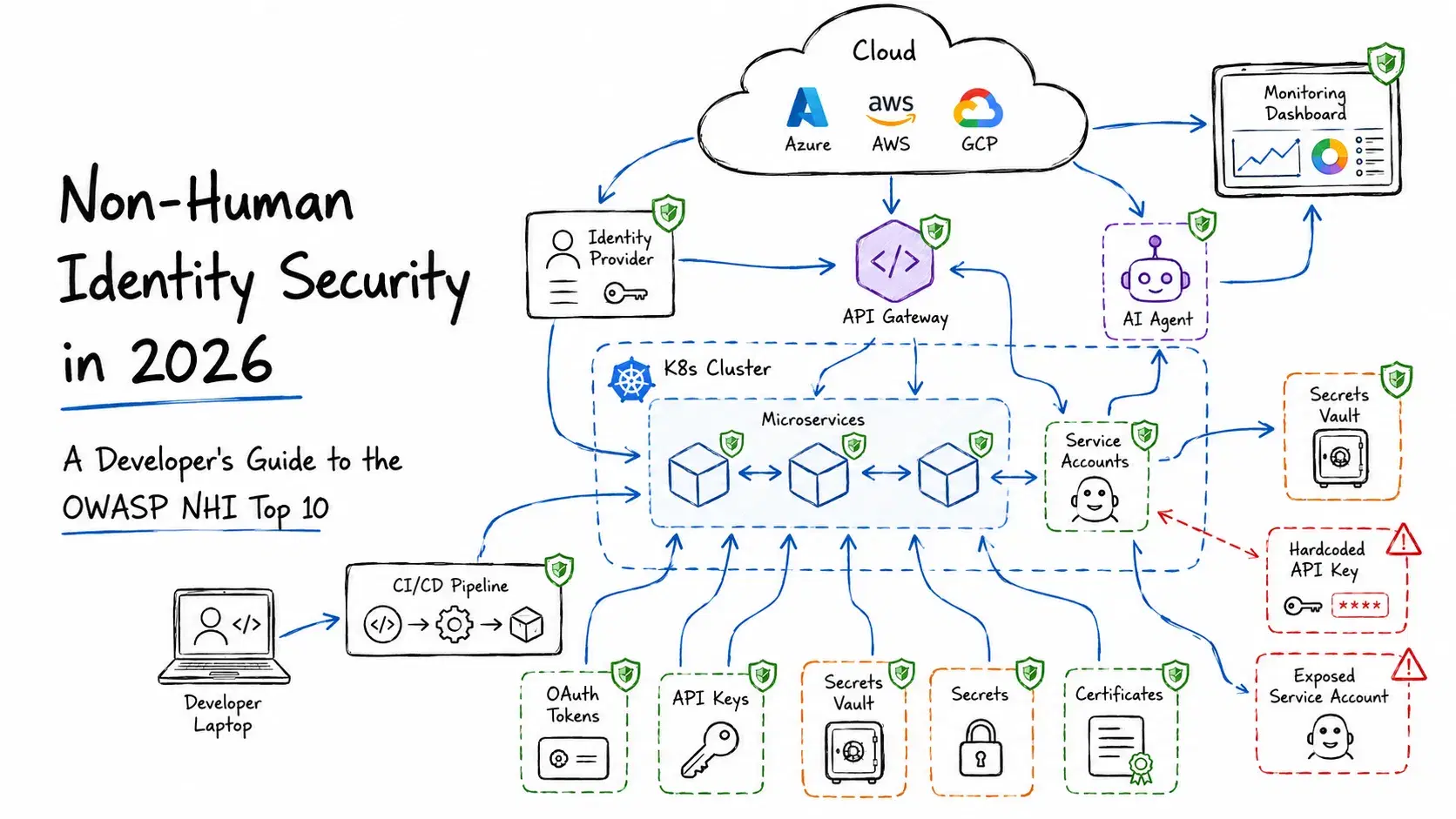
In 2025, OWASP made this official by publishing its first Non-Human Identities Top 10, using the same ranked, exploitability-first format that turned the original OWASP Top 10 into required reading for web developers two decades ago. This guide walks through what non-human identity security actually means, why it went from niche security-team concern to something every developer needs to understand, what's actually on the OWASP list, and what to go fix this week, with code you can copy.
What Actually Counts as a Non-Human Identity
Strip away the acronym and the idea is simple: a non-human identity is any credential that authenticates something other than a person sitting at a keyboard. A service account, an API key, an OAuth access token, a TLS client certificate, an SSH deploy key, a CI/CD pipeline's assumed cloud role, an AI agent's session token. If it logs in and there's no human typing a password behind it, it's an NHI.
The reason this got its own name and its own OWASP list is that NHIs quietly break every assumption baked into 20 years of identity and access management tooling. Human identity programs handle onboarding, offboarding, password rotation, and MFA reasonably well, because there's a person to email and a login screen to challenge. NHIs skip almost all of it. A service account doesn't get an exit interview when the project it was created for gets shut down. An API key doesn't fail a phishing simulation. Nobody gets a calendar reminder that the Stripe webhook secret from 2024 is still active, still unrotated, and still sitting in a Notion doc somewhere.
Three things collided to make this worse fast. Microservices and CI/CD multiplied the number of machine-to-machine connections that need their own credentials. Every SaaS integration and browser extension now wants an OAuth grant before it'll do anything useful. And the newest factor, the one that's actually driving the 2026 numbers: AI agents need credentials of their own to call APIs, query databases, and take action on a user's behalf, and teams are handing those out faster than anyone can track.
Why AI Agents Broke the Old Model
Here's the uncomfortable stat: CyberArk's 2026 Identity Security Landscape research, covered on the CyberArk blog, found that 91% of organizations are already running AI agents in production. Only 10% have anything resembling a real strategy for managing the identities those agents use. That's not a gap, that's most of the industry improvising. A related survey covered by IANS Research in February 2026 found that 68% of organizations can't reliably tell AI agent activity apart from human activity in their own logs, only 34% apply the same access controls to their "digital labor force" that they'd apply to a human hire, and just 15% said they were confident they could actually catch an attack that abused one of these agent identities. If you flip that last number around: 85% of security teams don't trust their own ability to catch this.
The reason an AI agent's identity is worse than a normal service account isn't mysterious, it's a scoping problem. A traditional service account does one narrow thing and you can write down what that thing is: a backup job reads from a database, a monitoring agent posts metrics somewhere. An AI agent, by contrast, usually gets broad, general-purpose access up front, because nobody can predict which tool calls it'll need to finish a task. Broad scope plus a credential that never expires is exactly the risk shape the OWASP list spends most of its ten items warning about.
You can see this play out concretely in the MCP (Model Context Protocol) ecosystem. GitGuardian's 2026 report found 24,008 unique secrets exposed in public MCP server configuration files, and 2,117 of them were still live and usable at scan time. Not old, dead keys. Working credentials, sitting in public config, attached to a protocol most teams adopted in the last year. If you're running MCP servers, our guide to the best MCP servers covers how to scope what each one can actually touch, and every credential an MCP server holds should get the same ownership and expiration treatment as anything else in this article.
The Home Depot Token: A Year-Long Case Study in Doing Nothing Wrong (Once)
If you want to see what an unmanaged non-human identity actually costs, TechCrunch reported a case in December 2025 that's almost boringly typical, which is what makes it worth reading. A Home Depot employee accidentally published a GitHub personal access token online, probably sometime in early 2024. Security researcher Ben Zimmermann stumbled onto it almost a year later and, out of curiosity, tested whether it still worked. It did. The token granted read and write access to hundreds of private Home Depot source code repositories, plus connected systems including order fulfillment, inventory management, and internal development pipelines. Zimmermann tried the responsible thing first, reporting it privately, and was ignored for weeks, partly because Home Depot had no vulnerability disclosure program for anyone to report it through. The token only got revoked after TechCrunch called the company directly.
Nothing exotic happened here. No zero-day, no clever exploit chain. One credential, scoped far past what its job required, sat exposed for roughly a year because no process existed to notice it. That's the entire non-human identity problem compressed into a single incident: too much privilege, too long a lifetime, and nobody watching. It's also exactly the story you'd expect after reading item five on the OWASP list below.
The OWASP Non-Human Identity Top 10, Translated Out of Committee-Speak
The OWASP NHI Top 10 is ranked by exploitability, prevalence, detectability, and impact, same methodology as the classic web app list. The official names read like compliance-checklist filler, so here's what each one actually means when it's your service account, not a slide deck.
NHI1: Improper Offboarding. The credential outlives whatever created it, the project, the employee, the vendor contract. Fix: every NHI needs an owner, and when that owner leaves or the project dies, the credential gets killed in the same workflow, not remembered six months later during an incident review.
NHI2: Secret Leakage. The one you already know about. Credentials committed to Git, pasted into a Slack message, logged in plaintext, dropped into a public S3 bucket. This is the single most common NHI failure and the one GitGuardian's 28.65 million number is measuring.
NHI3: Vulnerable Third-Party NHI. A SaaS integration or browser extension you authorized gets compromised, and the attacker inherits whatever scope you handed it. Every "Connect your GitHub account" OAuth prompt you click through is a non-human identity you just created and shipped off to run on somebody else's infrastructure.
NHI4: Insecure Authentication. Machine-to-machine auth that's stuck in 2015: basic auth over plain HTTP, static API keys with no request signing, shared secrets hardcoded into client-side JavaScript where anyone with dev tools can read them.
NHI5: Overprivileged NHI. A credential that can do far more than its actual job requires. This is the Home Depot pattern exactly: a token scoped for one narrow task that happened to also open every door in the building.
NHI6: Insecure Cloud Deployment Configurations. Static credentials exposed in CI/CD, usually because a pipeline was wired up with a long-lived cloud access key instead of a short-lived, federated one. The OIDC walkthrough right after this list is the direct fix.
NHI7: Long-Lived Secrets. Keys, tokens, and certificates with expiration dates set to "never" or "who cares." Strength doesn't matter here. A credential that doesn't expire isn't secure, it's just a countdown to exposure with no reset button.
NHI8: Environment Isolation and NHI9: NHI Reuse are really the same mistake worn two ways: the same credential shared across dev, staging, and production, or shared across multiple unrelated services. Either way, one leak in the weakest environment becomes an incident in your most important one, because you gave the attacker a skeleton key instead of a room key.
NHI10: Human Use of NHI. A developer borrows a service account's credentials for a manual task because requesting personal access is annoying. Convenient in the moment, and it quietly erases the audit trail, because now every action that service account takes is attributed to "the service account," not to the person actually driving it.
Fixing NHI6 and NHI7: Kill Long-Lived Cloud Credentials with OIDC
Of everything on that list, this is the one fix that pays off fastest for the least effort. If your GitHub Actions workflow currently stores an AWS_ACCESS_KEY_ID and AWS_SECRET_ACCESS_KEY as repository secrets, stop reading for a second and go check. That pair works forever, from anywhere, until someone remembers to rotate it, which in practice means never.
GitHub Actions supports OpenID Connect (OIDC) federation: the workflow requests a short-lived token from GitHub's own OIDC provider and trades it for temporary AWS credentials that expire automatically when the job finishes. No static keys sitting in your repo settings at all. Here's the actual setup.
First, create an IAM OIDC identity provider in AWS that trusts GitHub's token issuer (this is a one-time setup per AWS account):
Bashaws iam create-open-id-connect-provider \ --url https://token.actions.githubusercontent.com \ --client-id-list sts.amazonaws.com \ --thumbprint-list 6938fd4d98bab03faadb97b34396831e3780aea1
Next, create an IAM role with a trust policy scoped to your specific repository and branch, so only workflows running on that exact repo can assume it:
JSON{ "Version": "2012-10-17", "Statement": [ { "Effect": "Allow", "Principal": { "Federated": "arn:aws:iam::123456789012:oidc-provider/token.actions.githubusercontent.com" }, "Action": "sts:AssumeRoleWithWebIdentity", "Condition": { "StringEquals": { "token.actions.githubusercontent.com:aud": "sts.amazonaws.com" }, "StringLike": { "token.actions.githubusercontent.com:sub": "repo:your-org/your-repo:ref:refs/heads/main" } } } ] }
Then in your workflow, request the token and assume the role instead of reading static secrets:
yamlname: deploy on: push: branches: [main] permissions: id-token: write contents: read jobs: deploy: runs-on: ubuntu-latest steps: - uses: actions/checkout@v4 - uses: aws-actions/configure-aws-credentials@v4 with: role-to-assume: arn:aws:iam::123456789012:role/github-actions-deploy aws-region: us-east-1 - run: aws s3 sync ./dist s3://your-bucket --delete
The permissions: id-token: write line is what lets the job request an OIDC token in the first place; without it, aws-actions/configure-aws-credentials has nothing to exchange. The role can only be assumed by workflows running on main in that exact repository, the credentials AWS hands back expire in about an hour, and CloudTrail logs exactly which workflow run assumed the role. Compare that to a static access key sitting in repository secrets with no expiration and no way to tell which specific run used it. GCP and Azure support the equivalent pattern through Workload Identity Federation, and most major CI platforms (GitLab CI, CircleCI, Buildkite) support OIDC the same way.
How to Audit Your Non-Human Identities This Week
You don't need to buy a dedicated NHI management platform to make real progress here, and you definitely don't need to boil the ocean. Here's a sequence that a small-to-mid-size team can actually get through.
- Inventory what you have. Pull a list of every API key, service account, and OAuth grant across your cloud provider's IAM console, your Git host's settings, and every third-party integration your team has authorized. Most teams have never done this and are surprised by the count.
- Assign an owner to each one. If nobody can say who owns a credential or why it exists, that's your first candidate for revocation. An unowned credential is an unmonitored credential.
- Check expiration dates. Flag anything with no expiration or an expiration more than 90 days out. Use our SSL Certificate Checker to confirm which of your domains and internal services are running on certificates nobody is tracking the renewal date for.
- Scan for credentials in code and config, not just Git history. Secrets leak through Slack exports, Notion pages, and CI logs just as often as commits. Run your
.envfiles through our Dotenv Linter to catch malformed entries and duplicate keys before they get copied into a service account's runtime config, and use our Password Leak Checker to confirm a shared credential hasn't already surfaced in breach data, using a k-anonymity lookup that never sends the full secret anywhere. - Replace static secrets in CI/CD with federated identity. Start with your highest-value pipeline (usually production deploy) and move it to OIDC using the pattern above before tackling the rest.
- Move Kubernetes secrets out of ad hoc scripts. If your team is still hand-editing base64 blobs in YAML, convert your
.envfiles properly with our .env to Kubernetes Secret converter so the manifest is generated consistently instead of copy-pasted. - Set a recurring review, not a one-time cleanup. A quarterly pass through the inventory from step 1 is what actually prevents the Home Depot scenario. A one-time audit finds today's problems; a recurring one catches the ones that accumulate afterward.
NHI Management vs. Secrets Management: Not the Same Thing
People use these two terms interchangeably in vendor pitches, which is annoying, because they solve genuinely different layers of the same problem.
| Secrets Management | NHI Management | |
|---|---|---|
| Primary question | Where is this credential stored? | Who or what owns this identity, and should it still exist? |
| Typical tools | HashiCorp Vault, AWS Secrets Manager, Doppler, Infisical | Astrix Security, Oasis Security, Entro, Token Security |
| Solves | Encryption at rest, access control, rotation mechanics | Discovery, ownership, lifecycle, and offboarding across every tool that issues credentials |
| Blind spot if used alone | Doesn't know if a stored secret is still needed or who owns it | Doesn't replace the vault itself; still needs somewhere secure to store what it discovers |
Most teams need both, and most teams currently have neither, they have a .env file and a prayer. A secrets manager handles the mechanics of storing and rotating a credential securely. NHI management answers the harder, more organizational question: should this credential exist at all, who's accountable for it, and what happens the day the person or project behind it disappears. Vault alone won't tell you that a key hasn't been used in eight months and belongs to someone who left the company. That's a different job.
Building New Integrations: Do the NHI Work Up Front
Retrofitting this stuff later is miserable, ask anyone who's had to rotate a credential that's hardcoded in six different services. If you're wiring up a new service-to-service integration, or handing an AI agent its own API access, it's dramatically cheaper to get this right on day one.
- Scope the credential to the minimum set of actions it actually needs. If your integration only reads data, don't hand it a key with write access "in case you need it later."
- Set the shortest expiration your workflow can tolerate, and build the rotation into your deployment process rather than treating it as a manual chore someone will forget.
- Give every credential a named owner in whatever system tracks that for your team, even if it's just a spreadsheet to start.
- Prefer signed requests over shared static keys where the receiving service supports it. Use our HMAC Generator to build and verify signed webhook payloads instead of shipping a bearer token that works forever if it leaks.
- When debugging a token issued to a service or an agent, inspect its claims and expiry with our JWT Decoder rather than assuming it's still valid.
- If you're testing whether a discovered or rotated key for OpenAI, Anthropic, or another provider is actually live before you panic and rotate everything downstream, our API Key Validator checks it without storing the key anywhere.
Related DevToolLab Tools
- JWT Decoder - Inspect a service account or AI agent token's header, payload, and expiry before you trust it
- API Key Validator - Check whether an OpenAI, Anthropic, or Google AI key is still live before rotating every downstream system
- HMAC Generator - Sign webhook and API requests instead of relying on a static bearer token
- .env to Kubernetes Secret - Convert environment variables into a proper Secret manifest instead of hand-editing base64 YAML
- Dotenv Linter - Catch duplicate keys and malformed values in
.envfiles before they reach a running service - Password Leak Checker - Check a shared credential against known breach data using a k-anonymity lookup, without sending the full secret anywhere
Conclusion
Non-human identity security isn't a new discipline invented to sell you another dashboard, whatever the vendor landing pages want you to think. It's the same access-control discipline security teams have run for human employees for years, finally pointed at the API keys, service accounts, and AI agents that now outnumber those employees 80 to 1 and mostly run with no owner, no expiration, and no offboarding process at all. The OWASP NHI Top 10 just gives that discipline a name and a ranked list of where it's missing.
You don't need to clear all ten items this quarter, and you probably can't. Start with the two that compound fastest: rip long-lived cloud credentials out of your CI/CD pipelines with OIDC federation, and run the inventory-and-ownership pass from the checklist above so you actually know what you're protecting. Everything else on the list gets easier once those two things are true, because right now, the honest answer to "how many non-human identities does our org have" is a shrug, and a shrug isn't a security posture.