
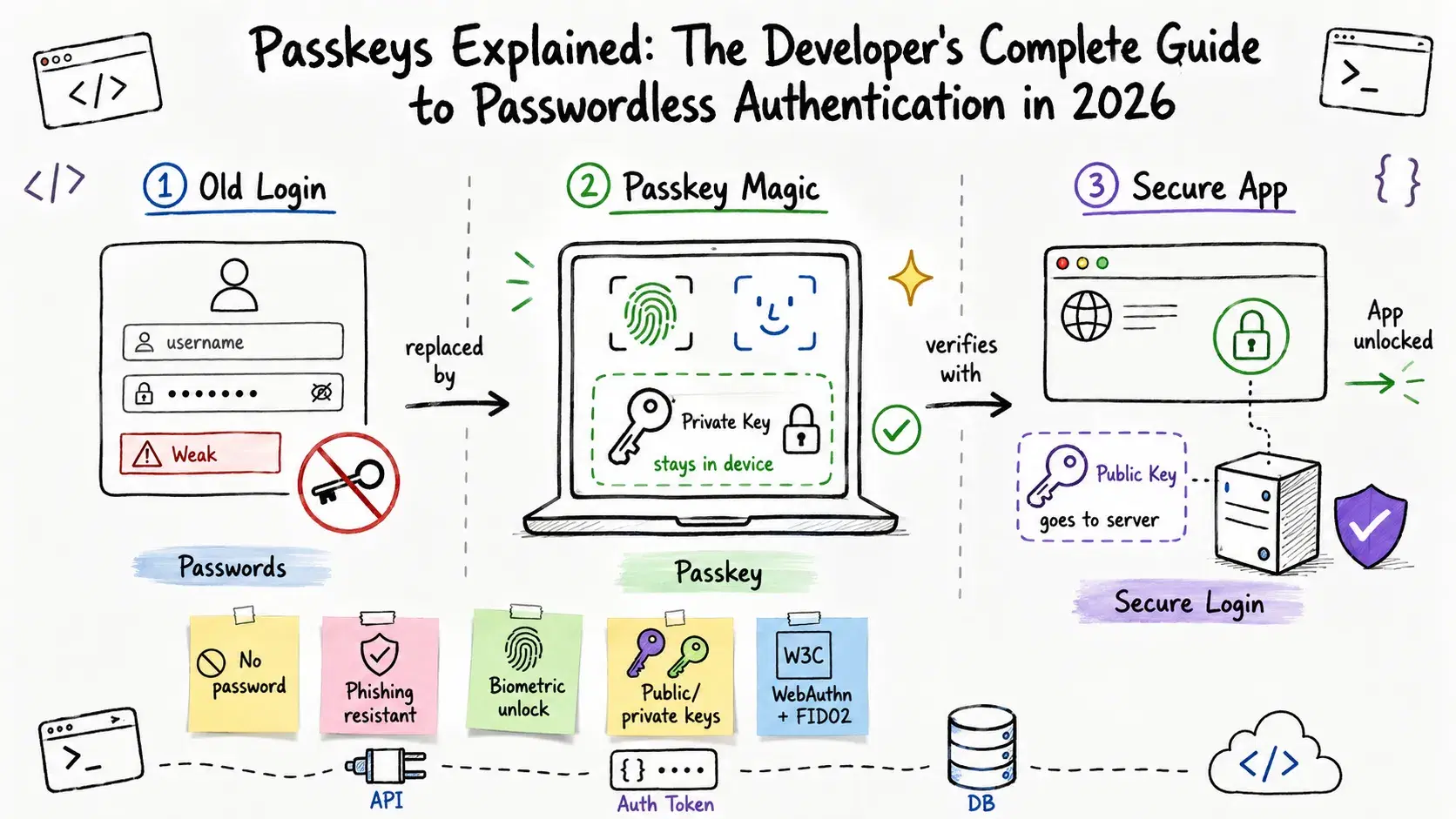
5 billion. That's how many passkeys are in active use right now, per FIDO Alliance data from May 2026. Google logs over 1 billion passkey sign-ins per month with a 99.9% lower account compromise rate than passwords. Microsoft made passkeys the default for all new accounts in May 2025 and hit 1 million new passkey registrations per day - a 350% jump from 2024.
These aren't projections - they're measurements from production systems. If you're still on the fence about adding passkey support, the industry already decided without you. The real question now is whether you understand them well enough to implement them correctly.
This guide covers the cryptographic mechanics, the common implementation pitfalls, and a complete working implementation in TypeScript. No hand-waving.
Why Passwords Were Always Broken (Not Just Bad)
Passwords don't just suck to use - they're structurally broken at the protocol level. Here's the problem: they're shared secrets. When you create a password, you hand a copy to the server. The server stores it (hopefully hashed), you send it on every login, and now you have two attack surfaces instead of one. Either your device or the server getting compromised ends your security.
The numbers are pretty grim. The Verizon 2025 DBIR found 22% of all breaches started with stolen credentials, and 88% of attacks against web apps used them. In 2024 alone, 548 million passwords were stolen by infostealer malware. The average credential-theft breach costs $4.44 million and takes 292 days to detect.
"Just add 2FA" is the usual response. It helps, but it doesn't fix the root problem. SMS 2FA is vulnerable to SIM-swapping. TOTP codes can be phished in real time - the attacker proxies your login, you enter the OTP, they replay it inside its validity window. Auth apps are better, but you're still handing over a code the user typed, which can be intercepted.
The fundamental issue - a shared secret that can be extracted, replicated, and replayed - never goes away with passwords. Passkeys fix it at the protocol level.
What a Passkey Actually Is
A passkey is a credential built on public-key cryptography, implemented via the WebAuthn spec and FIDO2 standard. The structural difference: there's no shared secret.
When you register a passkey, your device generates a public-private key pair. The private key never leaves your device - it lives in the secure enclave (Apple's Secure Enclave, Android's StrongBox, or a hardware key's protected storage). The server gets and stores only the public key. A public key can't derive the private key, so a server-side credential database breach gives an attacker nothing useful.
When you authenticate, the server sends a random challenge. Your device signs it with the private key - which requires biometric or PIN verification from the user. The server verifies the signature against the stored public key. Match means you're in. No secret was transmitted. Nothing to intercept.
This eliminates three attack categories entirely:
- Credential stuffing - there are no stored passwords to stuff
- Phishing - passkeys are cryptographically bound to a specific origin; a fake domain gets a signature it can't use
- Server-side breaches - the stored public key is useless without the private key on the user's device
The Cryptography (Worth Understanding)
You don't need to implement this from scratch - but understanding the mechanics changes how you reason about the security guarantees.
The standard algorithm is ES256: ECDSA with the P-256 curve and SHA-256. Each key pair is bound to a single relying party (your app's domain). A passkey created for yourapp.com cannot work on yourapp-phishing.com - the relying party ID is embedded in the credential at creation and verified cryptographically every time.
Registration flow:
- Your server generates a random, single-use challenge (32 bytes minimum)
- Your client calls
navigator.credentials.create()with the challenge, your relying party ID, user info, and algorithm preferences - The authenticator (Touch ID, Face ID, Windows Hello, hardware key) verifies the user biometrically and generates the key pair
- The authenticator returns a signed attestation: the new public key, a credential ID, and the challenge signed with the private key
- Your server verifies the challenge signature, parses the attestation, and stores the credential ID and public key against the user account
Authentication flow:
- Server generates a new random challenge
- Client calls
navigator.credentials.get()with the challenge - Authenticator verifies the user, signs the challenge with the private key, returns the signature
- Server verifies the signature against the stored public key. Match = authenticated
The origin binding happens at step 2: the browser passes the current origin to the authenticator as part of clientDataJSON. If the origin doesn't match the registered relying party ID, the authenticator refuses to sign. Phishing-proof by cryptography, not by UX hope.
Implementing Registration
Don't implement raw WebAuthn from scratch. The CBOR decoding of authenticator data, challenge verification, and signature verification against stored keys are all easy to get subtly wrong. The standard library for TypeScript/Node.js is SimpleWebAuthn - it handles the cryptographic heavy lifting with a clean API and downloads 800K+ times per week on npm.
Bashnpm install @simplewebauthn/server @simplewebauthn/browser
Server side (Node.js + Express):
TypeScriptimport { generateRegistrationOptions, verifyRegistrationResponse, } from "@simplewebauthn/server"; import type { RegistrationResponseJSON } from "@simplewebauthn/types"; const rpName = "Your App Name"; const rpID = "yourapp.com"; // must match your domain exactly const origin = `https://${rpID}`; // Step 1: Generate registration options and send to client app.get("/auth/register/options", requireSession, async (req, res) => { const user = req.user; const options = await generateRegistrationOptions({ rpName, rpID, userName: user.email, userDisplayName: user.name, // Prevent re-registering an existing credential excludeCredentials: user.passkeys.map((pk) => ({ id: pk.credentialID, transports: pk.transports, })), authenticatorSelection: { residentKey: "required", // required for discoverable credentials userVerification: "required", // requires biometric/PIN verification }, }); // Store the challenge in the session - it must match on verification req.session.registrationChallenge = options.challenge; res.json(options); }); // Step 2: Verify the response from the authenticator app.post("/auth/register/verify", requireSession, async (req, res) => { const body: RegistrationResponseJSON = req.body; const expectedChallenge = req.session.registrationChallenge; let verification; try { verification = await verifyRegistrationResponse({ response: body, expectedChallenge, expectedOrigin: origin, expectedRPID: rpID, }); } catch (error) { return res.status(400).json({ error: (error as Error).message }); } const { verified, registrationInfo } = verification; if (verified && registrationInfo) { const { credential, credentialDeviceType, credentialBackedUp } = registrationInfo; // Store the credential against the user await db.passkeys.create({ userId: req.user.id, credentialID: credential.id, credentialPublicKey: Buffer.from(credential.publicKey), counter: credential.counter, deviceType: credentialDeviceType, backedUp: credentialBackedUp, transports: body.response.transports ?? [], }); req.session.registrationChallenge = undefined; } res.json({ verified }); });
Client side:
TypeScriptimport { startRegistration, browserSupportsWebAuthn, } from "@simplewebauthn/browser"; async function registerPasskey() { if (!browserSupportsWebAuthn()) { alert("Your browser does not support passkeys."); return; } // 1. Fetch options from server const optionsRes = await fetch("/auth/register/options"); const options = await optionsRes.json(); // 2. Call the WebAuthn API (this triggers the biometric prompt) let attResp; try { attResp = await startRegistration({ optionsJSON: options }); } catch (error) { if ((error as Error).name === "InvalidStateError") { console.error("This device already has a passkey registered."); } else { console.error(error); } return; } // 3. Send the response to your server for verification const verifyRes = await fetch("/auth/register/verify", { method: "POST", headers: { "Content-Type": "application/json" }, body: JSON.stringify(attResp), }); const result = await verifyRes.json(); if (result.verified) { console.log("Passkey registered successfully!"); } }
Implementing Authentication
The auth flow mirrors registration - generate a challenge, get the authenticator to sign it, verify the signature.
Server side:
TypeScriptimport { generateAuthenticationOptions, verifyAuthenticationResponse, } from "@simplewebauthn/server"; import type { AuthenticationResponseJSON } from "@simplewebauthn/types"; // Step 1: Generate authentication options app.get("/auth/login/options", async (req, res) => { // For passkeys, you don't need to know the user ahead of time // The authenticator will present stored credentials for your domain const options = await generateAuthenticationOptions({ rpID, userVerification: "required", }); req.session.authChallenge = options.challenge; res.json(options); }); // Step 2: Verify the authentication response app.post("/auth/login/verify", async (req, res) => { const body: AuthenticationResponseJSON = req.body; const expectedChallenge = req.session.authChallenge; // Look up the stored credential by the credential ID in the response const passkey = await db.passkeys.findByCredentialID(body.id); if (!passkey) { return res.status(400).json({ error: "Unknown credential" }); } let verification; try { verification = await verifyAuthenticationResponse({ response: body, expectedChallenge, expectedOrigin: origin, expectedRPID: rpID, credential: { id: passkey.credentialID, publicKey: new Uint8Array(passkey.credentialPublicKey), counter: passkey.counter, transports: passkey.transports, }, }); } catch (error) { return res.status(400).json({ error: (error as Error).message }); } const { verified, authenticationInfo } = verification; if (verified) { // Update the counter (prevents replay attacks) await db.passkeys.updateCounter( passkey.credentialID, authenticationInfo.newCounter ); // Look up the user and establish a session const user = await db.users.findById(passkey.userId); req.session.userId = user.id; req.session.authChallenge = undefined; } res.json({ verified }); });
Client side:
TypeScriptimport { startAuthentication } from "@simplewebauthn/browser"; async function signInWithPasskey() { // 1. Get authentication options from server const optionsRes = await fetch("/auth/login/options"); const options = await optionsRes.json(); // 2. Invoke the WebAuthn API - browser shows the passkey selector UI let assnResp; try { assnResp = await startAuthentication({ optionsJSON: options }); } catch (error) { console.error("Authentication failed:", error); return; } // 3. Verify with server const verifyRes = await fetch("/auth/login/verify", { method: "POST", headers: { "Content-Type": "application/json" }, body: JSON.stringify(assnResp), }); const result = await verifyRes.json(); if (result.verified) { window.location.href = "/dashboard"; } }
That's the full implementation - registration and authentication in roughly 150 lines using SimpleWebAuthn. The library handles CBOR decoding, signature verification, and most spec compliance internally so you don't have to.
Where Adoption Actually Stands
The "passkeys are the future" framing is outdated - they're the present. FIDO Alliance research from April 2026 across 11,000 consumers in 10 countries: 75% of people globally have at least one passkey enabled, up from 69% six months earlier. 90% passkey awareness, up from 39% two years ago. 49% use them regularly when available.
On the platform side: Google has 800 million accounts using passkeys with sign-in success rates 4x higher than passwords and ~20% faster sign-in times. Amazon has 175 million passkey users. TikTok reports a 97% auth success rate with passkeys. Among the Tranco top-100K websites, 11.3% (9,397 sites) now support passkeys - 62× more than manually curated directories suggested, per a February 2026 arXiv study. Among the top 10 sites globally, coverage is essentially complete.
On the enterprise side, 68% of organizations have deployed or are actively deploying passkeys for employee access.
If your app doesn't support passkeys yet, you're behind the median adoption curve, not ahead of it.
The Four Bugs Everyone Ships
Passkey implementations fail in predictable ways. Here's what keeps showing up in developer forums and support queues.
Challenge reuse. Challenges must be single-use, server-generated, and stored in the session between the options request and the verification. Caching or reusing a challenge opens a replay attack window. The pattern above - store in session, clear after use - is correct. Don't deviate from it.
Skipping counter updates. The authenticator increments a counter on every auth. You store and compare this counter to detect cloned credentials - if the incoming counter isn't greater than the stored one, that credential may have been cloned. Don't skip the updateCounter call after every successful authentication.
No account recovery path. This one bites everyone eventually. A user who loses their phone has lost their passkey. If you ship passkeys without a recovery mechanism, that user is locked out permanently. Build recovery before you enable passkeys in production: backup email codes, support-assisted identity verification, or registered recovery keys. This is not optional.
Cross-device UX friction. Register a passkey on an iPhone, try to authenticate from a Windows PC - the browser kicks off a cross-device flow via QR code and Bluetooth. Same-device passkey completion rates are 79–98%. Cross-device on Windows web drops to 52–67%. That's a significant dropoff. Keep a password fallback during migration and monitor your users' device patterns before removing it.
Migrating From Passwords Without Breaking Things
The right approach is additive, not replacement. Three stages:
Stage 1 - Opt-in registration. Surface a passkey registration prompt after a successful password login. Users who register can start using it immediately without giving up their password. Most won't notice a difference until the next login.
Stage 2 - Flip the default. Once 60–70% of active users have passkeys, make the passkey flow the primary login UI with password as a secondary option. Users with passkeys will use them - the UX is meaningfully better - so conversion happens on its own.
Stage 3 - New account sign-up. For new accounts specifically, require passkey registration as part of the sign-up flow. Apple's OS 26 (2025) includes an Automatic Passkey Upgrade feature that silently creates a passkey on every password sign-in for eligible users - worth knowing as a reference for aggressive migration strategies.
If you're under regulatory constraints: NIST guidelines updated in 2025 now require phishing-resistant MFA - specifically citing WebAuthn/FIDO2 - for all US federal agency systems. Syncable passkeys meet AAL2 (Authentication Assurance Level 2).
Browser and Platform Support
WebAuthn has ~95% global browser coverage in 2026. Chrome (v67+), Edge (v18+), Safari (v13+, iOS v14.5+), and all major Chromium forks work. Firefox supports the core API but has some quirks with specific authenticator flows.
Platform authenticators exist on every major consumer OS: Touch ID/Face ID on Apple, Windows Hello on Windows, Android biometrics on Android 9+. Hardware keys (YubiKey, Google Titan) work via USB/NFC and are the right choice for high-assurance enterprise contexts.
The browserSupportsWebAuthn() check from SimpleWebAuthn gives you a reliable runtime signal, so you can progressively render the passkey UI only where it'll actually work.
Conclusion
Passkeys are not an emerging standard - they're the current standard. The tooling is mature, the implementation is ~150 lines with SimpleWebAuthn, and the security properties are proven in production at scale.
One thing you absolutely must get right before shipping: build account recovery first. A user who loses their device without a recovery path is locked out permanently and will be angry at you. Everything else - the crypto, the flows, the browser compatibility - is already a solved problem.
Related DevToolLab Tools
Useful when building and debugging passkey and authentication systems:
- JWT Decoder - Inspect access tokens issued alongside your passkey authentication to verify claims and expiry.
- JWT Generator - Generate test JWTs for local development when building your token issuance logic.
- Hash Generator - Generate SHA-256 and other hashes for verifying WebAuthn challenge integrity during debugging.
- Base64 Encoder/Decoder - WebAuthn challenge values and credential IDs are Base64URL-encoded; decode them for inspection during development.
- UUID Generator - Generate user IDs for the
user.idfield in WebAuthn registration options. - Password Strength Checker - Evaluate your existing password-based fallback flows before migration.
- Password Leak Checker - Check if user passwords appear in known breach databases - useful for prioritizing passkey migration outreach.
- Security Headers Checker - Verify your security headers. HTTPS is required for WebAuthn, and a solid CSP reduces XSS risk during the transition period.
Related reading: JWT Tokens: Complete Security Guide for Developers · Password Security Best Practices