

To enable CORS, make the API send an Access-Control-Allow-Origin header naming the origin your frontend runs on, and answer the browser's OPTIONS preflight with the methods and headers you allow. In Express, app.use(cors({ origin: "http://localhost:3000" })) does both. Nothing you change in the frontend can fix it.
What makes CORS annoying is where it fails. The server answers 200, curl works, Postman works, and only the browser refuses to hand the response to your JavaScript. Every example below uses the same setup: a frontend at http://localhost:3000 calling an API at http://localhost:4000/api/orders. Those are two different origins, because the port is part of the origin.
The Fastest Way
Pick a framework, an allowed origin, methods, headers and credentials in the CORS Header Generator and it writes the middleware for Express.js, FastAPI, Nginx or Django, plus the raw response headers and a curl command that tests the preflight. It generates config for you to paste; it does not change your server.

To check a server you already run, the CORS Tester sends a real fetch from your browser to any URL and explains why a request was blocked when it fails.
What the Server Has to Say
An origin is scheme, host and port. The browser attaches an Origin header to cross-origin requests, and the response has to contain an Access-Control-Allow-Origin that matches it, or the browser discards the response. The server itself does not enforce anything, and I confirmed that: an Express server configured for http://localhost:3000 still returned 200 and the full JSON body to a request claiming Origin: https://evil.example. The block happens in the browser, after the data has already arrived.
Some requests are preflighted. According to the MDN CORS guide (checked October 9, 2026), a request skips preflight only if it uses a safelisted method and only safelisted headers, and its Content-Type, if present, is application/x-www-form-urlencoded, multipart/form-data or text/plain. A PUT, an Authorization header or a JSON body (application/json) all trigger a preflight: the browser first sends OPTIONS with Access-Control-Request-Method and Access-Control-Request-Headers, and only sends the real request if the answer allows it.
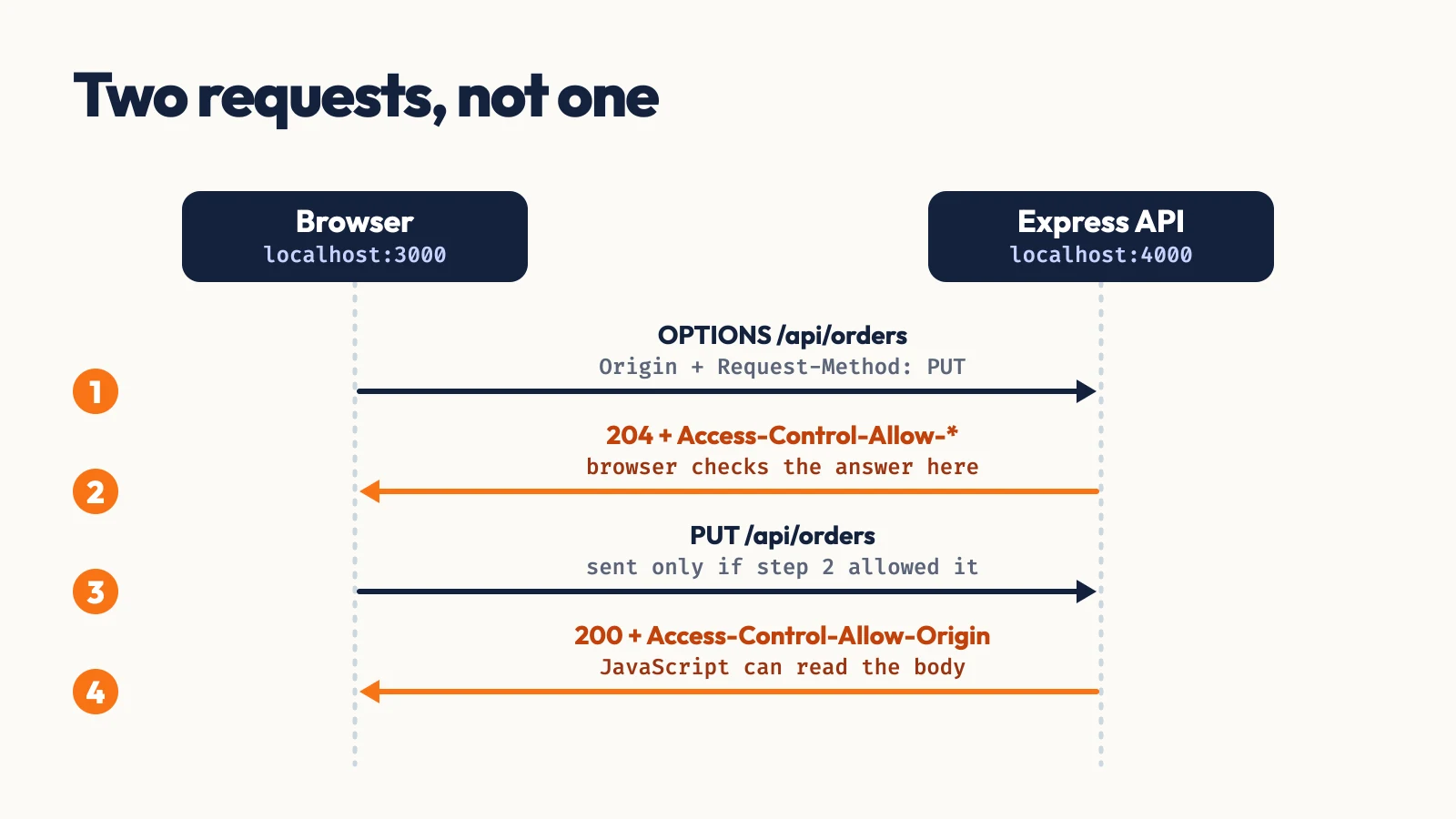
Enable CORS in Express
The cors package (2.8.6, published January 22, 2026) handles both halves. This was run against Express 5.2.1:
jsimport express from "express" import cors from "cors" const app = express() app.use( cors({ origin: "http://localhost:3000", methods: ["GET", "POST", "PUT", "DELETE"], allowedHeaders: ["Content-Type", "Authorization"], credentials: true, maxAge: 600, }) ) app.get("/api/orders", (req, res) => res.json([{ id: 1, total: 49.99 }])) app.listen(4000)
The preflight, with unrelated headers trimmed:
Bash$ curl -si -X OPTIONS http://localhost:4000/api/orders \ -H "Origin: http://localhost:3000" \ -H "Access-Control-Request-Method: PUT" \ -H "Access-Control-Request-Headers: authorization,content-type" HTTP/1.1 204 No Content Access-Control-Allow-Origin: http://localhost:3000 Vary: Origin Access-Control-Allow-Credentials: true Access-Control-Allow-Methods: GET,POST,PUT,DELETE Access-Control-Allow-Headers: Content-Type,Authorization Access-Control-Max-Age: 600
Three behaviors of origin are worth knowing. A bare cors() sends Access-Control-Allow-Origin: * and echoes whatever headers the preflight asked for. A single string is sent on every response, matching or not. An array such as ["http://localhost:3000", "https://app.example.com"] echoes the request origin only when it is in the list, adds Vary: Origin, and sends no allow header at all for anyone else.
Without the package, the same allowlist is a short middleware:
jsconst allowed = new Set(["http://localhost:3000", "https://app.example.com"]) app.use((req, res, next) => { const origin = req.get("Origin") if (origin && allowed.has(origin)) { res.set("Access-Control-Allow-Origin", origin) res.set("Vary", "Origin") res.set("Access-Control-Allow-Credentials", "true") } if (req.method === "OPTIONS") { res.set("Access-Control-Allow-Methods", "GET, POST, PUT, DELETE") res.set("Access-Control-Allow-Headers", "Content-Type, Authorization") res.set("Access-Control-Max-Age", "600") return res.sendStatus(204) } next() })
Enable CORS in FastAPI
FastAPI re-exports Starlette's CORSMiddleware. This ran on FastAPI 0.143.0 (released October 8, 2026) with Starlette 1.7.0:
pyfrom fastapi import FastAPI from fastapi.middleware.cors import CORSMiddleware app = FastAPI() app.add_middleware( CORSMiddleware, allow_origins=["http://localhost:3000", "https://app.example.com"], allow_credentials=True, allow_methods=["GET", "POST", "PUT", "DELETE"], allow_headers=["Content-Type", "Authorization"], max_age=600, )
It answers a preflight from an allowed origin with 200, access-control-allow-origin: http://localhost:3000 and access-control-allow-headers: Accept, Accept-Language, Authorization, Content-Language, Content-Type, because it adds the safelisted names to your list. A preflight from https://evil.example gets 400 Bad Request with the body Disallowed CORS origin.
Enable CORS in Next.js
If the API routes live in a Next.js app, there are two options. For one fixed origin, set headers in next.config.mjs:
jsconst nextConfig = { async headers() { return [ { source: "/api/:path*", headers: [ { key: "Access-Control-Allow-Origin", value: "http://localhost:3000" }, { key: "Access-Control-Allow-Methods", value: "GET, POST, PUT, DELETE, OPTIONS" }, { key: "Access-Control-Allow-Headers", value: "Content-Type, Authorization" }, { key: "Vary", value: "Origin" }, ], }, ] }, } export default nextConfig
On Next.js 15.5.20 a preflight to a route handler returned 204 with those headers. The limit is that the value is static: a request from https://evil.example received the same http://localhost:3000 header, so this suits one origin only. For an allowlist, use a request-time function in middleware.ts:
tsimport { NextRequest, NextResponse } from "next/server" const allowed = ["http://localhost:3000", "https://app.example.com"] export function middleware(req: NextRequest) { const origin = req.headers.get("origin") ?? "" const ok = allowed.includes(origin) if (req.method === "OPTIONS") { const res = new NextResponse(null, { status: 204 }) if (ok) { res.headers.set("Access-Control-Allow-Origin", origin) res.headers.set("Access-Control-Allow-Methods", "GET, POST, PUT, DELETE") res.headers.set("Access-Control-Allow-Headers", "Content-Type, Authorization") res.headers.set("Access-Control-Max-Age", "600") } res.headers.set("Vary", "Origin") return res } const res = NextResponse.next() if (ok) res.headers.set("Access-Control-Allow-Origin", origin) res.headers.set("Vary", "Origin") return res } export const config = { matcher: "/api/:path*" }
With Origin: https://app.example.com it echoed that origin; with https://evil.example it sent no allow header. One caveat: the current Next.js docs say the middleware file convention was deprecated and renamed proxy in v16.0.0, with a codemod (npx @next/codemod@canary middleware-to-proxy). I ran this on 15.5.20; on 16.x the file is proxy.ts and the function is proxy, and the docs carry a CORS example under proxy.ts.
Credentials, Wildcards and Caching
If the frontend sends cookies or credentials: "include", the server must name one explicit origin. The MDN guide says * is not allowed in Access-Control-Allow-Origin, Access-Control-Allow-Headers, Access-Control-Allow-Methods or Access-Control-Expose-Headers on a credentialed response, and the Access-Control-Allow-Headers reference adds that Authorization is never covered by a wildcard and must always be listed.
Access-Control-Max-Age controls how long the browser reuses a preflight answer. MDN lists the default as 5 seconds, with Chromium capping it at 2 hours (7,200 seconds) since version 76 and Firefox at 24 hours. Setting 600 is plenty, and any value above 7,200 is silently capped in Chrome.
Common Errors
Each message below was triggered on purpose and copied from Chrome 154.0.8037.98 on October 9, 2026. Every one is prefixed with Access to fetch at '...' from origin 'http://localhost:3000' has been blocked by CORS policy:.
No 'Access-Control-Allow-Origin' header is present on the requested resource.The response has no allow header. Add CORS middleware, or check that it runs before your routes and also covers error responses.The value of the 'Access-Control-Allow-Origin' header in the response must not be the wildcard '*' when the request's credentials mode is 'include'.Replace*with the exact origin, and addVary: Origin.Request header field authorization is not allowed by Access-Control-Allow-Headers in preflight response.The preflight did not list the header. AddAuthorizationexplicitly.Method PUT is not allowed by Access-Control-Allow-Methods in preflight response.Add the method to the allowed list.Response to preflight request doesn't pass access control check: No 'Access-Control-Allow-Origin' header is present on the requested resource.TheOPTIONSrequest got an answer without CORS headers. Express replies200with anAllowheader and nothing else when only aPUTroute exists, and a404for an unknown path. HandleOPTIONSin middleware that runs before authentication and routing.The 'Access-Control-Allow-Origin' header contains multiple values '*, *', but only one is allowed.Two layers each added the header, typically the app and a proxy or gateway in front of it. Keep CORS in one layer.
When Not to Do This
CORS is not access control. Access-Control-Allow-Origin: * is fine for a public, read-only API with no cookies, because any site could fetch that data anyway. The dangerous setup is reflecting whatever Origin arrives while also sending Access-Control-Allow-Credentials: true, which lets any website read a logged-in user's responses. Use an allowlist. And if you own both the frontend and the API, a same-origin proxy such as a Next.js rewrite from /api to the backend removes the cross-origin request entirely.
Conclusion
CORS comes down to three rules on the server: send Access-Control-Allow-Origin for the exact origins you trust, answer OPTIONS before authentication and routing, and list Authorization explicitly if the frontend sends it. Everything else in this post is those rules written for a specific framework.
If the API is Express with a separate frontend, use cors with an origin array. On FastAPI, use CORSMiddleware with an allow_origins list. In Next.js, use next.config.mjs headers for one origin and middleware.ts (proxy.ts on 16.x) for several. If you own both ends, skip CORS and proxy /api from the frontend's own origin. When a request still fails, replay the preflight with the curl command above, compare it to the error text, and run the URL through the CORS Tester.
Related DevToolLab Tools
- CORS Header Generator - build the allow-origin, methods and headers config for Express, FastAPI, Nginx or Django, with a curl preflight test.
- CORS Tester - send a real cross-origin fetch from your browser and see why it was blocked.
- HTTP Response Headers Checker - list the headers any public URL returns, to see whether
Access-Control-Allow-Originis there at all. - HTTP Request to cURL Converter - turn the failing request from your browser's network tab into a curl command you can replay without a browser.