
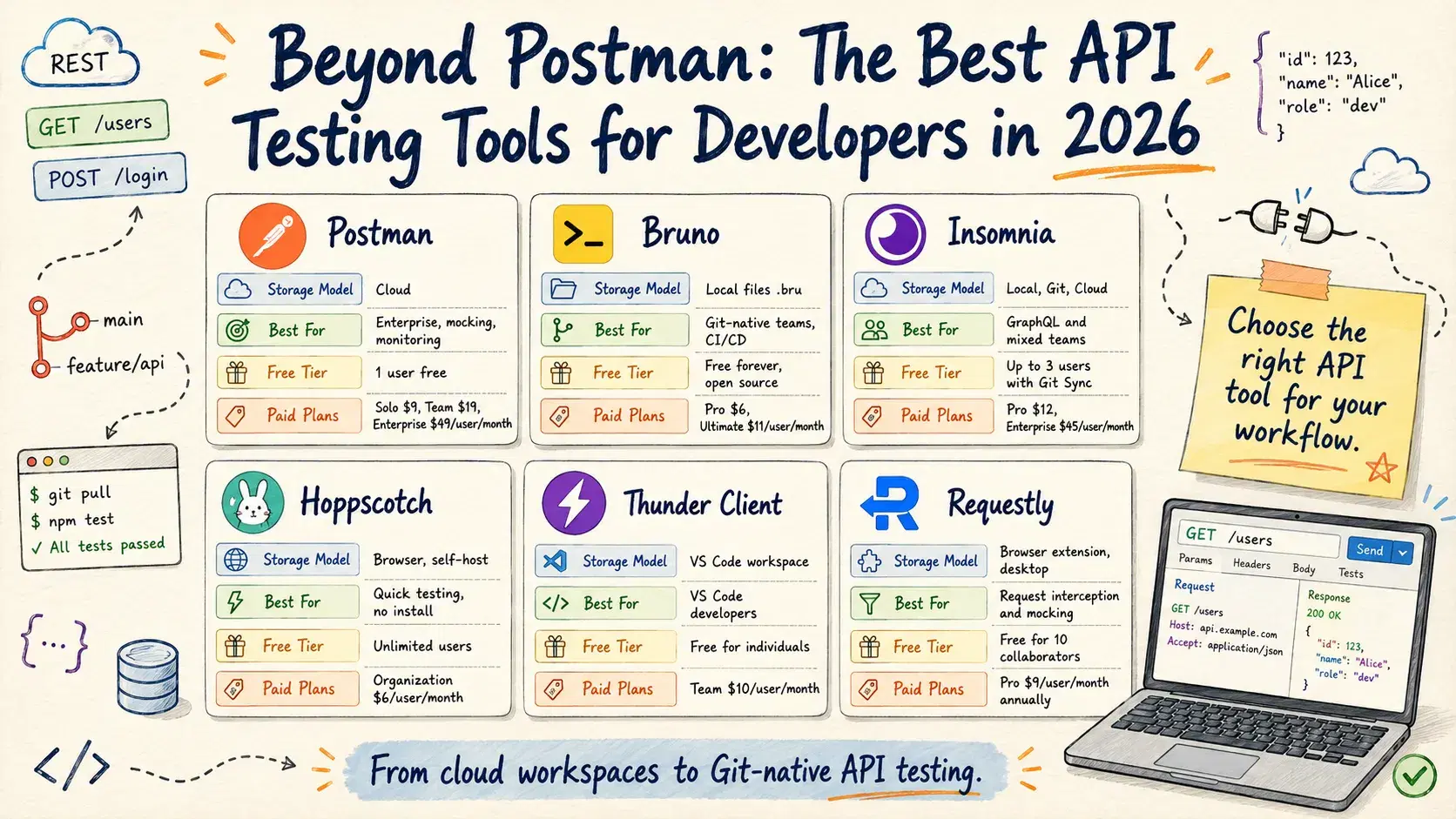
On March 1, 2026, Postman quietly ended free team collaboration. The change was announced six weeks earlier in a blog post most developers missed: the Free plan now supports exactly one user. The moment a second teammate opens a shared workspace, the plan stops working. No grace period. You either upgrade to the Team plan at $19/user/month (or Solo at $9/month for individuals), or you migrate your collections somewhere else.
That pricing change set off a wave of migration that is still ongoing. Slack threads filled up with "what are you switching to?" posts. GitHub stars for Bruno - a Git-native open-source API client - jumped from 30,000 to 41,700 in about three months. This guide is for the developer who got the Postman notification, has 200 saved requests to move, and needs to make a decision without reading fifteen comparison posts.
Two Schools of API Clients
Before getting into individual tools, it helps to know that the market split into two philosophies around 2023, and they have diverged further since.
Cloud-first clients (Postman, Insomnia with Cloud Sync) store your collections on their servers. You sign in from any machine and everything is there. Collaboration is built around shared workspaces, comments, and role-based access. The tradeoff is that your API tests live outside your codebase - in a separate system, with its own versioning, its own outages, and increasingly its own price tag.
Local-first clients (Bruno, Thunder Client, Hoppscotch with Local Vault) store collections as files on disk. You commit those files to your Git repo alongside the code they test. Collaboration happens through pull requests. The tradeoff is that you manage the sync yourself - but for most development teams, that is exactly the workflow you already have for everything else.
Neither model is wrong. The right choice depends on whether your team treats API definitions as code artifacts or as standalone documentation.
Quick Comparison
| Tool | Storage Model | Best For | Free Tier | Paid Plans |
|---|---|---|---|---|
| Postman | Cloud | Enterprise, mocking, monitoring | 1 user | Solo $9 · Team $19 · Enterprise $49/user/mo |
| Bruno | Local files (.bru) | Git-native teams, CI/CD | Free forever (open source) | Pro $6 · Ultimate $11/user/mo |
| Insomnia | Local / Git / Cloud | GraphQL, mixed teams | Up to 3 users (Git Sync) | Pro $12 · Enterprise $45/user/mo |
| Hoppscotch | Browser / Self-host | Quick testing, no install | Unlimited users | Organization $6/user/mo |
| Thunder Client | VS Code workspace | VS Code developers | Free (individuals) | Team $10/user/mo |
| Requestly | Browser extension / Desktop | Request interception, mocking | Free (10 collaborators) | Pro $9/user/mo (annual) |
Postman

Postman is still the most feature-complete API platform in this list. That is not a marketing claim - it is just accurate. Mock servers, API monitors, documentation hosting, Newman for CI/CD, and a marketplace with thousands of published API collections: none of the alternatives match all of this. If you need API mocking as a service, or if you need to publish developer documentation directly from your Postman workspace, no other tool in this roundup handles it as smoothly.
The current pricing tiers (all prices are per user per month, billed annually):
Pricing: Free (1 user) · Solo $9/mo · Team $19/user/mo · Enterprise $49/user/mo
The Free plan still lets a single developer use the full Postman client locally. The restriction is team workspaces - shared collections, comments, review workflows. If you are a solo developer and have no plans to share collections with teammates, the Free plan is genuinely usable. Postman also removed its Scratch Pad offline mode in 2023, which means opening the app now requires signing in with a Postman account even on the free plan.
Bash# Run Postman collections from CI/CD using Newman npm install -g newman newman run "My Collection.json" \ --environment "production.json" \ --reporters cli,junit \ --reporter-junit-export results.xml
Newman - Postman's CLI runner - is solid and widely used in CI pipelines. If your team is already on Postman and already running Newman in CI, the migration cost to anything else is non-trivial. Factor that in before switching.
What it does well: Enterprise governance, API monitoring, mock servers, documentation hosting, the largest community and ecosystem.
What it does not do: Free team collaboration. Offline-first use. Storing collections next to your code in Git without extra tooling.
Bruno

Bruno is the tool most developers land on after leaving Postman, and the reason is simple: it solves the specific problem Postman created. Bruno stores every API request as a plain-text .bru file in a folder on disk. You put that folder in your Git repo, and your API tests version alongside your code automatically.
There is no Bruno account. No cloud sync required. No subscription. The entire client is MIT-licensed and free.
Here is what a .bru file looks like:
brumeta { name: Get User Profile type: http seq: 1 } get { url: {{baseUrl}}/users/{{userId}} body: none auth: bearer } auth:bearer { token: {{authToken}} } headers { Accept: application/json X-Request-ID: {{$uuid}} } tests { test("Status is 200", function() { expect(res.status).to.equal(200); }); test("Response has id field", function() { expect(res.body.id).to.be.a("string"); }); }
The format is human-readable. Reviewers can read it in a PR diff without opening the Bruno app. Variables ({{baseUrl}}, {{authToken}}) come from environment files that you commit to the repo or keep local for secrets. The .env.bru file for sensitive values is gitignored by default.
Bruno has a CLI for CI/CD pipelines:
Bash# Install the Bruno CLI npm install -g @usebruno/cli # Run all requests in a collection against the staging environment bru run --env staging # Run a specific folder bru run auth/ --env production # Output JUnit XML for CI reporting bru run --env production --reporter junit --output results.xml
New in 2026: Bruno added OAuth 1.0 authentication, a visual GraphQL query builder with schema introspection, OpenAPI Sync to keep collections in sync with your OpenAPI spec, and a VS Code extension if you prefer to stay in your editor.
Pricing: Open Source (free forever) · Pro $6/user/mo · Ultimate $11/user/mo (billed annually). The free tier includes 2 workspaces and 5 OpenAPI syncs per month. Pro unlocks unlimited workspaces and full Git UI. Ultimate adds SSO, SCIM, and a dedicated account manager. 14-day free trial for Ultimate, no credit card required.
What it does well: Git-native workflow, zero vendor lock-in, fast startup, CI/CD via CLI, free forever, fully offline.
What it does not do: Mock servers, hosted documentation, API monitoring, or team workspaces with comments and roles. If those are hard requirements, Bruno is not the right tool.
Supported: macOS, Windows, Linux. VS Code extension available.
Insomnia

Insomnia sits in the middle of the spectrum. Kong acquired it in 2019, briefly enforced mandatory cloud sync (which the community pushed back on loudly), and then re-opened the codebase under Apache 2.0 in 2023. The current version lets you pick storage per project: Local Vault (everything on-device, no account needed), Git Sync (collections committed to your own Git repo), or Cloud Sync with optional end-to-end encryption.
That flexibility is Insomnia's strongest selling point. Teams that want some collections local and others synced to cloud can do both, project by project.
Where Insomnia genuinely leads the field is GraphQL. When you point Insomnia at a /graphql endpoint, it introspects the schema, provides full autocompletion on queries and mutations, shows field descriptions inline, and supports persisted queries and GraphQL subscriptions over WebSocket. No other client in this list handles that workflow as cleanly.
graphql# Insomnia provides schema-aware autocompletion for queries like this query GetUserWithOrders($userId: ID!) { user(id: $userId) { id email profile { firstName lastName avatarUrl } orders(limit: 10) { id status totalAmount createdAt } } }
Pricing: Essentials (free) · Pro $12/user/mo · Enterprise $45/user/mo (billed annually). The free Essentials plan covers unlimited local and cloud projects but limits Git Sync to 3 users and mock server requests to 1,000 per month. Pro removes those caps, adds RBAC, and lets all team members use Git Sync. Enterprise adds SSO/SCIM, unlimited mock requests, and native vault integrations (AWS, GCP, HashiCorp, Azure).
What it does well: GraphQL introspection and autocompletion, flexible storage model, clean UI, good WebSocket and SSE support.
What it does not do: Store collections as plain-text files you can read in any editor without the app (Cloud Sync uses a proprietary format). Mock servers are not a built-in feature.
Supported: macOS, Windows, Linux.
Hoppscotch

Hoppscotch is the odd one out in this comparison: it runs in the browser. You open the URL and you have a full-featured API client with no install, no sign-up required for the free tier. It supports REST, GraphQL, WebSockets, Socket.IO, SSE, and MQTT from a single interface.
The real power of Hoppscotch is the self-hosted deployment. The entire platform is open-source (MIT) and ships as a Docker Compose stack. Your company can run Hoppscotch internally, behind VPN, with all data staying on your infrastructure:
Bash# Self-host Hoppscotch on your own server git clone https://github.com/hoppscotch/hoppscotch cd hoppscotch # Configure your environment cp .env.example .env # Edit .env with your database URL, email settings, etc. # Start all services docker compose up -d
Once deployed, the self-hosted version includes team workspaces, shared environments, collections, and history - all on your infrastructure. For teams in regulated industries where data cannot leave the corporate network, Hoppscotch self-hosted is the only tool in this list that delivers a cloud-collaboration UX without actual cloud dependency.
The public hosted version at hoppscotch.io is genuinely fast for quick one-off requests. No installed app, no startup time. The limitation is that collections are stored in browser localStorage by default, which makes collaboration harder unless you use the cloud sync or self-hosted option.
Pricing: Free (unlimited users, workspaces, collections, and requests) · Organization $6/user/mo. The free plan has no hard feature limits - the paid Organization tier adds an admin dashboard, dedicated support, and custom billing options. Self-hosting is always free regardless of team size.
What it does well: Zero-install quick testing, protocol breadth (REST, GraphQL, WebSocket, MQTT), open-source self-hosted deployment.
What it does not do: Git-native file storage. The browser-based model is great for quick testing but less suited to version-controlled API collections in a monorepo workflow.
Supported: Any browser. Self-hosted via Docker.
Thunder Client

Thunder Client is not a standalone app - it is a VS Code extension. For developers who spend their entire working day in VS Code and want API testing without switching windows, that distinction matters. You open a panel in the sidebar, fire off a request, and see the response without leaving your editor.
Thunder Client stores collections as JSON files in your workspace's .vscode/ folder or in a custom location. Those files commit to Git alongside your code. The interface covers the basics: REST requests, environments, variables, basic scripting, and request chaining. It is not trying to be Postman.
The free tier is individual-only. The Team plan at $10/user/month adds shared collections, team environments, and activity logs - significantly cheaper than Postman's $19/user/month for teams that do not need mock servers or monitoring.
JSON// Thunder Client stores collections as readable JSON // .vscode/thunder-tests/get-users.json { "_id": "abc123", "colName": "Users API", "created": "2026-06-01", "requests": [ { "_id": "req1", "name": "Get All Users", "url": "{{baseUrl}}/users", "method": "GET", "headers": [ { "name": "Authorization", "value": "Bearer {{token}}" } ], "tests": [ { "type": "res-code", "custom": "", "action": "equal", "value": "200" } ] } ] }
What it does well: Zero context-switch for VS Code users, lightweight, team plan is cost-effective compared to Postman.
What it does not do: Run outside VS Code. The JSON collection format is less human-readable than Bruno's .bru format, and there is no CLI runner for CI/CD as of mid-2026.
Supported: Any OS where VS Code runs.
Requestly

Requestly occupies a different category from the tools above. It is not a request builder - it is an HTTP interceptor. Instead of constructing and firing API calls, Requestly sits between your browser or app and the network, letting you modify, redirect, or mock requests and responses as they pass through.
The core use case is mocking API responses without touching the backend. You write a rule that matches a URL pattern, and Requestly returns your custom JSON instead of hitting the real server. That lets frontend developers work against a stable mock while the backend is still in progress, or test error states (500, 401, timeout) that are hard to reproduce in a real environment.
Common things developers use it for:
- Redirect a production API endpoint to a local development server without changing any code
- Add CORS headers to a third-party API that blocks browser requests
- Replace a response body to test how your UI handles different data shapes
- Simulate slow API responses by adding artificial delays
- Modify request headers (inject auth tokens, change User-Agent) for testing access control
BashRule: If URL contains "api.example.com/users" Then: Return custom JSON response Body: { "id": "test-123", "name": "Mock User", "role": "admin" } Status: 200
Requestly runs as a browser extension (Chrome, Firefox, Edge) and as a standalone desktop app for non-browser traffic. The desktop app can intercept traffic from any application using a local proxy, not just the browser.
Pricing: Free (up to 10 collaborators, 3 team projects, 100 collection runs) · Pro $9/user/mo (annual) or $12/user/mo (monthly). The free plan includes unlimited API tests and Git-based collaboration - the limits are on team projects and collection run count. Pro removes all caps and adds AI-powered testing, test reports, AWS Secrets Manager integration, and SOC 2 report access.
What it does well: Intercepting and modifying live traffic without code changes, frontend development against mock APIs, testing error states and edge cases, sharing reproducible debugging sessions with teammates.
What it does not do: Replace a full API client for building and organizing collections of requests. Requestly complements Bruno or Postman rather than replacing them - you use both together.
Supported: Chrome, Firefox, Edge (extension). macOS, Windows (desktop app).
How to Choose
- Collections in version control? Bruno (best-in-class Git workflow) or Insomnia with Git Sync.
- Heavy GraphQL? Insomnia - schema introspection and query autocompletion are noticeably ahead.
- Data must stay on your own infrastructure? Hoppscotch self-hosted, deployed via Docker.
- Live in VS Code? Thunder Client, no context switching required.
- Need mock servers, API monitoring, or hosted docs? Postman only - no open-source equivalent yet.
- Solo or small team on free tools? Bruno or Insomnia, both handle the common workflow well.
Working Smarter Alongside Your API Client
A few DevToolLab tools fill the gaps around API testing workflows. The cURL Command Generator builds exact cURL syntax from your parameters; the companion cURL to Code Converter converts cURL back to JavaScript fetch, Axios, or Python. The Webhook Receiver captures incoming HTTP requests so you can verify your app is sending the right payload.
For response inspection: the JSON Formatter cleans up single-line API responses, JSON Diff highlights what changed between two responses, and JWT Decoder parses token claims without sending them to an external service. The Swagger Viewer renders OpenAPI specs interactively in the browser, and HTTP Status Checker shows what status code or redirect chain a URL returns before you test it.
Conclusion
The Postman pricing change forced a decision most teams had been deferring - and the alternatives are genuinely good. For most teams, Bruno is the right call: free, Git-native, and improving fast. Use Insomnia if GraphQL is core to your work, Hoppscotch if you need self-hosted collaboration, and Thunder Client if you live in VS Code. Add Requestly to the mix for request interception and mocking without touching your code. Postman is still worth the price if you need mock servers or hosted documentation - but for everything else, the open-source stack has caught up.