
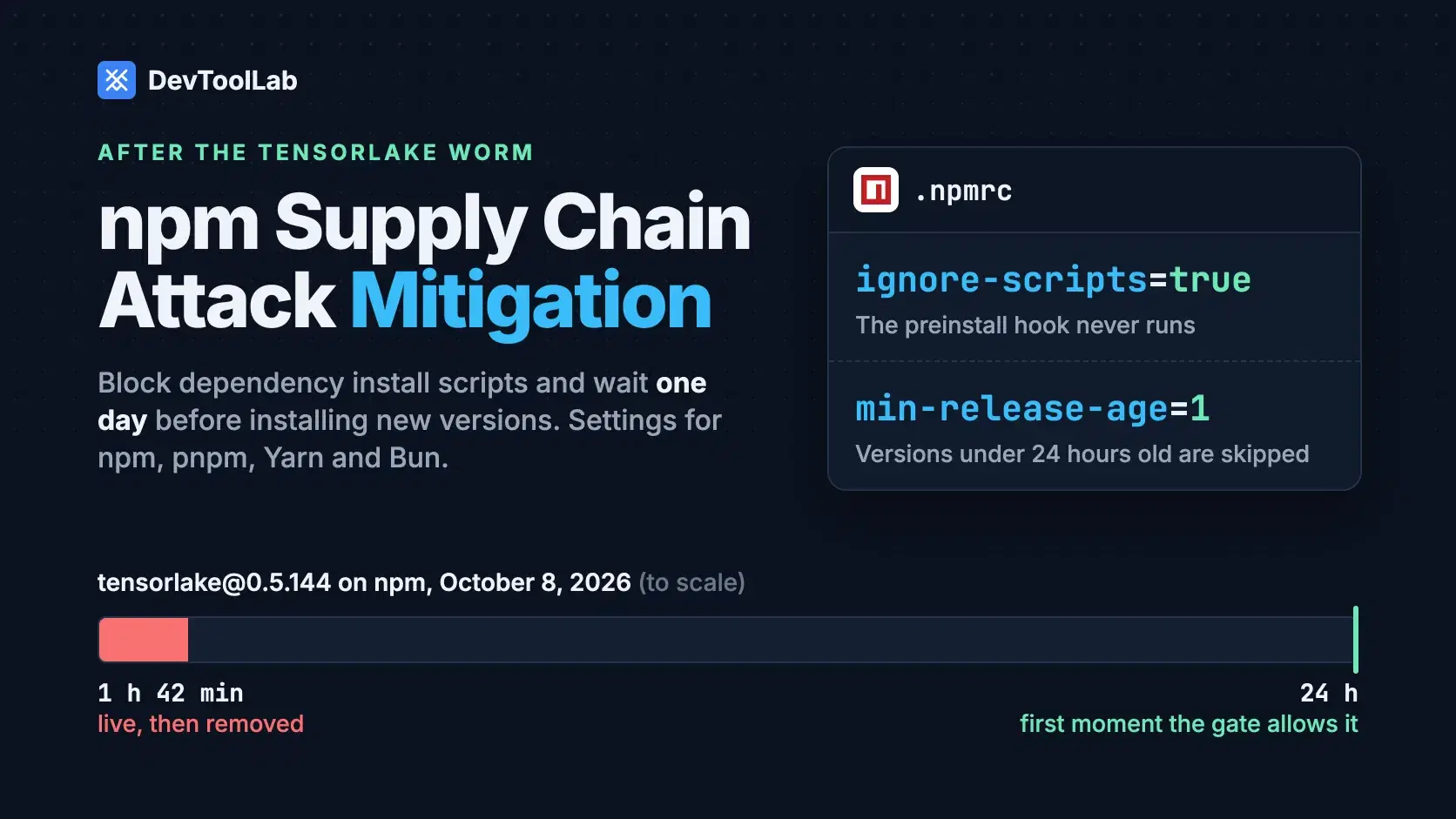
To mitigate npm supply chain attacks, block dependency install scripts and refuse any package version younger than one day. npm 12 blocks the scripts by default; on the npm that ships with Node.js, put ignore-scripts=true and min-release-age=1 in your project's .npmrc. Either setup would have stopped tensorlake@0.5.144, the credential-stealing worm published on October 8, 2026, from running its payload on your machine.
The catch is the version gap. As of October 14, 2026, Node.js 26.12.0 bundles npm 11.20.0, Node.js 24.22.0 LTS bundles npm 11.19.1 and Node.js 22.23.3 LTS bundles npm 10.9.9, per the Node.js release list, and all of them still run a dependency's preinstall hook the moment you type npm install. This guide follows one project, an AI agent called my-agent that depends on tensorlake, through every setting. Each output below came from running the commands on October 19, 2026.
How tensorlake@0.5.144 Ran Without Being Imported
Tensorlake provides isolated sandboxes for running untrusted, LLM-generated code, and its npm SDK gets about 12,000 weekly downloads, according to Socket's analysis. On October 8, 2026, an attacker using a compromised maintainer account pushed malicious code to the repository and published version 0.5.144 through Tensorlake's own release workflow, which is why the package carried valid npm provenance. Tensorlake's security advisory puts the exposure window at 1:12 AM to 2:54 AM UTC (9:12 PM to 10:54 PM ET on October 7), before npm removed the version.
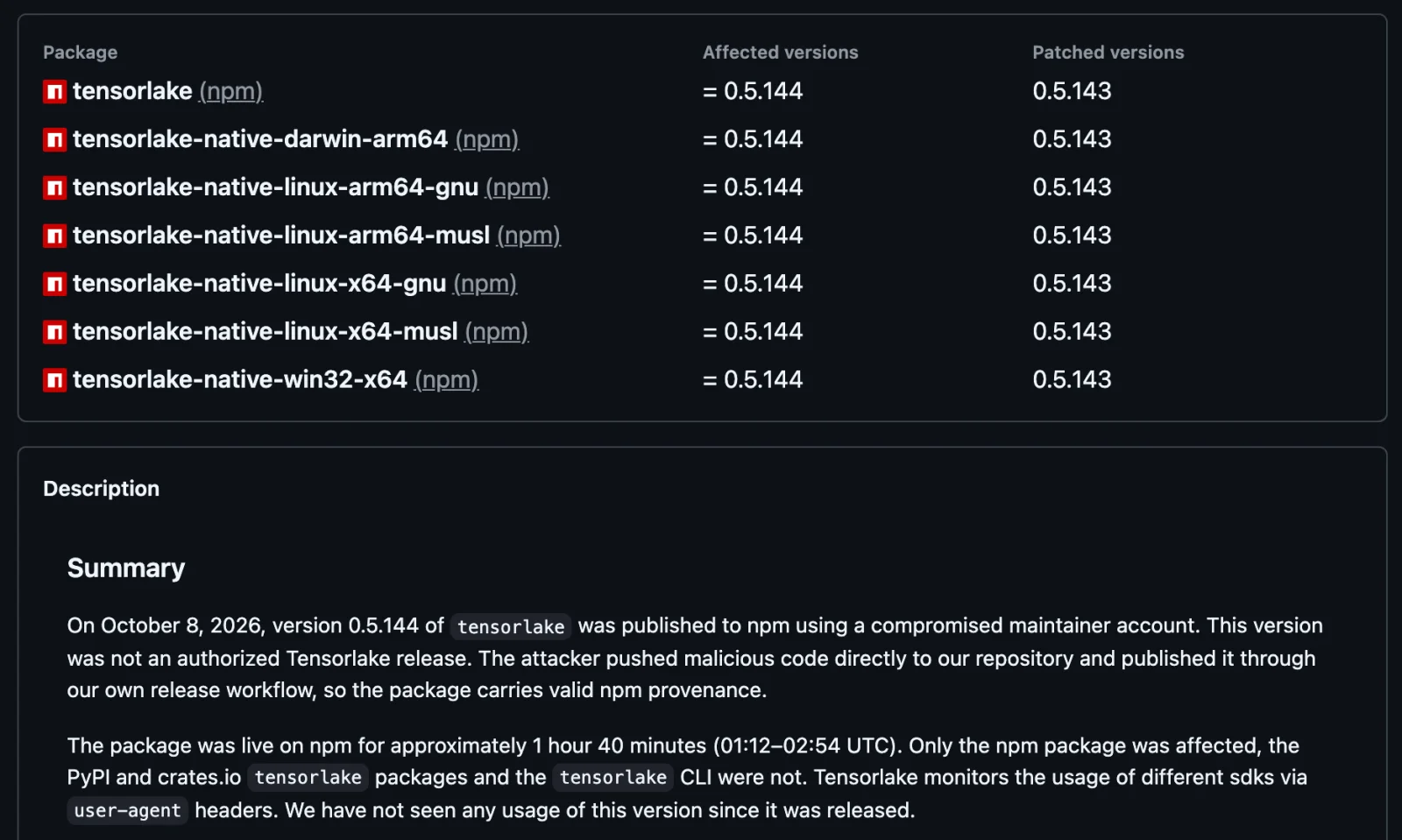
The attack hangs on one manifest line: "preinstall": "node lib/setup.mjs". npm runs it during the install, so nobody has to import the SDK. The loader starts an obfuscated payload with Bun that collects npm tokens from .npmrc, GitHub tokens, AWS, Kubernetes and Vault credentials, SSH keys, .env files, and the config and MCP files of .claude, .cursor, .kiro, Windsurf and Zed. With a stolen npm token it republishes itself into every package the victim can publish. It also installs a gh-token-monitor service that wipes your home directory if the stolen GitHub token is revoked, so the advisory says to remove that service first and rotate credentials second.
This was not a one-off. Microsoft Threat Intelligence counted more than 400 packages hit by the same Mini Shai-Hulud worm in its ChainDrop analysis on August 4, 2026, with the same setup.mjs preinstall loader. The pattern repeats every time: code that runs at install time, from a freshly published version. That is exactly what the two settings below block.
The Fastest Way to See a Package's Install Scripts
Before you approve anything, look at what it would run. Type a package name and version into the NPM Package Info tool to get the registry's own manifest for that version. Any preinstall, install or postinstall key under scripts is code npm would execute on your machine, and a dist.attestations entry means the version has provenance. For my-agent the one to check is protobufjs at 7.6.6, a tensorlake dependency whose manifest contains "postinstall": "node scripts/postinstall". The tool reads metadata only and never scans the tarball, so it tells you a script exists, not whether it is safe.
Block Dependency Install Scripts
npm 12.0.0, released July 8, 2026, blocks dependency lifecycle scripts unless the root package.json allows them in an allowScripts field. npm 11.20.0, the version Node.js 26.12.0 ships, only warns. Here is the same install from a fresh my-agent directory on npm 11.20.0:
Bash$ npm install tensorlake --no-audit --no-fund added 46 packages in 2s npm warn install-scripts 1 package has install scripts not yet covered by allowScripts: npm warn install-scripts protobufjs@7.6.6 (postinstall: node scripts/postinstall) npm warn install-scripts npm warn install-scripts Run `npm install-scripts ls` to review, or `npm install-scripts approve <pkg>` to allow.
"Not yet covered" means the script already ran. After npm install -g npm@12 (it needs Node.js 22.22.2 or later on the 22 line, 24.15.0 or later on the 24 line, or Node.js 26), the same command on npm 12.2.1 stops it, and two more commands approve it once you have read it:
Bash$ npm install tensorlake --no-audit --no-fund added 46 packages in 3s npm warn install-scripts 1 package had install scripts blocked because they are not covered by allowScripts: npm warn install-scripts protobufjs@7.6.6 (postinstall: node scripts/postinstall) npm warn install-scripts npm warn install-scripts Run `npm install-scripts ls` to review, or `npm install-scripts approve <pkg>` to allow. $ npm install-scripts approve protobufjs Approved protobufjs: added protobufjs@7.6.6 $ npm rebuild rebuilt dependencies successfully
The approval lands in package.json as "allowScripts": { "protobufjs@7.6.6": true }. npm pins it to the version you reviewed, so a later protobufjs release has to be approved again before its script runs. Commit the field; it is now team policy.
If you cannot move to npm 12 yet, turn scripts off entirely:
# .npmrc
ignore-scripts=true
That is blunter. Per the npm config docs, it also skips your own project's pre and post scripts, though npm test and npm run build still run. A package that builds native code in postinstall then needs a deliberate npm rebuild <name> --ignore-scripts=false after you read its script. A plain npm rebuild <name> runs nothing while the setting is on; we checked both.
Add a One-Day Release-Age Gate
min-release-age, added in npm 11.10.0 on February 11, 2026, tells npm to resolve only versions published more than the given number of days ago. One day is the useful minimum, because worms like this one are caught in hours. The pnpm docs say it directly: "In most cases, malicious releases are discovered and removed from the registry within an hour."
| Time (UTC) | What happened | Age of 0.5.144 |
|---|---|---|
| 1:12 AM, October 8 | tensorlake@0.5.144 published | 0 min |
| 1:23 AM, October 8 | Socket flags the preinstall hook | 11 min |
| 2:54 AM, October 8 | npm removes it; GitHub malware advisory published | 1 h 42 min |
| 1:12 AM, October 9 | First moment min-release-age=1 would consider it | 24 h |
With the gate on, 0.5.144 never became installable. You can watch the gate fall back to the last pre-attack release today by pushing the window back 12 days:
Bash$ npm install tensorlake --min-release-age=12 --dry-run --no-audit --no-fund 2>/dev/null | grep tensorlake add tensorlake-native-darwin-arm64 0.5.143 add tensorlake 0.5.143
Put the setting in the project .npmrc beside the script setting, so every install in the repository gets it:
# .npmrc
min-release-age=1
Two traps. npm 10.9.9, the version Node.js 22 LTS ships, does not know the setting and ignores it without a word: with min-release-age=30 in .npmrc, it still resolved tensorlake 0.5.151, published October 14. And when a security fix is younger than the window, npm audit fix keeps the vulnerable version, warns and exits non-zero, so list that package under min-release-age-exclude to let it through.
pnpm, Yarn and Bun Use the Same Two Controls
The other package managers got here first. pnpm 11.0.0, released April 28, 2026, turned on a one-day minimumReleaseAge by default, and pnpm 12.14.0 failed our install outright when a dependency had an unapproved build script. Yarn 4.18.1 reports enableScripts as false and npmMinimalAgeGate as 1440 out of the box, which we confirmed with yarn config get. Bun runs lifecycle scripts only for a built-in list of popular packages plus your trustedDependencies, but its release-age setting is off by default.
| Package manager | Dependency install scripts | Release-age setting | Default age |
|---|---|---|---|
| npm 10.9.9 (Node.js 22 LTS) | Run | None | None |
| npm 11.20.0 (Node.js 26) | Run, with a warning | min-release-age (days) | Off |
| npm 12.2.1 | Blocked unless in allowScripts | min-release-age (days) | Off |
| pnpm 12.14.0 | Blocked, install fails | minimumReleaseAge (minutes) | 1440 |
| Yarn 4.18.1 | Blocked (enableScripts: false) | npmMinimalAgeGate (minutes) | 1440 |
| Bun (docs, October 2026) | Blocked except a built-in list and trustedDependencies | install.minimumReleaseAge (seconds) | Off |
Watch the units. 1440 means one day to pnpm and Yarn, 24 minutes to Bun, and almost four years to npm. Yarn with npmMinimalAgeGate: 17280 (12 days in minutes) resolved tensorlake to 0.5.143, matching npm.
What to Set, by Setup
- Node.js 22 LTS with npm 10: add
ignore-scripts=truenow, then upgrade to npm 12 (Node.js 22.22.2 or later) to get both controls. - Node.js 24 or 26 with npm 11: add
ignore-scripts=trueandmin-release-age=1to the project.npmrc. - npm 12: add
min-release-age=1, approve scripts withnpm install-scripts approve, and commitallowScripts. - pnpm 11 or later, or Yarn 4.18.1: the defaults already cover both. Do not lower them to make an install pass.
- Bun: add
minimumReleaseAge = 86400under[install]inbunfig.toml.
Why npm ci and Provenance Do Not Close the Gap
The age gate only works where npm chooses a version. A lockfile freezes that choice, and npm ci installs whatever it says. We locked tensorlake 0.5.151, published October 14, then reinstalled with a seven-day window:
Bash$ npm ci --min-release-age=7 --ignore-scripts --no-audit --no-fund added 46 packages in 2s $ node -p "require('./node_modules/tensorlake/package.json').version" 0.5.151
No error and no warning. The gate protects you when the lockfile is written: npm install, npm update and the pull requests Dependabot or Renovate open. Review those lockfile diffs the way you review code.
Provenance does not catch this attack either. 0.5.144 carried valid npm provenance because it came out of Tensorlake's real release workflow, and Socket found the worm building Sigstore provenance for the packages it republishes. npm audit signatures on my-agent reports "46 packages have verified registry signatures" and "6 packages have verified attestations", which proves where a tarball was built, not that its code is safe. npm audit is no faster: the malware advisory went up at 2:54 AM UTC, as the package came down, and it currently flags even the clean 0.5.151 as critical.
Maintainers got a second lesson on October 13, 2026, when Bloom Security disclosed SlugFest: npm trusted publishing matched a GitHub repository by its owner/repo name until the first publish, so whoever claimed a renamed or deleted repository's old name could publish to the package. Bloom counted more than 1,500 exposed packages, The Hacker News reported. A new trusted publisher configuration now expires if it does not publish within 2 days, per the npm trusted publishers docs. Run npm trust list <package> (npm 11.15.0 or later) and confirm each binding still points at a repository you control.
Coding Agents Run npm install Too
Two details make this an AI tooling problem. The tensorlake payload hunts for .claude, .cursor and other agent config and MCP files, and Microsoft found the ChainDrop worm injecting Claude and VS Code configuration files into repositories it could push to. And agents install packages on their own, and Bloom Security notes they tend to take the latest version.
A project .npmrc covers that case, because npm reads it for every install in the directory, whoever types the command. For one-off npx runs and global installs, which have no project package.json, set the gate in your user config too:
Bash$ npm config set min-release-age=1 --location=user
We tested that npx honors it: with a 30-day window in the user config, npx -y pnpm@12 --version printed 12.5.1 instead of the current 12.14.0.
Common Errors
npm error notarget No matching version found for tensorlake@0.5.151 with a date before 10/12/2026, 12:00:41 PM. You, or a dependency, asked for an exact version younger than the window. Wait it out, pick an older version, or add the package to min-release-age-exclude.
npm warn Unknown project config "minimum-release-age". That is pnpm's spelling, and npm ignores the line. With minimum-release-age=30 in .npmrc, npm 12.2.1 still resolved tensorlake 0.5.151. Use min-release-age.
npm error --allow-scripts is not allowed in project-scoped installs. Inside a project, npm 12 wants approvals in package.json, so run npm install-scripts approve <pkg>. The flag is for npx and npm install -g only.
ERR_PNPM_IGNORED_BUILDS with "Ignored build scripts". pnpm stopped because strictDepBuilds is on. Run pnpm approve-builds, or set the package to true or false under allowBuilds in pnpm-workspace.yaml.
When Not to Do This
Neither setting is free. A release-age window delays every fix by the same day it delays every worm, which is why npm and pnpm ship an exclude list. Blocking scripts breaks packages that build or download native binaries in postinstall, so expect to approve a few after reading them. And both controls stop install-time attacks only. A package that waits until your code imports it, or a bad version that stays on npm for weeks, gets past both; that is the job of lockfile review, the scanners in our supply chain security tools guide, and narrowly scoped tokens.
Conclusion
Every attack in this post ran code at install time from a freshly published version, so the defense fits in a project .npmrc: ignore-scripts=true and min-release-age=1. Add both today. Then move to npm 12, where allowScripts turns the blanket block into approvals you commit. On Node.js 22 LTS, upgrade npm first, because npm 10.9.9 ignores the age gate without a warning. Keep reviewing lockfile diffs: the gate never rechecks a locked version.
Related DevToolLab Tools
- NPM Package Info - pull a version's registry manifest and read its
scriptsanddist.attestationsbefore you approve an install script. - Secret Scanner - find npm, GitHub and AWS tokens pasted into code or config before a worm on a build runner finds them first.
- Dependabot.yml Generator - build the update schedule your lockfile changes arrive through, then review those pull requests with the age gate in mind.
- npm Yarn pnpm Converter - translate install commands when you move a project to a package manager whose defaults already block scripts.