
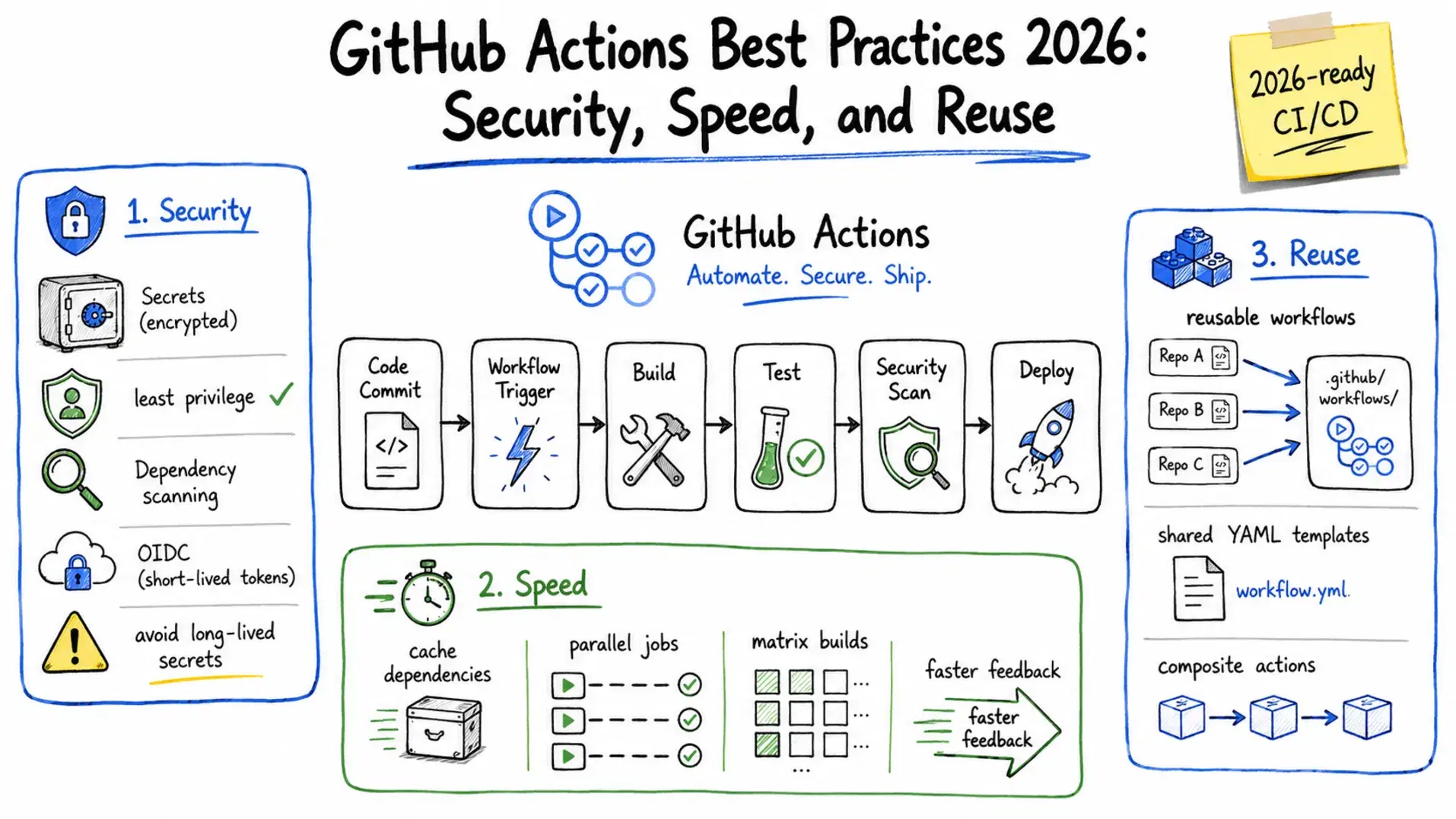
GitHub Actions now powers CI/CD for over 100 million repositories. It is the default choice for most teams, yet the gap between a workflow that works and a workflow that is secure, fast, and maintainable is wide. Most pipelines accumulate debt the same way codebases do - copy-pasted jobs, long-lived secrets checked in as env vars, no caching, and workflows that take 12 minutes to run a 2-minute test suite.
This guide covers the practices that actually move the needle in 2026: reusable workflows to stop copy-pasting YAML, OIDC authentication to eliminate long-lived cloud credentials, SHA pinning to harden your supply chain, and caching patterns that cut run times in half.
Organize Workflows by Concern
The most common mistake is one giant workflow file. A single ci.yml with 400 lines that lints, tests, builds, deploys to staging, and deploys to production is a maintenance problem. When the deploy step is broken, every push triggers a lint run you do not need.
Split workflows by what triggers them and what they do:
Bash.github/ workflows/ ci.yml # on: push / pull_request - lint, test, build deploy.yml # on: push to main - deploy to production release.yml # on: release published - tag, changelog, publish scheduled.yml # on: schedule - nightly scans, cache warm-up pr-checks.yml # on: pull_request - size check, label, assign
Each workflow file should be small enough that you can understand what it does in 30 seconds. If it is not, split it further using reusable workflows or composite actions.
Reusable Workflows: Stop Copy-Pasting YAML
If you manage more than one repository, you have almost certainly copy-pasted a setup-node, install-dependencies, run-tests block across repos. When Node updates to a new LTS version, you update it in 12 places.
Reusable workflows fix this. A workflow with on: workflow_call can be called by any other workflow in your organization, receiving typed inputs and returning outputs.
The reusable workflow (org/shared-workflows/.github/workflows/node-ci.yml):
yamlon: workflow_call: inputs: node-version: description: "Node.js version to use" required: false default: "22" type: string run-lint: description: "Run ESLint step" required: false default: true type: boolean secrets: NPM_TOKEN: description: "npm registry token for private packages" required: false outputs: coverage-pct: description: "Test coverage percentage" value: ${{ jobs.test.outputs.coverage }} jobs: test: runs-on: ubuntu-latest outputs: coverage: ${{ steps.coverage.outputs.pct }} steps: - uses: actions/checkout@11bd71901bbe5b1630ceea73d27597364c9af683 # v4.2.2 - uses: actions/setup-node@49933ea5288caeca8642d1e84afbd3f7d6820020 # v4.4.0 with: node-version: ${{ inputs.node-version }} cache: "npm" - run: npm ci env: NPM_TOKEN: ${{ secrets.NPM_TOKEN }} - if: ${{ inputs.run-lint }} run: npm run lint - run: npm test -- --coverage - id: coverage run: echo "pct=$(cat coverage/coverage-summary.json | jq '.total.lines.pct')" >> "$GITHUB_OUTPUT"
The caller (in any consuming repo):
yamlname: CI on: push: branches: [main] pull_request: jobs: ci: uses: org/shared-workflows/.github/workflows/node-ci.yml@main with: node-version: "22" run-lint: true secrets: NPM_TOKEN: ${{ secrets.NPM_TOKEN }}
Outputs flow back to the caller automatically. The coverage percentage from the reusable workflow is available as ${{ needs.ci.outputs.coverage-pct }} in downstream jobs.
One practical note: secrets cannot be passed through with: (inputs). They must go through secrets:. Pass secrets: inherit if you want all the caller's secrets to be available in the reusable workflow without enumerating them.
Security: SHA Pinning, OIDC, and Least-Privilege Permissions
Pin Actions to Full Commit SHAs
Tags like @v4 are mutable - a maintainer can push new code to a tag without changing its name. For supply chain hardening, pin every action to its full commit SHA:
yaml# Instead of this - uses: actions/checkout@v4 # Do this - uses: actions/checkout@11bd71901bbe5b1630ceea73d27597364c9af683 # v4.2.2
The SHA is immutable. Add a comment with the version tag so you know what it corresponds to. Tools like StepSecurity Harden-Runner or Dependabot can automate SHA updates when new versions are released.
Set Least-Privilege Token Permissions
By default, GITHUB_TOKEN in a workflow has write access to most repository resources. Restrict it globally and only elevate where needed:
yaml# Set global default at workflow level permissions: contents: read # read-only by default jobs: test: runs-on: ubuntu-latest # No additional permissions needed steps: - uses: actions/checkout@11bd71901bbe5b1630ceea73d27597364c9af683 # v4.2.2 deploy: runs-on: ubuntu-latest permissions: contents: read id-token: write # only jobs that need OIDC get this steps: - name: Deploy run: echo "deploying..."
Replace Long-Lived Cloud Credentials with OIDC
Storing AWS access keys or Azure service principal secrets in GitHub Secrets is a common but risky pattern. If a secret leaks - through a log line, a misconfigured step, or a compromised dependency - those credentials can be used from anywhere.
OIDC authentication eliminates the need to store long-lived credentials entirely. GitHub generates a short-lived token for each workflow run that cloud providers verify against a trust policy. The token expires when the run ends.
AWS deployment without stored credentials:
yamlname: Deploy to AWS on: push: branches: [main] permissions: id-token: write # required for OIDC token request contents: read jobs: deploy: runs-on: ubuntu-latest steps: - uses: actions/checkout@11bd71901bbe5b1630ceea73d27597364c9af683 # v4.2.2 - uses: aws-actions/configure-aws-credentials@e3dd6a429d7300a6a4c196c26e071d42e0343502 # v4.0.2 with: role-to-assume: arn:aws:iam::${{ vars.AWS_ACCOUNT_ID }}:role/github-actions-deploy aws-region: us-east-1 - run: aws s3 sync ./dist s3://my-bucket --delete
The IAM role github-actions-deploy needs a trust policy that allows GitHub's OIDC provider (token.actions.githubusercontent.com) to assume it, scoped to your specific repository and branch:
JSON{ "Version": "2012-10-17", "Statement": [ { "Effect": "Allow", "Principal": { "Federated": "arn:aws:iam::ACCOUNT_ID:oidc-provider/token.actions.githubusercontent.com" }, "Action": "sts:AssumeRoleWithWebIdentity", "Condition": { "StringEquals": { "token.actions.githubusercontent.com:sub": "repo:your-org/your-repo:ref:refs/heads/main" } } } ] }
The sub condition locks the role to exactly your repository and branch. Use repo:your-org/your-repo:* only if multiple branches genuinely need deploy access - not as a convenience shortcut.
Azure uses the same OIDC pattern through azure/login@v2 with federated identity credentials configured on the app registration.
Caching: The Single Biggest Performance Win
Most slow pipelines spend the majority of their time downloading dependencies that have not changed. The actions/cache action stores dependency directories between runs, with a cache key tied to a hash of your lock file.
yaml- uses: actions/setup-node@49933ea5288caeca8642d1e84afbd3f7d6820020 # v4.4.0 with: node-version: "22" cache: "npm" # setup-node has built-in npm/yarn/pnpm caching - run: npm ci
For more control, or for other languages:
yaml- uses: actions/cache@5a3ec84eff668545956fd18022155c47e93e2684 # v4.2.3 id: cache-deps with: path: | ~/.cache/pip .venv key: ${{ runner.os }}-pip-${{ hashFiles('requirements.txt') }} restore-keys: | ${{ runner.os }}-pip- - run: pip install -r requirements.txt if: steps.cache-deps.outputs.cache-hit != 'true'
The restore-keys fallback lets the cache warm up on the first run of a new lock file rather than downloading everything from scratch. Always base the cache key on the exact file that controls your dependencies (package-lock.json, requirements.txt, go.sum, Cargo.lock) - not a date or a branch name.
setup-node, setup-python, setup-go, and setup-java all have built-in caching via the cache: input - use those instead of actions/cache directly when available.
Concurrency: Stop Wasting Runner Minutes
When you push two commits quickly to a branch, both run triggers queue up. The first run becomes stale the moment the second starts. Concurrency groups cancel the older run automatically:
yamlconcurrency: group: ${{ github.workflow }}-${{ github.ref }} cancel-in-progress: true
For pull requests this collapses all pushes to the same PR into one active run. For the main branch you may want cancel-in-progress: false so that a deploy already in progress is not interrupted mid-deploy:
yamlconcurrency: group: deploy-${{ github.ref }} cancel-in-progress: ${{ github.ref != 'refs/heads/main' }}
Matrix Builds for Cross-Environment Testing
If your project supports multiple Node versions, Python versions, or operating systems, matrix builds run all combinations in parallel rather than sequentially:
yamljobs: test: strategy: fail-fast: false matrix: os: [ubuntu-latest, windows-latest, macos-latest] node: ["20", "22"] runs-on: ${{ matrix.os }} steps: - uses: actions/checkout@11bd71901bbe5b1630ceea73d27597364c9af683 # v4.2.2 - uses: actions/setup-node@49933ea5288caeca8642d1e84afbd3f7d6820020 # v4.4.0 with: node-version: ${{ matrix.node }} cache: "npm" - run: npm ci && npm test
fail-fast: false lets all matrix jobs complete even if one fails - useful for seeing the full compatibility picture at once. Set it to true (the default) when you want the matrix to abort early on the first failure to save runner minutes.
For large test suites, you can split tests across matrix shards using --shard=1/4, --shard=2/4, etc. with Vitest, Jest, or Playwright.
Scheduled Workflows for Maintenance Tasks
Use on: schedule with a cron expression for tasks that should run on a timer - nightly security scans, dependency audits, cache warm-up, or stale issue cleanup:
yamlon: schedule: - cron: "0 2 * * 1" # every Monday at 2:00 AM UTC jobs: audit: runs-on: ubuntu-latest steps: - uses: actions/checkout@11bd71901bbe5b1630ceea73d27597364c9af683 # v4.2.2 - run: npm audit --audit-level=high
GitHub executes scheduled workflows on UTC time, and high-traffic periods (top of the hour) can delay runs by up to 15 minutes. Schedule off the hour to get more consistent timing.
GitHub Actions Security Checklist
Run through this before merging any new workflow:
- All third-party actions are pinned to full commit SHAs, not tags
-
permissions:is set at the workflow level with minimum required access - No long-lived cloud credentials stored in GitHub Secrets - use OIDC
-
pull_request_targetis not used unless you fully understand the security implications - No
${{ github.event.issue.body }}or similar user-controlled input passed directly torun:steps (script injection risk) -
concurrency:is set to avoid duplicate runs on the same branch - Secrets are not echoed in step outputs or logs
- Dependabot or Renovate is configured to keep action versions up to date
Conclusion
The single highest-value change in most pipelines is adding concurrency groups and dependency caching - those two changes alone commonly cut run times by 40-60% and eliminate duplicate runs with zero architectural changes. After that, migrate cloud credentials to OIDC and set permissions: read as the default. Reusable workflows pay off once you hit three or more repos with similar pipelines.
GitHub's 2026 security roadmap adds a workflow lockfile that pins all direct and transitive action dependencies with commit SHAs automatically. Until that ships, the SHA pinning and permission checklist above covers the same ground manually.
Related DevToolLab Tools
These tools are directly useful when building and maintaining GitHub Actions workflows.
- GitHub Actions Generator - Generate GitHub Actions workflow YAML for common CI/CD patterns. Covers Node.js, Python, Docker, and deployment pipelines - useful as a starting point before customizing for your specific setup.
- YAML Validator - Validate your
.github/workflows/*.ymlfiles before pushing. Catches indentation errors and type mismatches that GitHub Actions surfaces only after a failed run. - YAML Formatter - Format and clean up workflow YAML. Especially useful after copy-pasting from documentation or other repos where indentation may be inconsistent.
- Cron Expression Generator - Build and test cron expressions for
on: scheduletriggers. Verify that "every Monday at 2 AM UTC" actually maps to0 2 * * 1before it runs in production. - Regex Tester - Test the glob patterns you use in
paths:andbranches:filters. Confirm thatsrc/**/*.tsactually matches the paths you intend before relying on it to scope your workflow triggers.