
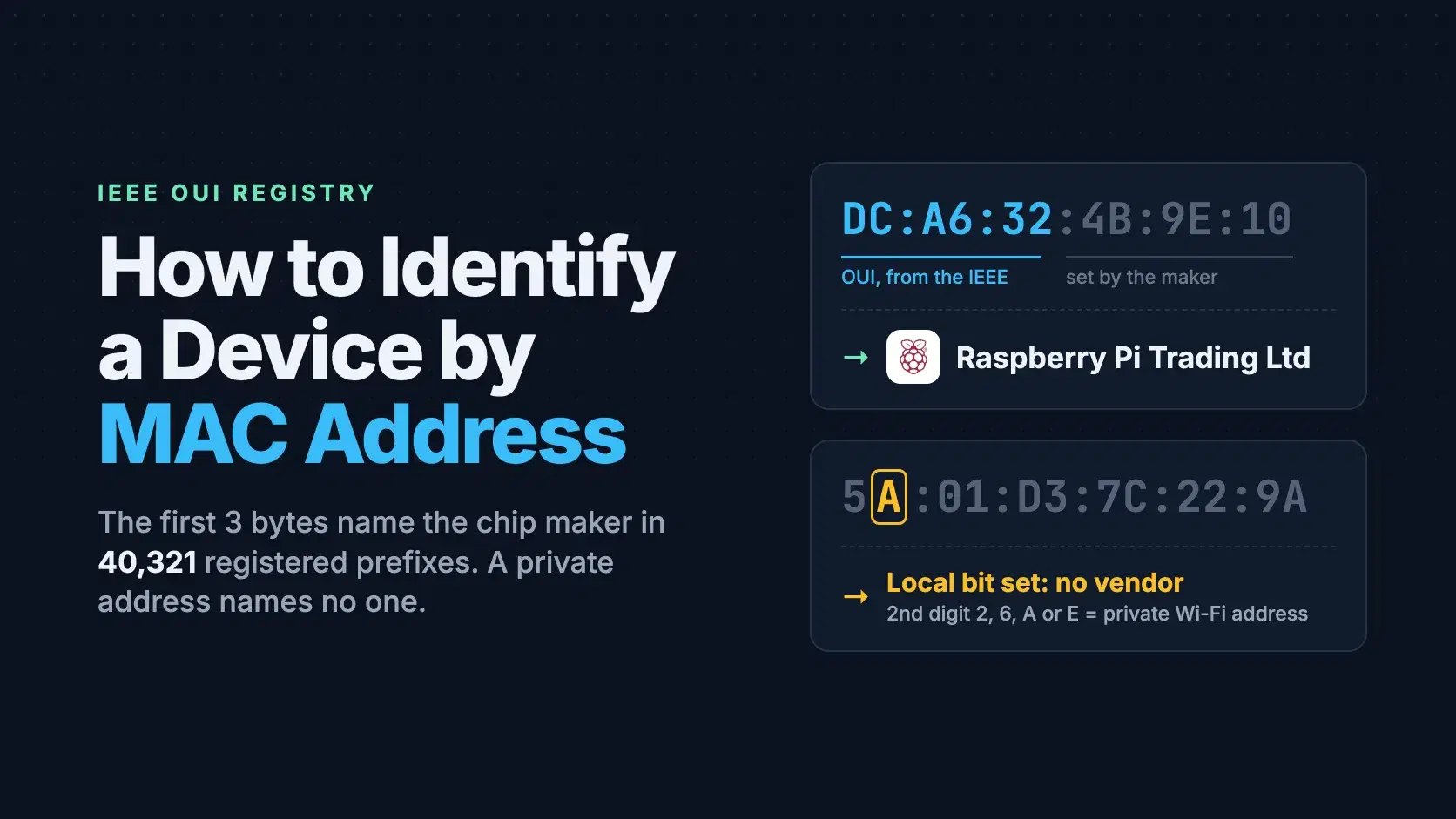
To identify a device by its MAC address, take the first three bytes (the OUI, such as DC:A6:32) and look them up in the IEEE's public MA-L registry: DC:A6:32 belongs to Raspberry Pi Trading Ltd. The answer is the company that made the network chip, which is often, but not always, the brand on the box.
A growing share of the addresses on your network, though, were never assigned to anyone. Phones and laptops now make up a different address for each Wi-Fi network, and a made-up address has no vendor to find.
The Fastest Way
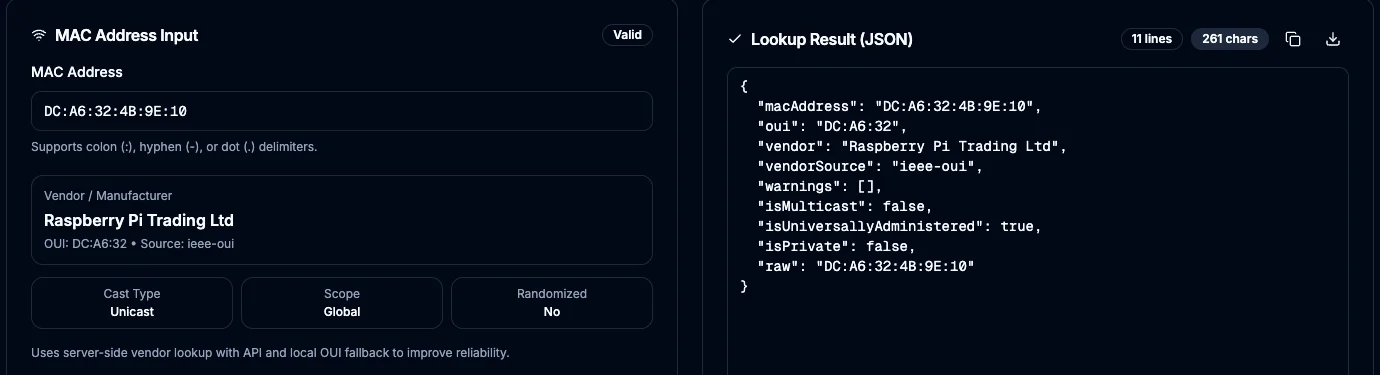
Paste the address into the MAC Address Lookup tool. It accepts colons, dashes or Cisco-style dots, tells you whether the address is unicast or multicast and burned-in or locally administered, and matches the first three bytes against the IEEE registry (a copy with 40,321 prefixes taken on October 13, 2026, refreshed from the IEEE in the background). If you copied the address from macOS arp, add back the leading zeros it drops first. The lookup runs on DevToolLab's server, so do not paste addresses you are not allowed to share. It resolves 24-bit prefixes only: for a device in one of the smaller 28-bit or 36-bit blocks it answers "IEEE Registration Authority", which the errors section below explains.
How a MAC Address Encodes Its Maker
A MAC address is 48 bits, written as six hex bytes. The IEEE Registration Authority sells the leading bits as a prefix, and the buyer numbers the rest of its devices however it likes. RFC 9542 (April 2024) lists the three prefix sizes in use: a 24-bit MA-L leaves 24 bits for the owner (16.8 million addresses), a 28-bit MA-M leaves 20 (about 1 million), and a 36-bit MA-S leaves 12 (4,096). On October 13, 2026, the IEEE's public files listed 40,321 MA-L, 6,630 MA-M and 7,228 MA-S assignments.
Two bits in the first byte change what the rest means. The lowest bit marks a multicast (group) address, which names a set of listeners rather than one device. The next bit up is the Local bit, and RFC 9542 is blunt about it: when it is 1, "the holder of an OUI has no special authority" over the address. In hex that gives a rule you can apply by eye: if the second character is 2, 6, A or E, the address is locally administered and no registry will name its maker.
Randomized addresses are built on exactly that bit. Android's documentation says its randomization works "by setting the locally administered bit to 1, and the unicast bit to 0. The other 46 bits are randomized," and Android 10 and later do it by default. Apple has used a private Wi-Fi address per network since iOS 14, iPadOS 14 and watchOS 7, with Off, Fixed and Rotating modes since iOS 18 and support on the Mac since macOS Sequoia 15.
Find the MAC Addresses on Your Network
A MAC address only travels as far as the nearest router, so you can only see the addresses of devices on your own local network. Your computer's ARP table already holds the ones it has talked to recently. On macOS, arp -a prints it. Here is real output from the Mac this post was written on, with the device bytes and the private subnet masked:
Bash$ arp -a ? (192.168.x.x) at a8:4a:28:xx:xx:xx on en0 ifscope [ethernet] mdns.mcast.net (224.0.0.251) at 1:0:5e:0:0:fb on en0 ifscope permanent [ethernet] $ networksetup -listallhardwareports | grep -A2 "Wi-Fi" Hardware Port: Wi-Fi Device: en0 Ethernet Address: 80:a9:97:xx:xx:xx $ ifconfig en0 | grep ether ether 5a:01:d3:xx:xx:xx
The first arp line is an Apple device (A8:4A:28 is one of Apple's 1,573 MA-L prefixes). The second is the multicast address for mDNS, not a device. The last two commands show the Mac itself: its Wi-Fi hardware carries a burned-in Apple address starting 80:a9:97, but en0 is sending 5a:01:d3. The second character is A, so that is a locally administered address, the private Wi-Fi address macOS 26.6.2 uses on this network.
On Windows, arp -a shows the same table and getmac /v lists your own adapters (Microsoft's reference). On Linux, ip neigh prints the neighbor table and ip link your own addresses. We did not run the Windows and Linux commands for this post. If a device is on the network but missing from the table, ping it first so your machine learns its address; Nmap does this for a whole subnet and keeps its own prefix-to-vendor file, nmap-mac-prefixes.
How to Look Up a MAC Vendor in Python
Download the registry once. The file is 3.9 MB and the IEEE serves it slowly: it took 36 to 70 seconds from our connection on October 13, 2026, so do not fetch it on every lookup.
Bashcurl -O https://standards-oui.ieee.org/oui/oui.csv
Then normalize the address, check the two flag bits before trusting the prefix, and read the vendor from the Assignment and Organization Name columns:
Pythonimport csv import re def normalize(mac: str) -> str: """Accept dc:a6:32:1:2:3, DC-A6-32-01-02-03 or dca6.3201.0203.""" parts = re.split(r"[:\-]", mac.strip()) if len(parts) == 6: # arp on macOS drops leading zeros: 1:0:5e:... return "".join(p.zfill(2) for p in parts).upper() return re.sub(r"[^0-9A-Fa-f]", "", mac).upper() def load_registry(path="oui.csv"): with open(path, newline="", encoding="utf-8") as f: return {row["Assignment"]: row["Organization Name"].strip() for row in csv.DictReader(f)} def lookup(mac: str, registry: dict) -> str: hex12 = normalize(mac) first_octet = int(hex12[:2], 16) if first_octet & 0b01: return "multicast address, not a device" if first_octet & 0b10: return "locally administered (randomized or virtual), no vendor" return registry.get(hex12[:6], "not in the MA-L registry") registry = load_registry() for mac in ["dc:a6:32:4b:9e:10", "24-0A-C4-3F-88-01", "1:0:5e:0:0:fb", "5a:01:d3:7c:22:9a"]: print(f"{mac:20} {lookup(mac, registry)}")
Output with Python 3.13 and the October 13 registry:
Bashdc:a6:32:4b:9e:10 Raspberry Pi Trading Ltd 24-0A-C4-3F-88-01 Espressif Inc. 1:0:5e:0:0:fb multicast address, not a device 5a:01:d3:7c:22:9a locally administered (randomized or virtual), no vendor
How to Look Up a MAC Vendor in JavaScript
The same logic in Node.js. Use a real CSV parser or a regex that allows unquoted fields: the IEEE file leaves the first two columns bare and quotes an organization name only when it needs to (17,251 of 40,324 names, nearly all because they contain a comma), so a pattern that expects every field in quotes matches nothing.
jsimport { readFileSync } from "node:fs" // Only some fields are quoted: MA-L,DCA632,Raspberry Pi Trading Ltd,"Maurice Wilkes Building, ..." const row = /^[^,]*,([0-9A-F]{6}),(?:"((?:[^"]|"")*)"|([^,]*))/i const registry = new Map() for (const line of readFileSync("oui.csv", "utf8").split("\n").slice(1)) { const m = line.match(row) if (m) registry.set(m[1].toUpperCase(), (m[2] ?? m[3]).replace(/""/g, '"').trim()) } function lookup(mac) { const parts = mac.trim().split(/[:-]/) const hex = (parts.length === 6 ? parts.map((p) => p.padStart(2, "0")).join("") : mac.replace(/[^0-9a-f]/gi, "")).toUpperCase() const first = parseInt(hex.slice(0, 2), 16) if (first & 1) return "multicast address, not a device" if (first & 2) return "locally administered (randomized or virtual), no vendor" return registry.get(hex.slice(0, 6)) ?? "not in the MA-L registry" } for (const mac of ["dc:a6:32:4b:9e:10", "24-0A-C4-3F-88-01", "1:0:5e:0:0:fb", "5a:01:d3:7c:22:9a"]) { console.log(mac.padEnd(20), lookup(mac)) }
Node.js 25.5 prints the same four lines as the Python version. We checked that regex against Python's csv module on all 40,321 prefixes in the October 13 file, with no differences.
Common Errors
The vendor comes back as "IEEE Registration Authority". The device sits in a 28-bit MA-M or 36-bit MA-S block, which the IEEE carves out of 24-bit prefixes it registers to itself (438 of them in October 2026). Look up the first 7 hex digits in mam.csv or the first 9 in oui36.csv, both on the same IEEE server. All 7,228 MA-S assignments share just 3 parent prefixes, so a 24-bit lookup cannot tell any of those devices apart.
"Not found" for a phone, tablet or laptop. Check the second hex digit. A 2, 6, A or E means a private address from Apple, Android or Windows, and the device's real maker is not recoverable from it. To see the burned-in address on the network, turn private addressing off for that network on the device.
A lookup of 1:0:5e:0:0:fb fails or returns nothing. macOS arp drops leading zeros, so 1:0:5e is really 01:00:5E. Pad each byte to two digits before you take the prefix. That particular address is also multicast (the first byte is odd), so it never belongs to one device.
The vendor is a chip company you have never heard of. Espressif, the maker of the ESP32, holds 360 MA-L prefixes, and its chips sit inside smart plugs, cameras and thermostats sold under many brand names. The OUI names whoever bought the address block, usually the Wi-Fi module maker. Pair the vendor with the device's hostname or open ports to pin down what it actually is.
When Not to Rely on It
A MAC address is a label, not proof of identity. Any device can be told to send a different one: it takes one ip link command on Linux and a single setting on Apple and Android devices. So never use a MAC address, or its vendor, for authentication or access control. It also identifies the hardware maker, not the owner, and nothing beyond your local network ever sees it. Treat a vendor lookup as a strong hint for an inventory or a "what is this thing on my Wi-Fi" question, and confirm it before you act on it.
Related DevToolLab Tools
- MAC Address Lookup - paste an address from
arp -aand get the vendor plus the multicast and Local bit flags this post explains. - Common Ports Lookup - once you know a device is an Espressif module or a Raspberry Pi, check what the ports you find open on it usually run.
- Subnet Calculator - work out the address range to ping or scan before the ARP table can list every device on it.
- IP Address Lookup - the other half of the picture: what a public IP address says about where traffic comes from, which a MAC address never shows.
Related Guides
- TCP vs UDP Explained: Key Differences and When to Use Each
- How to Generate an SSH Key for GitHub, the next step once you have found the Raspberry Pi
- 5 Best Self-Hosted VPN Servers
- Cybersecurity Lab Gear for Students