
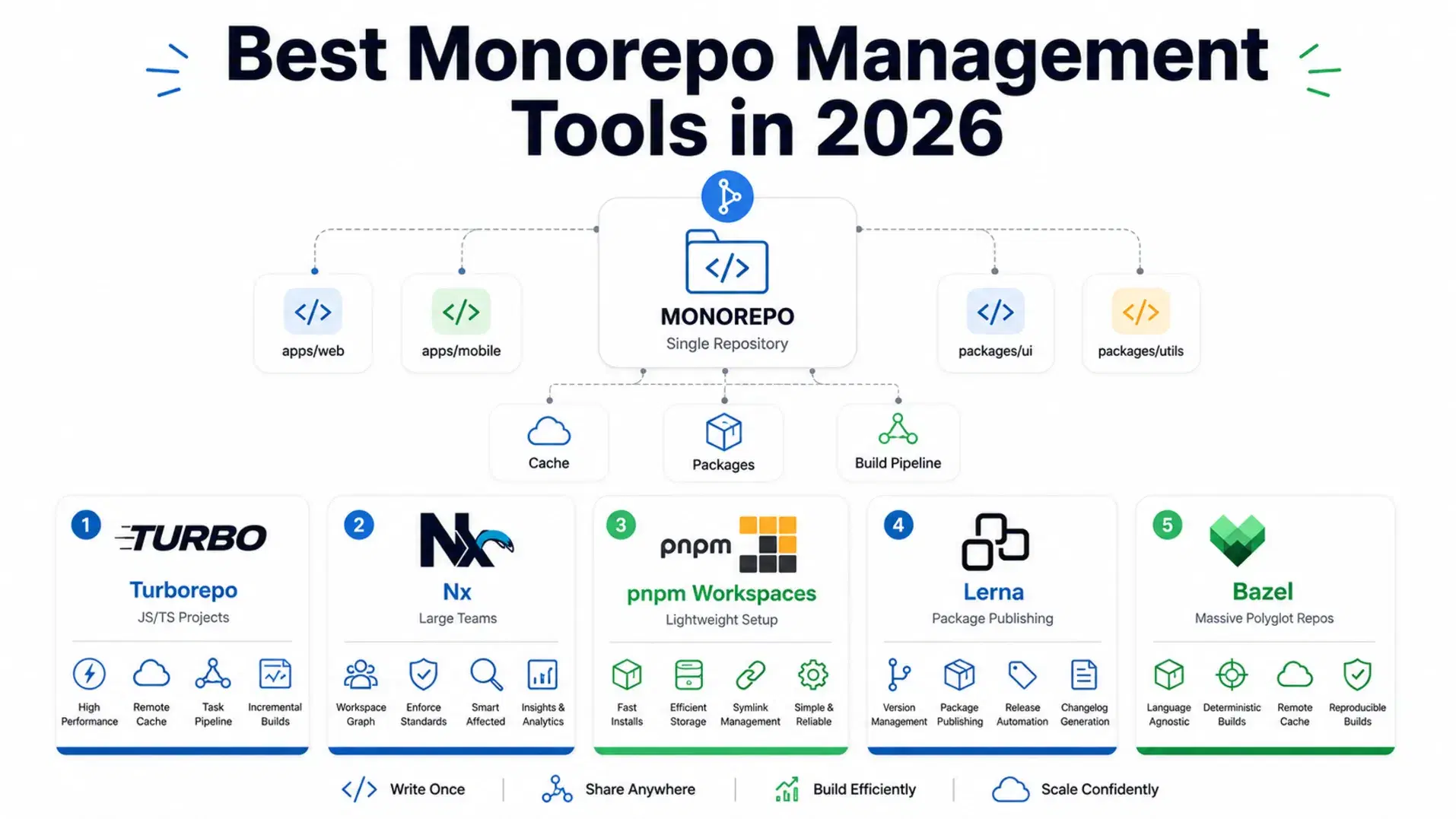
A monorepo stops being a filesystem decision the moment CI gets involved. One repository, shared tooling and atomic commits across packages are genuinely useful, but the cost shows up as build times that scale with the whole repo rather than with what you actually changed, plus a dependency graph nobody holds in their head.
As of September 2026 the two leading options have diverged on price as much as on design. Turborepo v2.11.3 ships a remote cache that its docs say is free on all Vercel plans, including for teams hosting nowhere near Vercel. Nx 22.7.12 keeps its CLI free but puts the feature that actually cuts CI wall-clock time, distributed task execution, behind Nx Cloud at $29 per month plus $19 per contributor beyond the first five. Choosing wrong is not catastrophic, since most teams migrate, but it costs weeks of configuration.
Monorepo vs Polyrepo: A Quick Decision Framework
A monorepo puts all your code in one repository. A polyrepo keeps each service, package, or app in its own repo. Neither is universally better.
Monorepos make sense when teams share code heavily, when changes often span multiple packages simultaneously, or when you want a single version of truth for your dependencies. They are the default pattern at companies like Google, Meta, and Vercel, and increasingly the default for open-source libraries that ship multiple related packages.
Polyrepos make sense when teams are truly independent, when services have completely different release cadences, or when the cognitive overhead of a shared repository creates more friction than it solves. If your backend team and your frontend team never touch the same code, keeping them in separate repos is not wrong.
This guide assumes you have decided on monorepo and need the right tooling.
Quick Comparison
| Tool | Best For | Language Support | Remote Cache | Free Tier |
|---|---|---|---|---|
| Turborepo | Small to medium JS/TS projects | JS/TS focused | Vercel (free) | Fully free |
| Nx | Large teams, code generation, DTE | Polyglot | Nx Cloud | 50k credits/mo |
| pnpm Workspaces | Lightweight baseline, no extra tooling | Any | Manual setup | Free |
| Lerna | Package versioning and publishing | JS/TS | Via Nx | Free |
| Bazel | Massive multi-language repos | Polyglot | Remote cache | Free (self-setup) |
Turborepo

Turborepo is the right starting point for most JavaScript and TypeScript projects in 2026. It does one thing exceptionally well: fast task execution with intelligent caching. It takes your existing workspace setup - npm, pnpm, or Yarn workspaces - and layers caching and task orchestration on top with minimal configuration.
Turborepo was acquired by Vercel in 2021 and rewritten from Go to Rust in 2024 (completed February 2024). The Rust engine improved hash computation, file scanning, and dependency graph traversal - the areas that matter most for large repositories.
The remote caching story is the simplest in the market, and it is less conditional than most write-ups suggest. Turborepo's own documentation states that the Vercel Remote Cache "is free to use on all plans, even if you do not host your applications on Vercel", so you do not have to deploy there to get it. Teams that need cache artifacts inside their own infrastructure can still self-host with the community turborepo-remote-cache package.
One practical note as of September 2026: turbo.build now redirects to turborepo.dev. Update bookmarked links and the $schema value in older turbo.json files.
Configuration is a turbo.json file at the root:
JSON{ "$schema": "https://turborepo.dev/schema.json", "tasks": { "build": { "dependsOn": ["^build"], "outputs": [".next/**", "dist/**"] }, "test": { "dependsOn": ["build"], "cache": true }, "lint": { "cache": true }, "dev": { "cache": false, "persistent": true } } }
The ^build syntax means "run build in all dependencies first." That is the core of Turborepo's dependency graph - you define what depends on what, and Turborepo handles the order and parallelism automatically.
What it does well: Two-file configuration (turbo.json + pnpm-workspace.yaml), a Vercel remote cache that is free on all plans, zero framework lock-in, and a Rust-backed engine that handles repos with hundreds of packages without breaking a sweat.
What it does not do: Turborepo does not generate code, enforce module boundaries, or understand your codebase at the import level. It knows about tasks, not about TypeScript imports. For affected analysis based on actual code dependencies, Nx is more precise.
Pricing: Free and open source under MIT, v2.11.3 as of September 22, 2026. Vercel Remote Cache is free on all plans.
Nx

Nx is a full monorepo platform rather than just a task runner. It builds a dependency graph of your entire codebase - every file, every import, every project boundary - and uses that graph to power precise "affected" commands, smart CI distribution, and code generation.
The most significant recent feature is Project Crystal, introduced in Nx 18. It fundamentally changes how plugins work: the mere presence of a plugin now auto-infers tasks from your existing tool configuration files (vite.config.ts, jest.config.js, eslint.config.js) without any manual task definition. A fresh Next.js app gets build, serve, lint, and test tasks automatically. This eliminates most of the configuration that previously made Nx feel heavyweight compared to Turborepo.
Nx's killer feature for large teams is Distributed Task Execution (DTE). Instead of running all CI tasks on one machine, Nx Cloud distributes them across a fleet of agents, with intelligent scheduling to minimize wall-clock time. A test suite that takes 40 minutes on a single CI runner can complete in 6 minutes across 8 agents. For large repos, this is transformative.
Bash# Install Nx into an existing monorepo npx nx@latest init # Run only tasks affected by your changes nx affected --target=test # Show the dependency graph in a browser nx graph # Generate a new library inside the monorepo nx generate @nx/react:library shared-ui
What it does well: The most precise affected analysis available, distributed task execution at scale, code generation and architectural enforcement, polyglot support (React, Angular, Node, Go, Rust, Python), and Project Crystal's zero-config setup.
What it does not do: The learning curve is steeper than Turborepo. If you are a three-person team shipping one Next.js app with a shared UI package, Nx is more tool than you need right now.
Pricing: Nx CLI is free and open source under MIT, v22.7.12 as of September 10, 2026. Nx Cloud's Hobby tier is free forever at 50,000 credits per month with 5 complimentary contributors. The Team tier is $29 per month including $29 of usage credit, then $5.50 per 10,000 additional credits, $19 per contributor beyond the first five and $2.25 per concurrent CI connection, as of September 2026.
pnpm Workspaces

pnpm is not a build system - it is a package manager with native workspace support that makes an excellent monorepo foundation. Many teams use pnpm workspaces as their entire "monorepo tool," layering Turborepo or Nx on top only when they need task orchestration.
pnpm is roughly 2x faster than npm on cold installs (official pnpm benchmarks show ~73% faster) and uses significantly less disk space, thanks to its content-addressable store that hardlinks packages rather than copying them. In a monorepo with 30 packages sharing the same version of React and TypeScript, pnpm stores those dependencies once.
The workspace:* protocol is pnpm's most important monorepo feature. It pins internal package references to their local versions during development:
yaml# pnpm-workspace.yaml packages: - 'apps/*' - 'packages/*'
JSON{ "dependencies": { "@myrepo/ui": "workspace:*", "@myrepo/utils": "workspace:^" } }
When you publish, workspace:* gets replaced with the actual published version. This means your apps always use the local version during development and the correct semver version after publishing.
What it does well: The fastest installs and smallest disk footprint of any package manager, strict dependency isolation (phantom dependencies are impossible by default), and the most natural monorepo workspace experience for pure package management.
What it does not do: pnpm has no caching layer, no task graph, and no remote execution. You still need pnpm -r run build to run builds across packages. For caching and parallelism, add Turborepo or Nx on top.
Pricing: Completely free and open source.
Lerna

Lerna is the original JavaScript monorepo tool and has found a clear niche after years of searching for one: package versioning and publishing. If you maintain an open-source library that ships as multiple related npm packages - think a UI component library with @mylib/core, @mylib/react, @mylib/vue - Lerna handles the versioning and publishing workflow better than anything else.
Lerna 9 removed lerna add and lerna bootstrap, the legacy commands that competed awkwardly with native workspace support. Those operations now belong to your package manager. What remains is Lerna's actual strength: deciding which packages changed, bumping versions (independent or fixed), writing changelogs, and publishing to npm - all in a single command.
Under the hood, Lerna now delegates its task running and caching to Nx. If you use Lerna in a repo that also has nx installed, you get Nx's task orchestration for free.
Bash# Publish changed packages with automatic version bumping npx lerna publish # Publish with conventional commits-based versioning npx lerna publish --conventional-commits --yes # Preview what would be published without actually publishing npx lerna publish --dry-run
What it does well: The most complete versioning and publishing workflow for multi-package libraries, conventional commits support for automatic changelogs, and a familiar API that many developers already know.
What it does not do: Lerna is not a build system. For task caching and CI speed, you need pnpm, Turborepo, or Nx alongside it.
Pricing: Free and open source under MIT, v10.0.1 as of August 19, 2026.
What About Bazel and moon?

Bazel (and its faster sibling Buck2) are in a different category. They are hermetic, language-agnostic build systems designed for repositories with hundreds of engineers and multiple programming languages in a single repo. Google built Bazel to handle their multi-billion-line codebase. If you are not at that scale, the setup overhead is not worth it.

moon is a newer Rust-based task runner from the same generation as Turborepo, with support for JavaScript, TypeScript, Python, and Go. Worth watching, not yet as widely adopted. Bazel is Apache-2.0 and reached 9.2.0 on July 13, 2026; moon is at v2.5.5 as of September 15, 2026.
How to Pick
You are a small team (under 10 developers) shipping a Next.js app with some shared packages. Start with pnpm Workspaces and add Turborepo. Two config files, free remote cache if you deploy to Vercel, done in an hour.
You are a medium team (10 to 50 developers) with a shared component library, a backend API, and multiple apps. Use pnpm + Turborepo, or go straight to Nx if you want code generation and architectural enforcement. Nx's Project Crystal means the setup is no longer the obstacle it was.
You are a large team (50+ developers) with multiple languages and long CI times. Use Nx with Nx Cloud's Distributed Task Execution. The Team tier starts at $29 per month plus $19 per contributor beyond the first five, which pays for itself in CI compute savings within the first week.
You are an open-source library maintainer publishing multiple packages to npm. Use pnpm Workspaces and Lerna. This combination is what projects like Babel, Vue, and countless others use.
Conclusion
Monorepo tooling in 2026 has reached a comfortable maturity. Turborepo and pnpm Workspaces cover 80% of use cases with minimal friction. Nx steps in when you need distributed execution, code generation, or enforcement of architectural boundaries. Lerna remains the best tool for the specific job of versioning and publishing npm packages.
The most common mistake teams make is treating the tool choice as permanent. It is not. Start simple - pnpm Workspaces and Turborepo take less than an hour to set up. If you outgrow them, migrating to Nx is a documented process with official migration guides. Optimize for getting started.
Pricing and feature details change frequently. Verify current pricing directly with each vendor before purchasing.
Related DevToolLab Tools
- Monorepo Config Generator - scaffold the Turborepo or Nx config discussed above without hand-writing
turbo.jsonand the workspace file from scratch. - npm Yarn pnpm Converter - translate install and run commands when you move a repo onto pnpm workspaces and every script in your docs is still npm.
- package.json Generator - build the per-package manifests a workspace needs, with the fields Lerna reads when it decides what to publish.
- SemVer Range Tester - check what a range like
workspace:^or^2.11.0actually resolves to before a Lerna publish bumps the wrong packages.
Related Guides
- Bun vs Node.js vs Deno in 2026 - runtime choices that affect how you run tasks in your monorepo
- UV: The Python Package Manager That Changes Everything - fast dependency management, similar philosophy to pnpm for Python
- Best Log Management Tools in 2026 - what the CI pipeline above sends its output to, priced on the same volume
- GitHub Actions Best Practices 2026 - securing and speeding up the workflows that run your monorepo tasks