
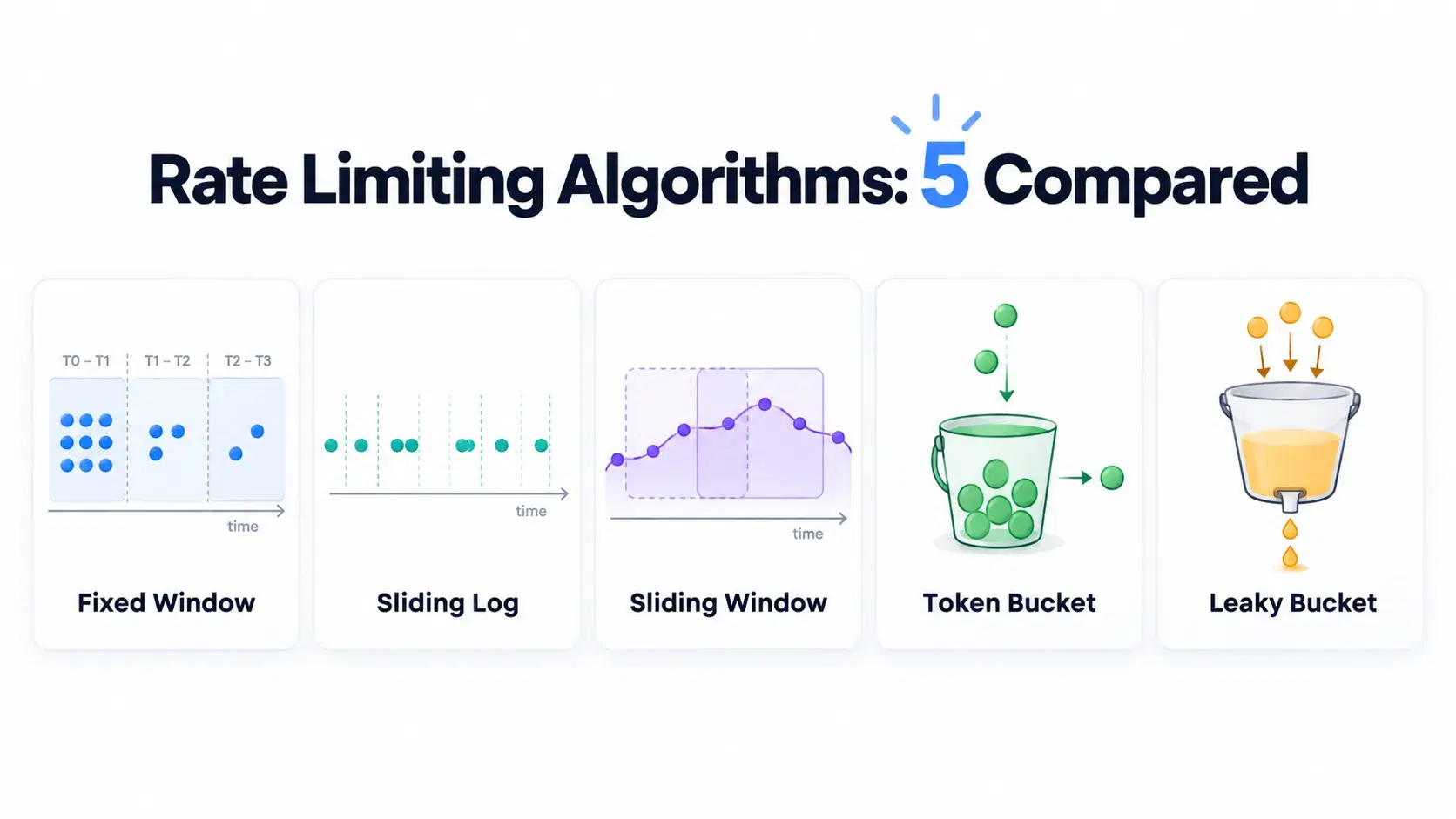
Any API that survives contact with real clients ends up with a rate limiter, and the choice of algorithm is usually made in an afternoon from a blog post diagram. The diagrams all look reasonable, which is the problem: they show the happy path, not the boundary.
Here is the number that should decide it. Run 20 requests against a limit of 10 per 60 seconds, arranged so half land just before a window boundary and half just after, and a fixed-window limiter allows all 20. That is twice the configured limit inside a six second span, and it is the default implementation in most tutorials.
The Five Algorithms
Fixed window counts requests in a clock-aligned bucket and resets at the boundary. One counter per client, trivially cheap, and the counter forgets everything the instant the minute rolls over.
Sliding window log stores a timestamp per request and counts how many fall inside the trailing window. It is exact. It also costs memory proportional to your limit multiplied by your client count.
Sliding window counter approximates the log by weighting the previous window's count by how far into the current window you are. Cloudflare popularized it because it needs two integers instead of a list.
Token bucket refills tokens at a steady rate up to a cap, and each request spends one. Bursts up to the cap are allowed by design, which is a feature when clients legitimately batch.
GCRA, the generic cell rate algorithm, keeps one timestamp called the theoretical arrival time and derives everything from it. It is what redis-cell and Traefik use, and it gets you token-bucket behavior with a single value in storage.
Running All Five Against the Same Traffic
Reasoning about these in prose is how the boundary bug survives code review. This script implements all five and runs identical traffic through them. Node 18 or newer, no dependencies.
js// ratelimit-sim.mjs - Node 18+, no dependencies. Run: node ratelimit-sim.mjs const LIMIT = 10 // requests const WINDOW = 60_000 // per 60 seconds // A client behaving itself under "10 per minute" as it understands the rule: // 10 requests late in one minute, 10 more just after the clock rolls over. const TRAFFIC = [ ...Array.from({ length: 10 }, (_, i) => 55_000 + i * 100), ...Array.from({ length: 10 }, (_, i) => 61_000 + i * 100), ] const fixedWindow = () => { let start = 0, count = 0 return (t) => { if (t - start >= WINDOW) { start = Math.floor(t / WINDOW) * WINDOW; count = 0 } return count++ < LIMIT } } const slidingWindowLog = () => { const log = [] return (t) => { while (log.length && log[0] <= t - WINDOW) log.shift() if (log.length >= LIMIT) return false log.push(t) return true } } // Cloudflare's approximation: previous window's count, weighted by position in the current one. const slidingWindowCounter = () => { let cur = 0, prev = 0, curStart = 0 return (t) => { const w = Math.floor(t / WINDOW) * WINDOW if (w !== curStart) { prev = w - curStart === WINDOW ? cur : 0; cur = 0; curStart = w } const overlap = 1 - (t - curStart) / WINDOW if (prev * overlap + cur >= LIMIT) return false cur++ return true } } const tokenBucket = () => { let tokens = LIMIT, last = 0 const rate = LIMIT / WINDOW return (t) => { tokens = Math.min(LIMIT, tokens + (t - last) * rate) last = t if (tokens < 1) return false tokens -= 1 return true } } // GCRA: one timestamp of state, no bucket, no log. Used by redis-cell and Traefik. const gcra = () => { const emission = WINDOW / LIMIT const burst = emission * LIMIT let tat = 0 // theoretical arrival time return (t) => { const allowAt = Math.max(tat, t) - burst if (t < allowAt) return false tat = Math.max(tat, t) + emission return true } } const ALGOS = { "fixed window": fixedWindow, "sliding window log": slidingWindowLog, "sliding window counter": slidingWindowCounter, "token bucket": tokenBucket, GCRA: gcra, } const worstWindow = (times) => { let worst = 0 for (const s of times) worst = Math.max(worst, times.filter((t) => t >= s && t < s + WINDOW).length) return worst } console.log(`limit: ${LIMIT} requests per ${WINDOW / 1000}s`) console.log(`traffic: ${TRAFFIC.length} requests, 10 at t=55.0s..55.9s and 10 at t=61.0s..61.9s\n`) console.log(`${"algorithm".padEnd(24)} allowed denied worst 60s verdict`) console.log("-".repeat(72)) for (const [name, make] of Object.entries(ALGOS)) { const allow = make() const accepted = TRAFFIC.filter((t) => allow(t)) const worst = worstWindow(accepted) const verdict = worst > LIMIT ? `LETS ${worst} THROUGH, ${((worst / LIMIT - 1) * 100).toFixed(0)}% over` : "holds the limit" console.log( `${name.padEnd(24)} ${String(accepted.length).padStart(7)} ${String(TRAFFIC.length - accepted.length).padStart(7)} ${String(worst).padStart(10)} ${verdict}`, ) }
Run on September 14, 2026 with Node 25.5.0:
textlimit: 10 requests per 60s traffic: 20 requests, 10 at t=55.0s..55.9s and 10 at t=61.0s..61.9s algorithm allowed denied worst 60s verdict ------------------------------------------------------------------------ fixed window 20 0 20 LETS 20 THROUGH, 100% over sliding window log 10 10 10 holds the limit sliding window counter 11 9 11 LETS 11 THROUGH, 10% over token bucket 11 9 11 LETS 11 THROUGH, 10% over GCRA 12 8 12 LETS 12 THROUGH, 20% over
What the Numbers Mean
Only the sliding window log holds the stated limit exactly, and it is the only one that stores per-request state. Everything else is buying a smaller memory footprint with a bounded amount of overshoot, and the size of that overshoot is the actual design decision.
Fixed window is not slightly wrong, it is 100 percent wrong at the boundary, and adversarial clients find that boundary immediately because it is a wall-clock minute. The sliding window counter and token bucket overshoot by 10 percent here, which is the honest cost of approximating. GCRA's 12 is not a flaw either: it is configured with a burst allowance equal to the full limit, so a client that has been quiet is allowed to spend the whole budget at once and then waits. Reduce the burst parameter and that number falls.
The right question is not "which is most accurate" but "what does one extra request cost me". For a login endpoint, overshoot is a security property and you want the log. For a read API where the limit protects a database, 10 percent is noise and you want the cheap counter.
What the Big APIs Actually Tell You
Published limits are easy to find; what is scarce is agreement on how to communicate them. GitHub's REST API allows 60 requests per hour unauthenticated, 5,000 per hour with a personal access token, and 15,000 per hour for GitHub Apps on Enterprise Cloud. It reports state in five headers: x-ratelimit-limit, x-ratelimit-remaining, x-ratelimit-used, x-ratelimit-reset and x-ratelimit-resource.
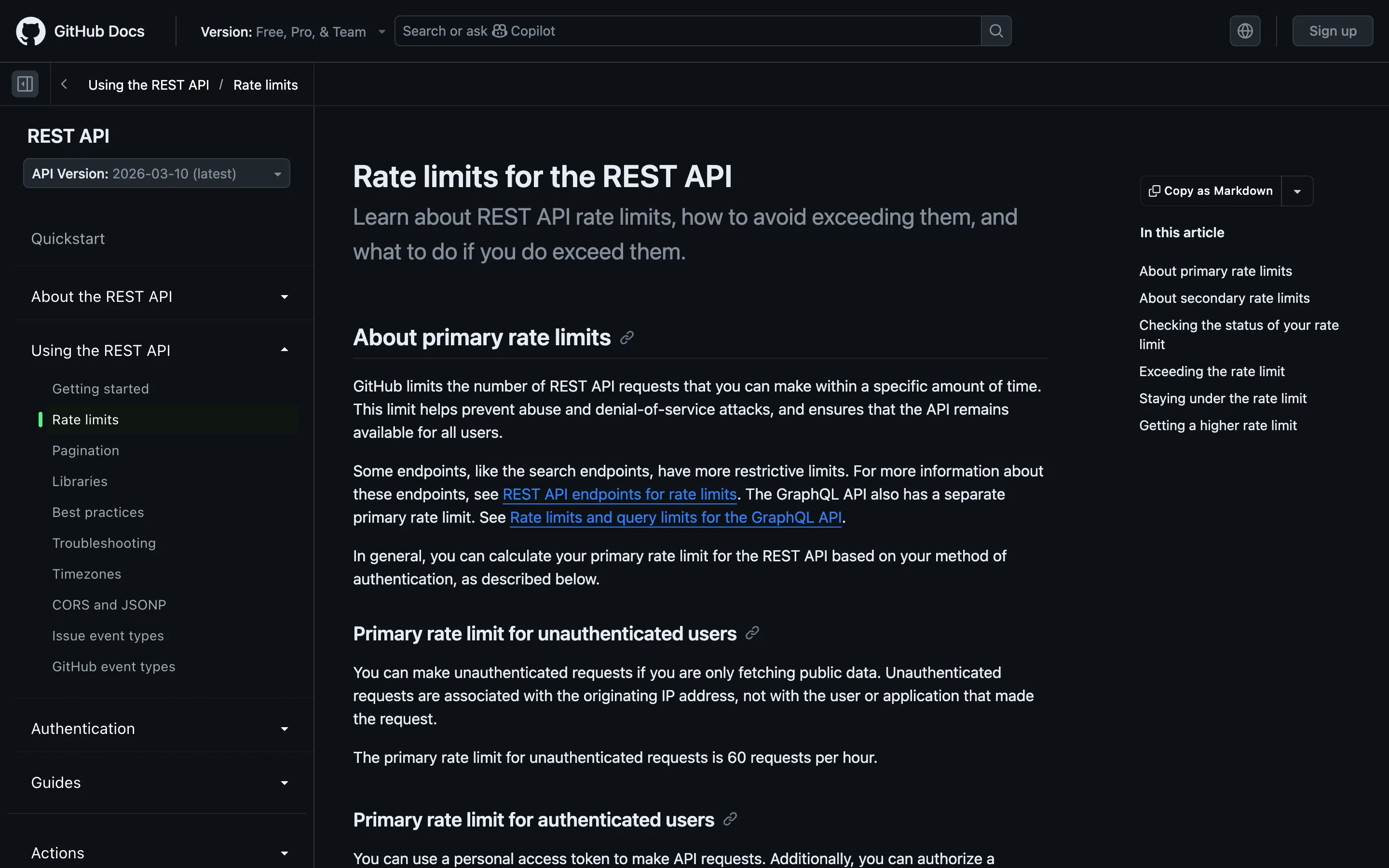
Those header names are a convention, not a standard. Other APIs send X-Rate-Limit-*, some send Retry-After only on a 429, and some send nothing and expect you to guess. Writing a client that handles three providers means writing three parsers.
The Header Standard That Is Still Not a Standard
The IETF has been working on this since 2019. The current document, draft-ietf-httpapi-ratelimit-headers, reached version 11 on May 23, 2026 and defines two fields: RateLimit-Policy, which advertises the server's quota policy, and RateLimit, which reports the quota currently available under it.
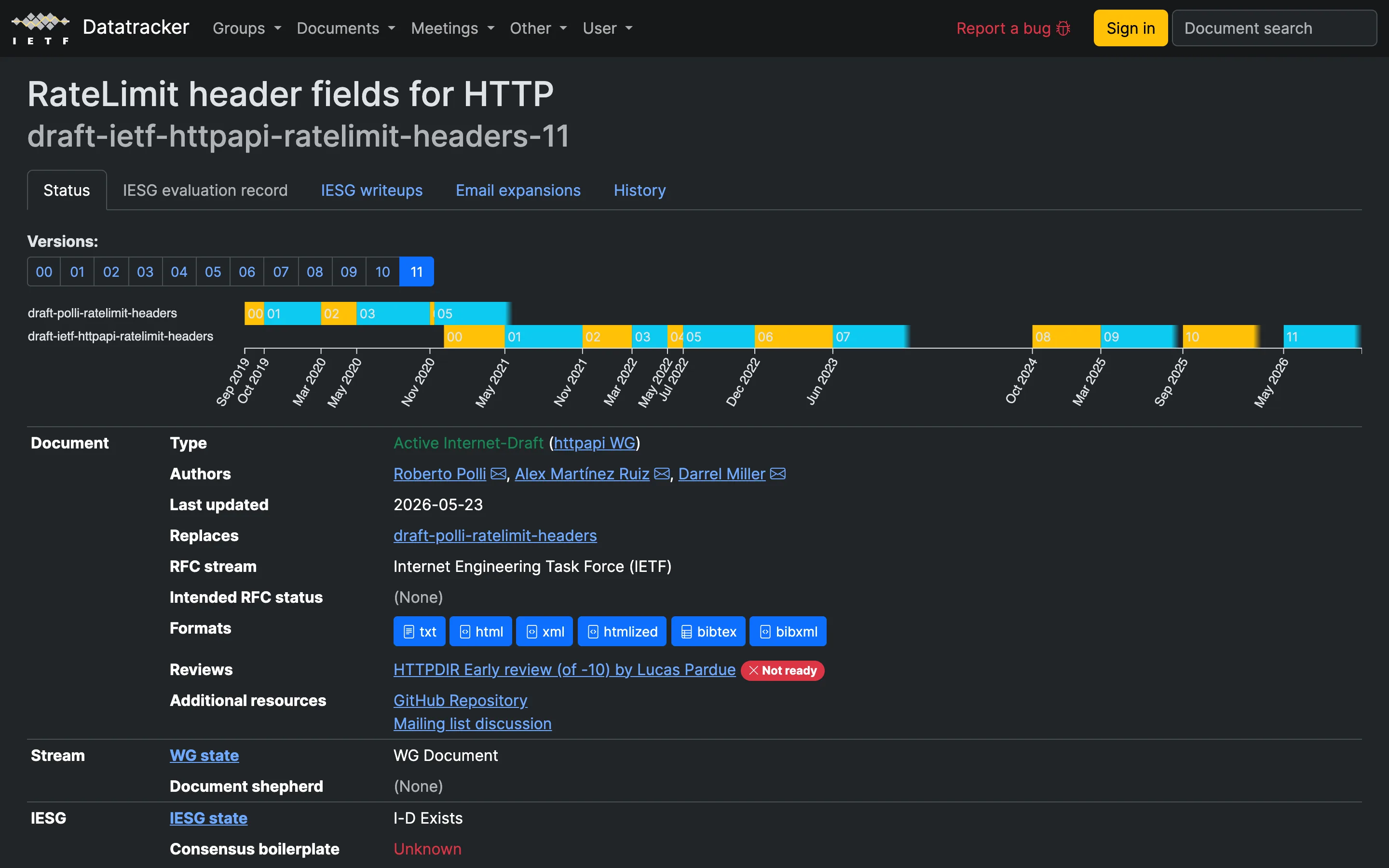
The Datatracker page is the honest summary. Type: Active Internet-Draft. Intended RFC status: none. The most recent HTTPDIR early review, filed against version 10, is marked "Not ready", and the version timeline runs from 00 in September 2019 to 11 in May 2026. Plan for the convention, not the spec: parse what your providers actually send, and treat Retry-After as the one field you can broadly rely on.
How to Pick One
- Decide what one extra request costs. If the answer is "a fraudulent login attempt," use the sliding window log and pay the memory. If it is "one more cache read," use the counter.
- Never ship a clock-aligned fixed window on a public endpoint. The measurement above is the whole argument. If you already have one, the cheapest fix is the sliding window counter, which is a two-integer change.
- Match the burst allowance to real client behavior. Batch jobs and mobile sync legitimately arrive in bursts. Token bucket and GCRA permit that; a strict log punishes it.
- Pick GCRA when storage is the constraint. One timestamp per client, and it is already implemented in
redis-celland Traefik, so you probably do not have to write it. - Return headers even though there is no standard. Send
RateLimitandRateLimit-Policyfrom the draft, plusRetry-Afteron every 429. Clients that do not understand the first two will still back off correctly.
Conclusion
The gap between these algorithms is not throughput or complexity, it is how much they let through when a client sits exactly on a boundary, and that ranges from zero overshoot to 100 percent. Run the script above with your own limit and window before choosing, because the overshoot depends on both. And check what your current limiter does at the boundary: if it was written from a tutorial diagram, the answer is probably 2x.
Related DevToolLab Tools
- Rate Limit Header Analyzer - paste the response headers from an API you are integrating with and see the effective quota, reset time and whether
Retry-Afteris present. - Exponential Backoff Calculator - plan the client half of the problem by mapping attempt numbers to delays with jitter before you hardcode a retry loop.
- HTTP Status Checker - confirm an endpoint returns 429 rather than 400 or 503 when throttled, which is what every client library keys its backoff on.
- Unix Timestamp Converter - turn an
x-ratelimit-resetepoch value into a readable time when you are working out why a client is still being throttled.
Related Guides
- What Is a Webhook? Anatomy of One Request - the inbound side of the same integration, including the retry policies providers apply to you.
- Best API Testing Tools in 2026 - the tooling for exercising an endpoint hard enough to hit its own limiter.
- Webhooks vs API - why polling loops generate the traffic that makes rate limiting necessary in the first place.
- Best LLM Gateways - where rate limiting shows up again, this time in front of token budgets rather than request counts.