
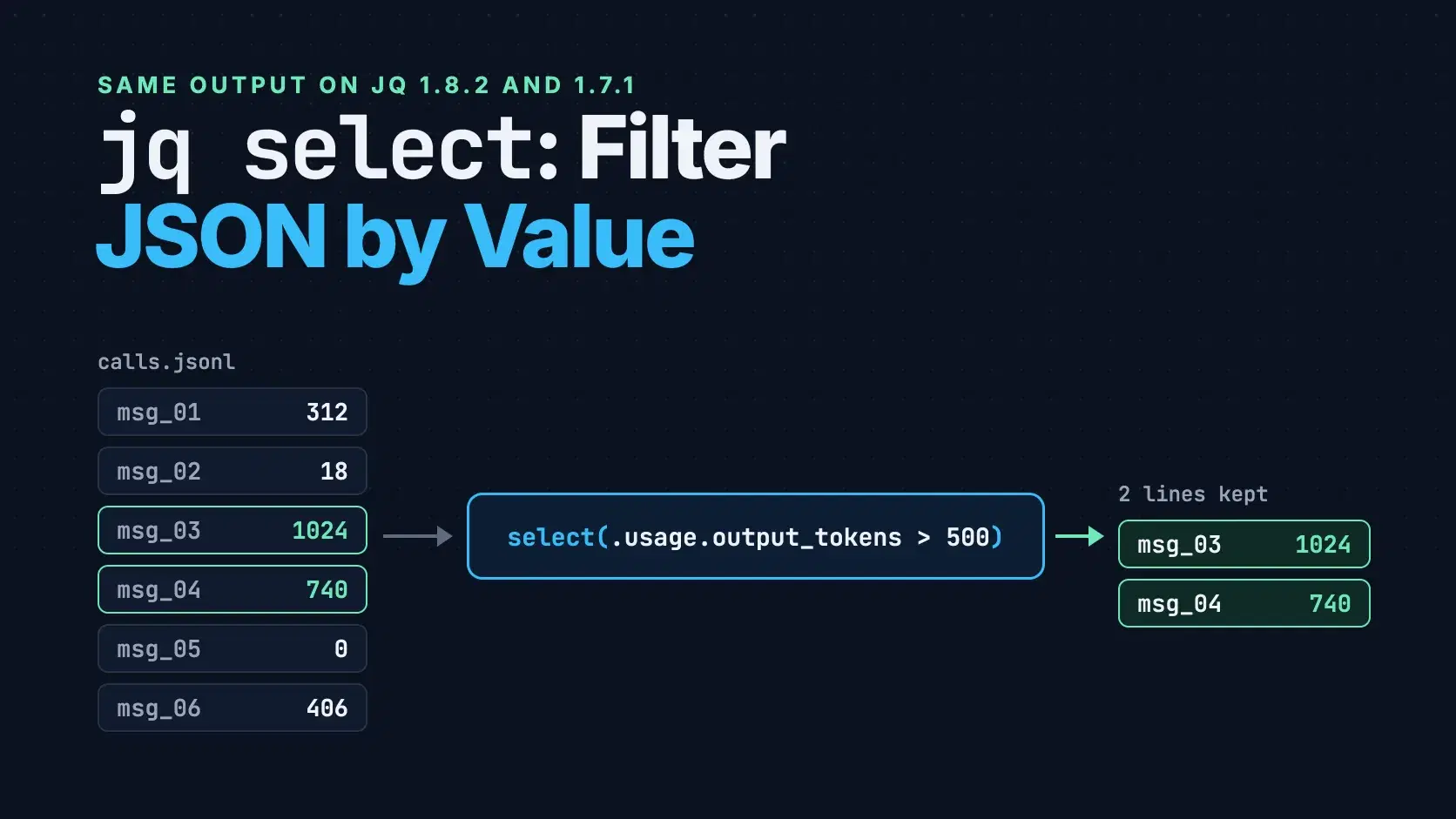
To filter JSON with jq, iterate the items and keep the ones that match: jq '.[] | select(.model == "claude-sonnet-5-5")' calls.json. The select(f) function passes its input through when f is true and outputs nothing otherwise. Wrap the expression in [...], or write map(select(...)), when you need an array back instead of a stream of objects.
The tricky part is that select rarely complains. A misspelled field, a number passed in as a string or a single = where you meant == gives you an empty result or every record, not an error, so a filter that looks right can quietly keep the wrong rows.
Every example below runs against one file, calls.jsonl: six Claude API calls an app logged, one JSON object per line. Each line keeps three fields from the Anthropic Messages API response (model, stop_reason and usage) plus the route and user the app recorded. The model IDs are the current ones on Anthropic's models page as of October 21, 2026.
JSON{"id":"msg_01","model":"claude-sonnet-5-5","route":"/api/summarize","user":"ava@example.com","stop_reason":"end_turn","usage":{"input_tokens":1840,"output_tokens":312}} {"id":"msg_02","model":"claude-haiku-5-5","route":"/api/classify","user":"liam@example.com","stop_reason":"end_turn","usage":{"input_tokens":420,"output_tokens":18}} {"id":"msg_03","model":"claude-sonnet-5-5","route":"/api/summarize","user":"mia@example.com","stop_reason":"max_tokens","usage":{"input_tokens":5210,"output_tokens":1024}} {"id":"msg_04","model":"claude-opus-5-5","route":"/api/draft-email","user":"ava@example.com","stop_reason":"end_turn","usage":{"input_tokens":2950,"output_tokens":740}} {"id":"msg_05","model":"claude-haiku-5-5","route":"/api/classify","user":"noah@example.com","stop_reason":"refusal","usage":{"input_tokens":388,"output_tokens":0}} {"id":"msg_06","model":"claude-sonnet-5-5","route":"/api/summarize","user":"liam@example.com","stop_reason":"end_turn","usage":{"input_tokens":2105,"output_tokens":406}}
All output was produced with jq 1.8.2, released June 20, 2026, and checked against the jq 1.7.1 build that macOS 26.6 ships at /usr/bin/jq (jq --version prints jq-1.7.1-apple). Both versions print identical results for every filter in this post; only some error messages differ, and those are quoted for both.
The Fastest Way
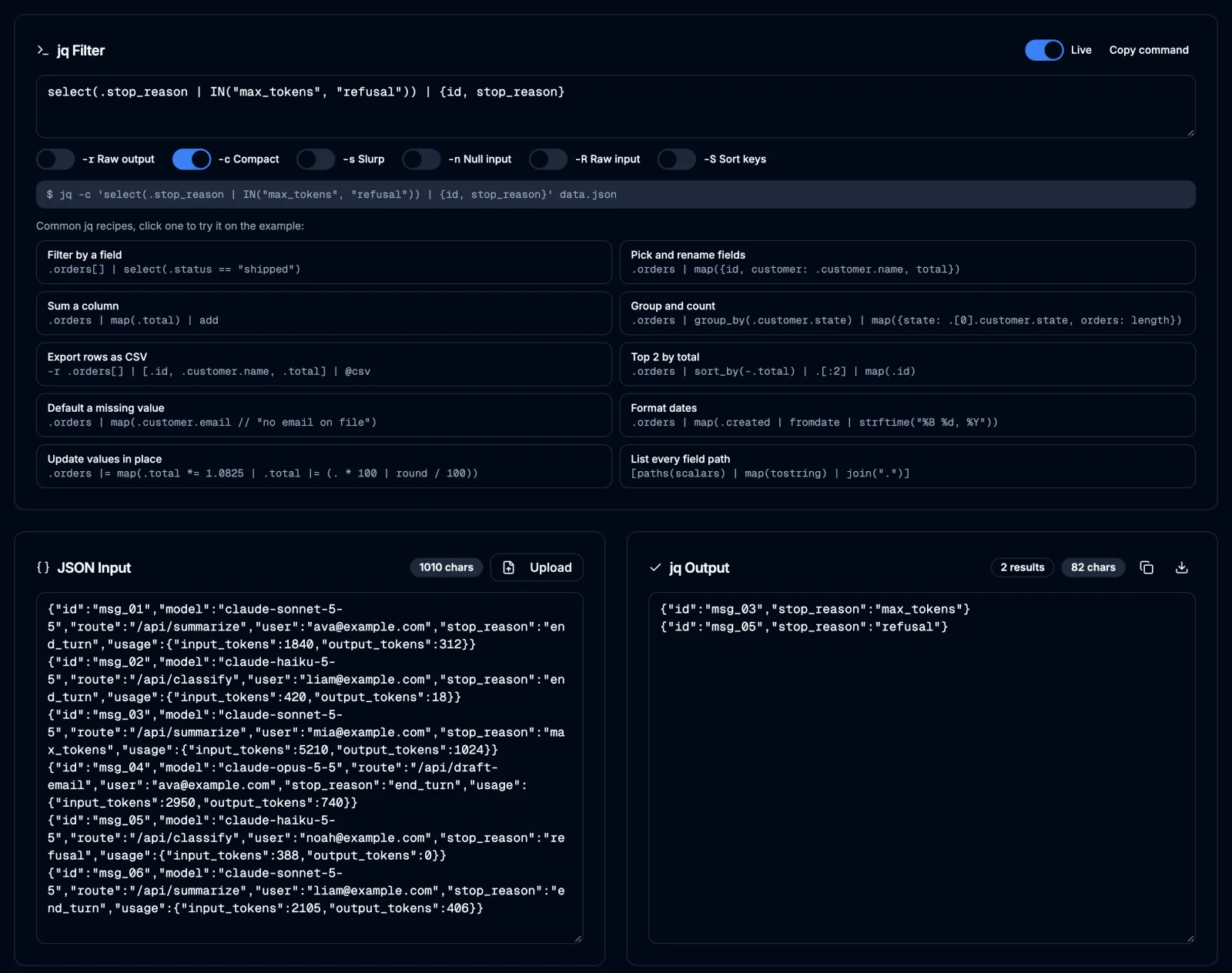
Paste the lines into the jq Playground, type the filter, and the output updates as you type. It runs a reimplementation of jq 1.7.1 in the browser, so a log full of customer emails never leaves your machine, and its Copy command button writes the same filter quoted for bash. It is not the jq binary, though: there are no files or environment variables, so $ENV comes back empty, and options like --arg belong in the terminal commands below.
How select() Decides What to Keep
jq defines select in its own standard library as one line, def select(f): if f then . else empty end; (builtin.jq in jq 1.8.2). Two consequences follow.
First, select returns its input, not the result of the test, so whatever comes after the pipe sees the whole call. Second, "true" means jq's truthiness: the jq manual says false and null are the only false values. Zero, an empty string and an empty array all count as true, so select(0) keeps all six lines.
That rule is why a single equals sign hurts. .model = "claude-opus-5-5" is an assignment that returns the updated object, which is truthy, so every call passes, and because select emits the original input you see the original models:
Bashjq -c 'select(.model = "claude-opus-5-5") | .model' calls.jsonl
text"claude-sonnet-5-5" "claude-haiku-5-5" "claude-sonnet-5-5" "claude-opus-5-5" "claude-haiku-5-5" "claude-sonnet-5-5"
Filter JSON Lines, and Get an Array Back
jq runs the filter once per JSON value in its input, so a JSON Lines file needs no .[]: select sees one call at a time. Add -r to print strings without quotes, which is what a shell loop or xargs wants:
Bashjq -r 'select(.model == "claude-sonnet-5-5") | .id' calls.jsonl # msg_01 # msg_03 # msg_06
When you need one array, for a count, a sort or a single JSON document to send to an API, read the whole file with -s. The manual describes --slurp as reading "the entire input stream into a large array". Then filter with map(select(...)); map(f) is defined as [.[] | f]:
Bashjq -s 'map(select(.usage.output_tokens > 500)) | length' calls.jsonl # 2
If your data is already a JSON array, as most API responses are, write .[] | select(...) for a stream or map(select(...)) for an array. Forgetting the .[] on an array is the most common mistake, and its error message is in the Common Errors section below.
Combine Conditions With and, or and IN
and and or work inside select the way you would expect:
Bashjq -c 'select(.model == "claude-sonnet-5-5" and .usage.input_tokens > 2000) | .id' calls.jsonl # "msg_03" # "msg_06"
To match one field against several values, IN is shorter than a chain of or clauses. It takes a stream, so the values are separated by commas rather than wrapped in an array:
Bashjq -c 'select(.stop_reason | IN("max_tokens", "refusal")) | {id, stop_reason}' calls.jsonl
text{"id":"msg_03","stop_reason":"max_tokens"} {"id":"msg_05","stop_reason":"refusal"}
That filter is a useful one to keep around. Anthropic's stop reasons guide says max_tokens means the response reached the request's max_tokens limit, and refusal is one of the seven stop_reason values its API reference lists.
Match Part of a String With startswith and test
For prefixes and suffixes, use startswith and endswith. For anything looser, test takes a regular expression and optional flags, and "i" makes it case-insensitive:
Bashjq -c 'select(.route | startswith("/api/sum")) | .id' calls.jsonl # "msg_01" # "msg_03" # "msg_06" jq -c 'select(.route | test("EMAIL"; "i")) | .id' calls.jsonl # "msg_04"
contains("sonnet") also works on a string, but be careful with it on arrays. The manual defines array containment as every element of the argument being contained in some element of the input, and for strings that means substring, so ["prod-east"] | contains(["prod"]) is true. If you mean an exact tag, use index("prod") or any(. == "prod") instead.
Handle Missing Fields Without Losing Rows
None of these six calls used prompt caching, so usage has no cache_read_input_tokens field, and select(.usage.cache_read_input_tokens > 0) returns nothing. The missing field reads as null, and the manual's sort order puts null below every number, so the comparison is simply false. That is the right answer here, but the same silence hides a misspelled field name. has() tells the two cases apart:
Bashjq -c 'select(.usage | has("cache_read_input_tokens") | not) | .id' calls.jsonl
That lists all six IDs. Use the // operator to supply a default when a field is missing or null, as in (.usage.cache_read_input_tokens // 0).
Pass the Threshold From Your Shell
--arg always binds a string; the manual's own example says --arg foo 123 binds $foo to "123". Compare a number field with it and nothing matches, with no error, because jq orders every string above every number:
Bashjq -c --arg min 500 'select(.usage.output_tokens > $min) | .id' calls.jsonl # (no output) jq -c --argjson min 500 'select(.usage.output_tokens > $min) | .id' calls.jsonl # "msg_03" # "msg_04"
--argjson parses the value as JSON, so 500 arrives as a number. When the value comes from a variable that might not be valid JSON, keep --arg and convert inside the filter with ($min | tonumber), which gives the same two IDs.
Export the Matches as CSV
@csv turns an array into one CSV row. It needs -r; without it jq prints each row as a JSON string, with every quote escaped:
Bashjq -r 'select(.stop_reason != "refusal") | [.id, .model, .usage.output_tokens] | @csv' calls.jsonl
text"msg_01","claude-sonnet-5-5",312 "msg_02","claude-haiku-5-5",18 "msg_03","claude-sonnet-5-5",1024 "msg_04","claude-opus-5-5",740 "msg_06","claude-sonnet-5-5",406
Swap @csv for @tsv to get tab-separated rows that paste straight into a spreadsheet.
Count and Total the Matches
For a token report per model, slurp the file, group it and sum each group:
Bashjq -s 'group_by(.model) | map({model: .[0].model, calls: length, output_tokens: (map(.usage.output_tokens) | add)})' calls.jsonl
JSON[ { "model": "claude-haiku-5-5", "calls": 2, "output_tokens": 18 }, { "model": "claude-opus-5-5", "calls": 1, "output_tokens": 740 }, { "model": "claude-sonnet-5-5", "calls": 3, "output_tokens": 1742 } ]
Sonnet produced 1,742 of the 2,500 output tokens in these six calls. group_by sorts by the key, which is why Haiku comes first; add sort_by(-.output_tokens) at the end to rank the models by usage instead.
Common Errors
Cannot index string with string "model" (jq 1.7.1) or Cannot index string with string ("model") (jq 1.8.2). You ran .[] on an object, so jq iterated its values, and the first one is the string "msg_01", which has no .model. On a JSON Lines file each line is already one object; drop the .[].
Cannot index array with string "model" (1.8.2 prints ("model")). The opposite case: the input is an array and the filter has no .[]. Write .[] | select(...) or map(select(...)).
syntax error, unexpected INVALID_CHARACTER. Curly quotes, usually pasted from a chat window or a document. jq 1.7.1 adds "(Unix shell quoting issues?)", and jq 1.8.2 prints the column with a caret under the bad character. Retype the quotes as straight ASCII.
parse error: Invalid numeric literal at line 1, column 16. The input is not JSON. That exact message is what jq prints for an HTML 502 Bad Gateway page that curl passed along; a Python dictionary printed with single quotes fails the same way in 1.7.1, while 1.8.2 says Invalid string literal; expected ", but got '. Run curl -sS --fail, which turns the HTTP error into a curl error (curl: (56) The requested URL returned error: 502 in our test) instead of piping the page into jq, and start the script with set -eo pipefail so that failure stops it; pipefail alone only changes the pipeline's exit status.
When Not to Use jq for This
-s holds the whole input in memory, so slurping a multi-gigabyte log can exhaust RAM. Filter line by line without -s, or use --stream, which the manual recommends for "very large inputs".
Also mind which jq reads untrusted JSON. The 1.8.2 release notes list 16 CVE fixes, including heap buffer overflows in string handling and a randomized hash seed against collision attacks. We could not find documentation of which of those fixes Apple's 1.7.1-apple build carries, so for anything that parses JSON from the network, install the current release from the jq releases page or a package manager and check jq --version in CI.
Conclusion
select itself is one line: it passes a value through when the test is true and drops it when it is not. The work is in the details around it. Use .[] when the input is an array, -s with map(select(...)) when you need an array back, IN to match a field against several values, and --argjson for numbers that come from the shell.
The mistakes that cost the most time are the quiet ones. A single =, a misspelled field name or a string compared with a number never raises an error; it only changes which rows come back. Before a new filter goes into a script, run it on a few lines whose answer you already know, and check that the count matches.
Related DevToolLab Tools
- jq Playground - try each filter from this post on your own log lines, with the
-r,-cand-sswitches, before it goes into a script. - JMESPath Tester - the AWS CLI and Azure CLI
--queryoption uses JMESPath, not jq, and its filter syntax ([?model == 'x']) differs. - JSON to CSV Converter - turn a whole array of call records into a spreadsheet when you do not need a filter first.
- NDJSON to JSON Converter - wrap a JSON Lines file into one array, the same job
jq -sdoes, for tools that only accept a JSON document.
Related Guides
- How to Use curl covers the request side of the
curl | jqpipelines above. - LLM Structured Outputs explains how to get JSON from a model that parses every time, which is what jq needs downstream.
- What Is JSONata? compares another JSON query language that runs inside JavaScript apps.
- Are Claude Code Mods Safe? uses a jq loop over
claude plugin validate --jsonreports to audit 22 mods.