
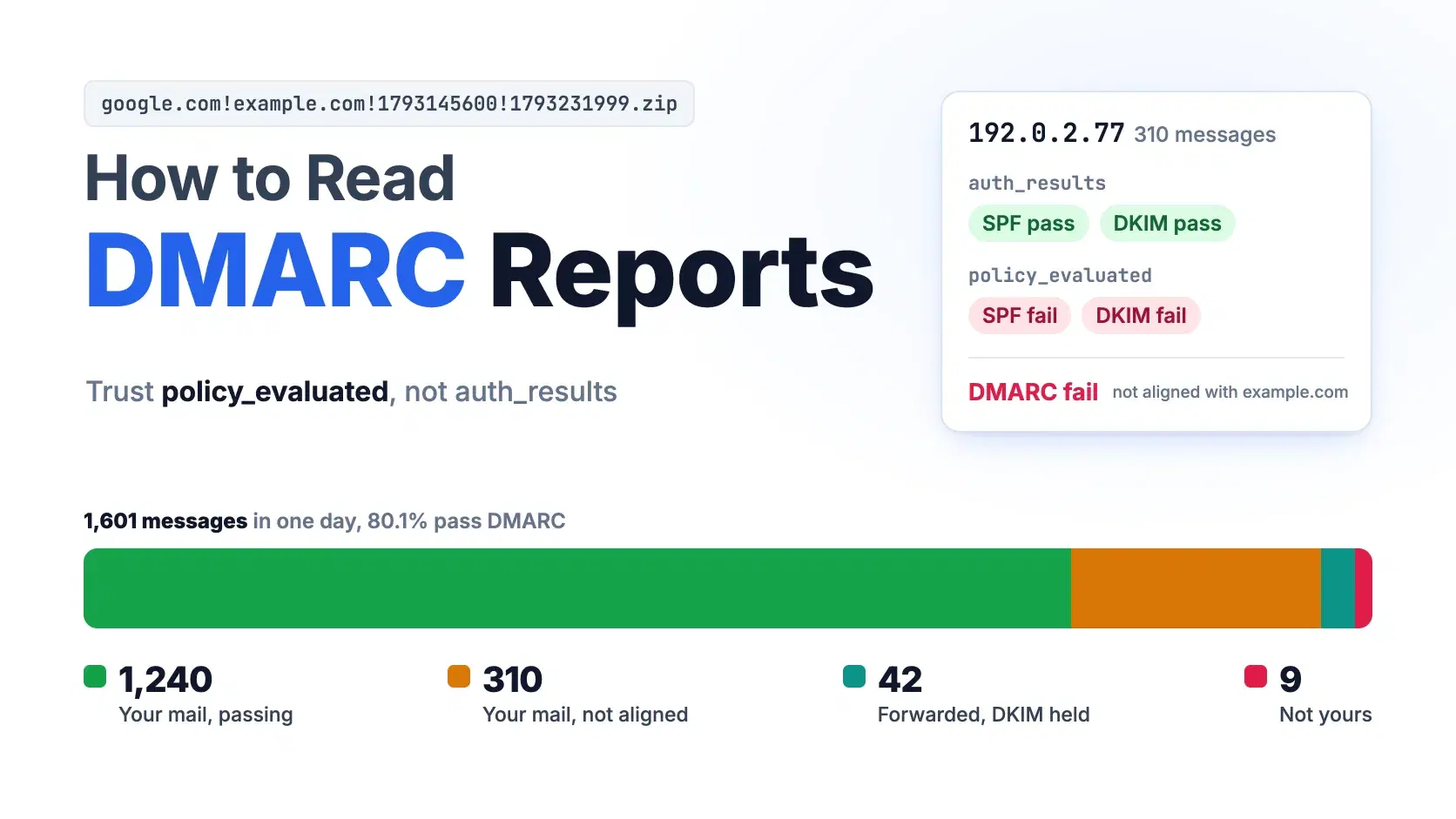
To read a DMARC aggregate report, unzip the attachment and go record by record. source_ip and count tell you who sent how much mail using your domain in the From header, and policy_evaluated tells you whether DKIM or SPF passed and aligned with that domain. DMARC passes when either one does. Leave auth_results alone until a row fails.
The trap is that auth_results can show SPF and DKIM both passing on a row DMARC failed, becuase those raw results belong to whatever domain the sending service used, not yours. Gmail has required DMARC from anyone sending 5,000 or more messages a day since February 1, 2024, and Outlook.com rejects non-compliant bulk mail, so misreading that row now costs real email.
The Fastest Way
Drop the .zip, .gz or .xml attachment into the DMARC Report Analyzer. It decompresses Google's zip files and everyone else's gzip in the browser, takes several reports at once, groups the rows by source IP and labels each failure with the patterns described below. Nothing is uploaded. It also does no IP lookups, so it cannot tell you that an address belongs to your email provider; you match addresses against your providers' published ranges yourself.
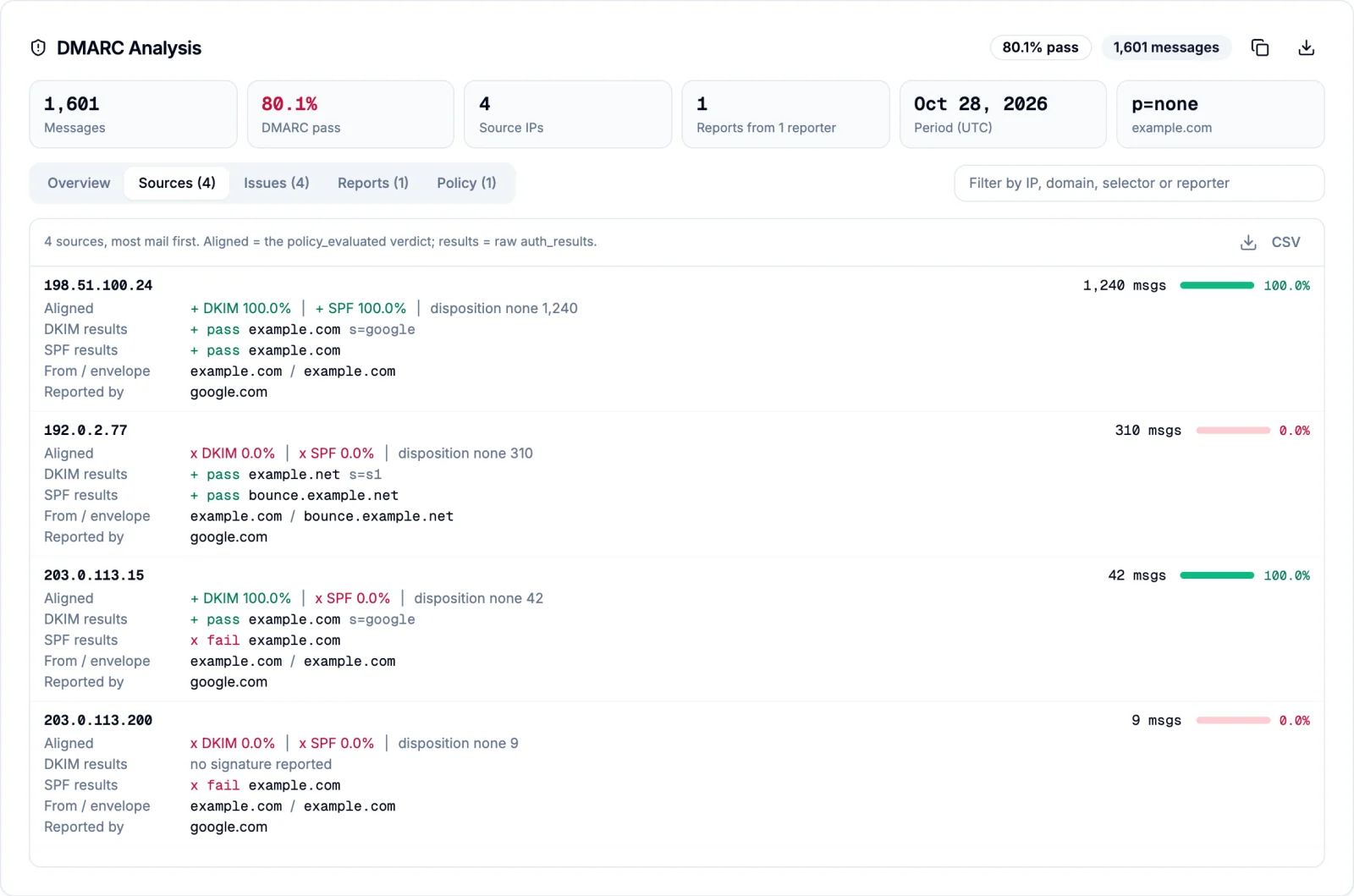
The rest of this guide reads one report by hand, so you can check what the tool tells you.
What Is Inside a DMARC Aggregate Report
Receivers send aggregate reports to the address in your DMARC record's rua tag, normally once a day, under a fixed subject: Report Domain: example.com Submitter: google.com Report-ID: .... The format is defined in RFC 9990, published in May 2026 alongside RFC 9989 for DMARC itself and RFC 9991 for failure reports; together they replaced RFC 7489, the 2015 spec every report generator was built on.
The attachment name follows the pattern receiver!policy-domain!begin!end. The worked example in this post is a Gmail report for example.com, google.com!example.com!1793145600!1793231999.zip. The two numbers are Unix timestamps in UTC. This report covers October 28, 2026 from midnight to 11:59:59 PM UTC, which is 8:00 PM ET on October 27 through 7:59 PM ET on October 28, so a send you made at 9:00 PM Eastern on the 28th lands in the next day's report. Google attaches a .zip even though the RFC asks for .xml.gz, so expect both formats in the same inbox.
Inside is one <feedback> element with three parts. report_metadata names the reporter and the date range. policy_published is your DMARC record as the receiver saw it: p=none, relaxed alignment for both DKIM and SPF. Then comes one <record> per combination of sending IP, result and identifiers. Here is the record from the example that matters most:
XML<record> <row> <source_ip>192.0.2.77</source_ip> <count>310</count> <policy_evaluated> <disposition>none</disposition> <dkim>fail</dkim> <spf>fail</spf> </policy_evaluated> </row> <identifiers> <header_from>example.com</header_from> <envelope_from>bounce.example.net</envelope_from> </identifiers> <auth_results> <dkim> <domain>example.net</domain> <selector>s1</selector> <result>pass</result> </dkim> <spf> <domain>bounce.example.net</domain> <scope>mfrom</scope> <result>pass</result> </spf> </auth_results> </record>
Reports written to the new RFC 9990 schema add the namespace urn:ietf:params:xml:ns:dmarc-2.0 and a <testing> element under policy_published, but the record structure is the same.
Why SPF and DKIM Pass but DMARC Fails
DMARC does not ask whether SPF or DKIM passed. It asks whether one of them passed for a domain that is aligned with the domain in the From header. In relaxed mode (adkim=r and aspf=r, the defaults) aligned means the same organizational domain, so news.example.com aligns with example.com. In strict mode the names must match exactly.
Look at the record above with that rule in mind. SPF passed, but for bounce.example.net. DKIM passed, but the signature's d= domain is example.net. Neither is example.com, so policy_evaluated records fail for both and the 310 messages fail DMARC, even though auth_results reads like a clean bill of health. This is what a marketing or transactional email platform does before you finish its domain setup: it signs with its own key and bounces to its own domain.
The fix lives in that platform's settings, not in your DMARC record. Publish the DKIM records it gives you (usually CNAME records) so it signs with d=example.com, and if it offers a custom return path, point it at a subdomain such as bounce.example.com. Aligned DKIM is the one to get first, because it survives forwarding and SPF does not.
Sort Every Row Into Four Groups
Reading a report is mostly sorting. Every row goes into one of four groups, and each group needs a diffrent response. The example report has one row of each:
| Source IP | Messages | Aligned DKIM | Aligned SPF | DMARC | Group |
|---|---|---|---|---|---|
| 198.51.100.24 | 1,240 | pass | pass | pass | Your mail, passing |
| 192.0.2.77 | 310 | fail | fail | fail | Your mail, not aligned |
| 203.0.113.15 | 42 | pass | fail | pass | Forwarded |
| 203.0.113.200 | 9 | fail | fail | fail | Not yours |
The first row is your own mail server with both checks aligned: nothing to do. The second is the unaligned platform from the previous section, the row to fix first. The third failed SPF because a forwarder (a university alias, a user's auto-forward rule) resent the message from its own IP, but your DKIM signature came through intact, so DMARC passed. Mailing lists that rewrite the subject or body break DKIM too, and receivers sometimes mark those rows with a <reason> of forwarded or mailing_list. The last row has no DKIM signature and comes from an address you do not recognize: spoofing, or a service someone signed up for without telling you.
Add it up and the report shows 1,601 messages, of which 1,282 passed, an 80.1% pass rate. Under p=reject, 319 messages would have been refused, and 310 of them were your own.
Read a Report in the Terminal
On macOS, unzip and xmllint (part of libxml2) come preinstalled and print the aligned results for every row; on Debian or Ubuntu, run sudo apt install libxml2-utils unzip first. Swap unzip -p for gunzip -c when the attachment ends in .gz.
Bashf='google.com!example.com!1793145600!1793231999.zip' n=$(unzip -p "$f" | xmllint --xpath 'count(//record)' -) for i in $(seq 1 "$n"); do unzip -p "$f" | xmllint --xpath "concat(//record[$i]/row/source_ip, ' ', //record[$i]/row/count, ' dkim=', //record[$i]/row/policy_evaluated/dkim, ' spf=', //record[$i]/row/policy_evaluated/spf)" - done
text198.51.100.24 1240 dkim=pass spf=pass 192.0.2.77 310 dkim=fail spf=fail 203.0.113.15 42 dkim=pass spf=fail 203.0.113.200 9 dkim=fail spf=fail
Read a Report in Python
The standard library is enough. This script opens a .zip, .gz or plain .xml report, strips the RFC 9990 namespace if there is one, and prints the DMARC verdict next to the raw results, so the unaligned row stands out:
Pythonimport gzip, sys, zipfile import xml.etree.ElementTree as ET def load(path): if path.endswith(".zip"): with zipfile.ZipFile(path) as z: return z.read(z.namelist()[0]) with open(path, "rb") as f: data = f.read() return gzip.decompress(data) if data[:2] == b"\x1f\x8b" else data root = ET.fromstring(load(sys.argv[1])) for el in root.iter(): # RFC 9990 reports use a namespace; drop it el.tag = el.tag.split("}")[-1] for rec in root.iter("record"): row = rec.find("row") pe = row.find("policy_evaluated") dkim, spf = pe.findtext("dkim"), pe.findtext("spf") verdict = "PASS" if "pass" in (dkim, spf) else "FAIL" raw = [f"{a.tag}:{a.findtext('domain')}={a.findtext('result')}" for a in rec.find("auth_results")] print(f"{verdict} {row.findtext('source_ip'):15} {row.findtext('count'):>5} " f"aligned dkim={dkim} spf={spf} raw {' '.join(raw)}")
textPASS 198.51.100.24 1240 aligned dkim=pass spf=pass raw dkim:example.com=pass spf:example.com=pass FAIL 192.0.2.77 310 aligned dkim=fail spf=fail raw dkim:example.net=pass spf:bounce.example.net=pass PASS 203.0.113.15 42 aligned dkim=pass spf=fail raw dkim:example.com=pass spf:example.com=fail FAIL 203.0.113.200 9 aligned dkim=fail spf=fail raw spf:example.com=fail
Once reports arrive by the dozen, use parsedmarc, the open-source option: Apache 2.0 licensed, version 11.1.0 released October 27, 2026. It pulls reports from an inbox over IMAP, Microsoft Graph or the Gmail API and ships the rows to Elasticsearch, OpenSearch or Splunk. On the example report it returned the same four rows and aligned results as the script above.
When the Reports Say You Can Enforce
Move past p=none only when the unaligned rows are gone and every source that still fails is one you are willing to block. Wait long enough to see senders that run monthly, like billing runs, because a clean week can miss them.
RFC 9989 also changed how you ramp up. The old pct tag, which asked receivers to apply the policy to a percentage of failing mail, was removed because receivers applied anything other than 0 or 100 inconsistently. Its replacement is t=y, a test flag that asks receivers to apply one level below what you publish: p=reject; t=y is treated as quarantine, and p=quarantine; t=y as none. Both RFCs tell receivers to ignore tags they do not know, so a receiver that still implements RFC 7489 ignores t=y and enforces your p value in full. Treat t=y as a softer landing on updated receivers, not as a safety net everywhere.
Common Errors
550 5.7.26 Unauthenticated email from domain-name is not accepted due to domain's DMARC policy. Gmail refused a message that failed DMARC because your record says reject (under quarantine, Gmail delivers it to spam instead and returns no error). Find the sending IP in the next day's report; it is almost always an unaligned platform row.
421 4.7.32 Your email has been rate limited because the From: header (RFC5322) in this message isn't aligned with either the authenticated SPF or DKIM organizational domain. Gmail's bulk sender rule catching the 192.0.2.77 pattern: authentication passed, alignment did not. Set up the platform's custom DKIM.
550; 5.7.515 Access denied, sending domain [SendingDomain] does not meet the required authentication level. Outlook.com's rejection for domains sending more than 5,000 messages a day without passing SPF, DKIM and DMARC, a rule Microsoft began enforcing on May 5, 2025. Same diagnosis: find the failing source in the reports.
No reports arrive at a rua address on another domain. When example.com sends reports to dmarc@reports.example.net, receivers first look for a TXT record at example.com._report._dmarc.reports.example.net containing v=DMARC1. Without it, they drop the reports silently.
When Not to Do This
Do not paste reports into a hosted analyzer you have not vetted: a month of them lists every server and vendor that sends mail as your domain. Reports carry no message content, so to debug one specific message, read its headers instead. And never move to reject on a single day's report, because the low-volume senders that skipped that day are the ones you will break.
Conclusion
Each row of a DMARC report says whether one source sent mail as your domain with DKIM or SPF aligned to it. Read policy_evaluated for that verdict and treat auth_results as the explanation. In the example report, one platform row accounts for 310 of the 319 messages a p=reject policy would have refused, all of it your own mail, and publishing that platform's DKIM records fixes it without touching your DMARC record.
Make that fix first, then keep reading reports for at least a month, so senders like monthly billing runs show up, until the only failing rows are sources you are willing to block. That is the point to move to quarantine and later to reject, with t=y as a softer first step on receivers that support RFC 9989.
Related DevToolLab Tools
- DMARC Report Analyzer - open a stack of
.zip,.gzand.xmlreports at once and export every row as CSV, without uploading anything. - DKIM Record Checker - confirm your email platform's DKIM records resolve to a public key before the next report has to tell you.
- DMARC Record Generator - build the
p,ruaand alignment tags for the record you publish once the reports come back clean. - Email Header Analyzer - read the Authentication-Results header of one message when a report row points at a problem.
Related Guides
- Email Authentication for Developers: SPF, DKIM, DMARC, BIMI, and MTA-STS covers setting up the records whose results these reports describe.
- Best Email API Providers compares Resend, Postmark, SendGrid, Amazon SES and others, the platforms whose rows show up in your reports.
- Unclaimed Funds Notification System Design walks through an alert pipeline whose mail has to pass SPF, DKIM and DMARC to reach the inbox.