
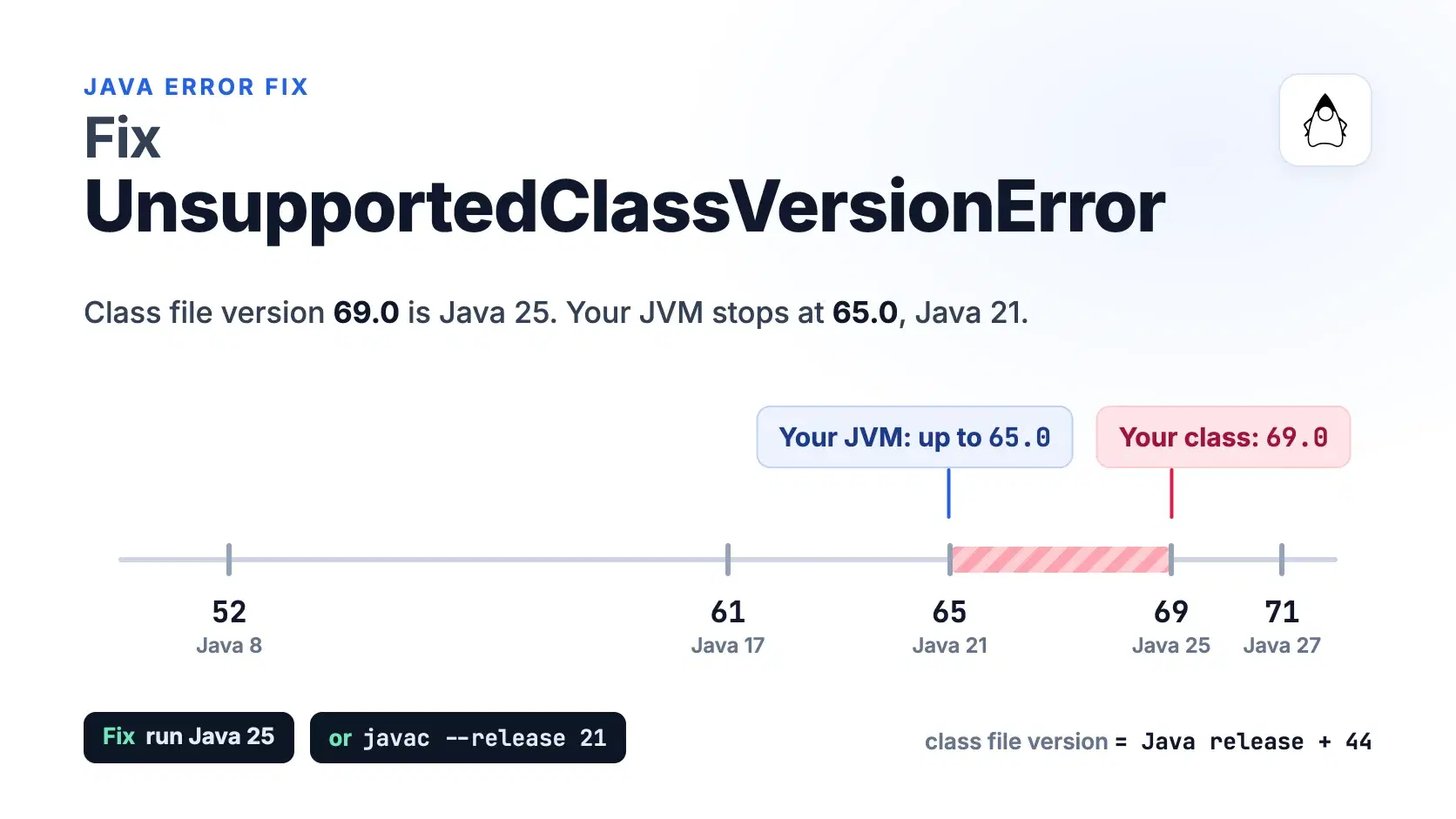
java.lang.UnsupportedClassVersionError means a class was compiled for a newer Java release than the JVM trying to load it. In the message, "class file version 69.0" is the class (Java 25) and "only recognizes class file versions up to 65.0" is your runtime (Java 21). Fix it by running the app on Java 25 or later, or by recompiling with javac --release 21.
The tricky part is finding which JVM actually runs the code. The java on your PATH is often not the one your IDE, Gradle, CI runner or Docker image uses, and one dependency built for a newer release throws the same error inside an otherwise old app.
Most commands in this post run against one small app, billing-service.jar, compiled with OpenJDK 25.0.1 on a Mac and started on OpenJDK 21.0.9 (Homebrew builds, run October 27, 2026):
text$ java -jar billing-service.jar Error: LinkageError occurred while loading main class com.example.billing.Main java.lang.UnsupportedClassVersionError: com/example/billing/Main has been compiled by a more recent version of the Java Runtime (class file version 69.0), this version of the Java Runtime only recognizes class file versions up to 65.0
The Fastest Way: Read the Version From the File
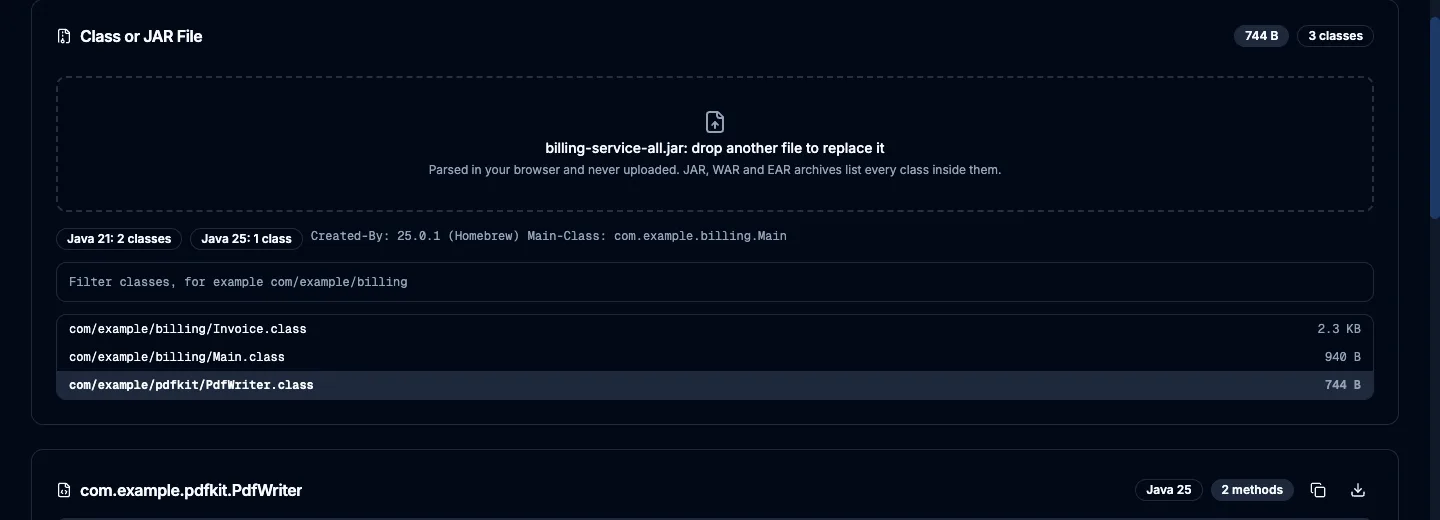
Drop the JAR or .class file into the Java Class File Viewer. It reads the version from each class header and, for a JAR, counts the classes compiled for each Java release, so one class built for Java 25 inside a Java 21 app stands out on the first screen. The file is parsed in your browser and never uploaded. It cannot tell you which Java your server runs; that is java -version on the server.
Here is a fat JAR variant of the same app. Its own classes target Java 21, and one shaded PDF class targets Java 25, which is enough to crash the service on a Java 21 host.
What the Two Numbers in the Message Mean
Every class file starts with the bytes CAFEBABE, then a two-byte minor version and a two-byte major version. Since Java 5, the major version is the Java release plus 44. The Java SE 25 edition of the Java Virtual Machine Specification accepts major versions 45 through 69, and the Java SE 27 edition accepts 45 through 71 (both checked October 27, 2026). A JVM refuses any class whose major version is above its own.
| Java release | Class file version | Long-term support |
|---|---|---|
| Java 8 | 52.0 | Yes |
| Java 11 | 55.0 | Yes |
| Java 17 | 61.0 | Yes |
| Java 21 | 65.0 | Yes |
| Java 25 | 69.0 | Yes |
| Java 26 | 70.0 | No |
| Java 27 | 71.0 | No |
Java 25 reached general availability on September 16, 2025, Java 26 on March 17, 2026, and Java 27 on September 15, 2026, per the OpenJDK JDK 27 project page and its siblings. Oracle's Java SE support roadmap lists 8, 11, 17, 21 and 25 as the long-term support releases and names Java 29, planned for September 2027, as the next one.
The first number in the error is the class; the second is the newest version the running JVM understands. The class named is the first one the JVM failed to load: usually your main class, sometimes a library class.
The wording depends on the runtime. Java 7 prints Unsupported major.minor version 52.0, a format OpenJDK replaced with today's text in February 2014 (JDK-8016644). A change merged on August 4, 2026, JDK-8385593, rewords it again to say the class "requires a newer Java runtime", but the 21, 25, 26 and 27 update lines still carry the current text, so the new wording first ships in JDK 28.
How to Check a Class File Version in the Terminal
javap ships with every JDK and reads the version without running any code:
text$ javap -v -cp billing-service.jar com.example.billing.Invoice | grep major major version: 69
Without a JDK, read the first eight bytes. The last two are the major version in hex, and 0x0045 is 69:
text$ unzip -p billing-service.jar com/example/billing/Invoice.class | head -c 8 | xxd 00000000: cafe babe 0000 0045 .......E
For a loose class file on macOS or Linux, file Invoice.class prints compiled Java class data, version 69.0.
Fix 1: Recompile for the Older Java With --release
If you control the build, target the oldest Java you deploy to. The --release flag, available since JDK 9, sets the bytecode version and limits the code to that release's APIs:
text$ javac --release 21 -d out src/com/example/billing/*.java $ jar --create --file billing-service.jar --main-class com.example.billing.Main -C out . $ java -jar billing-service.jar # OpenJDK 21.0.9 Acme Corp owes $1,644.00
In Maven, set the maven.compiler.release property, which the Maven Compiler Plugin has read since version 3.6. Built with JDK 25, Maven 3.9.12 and plugin 3.13.0, this project produced class file version 65:
XML<properties> <maven.compiler.release>21</maven.compiler.release> </properties>
In Gradle, the toolchain picks the JDK that compiles and options.release picks the target. This Kotlin DSL follows Gradle's toolchain documentation; it was not run here, because Gradle is not installed on the test machine:
kotlinjava { toolchain { languageVersion = JavaLanguageVersion.of(25) } } tasks.withType<JavaCompile>().configureEach { options.release = 21 }
Use --release, not -source 21 -target 21. Those flags change the bytecode version but still compile against the newer JDK's class library, so a call to a Java 25-only API compiles and then fails at runtime. JDK 25 warns about it:
text$ javac -source 21 -target 21 -d out Hello.java warning: [options] location of system modules is not set in conjunction with -source 21 $ java -cp out Hello # Java 21 Exception in thread "main" java.lang.NoClassDefFoundError: java/lang/IO
With --release 21, the same IO.println call fails at compile time instead, with cannot find symbol ... variable IO.
--release cannot fix a dependency. A library compiled for Java 25 keeps its version 69 class files however you build your own code, so pick a library release that supports your runtime, or upgrade the runtime.
Fix 2: Run the App on a Newer Java
When the code is fine and the runtime is old, upgrade the JVM that actually runs it. Check java -version and echo $JAVA_HOME; on macOS, /usr/libexec/java_home -V lists every installed JDK. Maven follows JAVA_HOME rather than your PATH, and mvn -version prints the JVM it uses (Java version: 25.0.1 on the test machine). IntelliJ IDEA sets the project SDK and the JVM that runs Gradle separately, and the two drift apart.
Gradle must support the JDK it runs on. Per Gradle's compatibility matrix (9.8.2 docs, checked October 27, 2026), running Gradle on Java 25 needs Gradle 9.1.0 or later, Java 26 needs 9.4.0, and Java 27 needs 9.8.0.
In CI, pin the version rather than trust the runner's default. This is the example from the setup-java README, whose latest release is v6.1.0 (October 14, 2026):
yamlsteps: - uses: actions/checkout@v7 - uses: actions/setup-java@v6 with: distribution: temurin java-version: '25' - run: java --version
In Docker, the base image decides. A JAR built for Java 25 needs FROM eclipse-temurin:25-jre, not 21-jre; both tags were current on Docker Hub on October 27, 2026.
Minecraft Servers Hit This After Every Java Bump
Minecraft Java Edition 1.20.5 (April 23, 2024) was the first version to require Java 21, and 26.1 (March 24, 2026) the first to require Java 25, per the Minecraft Wiki; 26.2 (June 16, 2026) still requires 25. The launcher bundles its own Java, the Microsoft Build of OpenJDK 25 since 26.1, so the game starts while a server on the same computer fails: the server .jar uses whatever java its start script finds. Install Java 25 and call it by its full path in the script.
Common Errors
has been compiled by a more recent version of the Java Runtime (class file version 69.0), this version of the Java Runtime only recognizes class file versions up to 65.0. The runtime is older than the class. Look up both numbers in the table, then pick a fix.
class file has wrong version 69.0, should be 65.0. The same mismatch at compile time: JDK 21's javac read a library built for Java 25 and added Please remove or make sure it appears in the correct subdirectory of the classpath. Compile with JDK 25, or use a library release built for Java 21.
error: release version 25 not supported. The JDK running javac is older than the release you asked for. Maven reports it as Fatal error compiling: error: release version 25 not supported. Point JAVA_HOME at JDK 25 for the build.
Unsupported class file major version 69. This one comes from ASM, the bytecode library inside Gradle, many Gradle plugins and JaCoCo, not from the JVM: that copy of ASM is older than your JDK, as reports on the Gradle forum show. ASM 9.8 (March 29, 2025) added Java 25, 9.9 (October 4, 2025) Java 26 and 9.10 (May 14, 2026) Java 27, per its release history. Upgrade Gradle or the plugin named in the stack trace, or build on the older JDK.
When Not to Do This
Do not patch the version bytes to get past the check. I changed a JDK 25 build of Hello.class from 69 to 65; Java 21 loaded it, then failed with the same NoClassDefFoundError: java/lang/IO. The patch only moves the error to the first line that touches a newer API. And do not reach for Java 26 or 27 to clear a production error: they are short-term releases, while 21 and 25 are the long-term support lines vendors keep patching.
Which Fix to Pick
Your app, your servers: move every environment to Java 25, the current long-term support release.
A library other teams depend on: keep --release at the oldest long-term support release your users run, usually 21 or 17, and check the output with javap before publishing.
A shaded dependency is the newer class: downgrade that dependency or upgrade the runtime; your build flags cannot change its bytecode.
Conclusion
UnsupportedClassVersionError is always one comparison: the class file's major version against the newest version the running JVM accepts. Read both numbers from the message, then decide which side moves. Rebuilding with --release 21 fixes code you own, but a dependency compiled for Java 25 leaves only the runtime upgrade, and Java 25 is the long-term support release to land on.
Related DevToolLab Tools
- Java Class File Viewer - drop a JAR to count its classes per Java release and find the one built for a newer JVM.
- Hex Viewer - see the
CA FE BA BEheader and major version bytes of a class file without a JDK. - GitHub Actions Validator - check the workflow that pins
java-versionbefore the runner proves it wrong. - Dockerfile Generator - start the image from a Temurin base that matches your build's target release.
Related Guides
- GitHub Actions Best Practices - pinning versions in the workflows that build JARs.
- Best CI/CD Tools - where each CI platform's build JDK comes from.
- How to Port Forward a Minecraft Server - once the server starts on Java 25.
- Best AI Code Migration Tools - OpenRewrite and AWS Transform for Java upgrades.