
Developers end up editing video more than they planned to: the product demo for a launch, the recorded conference talk, the two-minute walkthrough a support ticket needs. The recording is the easy part. Cutting the pauses, the retakes and the "let me just find that tab" moments out of a 30-minute screen recording is where the evening goes.
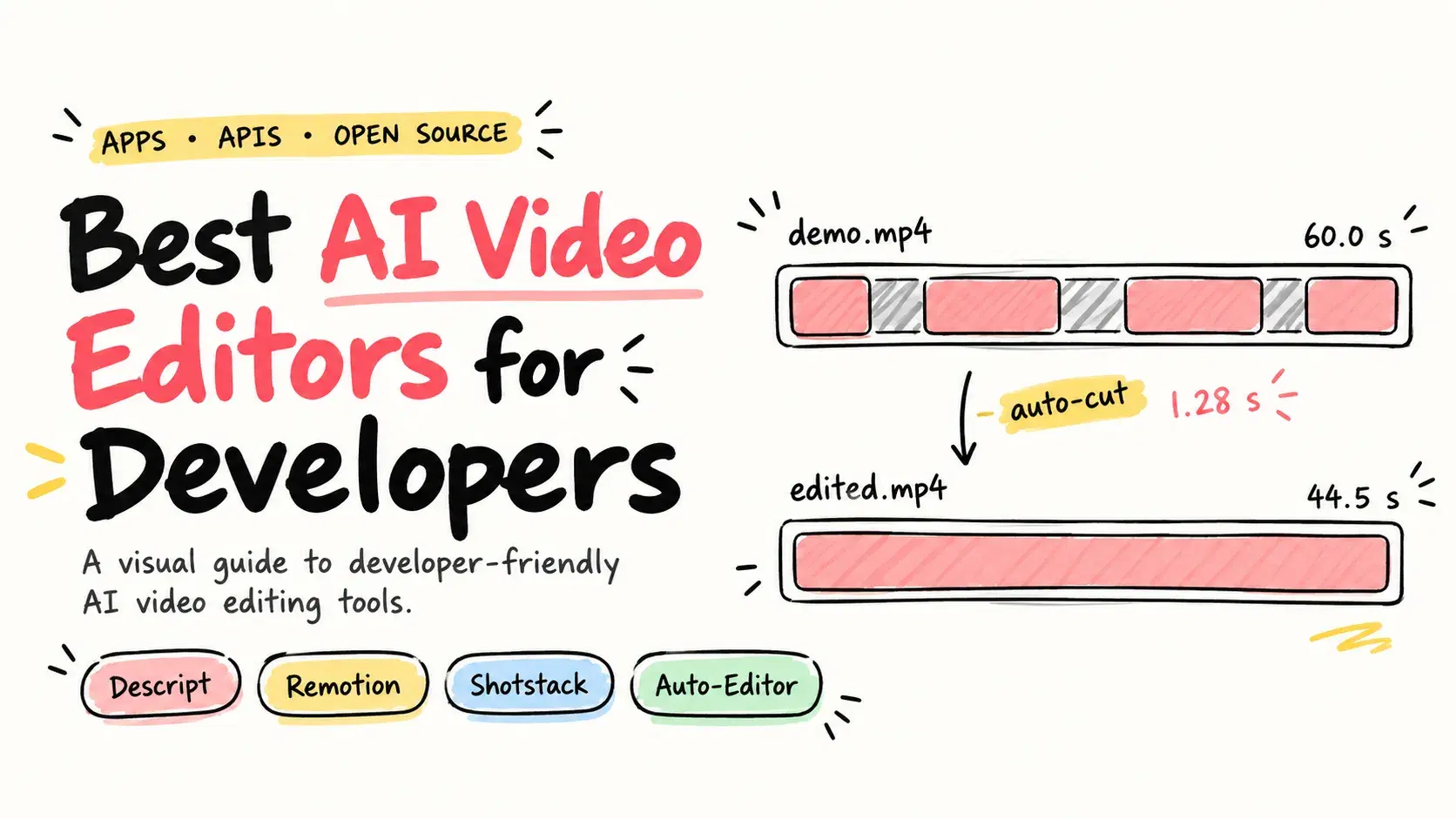
That first pass is also the part software now does well. On October 10, 2026, the open-source auto-editor 31.7.2 cut a 60-second test recording with four pauses down to 44.53 seconds in 1.28 seconds, and exported the result as a DaVinci Resolve timeline instead of a finished file. This guide compares five tools on that job and on the next one, editing video from code: Descript, DaVinci Resolve, Shotstack, Remotion and auto-editor.
What AI Editing Does to a Recording
AI video editing here means changing footage you already have, not generating new footage from a prompt. That second category is covered in our AI video generation models guide. Editing tools do four things to a recording: they transcribe it so you can cut by deleting words, they find and remove silence, filler words and retakes, they clean up audio and framing, and they reframe or clip a long recording into shorter pieces.
For a developer the useful question is how much of that runs without you, and whether it runs from code. A quarterly launch demo wants an interactive editor. A video per release or per customer wants an API.
How We Compared
Every price, limit, license and version below comes from the vendor's own pricing page, documentation or GitHub repository, checked on October 10, 2026, in US dollars. The worked example throughout is a 30-minute screen recording of a product demo that has to become a three-minute video for the launch post. We tested auto-editor ourselves. We did not have paid accounts for Descript or Shotstack, so their entries describe what their pages and docs state.
Measure the First Pass Yourself
Cutting silence is the step every tool on this list automates in some form, so it is the one worth seeing. This test used a synthetic 60-second, 1280x720 recording with speech-like audio and four pauses totaling 17 seconds, run through the official auto-editor 31.7.2 binary for macOS:
Bash$ auto-editor demo.mp4 --no-open Finished. took 1.28 seconds (0:00:01) $ auto-editor info demo.mp4 | grep -m1 duration - duration: 60.0 $ auto-editor info demo_ALTERED.mp4 | grep -m1 duration - duration: 44.53333333333333
The output is 15.5 seconds shorter rather than 17, because the default --margin of 0.2 seconds keeps a little air around each kept section so the cuts do not feel abrupt. The more useful command for a real demo is the next one, which writes a timeline instead of a video, so you review the cuts in an editor before anything is rendered:
Bash$ auto-editor demo.mp4 --export resolve -o demo.fcpxml $ grep -c '<asset-clip' demo.fcpxml 4
Four clips, one per stretch of speech. Every tool below follows that shape: automation makes the rough cut, a person makes the final decisions.
Descript: Edit the Transcript, Cut the Video
Descript is a video editor built around a transcript: you delete words from the text and the matching video disappears, which is the fastest way to cut a talking-head demo.
Its AI tools cover the cleanup a demo needs: Remove Filler Words, Remove Retakes, Studio Sound for audio and Eye Contact, driven by an assistant Descript calls Underlord. For developers, the Descript API page describes triggers such as a new recording or a file upload that send media to Underlord for transcription, filler-word removal, captions and clips, reachable through an MCP server for Claude, Zapier, a CLI or direct HTTP calls.
What it does not give you is unlimited processing. Every plan has a monthly allowance of media hours and AI credits, from 60 media minutes on Free to 40 media hours on Business, and the API page describes itself as early access. It is proprietary, and every tier above Free is a subscription.
Pricing: Free (60 media minutes a month) · Hobbyist $16 per person per month billed annually, $24 monthly (10 media hours, 400 AI credits) · Creator $24 annually, $35 monthly (30 media hours) · Business $50 annually, $65 monthly (as of October 10, 2026)
DaVinci Resolve: AI Tools Behind a One-Time License
DaVinci Resolve from Blackmagic Design is a full professional editor, color grader and audio suite, now at version 21, and the only entry here with a capable free tier and no subscription.
The free version handles up to 3840x2160 at 60 frames per second. The AI features sit in DaVinci Resolve Studio: Blackmagic's page lists the DaVinci AI Neural Engine, text-based editing, Magic Mask and AI spatial noise reduction as Studio additions, alongside 10-bit video up to 120 frames per second. It is also the natural place to finish an auto-editor rough cut, since auto-editor writes a timeline Resolve opens.
What it does not do is make the first hour easy, because it is built for film and television post-production, and the AI tools are not in the free download. There is no hosted API for rendering edits on a server.
Pricing: Free · DaVinci Resolve Studio $295 one time (as of October 10, 2026)
Shotstack: Render Edits From JSON
Shotstack is a cloud video editing API: you describe an edit as JSON, with tracks, clips, text and transitions, and Shotstack renders it, which suits a video per customer or per release.
It ships SDKs for Node.js, Python, PHP and Ruby, a white-label editor you can embed, a free sandbox on every plan, and AI image, video, voice and music generation charged per model at the same rate on every plan. Billing is per minute of rendered video, from 20 cents a minute on pay as you go to 5 cents on the Volume plan, and unused subscription minutes roll over for three months.
What it does not do is edit your 30-minute demo for you: it renders the edit you specify, so the decisions about what to cut are still yours or another tool's. Pay as you go and Starter cap output at 1080p, with 4K from Pro upward.
Pricing: Pay as you go $10 for 50 minutes · Starter $39 a month (250 minutes) · Pro $99 (750 minutes) · Scale $199 (2,000) · Volume $499 (10,000) (as of October 10, 2026)
Remotion: Video as React Components
Remotion renders React components to video, so a product demo becomes a codebase: props for the customer name, data from your API, and the same layout every time. Version 4.0.534 shipped on October 7, 2026, and the repository had 62,925 GitHub stars.
Its homepage now pitches making videos with coding agents as well as by hand, and it suits generated video such as release notes, changelog videos and personalized onboarding. Rendering runs on machines you control, so the cost does not scale with a vendor's per-minute meter.
What it does not do is edit an existing recording with AI. You write the video. It is also not open source: the license is free for individuals and companies of up to three people, and larger companies need a paid Company License.
Pricing: Free for individuals and companies up to 3 people · Remotion for Creators $25 per seat per month · Remotion for Automators $0.01 per render with a $100 monthly minimum · Enterprise from $500 a month (as of October 10, 2026)
auto-editor: Cut Silence From the Command Line
auto-editor is an open-source command line tool that cuts the dead space out of a recording by analyzing audio loudness, motion or subtitles. It is released under the Unlicense, version 31.7.2 shipped on October 3, 2026, and the repository had 5,472 GitHub stars.
It does one job fast, as the run above shows, and exports a timeline so a person reviews every cut. It runs in CI or a shell script with no account and no upload.
What it does not do is any machine learning: it cuts on thresholds, so it cannot tell a meaningful pause from a dead one, remove filler words or fix audio. Install it from the official binaries or Homebrew, because its install page says the CLI is no longer published on pip.
Pricing: Free, Unlicense, runs locally (as of October 10, 2026)
Side by Side
| Tool | Type | Entry price | AI editing | API or code | License |
|---|---|---|---|---|---|
| Descript | Editor app | Free, then $16/month annually | Filler words, retakes, Studio Sound | API and MCP, early access | Proprietary |
| DaVinci Resolve | Editor app | Free, Studio $295 once | Studio only | No hosted API | Proprietary |
| Shotstack | Cloud API | $10 for 50 minutes | AI generation per model | JSON API, 4 SDKs | Proprietary |
| Remotion | React framework | Free up to 3 people | None built in | React code | Custom, source available |
| auto-editor | CLI | $0 | No, threshold cuts | CLI, timeline export | Unlicense |
How to Choose Without Migrating Twice
- Count how often you make the same video. One launch demo a quarter wants an editor. A video per release, per customer or per pull request wants Shotstack or Remotion.
- Price your real hours, not the plan name. A team recording four 30-minute demos a month needs 2 media hours in Descript, which fits Hobbyist's 10. A rendering pipeline making 200 three-minute videos a month needs 600 minutes, which is Shotstack Pro.
- Run the free first pass before paying for one. Put a real recording through auto-editor's timeline export. If the rough cut is close, a free DaVinci Resolve finish may be all you need.
- Check the license against your headcount. Remotion is free up to three people. OpenCut, the MIT-licensed editor with 93,388 GitHub stars, is being rewritten from scratch, and its own README points users to the classic version for now.
- Decide where footage is allowed to go. Descript and Shotstack are hosted services that process your media. auto-editor, DaVinci Resolve and Remotion run on machines you control, which matters for an unreleased product or a customer's data under a SOC 2 commitment.
Which One Should You Actually Use?
A launch demo or conference talk to clean up: Descript, because editing the transcript and removing filler words is faster than scrubbing a timeline.
No subscription budget: auto-editor for the first pass and the free DaVinci Resolve to finish it.
Videos generated from data, at volume: Shotstack if you want a hosted renderer and per-minute billing, Remotion if your team writes React and wants to render on its own infrastructure.
Recordings that cannot leave your machines: auto-editor and DaVinci Resolve Studio, which keep the footage local.
Conclusion
Most of what developers mean by AI video editing is the first pass: silence, filler words and retakes out, so a person can make the remaining decisions. That step is now free and fast, and the paid tools earn their price on the parts after it: transcript editing, audio cleanup and rendering at volume. Before you subscribe, ask one question: is this a video you edit once, or one you will make a hundred times?
Related DevToolLab Tools
- FFmpeg Command Generator - build the command to trim, compress or convert a recording before or after an AI pass, with every flag explained.
- SRT to VTT Converter - turn the SRT captions an editor exports into WebVTT for an HTML5 video player.
- Subtitle Timing Shifter - re-time captions that drift after you cut silence out of the video they belong to.
- Aspect Ratio Calculator - work out the dimensions for cutting a 16:9 demo into a 9:16 clip for social posts.