

AI video generation crossed a threshold in 2026 that image generation crossed a few years earlier: the gap between what you can do locally or through an API and what requires a professional production team has become narrow enough to matter for real workflows. Text-to-video, image-to-video, and video editing models can now produce output that earns a second look before you conclude it was AI-generated-and the best open-source models run on hardware that ships in gaming PCs.
The field has also fragmented significantly. There are proprietary cloud models optimized for cinematic quality, open-weight models designed for self-hosting on consumer GPUs, API-accessible services with free tiers, and research-grade models that push architecture boundaries. Understanding which model belongs in which context requires more than a benchmark score-it requires understanding what each model was designed to do and what hardware or cost it implies.
This guide covers both proprietary and open-source models, compares them honestly, and includes a setup walkthrough for developers who want to run video generation locally.
The Landscape at a Glance
The 2026 video generation market splits cleanly into two tracks. Proprietary cloud models (Veo 3.1, Runway Gen-4.5, Kling 2.6) compete on output quality, cinematic physics, and character consistency-capabilities that require enormous training compute and specialized architectures. Open-source models (Wan 2.2, HunyuanVideo 1.5, LTX-2) compete on accessibility, self-hosting viability, and licensing, and several of them have reached a quality level where the gap with commercial offerings is closing.
Neither track is universally better. A developer building a consumer product might integrate a cloud API for convenience and cost predictability. A researcher, a creative studio with IP concerns, or a team building infrastructure for high-volume generation might self-host an open model instead.
Comparison Table
| Model | Type | Best For | Max Duration | Resolution | Pricing |
|---|---|---|---|---|---|
| Veo 3.1 | Proprietary | 4K production, mobile-first | 8 sec | 4K | $19.99/mo |
| Runway Gen-4.5 | Proprietary | Film production, motion control | Variable | 1080p+ | From $12/mo |
| Kling 2.6 | Proprietary | Social media, audio-visual sync | 120 sec | 1080p/30fps | Free tier + paid |
| Magic Hour | Hosted platform | Multi-model pipelines, one API | 60 sec (model-dependent) | Up to 4K | Free tier + from $12/mo |
| Luma Ray3 | Proprietary | Photorealism, physics accuracy | Variable | 4K HDR | From $7.99/mo |
| Wan 2.2 | Open Source | Self-hosted, consumer GPU | Variable | 480p–1080p | Free |
| HunyuanVideo 1.5 | Open Source | Efficient local inference | Variable | 480p–720p | Free |
| LTX-2 | Open Source | 4K self-hosting, licensed data | 20 sec | 4K/50fps | Free (Apache 2.0) |
Proprietary Models: Cloud-Grade Quality
Veo 3.1 (Google DeepMind)

Veo 3.1 from Google DeepMind is currently the strongest commercial option for high-resolution video generation. A standout capability is native vertical video support optimized for YouTube Shorts and mobile-first platforms. The model generates true 4K resolution-not upscaled 1080p-and ships SynthID watermarking automatically for AI content disclosure compliance.
The reference image system is practically useful. You can supply up to four reference images per generation to anchor character appearance, setting, or style, and the model maintains visual consistency across scene changes. This makes Veo 3.1 a strong choice for content that needs a recognizable protagonist or location across multiple clips. It's accessible through a Gemini Advanced subscription ($19.99/month) and through the Vertex AI API for programmatic access.
- Best use cases: 4K production, YouTube Shorts, any workflow requiring character consistency across clips
- Limitations: Maximum 8-second generation duration per clip
Runway Gen-4.5

Runway Gen-4.5 sits at the top of the Artificial Analysis Text-to-Video benchmark with 1,247 Elo points, which reflects its particular strength in the areas that matter most for professional video production: physics accuracy, natural human motion, and precise camera movement control. The model uses a hybrid architecture that combines diffusion models with neural rendering, which gives it better material dynamics than pure diffusion approaches-fabric folds, surface reflections, and particle effects behave with a physical coherence that other models still struggle to match.
The motion brush feature is a meaningful practical tool. Rather than describing camera behavior in a prompt and hoping the result matches your intent, you can paint directly on regions of the frame to specify how each element should move, giving you granular compositional control. A Gen-4 Turbo variant offers 50% lower credit cost for faster iteration cycles during the editing process. Plans start at $12/month.
- Best use cases: Film production, visual effects, advertising where precise motion control matters
- Limitations: Credit-based pricing can be difficult to predict at high volume
Kling 2.6 / Kling Video O3 (Kuaishou)

Kling 2.6 from Kuaishou is the most practically capable model for high-volume short-form content. Its architecture generates synchronized video and audio in a single pass-you don't need to run a separate audio model and stitch the results together. Video duration extends to 2 minutes at 1080p/30fps, which is substantially longer than any other model in this comparison and opens up use cases like product demonstrations, tutorial clips, and short-form narrative content that are impractical with models capped at 8–25 seconds.
The Kling Video O3 variant pushes the quality envelope further with exceptional detail in textures, lighting conditions, atmospheric effects, and complex multi-subject scenes. It handles reflections and environmental detail with a fidelity that previous Kling versions lacked. A free tier is available for lower-volume use.
- Best use cases: Social media content, short-form narrative, any workflow that needs audio-visual synchronization without separate processing
- Limitations: Designed primarily for social-platform output dimensions
Luma Ray3 / Dream Machine

Luma Ray3 targets the intersection of photorealism and physics accuracy more directly than any other model in the commercial space. Its training approach produces output where light behaves according to the actual physics of the scene-caustics, surface reflections, and shadow casting respond to the geometry of objects rather than just matching visual patterns from training data. Natural motion also benefits: dust settling, fabric behavior under gravity, and the weight of organic movement all feel grounded rather than hallucinated.
At $7.99/month for the Lite tier (1080p), Luma Ray3 is the most affordable commercial entry point in the category, which makes it the natural starting point for individual developers evaluating whether API-based video generation fits their use case before committing to higher-cost tiers or self-hosting infrastructure.
- Best use cases: Product visualization, photorealistic content, any workflow where physical accuracy of material and light matters
- Licensing tiers: Lite ($7.99/mo), Plus ($20.99/mo), Unlimited ($66.49/mo), Enterprise
Hosted Platforms: Several Models Behind One API
Everything above assumes you pick a model and integrate against it. There is a third option worth knowing about: a platform layer that puts several of these models behind one account and one API, which is useful when your workflow wants a different model per shot rather than one model for everything.
Magic Hour
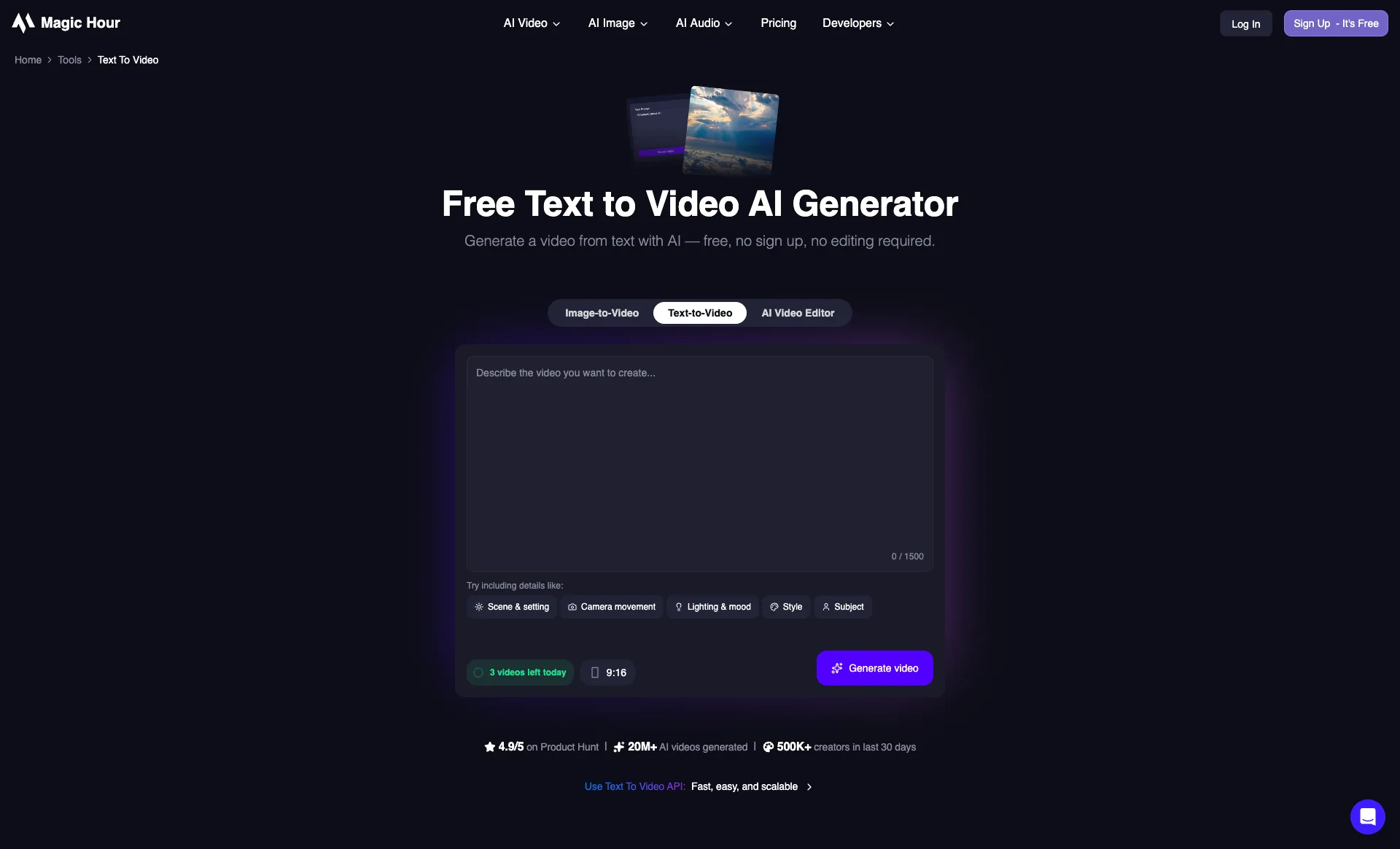
Magic Hour takes the aggregator approach. Instead of training its own foundation model, it runs Kling 2.5 and 3.0, Veo 3.1, Sora 2, LTX 2.3, Wan 2.2, and Seedance 2.0 behind a single interface and a single API key. For a developer that removes the part of this comparison which is genuinely tedious in production: separate contracts, separate request formats, and a re-integration every time a better model ships.
The practical payoff is per-shot model selection. Camera-heavy establishing shots can go to Kling, dialogue and prompt adherence to Veo 3.1, longer sequences to Sora 2 at up to 60 seconds, and audio-synced clips to LTX 2.3, all from the same codebase. The text-to-video API bills per second of output, from $0.023/sec, which is 24 credits per second at the base rate on paid plans, so spend tracks what you actually generate rather than a seat count.
The platform also covers the steps that raw model APIs leave to you. Lip sync, video face swap, voice cloning, and image generation are separate endpoints on the same account, which matters when your pipeline ends in a finished clip rather than a raw generation. There is a free tier of 3 generations per day with no account needed (480p exports, and free results may carry a watermark), and paid plans run $12/month for Creator (1024px export), $25/month for Pro (1472px), and $66/month for Business (4K) on annual billing, which works out to $144, $300, and $792 per year. Month to month those same tiers are $19, $39, and $99. API access is included on every paid tier rather than sold as an add-on.
- Best use cases: Multi-model pipelines, teams that want to swap models without re-integrating, workflows that need lip sync or face swap after generation
- Limitations: You do not control model weights or versions, and per-second billing costs more than self-hosting once volume gets high
Open-Source Models: Self-Host on Your Own Hardware
Wan 2.2 (Alibaba)

Wan 2.2 from Alibaba is the practical standard for self-hosted video generation in 2026. The model uses a Mixture-of-Experts architecture-27 billion total parameters with only 14 billion active per inference step-which keeps memory requirements manageable while maintaining output quality that competes meaningfully with commercial alternatives. It was trained on 1.5 billion videos and 10 billion images, which shows in its broad capability across subjects and styles.
The hardware accessibility is the headline feature. The smaller T2V-1.3B variant requires just 8.19GB of VRAM and generates a 5-second 480p video in approximately 4 minutes on an RTX 4090-consumer-grade performance that makes Wan 2.2 the default recommendation for developers who want to run video generation locally without enterprise hardware. The model also supports text-to-video, image-to-video, video editing, and video-to-audio in a single installation, and handles bilingual Chinese and English text rendering natively.
Bash# Install dependencies pip install torch torchvision torchaudio --extra-index-url https://download.pytorch.org/whl/cu121 pip install git+https://github.com/Wan-Video/Wan2.1.git # Download the T2V-1.3B model (most accessible variant) huggingface-cli download Wan-Video/Wan2.1-T2V-1.3B --local-dir ./models/Wan2.1-T2V-1.3B # Generate a video python generate.py \ --task t2v-1.3B \ --size 832*480 \ --ckpt_dir ./models/Wan2.1-T2V-1.3B \ --prompt "A time-lapse of cherry blossoms falling in a Japanese garden, golden hour"
- License: Open-source
- Minimum VRAM: 8.19GB (T2V-1.3B variant)
- GitHub: github.com/Wan-Video/Wan2.1
HunyuanVideo 1.5 (Tencent)

HunyuanVideo 1.5 from Tencent is the technically ambitious option in the open-source space. The model uses a dual-stream transformer architecture with a 3D causal VAE for spatiotemporal compression-a design that allows it to operate in a compressed latent space across both spatial and temporal dimensions simultaneously, rather than treating video as a sequence of independent image frames. Independent evaluations have placed it above Runway Gen-3 and Luma 1.6 in professional benchmarks for visual quality and text alignment.
The 8.3 billion parameter model requires 13.6GB VRAM for 720p output with memory offloading enabled, and generates 480p video in approximately 75 seconds on an RTX 4090. That's slower than Wan 2.2's smaller variant but produces noticeably higher quality output. Tencent actively maintains the repository with regular updates, and the project has a substantial community of contributors developing ComfyUI integrations and quantization variants.
Bash# Clone the repository git clone https://github.com/Tencent/HunyuanVideo.git cd HunyuanVideo # Create a virtual environment and install dependencies python -m venv hyvideo-env source hyvideo-env/bin/activate pip install -r requirements.txt # Download model weights (requires huggingface-cli) huggingface-cli download tencent/HunyuanVideo \ --local-dir ./ckpts/hunyuan-video-t2v-720p/transformers/ # Run inference python sample_video.py \ --video-size 720 1280 \ --video-length 129 \ --infer-steps 50 \ --prompt "A drone shot over a mountain range at dawn, mist in the valleys" \ --flow-reverse \ --seed 0 \ --embedded-cfg-scale 6.0 \ --save-path ./results/
- License: Open-source
- Minimum VRAM: 13.6GB (720p with offloading)
- GitHub: github.com/Tencent/HunyuanVideo
LTX-2 (Lightricks)

LTX-2 from Lightricks occupies a distinct position in the open-source landscape: it's the only model here with a documented commercial data provenance story. Its training data is licensed from Getty Images and Shutterstock, which means there's a defensible legal basis for commercial use that other models-trained on web-scraped data-cannot match. For enterprise applications where IP risk is a real concern, this matters.
On the technical side, LTX-2 generates native 4K video at up to 50fps for up to 20 seconds, with synchronized audio generation built into the same architecture (19 billion parameters total: 14B for video, 5B for audio). NVFP8 quantization reduces model size by approximately 30% and improves inference performance by 2x on supported NVIDIA hardware. The Apache 2.0 license covers commercial use for organizations under $10M annual revenue, with tiered licensing for larger companies.
- License: Apache 2.0 (commercial for orgs under $10M ARR; tiered above)
- Parameters: 19B (14B video + 5B audio)
- GitHub: github.com/Lightricks/LTX-Video
Production Hardware for Self-Hosted Video Generation
Video generation is substantially more VRAM-intensive than image generation. A 5-second video at 480p contains 120 frames at 24fps, each of which requires the model to maintain coherent spatiotemporal context. The practical effect is that models which comfortably fit in memory for image generation may not run at all for video.
A rough sizing guide for consumer hardware:
RTX 3090 / RTX 4080 (16–24GB VRAM): Can run Wan 2.2's smaller T2V variant for 480p output. HunyuanVideo 1.5 is feasible with aggressive memory offloading. This is the practical entry point for self-hosted video generation.
RTX 4090 (24GB VRAM): The recommended baseline for comfortable self-hosted video work. Wan 2.2 runs at 720p, HunyuanVideo 1.5 produces clean 480p output in ~75 seconds, and GGUF-quantized variants of most models are accessible.
Dual RTX 4090 / A100 (48GB+ VRAM): Opens up higher-resolution inference, larger batch sizes for production pipelines, and faster iteration. Required for LTX-2 at full 4K without quantization.
For Apple Silicon users, the M3 Max and M4 Max with 48GB+ unified memory can run Wan 2.2 and HunyuanVideo 1.5 via MPS (Metal Performance Shaders), though throughput is lower than an equivalent NVIDIA workstation.
| Hardware | Recommended Model | Resolution | Approx. Generation Time (5s clip) |
|---|---|---|---|
| RTX 4080 (16GB) | Wan 2.2 T2V-1.3B | 480p | ~6–8 min |
| RTX 4090 (24GB) | Wan 2.2 / HunyuanVideo 1.5 | 480p–720p | ~4–6 min |
| M3 Max (48GB) | Wan 2.2 / HunyuanVideo 1.5 | 480p–720p | ~8–12 min |
| Dual RTX 4090 | LTX-2 / HunyuanVideo 1.5 | 720p–4K | ~2–4 min |
Choosing the Right Model for Your Use Case
The model you choose should match the actual constraints of your project, not just the top benchmark score.
For maximum output quality with no hardware constraints: Runway Gen-4.5 for precise motion control and physics-heavy scenes, Veo 3.1 for 4K production.
For audio-visual synchronization in a single pass: Kling 2.6 and LTX-2 both handle audio generation natively-relevant if you need synchronized sound without building a separate audio pipeline.
For self-hosting on consumer hardware: Wan 2.2 is the practical default. Start with the T2V-1.3B variant on 8GB VRAM and graduate to the larger model when quality demands it.
For commercially safe self-hosting: LTX-2 is the only open-source model with documented licensed training data and a clean Apache 2.0 commercial use story.
For access to several models through one integration: Magic Hour puts Kling, Veo 3.1, Sora 2, LTX 2.3, Wan 2.2, and Seedance behind one API billed per second of output, which is the shortest path to comparing models on your own prompts before committing to one.
For research and maximum quality locally: HunyuanVideo 1.5 consistently outperforms models like Runway Gen-3 in independent evaluations, at the cost of higher VRAM requirements.
Conclusion
AI video generation in 2026 is no longer a research preview. The proprietary models-Veo 3.1, Runway Gen-4.5, Kling 2.6-have reached a quality level where they're being integrated into production creative workflows, not just demos. The open-source models-Wan 2.2, HunyuanVideo 1.5, LTX-2-have compressed the quality gap enough that self-hosting is a legitimate architectural choice rather than a compromise.
The practical starting point depends on your constraints. If you want to experiment quickly and cost-effectively, Luma Ray3 at $7.99/month or Kling 2.6's free tier are the lowest-friction entry points in the commercial space. If you want to own your pipeline end to end, start with Wan 2.2's T2V-1.3B variant-8GB VRAM, free, and good enough output to evaluate whether local video generation fits your workflow before investing in heavier hardware.