
Businesses of all sizes and across every industry now contend with an average of 2,803 attempted cyberattacks per organization each week, according to Check Point Research's September 2026 report. For software developers pulling dependencies into local environments, this relentless volume transforms a routine repository pull into a high-stakes security gamble.
Malicious installers and trojanized open-source libraries bypass traditional perimeter defenses by disguising themselves as routine productivity utilities, database drivers, or command-line tools. When a developer executes an unverified binary or pulls a typosquatted package, they inadvertently grant remote access to malicious actors. Recognizing how these vectors operate is the first step toward building a resilient local defense strategy that protects both personal productivity and enterprise codebases.
The sheer scale of open-source adoption means that a single compromised package can ripple across thousands of dependent applications within hours. Developers are pressured to move fast and ship features under tight deadlines, which often leads them to bypass standard security checks when downloading third-party tools or experimental libraries. Understanding the anatomy of these attacks is crucial for writing secure code and maintaining a clean local development environment.
Anatomy of Modern Software Supply Chain Compromises
Modern threat actors leverage sophisticated social engineering and automated repository poisoning to target development teams. Ecosystem attacks have surged dramatically as adversaries target popular package managers. Developers often trust package registries implicitly, assuming that automated scanning tools catch every anomaly before it reaches local machines.
Unfortunately, subtle typosquatting and compromised maintainer accounts allow malicious payloads to slip past standard checks. These payloads execute arbitrary code during installation, scraping environment variables, SSH keys, and cloud credentials within seconds.
Equipping your workstation with the right utilities makes sense, so take time to download free Bitdefender Antivirus and other protective programs to add an essential layer of monitoring that flags suspicious installer behavior before system files are altered. Security tools that are proactive in threat detection fare much better against modern threats.
Advanced persistent threats often use multi-stage payloads hidden inside seemingly innocuous installation wizards downloaded from unofficial mirrors. These installers might appear to function correctly while silently installing background daemons that monitor keystrokes or intercept local API tokens. Engineers must learn to scrutinize every downloaded binary, checking digital signatures, publisher certificates, and file hashes against trusted sources before execution.
To harden your daily workflow against rogue binaries, keep these core practices front of mind:
- Verify all cryptographic hashes before executing downloaded binaries on your primary workstation
- Isolate experimental packages inside ephemeral containers rather than running them natively
- Audit lockfiles regularly for unauthorized dependency tree modifications
Securing Your Local Environment and Upstream Dependencies
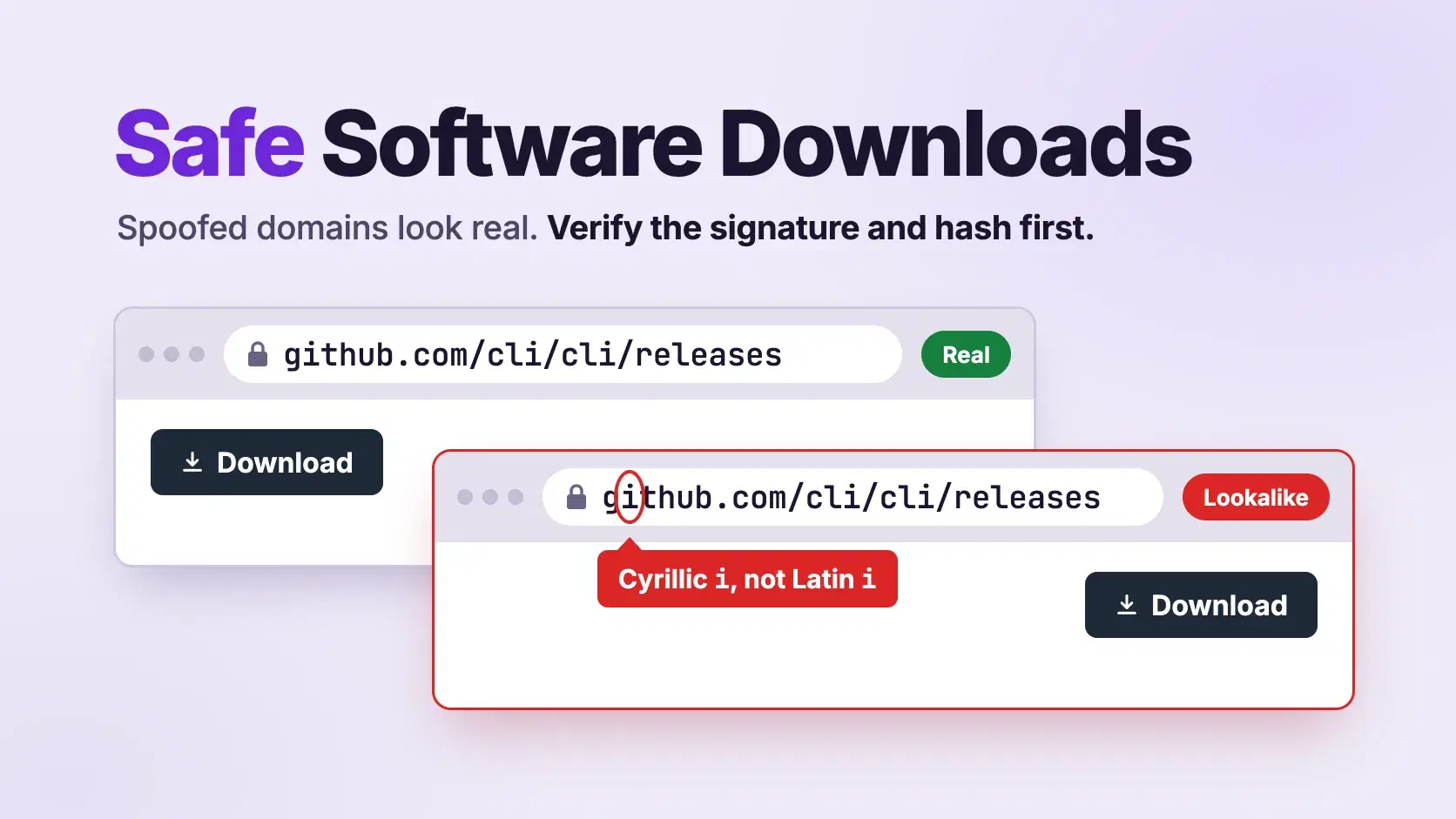
Securing your local machine requires shifting security left into your personal habit stack. When you download tools directly from vendor websites or GitHub releases, treat every executable as untrusted until proven otherwise. Code signers can be compromised, and attackers spoof legitimate project domains, sometimes with convincing homograph attacks.
Furthermore, monitoring incoming network requests during package installation helps catch data exfiltration attempts in real time. Malicious scripts often use obfuscated domain requests to leak local environment secrets immediately after installation. Maintaining strict separation between your personal browsing environment and your heavy development workspace prevents casual web downloads from contaminating core project repositories.
Many developers make the critical mistake of running local development servers under root or administrator privileges, which amplifies the damage of any malicious installer. If a trojanized package executes with elevated privileges, it can modify system directories, install rootkits, and manipulate core network configurations without triggering standard user access prompts. Adopting the principle of least privilege for your local user account provides an extra safety net against hidden malware payloads.
Establishing Proactive Endpoint Hygiene for Engineers
Engineering teams frequently overlook the endpoint security posture of individual developers, focusing heavily on server-side infrastructure instead. A compromised developer laptop serves as an ideal pivot point into corporate infrastructure, which can give attackers administrative access to production CI/CD pipelines and tools.
Regular vulnerability assessments of local development tools help identify outdated runtimes and insecure command-line utilities that attackers actively exploit. By combining strict binary verification practices with real-time behavioral protection, engineering teams can drastically reduce their exposure to malicious installers and compromised open-source dependencies.
Strong workstation hygiene also means keeping your operating system, package managers, and development environments fully updated with the latest security patches. Malware disguised as developer utilities is frequently bundled into installers circulating on forums and secondary download portals. By sourcing tools exclusively from official developer portals and verifying digital signatures, you eliminate a major vector for accidental compromise and take one of the most overlooked backdoors to mission-critical systems out of the equation.
Conclusion
Protecting your code and your hardware requires an ongoing commitment to rigorous verification standards rather than relying on perimeter security alone. For deeper insights into maintaining secure engineering environments, check out our latest articles on our blog.
Related DevToolLab Tools
- SHA-256 File Checksum - hash a downloaded installer in your browser, then compare the result with the checksum on the vendor's release page.
- EXE Viewer - see who signed a Windows
.exeor.dll, along with its imports, sections and entropy, without running it. - Mach-O Viewer - read a macOS binary's code signature, entitlements and linked libraries before you open it.
- Lockfile Analyzer - list the install scripts and the git or tarball sources in a
package-lock.jsonoryarn.lock.
Related Guides
- npm Supply Chain Attack Mitigation - block dependency install scripts and add a release-age gate in npm, pnpm, Yarn and Bun
- Supply Chain Security Tools - SBOM generators, build provenance and vulnerability scanners compared
- Best Secret Scanning Tools - find the keys and tokens a malicious install script would go after
- Container Security Tools Compared - image scanning and runtime defense for the containers you test packages in