
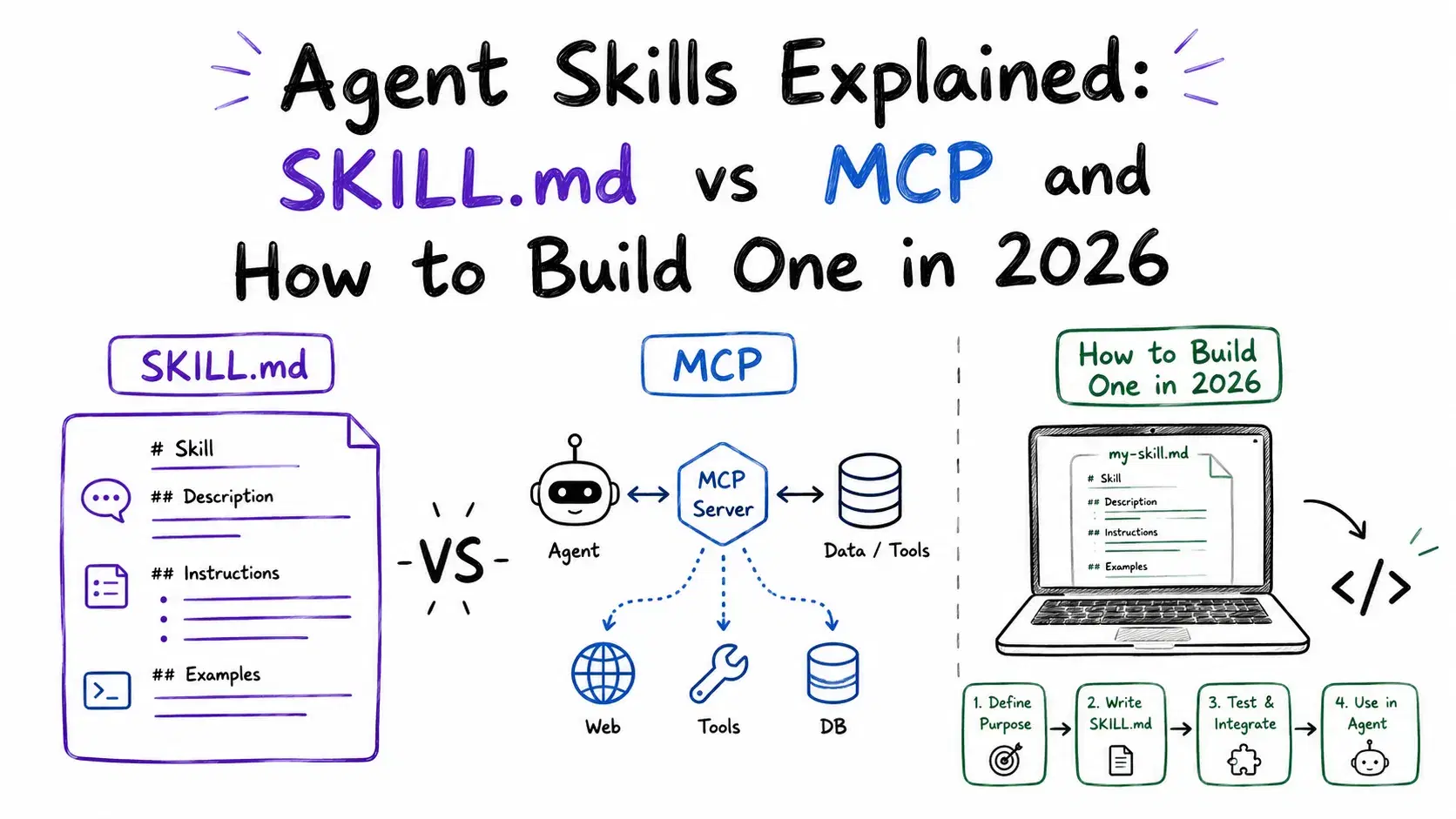
Anthropic published the Agent Skills specification on December 18, 2025. Within 48 hours, Microsoft had wired it into VS Code and OpenAI had added it to both ChatGPT and Codex CLI. By March 2026, 32 competing tools read the same SKILL.md files from the same folder structure - Google's Gemini CLI, JetBrains' Junie, AWS's Kiro, Block's Goose. By June 2026, the official showcase at agentskills.io listed roughly 40 supporting products, including Cursor, GitHub Copilot, OpenCode, Databricks Genie Code, and Snowflake Cortex Code.
That is a faster cross-vendor adoption curve than MCP had in its first year, and MCP was already unusually fast. The reason is boring in the best way: the entire spec is two required YAML fields and a Markdown body. No JSON-RPC, no auth handshake, no server process to keep alive. A competent engineer can add support to any agent tool in an afternoon.
This guide covers what a Skill actually is, exactly what goes in SKILL.md (with the real field constraints, not a paraphrase), how it's different from MCP, and how to write and validate one yourself - with a working example I tested locally.
Quick facts, if you're skimming:
- Agent Skills is an open spec Anthropic published December 18, 2025 - a folder with a
SKILL.mdfile, nothing more. - It's not a competitor to MCP. MCP gives an agent live capabilities (call an API, query a DB). Skills give it static procedures (how your team wants a task done).
- ~40 tools support it as of June 2026: Claude, Cursor, GitHub Copilot, VS Code, Gemini CLI, OpenCode, and more.
- Two required frontmatter fields:
nameanddescription. That's the entire barrier to entry. - Validate any skill with
npx skills-ref validate ./your-skillbefore you ship it.
What Is an Agent Skill?
A Skill is a folder. At minimum it contains one file, SKILL.md, with YAML frontmatter followed by Markdown instructions:
textskill-name/ ├── SKILL.md # required: metadata + instructions ├── scripts/ # optional: executable code the agent can run ├── references/ # optional: docs the agent loads on demand └── assets/ # optional: templates, images, data files
There's no runtime, no protocol, no server. The agent reads the file and follows the instructions using whatever tools it already has (Bash, file read/write, etc). Compare that to an MCP server, which is a separate process speaking JSON-RPC that the agent calls over stdio or HTTP.
Progressive disclosure: why skills don't blow up your context window
Skills load in three tiers, and understanding this matters for how you write one:
- Metadata (~100 tokens) - the
nameanddescriptionfields from every installed skill's frontmatter are loaded into the system prompt at startup. This is how the agent knows a skill exists without paying for its full content. - Instructions (under 5,000 tokens recommended) - once the agent decides a skill is relevant to the current task, it loads the full
SKILL.mdbody. - Resources (as needed) - files under
scripts/,references/, orassets/are read only when the instructions point to them.
This is the whole trick: you can have hundreds of skills installed and only pay context for the ones actually in play, plus a tiny metadata tax for the rest.
The SKILL.md Spec, Field by Field
The full specification lives at agentskills.io/specification. Here's every frontmatter field and its actual constraints:
| Field | Required | Constraints |
|---|---|---|
name | Yes | Max 64 chars. Lowercase letters, numbers, hyphens only. Can't start/end with a hyphen or contain --. Must match the parent directory name. |
description | Yes | Max 1024 chars. Must describe what the skill does and when to use it. |
license | No | License name, or a reference to a bundled license file. |
compatibility | No | Max 500 chars. Environment requirements - target product, required binaries, network access. |
metadata | No | Arbitrary string-to-string map for anything the spec doesn't cover. |
allowed-tools | No | Experimental. Space-separated list of pre-approved tools, e.g. Bash(git:*) Bash(jq:*) Read. |
The name rule is stricter than it looks: pdf-processing is valid, but PDF-Processing and pdf--processing are not, and the name has to match the folder it lives in.
The description field does double duty - it's the only thing the agent sees before deciding whether to load the rest of the file. A vague one-liner like "Helps with PDFs" means the skill won't get picked up when it should. A good description names both the capability and the trigger: what the skill does, and what kind of request should activate it.
Keep the SKILL.md body itself under 500 lines. If it grows past that, move detail into references/ and link to it with a relative path - the agent only opens those files when the instructions actually point at them.
Agent Skills vs. MCP: Different Layers, Not Competitors
The most common confusion is treating these as rival standards. They solve different problems:
| MCP | Agent Skills | |
|---|---|---|
| What it is | A client-server protocol (JSON-RPC over stdio/HTTP) | A folder convention (SKILL.md + files) |
| Solves for | Live capabilities - calling APIs, querying databases, fetching current data | Static procedures - workflows, domain knowledge, step-by-step playbooks |
| Runtime | Separate process that must stay running | None - the agent's own tools execute it |
| Best fit | Data changes between runs (ticket status, DB rows, search results) | Knowledge is stable for weeks (how your team formats a changelog, how to triage a specific error class) |
| Failure mode | Can fail independently of the agent (server crash, auth expiry) | Can only fail the way a bad prompt fails |
If you already read our guide to the best MCP servers, the mental model carries over directly: MCP is the nervous system connecting the agent to the outside world, Skills are the playbooks for what to do once it's there. Most serious setups in 2026 use both - MCP to fetch a live GitHub issue, a Skill to define the exact triage steps once it's fetched.
How to Build a SKILL.md File (Tested Example)
Here's a complete, tested example: a skill that decodes a failed HTTP API response into a plain-English cause and fix, using a bundled reference file instead of stuffing everything into the main instructions.
mkdir -p api-error-decoder/references
markdown--- name: api-error-decoder description: Decode HTTP API error responses (status code, provider-specific error body) into a plain-English cause and fix. Use when the user pastes a failed API response, a stack trace containing an HTTP status, or asks why a request failed. license: MIT metadata: author: devtoollab version: "1.0" compatibility: No network access needed - static lookup only --- # API Error Decoder Decode a failed HTTP API call into: what happened, why, and the most likely fix. ## Steps 1. Extract the HTTP status code and any JSON error body from the user's paste. 2. Look up the status code meaning in `references/http-status-codes.md`. 3. If the body includes a provider-specific error (Stripe, GitHub, OpenAI, AWS), check `references/provider-errors.md` for that provider's known codes. 4. Report: status meaning, most likely root cause given the body, and one concrete fix. 5. If the status is 429, always mention rate-limit backoff as the fix before anything else. ## Output format - **Status:** <code> - <meaning> - **Likely cause:** <one line> - **Fix:** <one actionable step>
The reference file it loads on demand:
markdown# HTTP Status Reference (abridged) - 400 Bad Request - malformed syntax or invalid request payload - 401 Unauthorized - missing or invalid auth credentials - 403 Forbidden - authenticated but not permitted - 404 Not Found - resource/endpoint does not exist - 409 Conflict - request conflicts with current resource state - 422 Unprocessable Entity - validation failed on well-formed request - 429 Too Many Requests - rate limit exceeded, check Retry-After header - 500 Internal Server Error - unhandled exception on the server - 503 Service Unavailable - server temporarily overloaded or down
Notice the shape: the main SKILL.md never explains what a 429 means - that detail lives in references/http-status-codes.md and only gets pulled into context when step 2 actually needs it. That's progressive disclosure applied on purpose, not by accident.
Validating before you ship it
Anthropic's reference implementation ships a small CLI, skills-ref, that checks frontmatter against the spec. I ran it against the skill above:
Bashnpx --yes skills-ref validate ./api-error-decoder
Valid skill: ./api-error-decoder
And against a deliberately broken one (name: Bad-Skill, which violates the lowercase rule):
npx --yes skills-ref validate ./Bad-Skill
Validation failed for ./Bad-Skill:
  - Skill name 'Bad-Skill' must be lowercase
Both runs are copy-pasteable and will reproduce exactly - skills-ref is a real, published npm package (skills-ref@0.1.5 at the time of writing), not a hypothetical tool.
Where to put it
For Claude Code specifically: personal skills go in ~/.claude/skills/<name>/SKILL.md, project skills (checked into git, shared with your team) go in .claude/skills/<name>/SKILL.md. Other tools follow their own convention but the same SKILL.md file works across all of them - that's the entire point of the standard. If you haven't set up Claude Code's skill directory before, our Claude Code skills setup guide covers the twelve highest-value skills to install first.
Is It Safe to Install Community Skills?
Fast adoption produced a predictable side effect: volume without curation. SkillsMP, one of the larger community catalogs, indexes roughly 1.9 million public skills scraped off GitHub. SkillsBench, a benchmark project that actually ran a sample of 47,150 public skills against real tasks, found an average quality score of 6.2 out of 12. Curated, hand-reviewed skill sets raised agent task pass rates by an average of 16.2 percentage points over the scraped baseline.
Short answer: not by default. Treat a random GitHub skill repo the way you'd treat a random npm package before npm audit existed. Before installing a community skill:
- Read the
SKILL.mdbody in full. It's plain Markdown - there's no reason not to. - Check
scripts/for anything that shells out, curls an external host, or reads credentials. A skill's instructions can tell an agent to run arbitrary commands; that's the same trust boundary as a Bash-capable MCP server, just less discussed. - Prefer skills with a
licensefield and a real maintainer over anonymous scraped submissions. - Run
skills-ref validateat minimum - it won't catch malicious instructions, but it will catch a malformed or spoofed frontmatter.
This is the same lesson the MCP ecosystem learned after the April 2026 stdio RCE disclosure we covered in our MCP guide: an open standard with near-zero adoption friction will always outrun its own vetting layer. That's not an argument against using it - it's an argument for being deliberate about what you install.
Conclusion
Agent Skills won because the spec is small enough to implement in an afternoon and useful enough that 40 competing companies had a reason to. If you're already writing repeated prompts by hand for the same workflow - triaging the same class of error, formatting release notes the same way, reviewing PRs against the same checklist - that's a SKILL.md waiting to be extracted, and it now works in whichever agent tool your team actually uses, not just one vendor's.
Start with one skill for the workflow you repeat most often this week. Validate it with skills-ref before you commit it to a shared .claude/skills/ directory. Keep the description field specific about both what it does and when to trigger it - that one field is doing more work than anything else in the file.
Related DevToolLab Tools
- YAML Validator - Check your
SKILL.mdfrontmatter for YAML syntax errors beforeskills-refeven runs. - Markdown Editor - Write and preview the
SKILL.mdinstruction body with live rendering before you ship it. - Diff Checker - Compare two versions of a skill's instructions when tuning it after a failed run.
- Regex Tester - Debug the extraction patterns a skill's bundled scripts use to parse log lines or error bodies.
- JSON Schema Validator - Validate structured output a skill produces (e.g. a JSON report) against a schema before handing it downstream.
Adoption numbers and the spec details above reflect the state of the Agent Skills ecosystem as of July 2026. The spec is versioned and evolving - check agentskills.io/specification for the current field list before publishing a skill to a shared registry.