
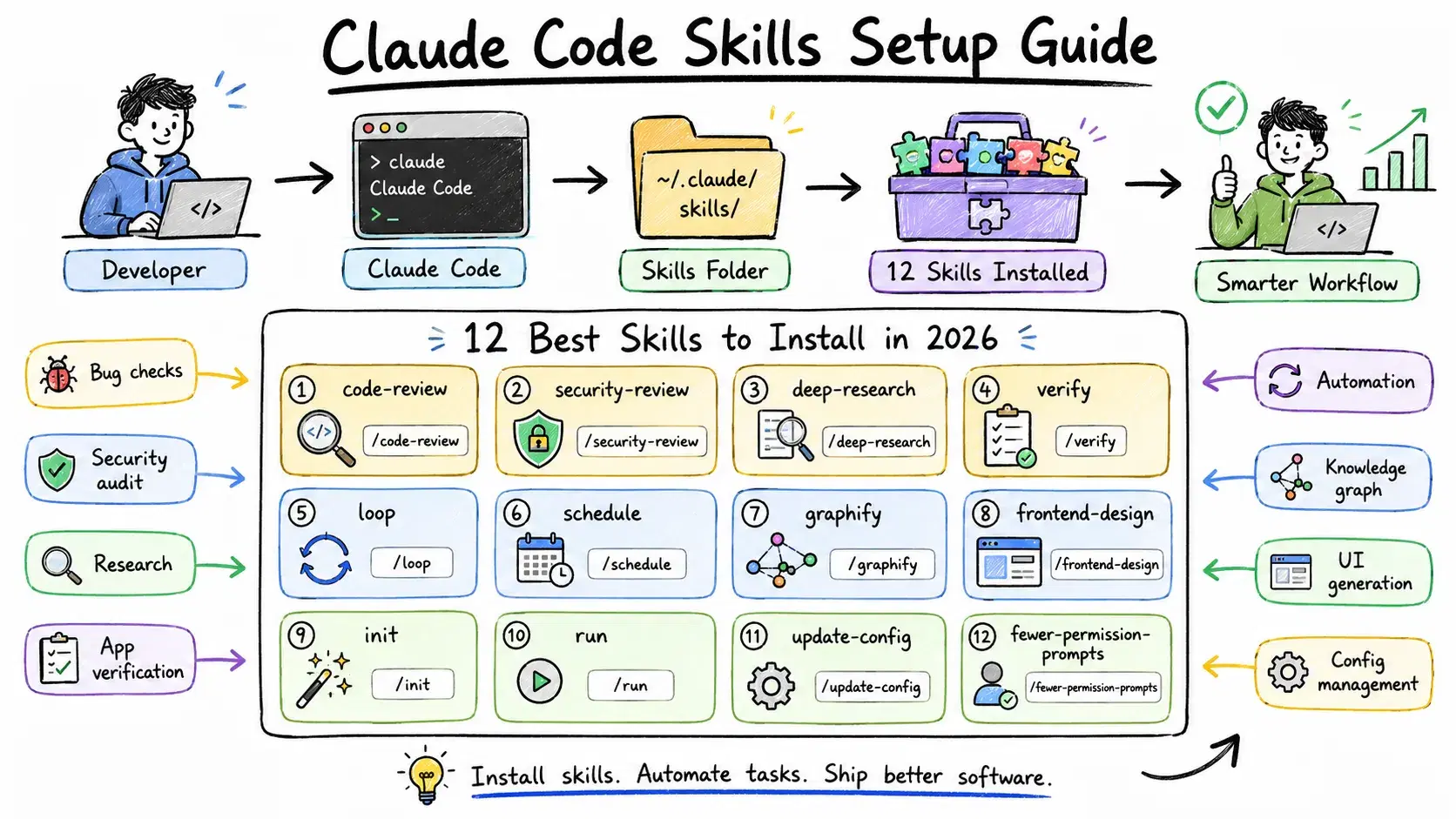
Out of the box, Claude Code is useful. With the right skills installed, it becomes something different - an agent that knows your workflow, follows team conventions automatically, runs security audits on demand, and schedules follow-up tasks without being asked. This guide covers the twelve highest-value skills, how to install them, and how to configure the environment around them.
Skills, Commands, and Plugins - What's the Difference?
A skill is a directory at ~/.claude/skills/<name>/SKILL.md (personal) or .claude/skills/<name>/SKILL.md (project). The directory name becomes the slash command. Content only loads when invoked - it doesn't add to your session context on startup.
A command (.claude/commands/name.md) is the older flat-file format. Still supported; skills take precedence when names conflict.
A plugin is a versioned bundle containing skills, hooks, and MCP definitions packaged for distribution. Installing one places files in the right directories automatically.
Claude Code ships several bundled skills by default: /code-review, /batch, /debug, /loop, /claude-api, /run, and /verify.
How to Install Skills
From inside a session (recommended): Type /plugin, go to Discover, pick a skill, and choose User scope (~/.claude/skills/) or Project scope (.claude/skills/). Browse available skills at claudeskills.info.
Manual install:
Bashmkdir -p ~/.claude/skills/code-standards cat > ~/.claude/skills/code-standards/SKILL.md << 'EOF' --- description: Review code against our team coding standards. --- Review the current diff for naming violations and functions over 50 lines. EOF
Project scope - place in .claude/skills/ and commit to git so the whole team gets it.
CLAUDE.md: Keep it Under 120 Lines
Every line of CLAUDE.md spends context budget. Anthropic's guidance is under 200 lines per file - keep it lean and use .claude/rules/*.md with paths: selectors for subsystem-specific instructions.
Four scopes load in order (all concatenated, not overriding):
Bash~/.claude/CLAUDE.md # Personal, all projects ./CLAUDE.md # Project, checked into git ./.claude/CLAUDE.md # Also valid project location ./CLAUDE.local.md # Local, gitignored
A good project CLAUDE.md covers four things: what the project is, the tech stack, conventions Claude wouldn't infer from code, and commands to know before running anything.
markdown# Project: PaymentService Node.js 22 + TypeScript 5.x REST API. Express 5, Prisma, PostgreSQL 16. ## Commands - `npm run dev` - dev server on :3001 - `npm test` - Jest suite ## Conventions - `Result<T, E>` for all service returns - never throw - Monetary values in cents (integer) - never floats ## Off-limits - Never modify src/legacy/ - Never use `any` type
Run /init to have Claude generate a first draft, then trim it to under 120 lines.
The 12 Best Claude Code Skills in 2026
| # | Skill | Command | What it does |
|---|---|---|---|
| 1 | code-review | /code-review | Reviews diff for bugs, simplification, efficiency |
| 2 | security-review | /security-review | OWASP Top 10 security audit on current branch |
| 3 | deep-research | /deep-research | Multi-source research with verified citations |
| 4 | verify | /verify | Launches app and checks a specific behavior works |
| 5 | loop | /loop | Runs a command on a recurring interval |
| 6 | schedule | /schedule | Creates remote agents on a cron schedule |
| 7 | graphify | /graphify | Turns codebase into a queryable knowledge graph |
| 8 | frontend-design | /frontend-design | Generates production-grade UI with real design quality |
| 9 | init | /init | Generates a first-draft CLAUDE.md from the repo |
| 10 | run | /run | Launches app and reports behavior with screenshots |
| 11 | update-config | /update-config | Manages permissions, hooks, and env vars in settings.json |
| 12 | fewer-permission-prompts | /fewer-permission-prompts | Auto-approves your most common tool calls |
1. code-review
The most-installed Claude Code skill in 2026. Reviews the current diff for correctness bugs, reuse opportunities, and efficiency issues.
Bash/code-review # medium effort /code-review --effort high # broader pass, more findings /code-review --fix # apply fixes automatically /code-review --comment # post as inline PR comments (requires GitHub MCP)
Use --effort low for daily pre-commit checks, --effort high before major releases.
2. security-review
Checks the current branch against OWASP Top 10:2025, ASVS 5.0, and Agentic AI security patterns - SQL injection, XSS, SSRF, auth flaws, and dependency risks across 20+ languages.
/security-review
Run this before any PR that touches authentication, data validation, or external service calls. Unlike a general code review, it's structured around security-specific threat models.
3. deep-research
Fans out web searches, fetches primary sources, adversarially verifies claims, and synthesizes a cited report with numbered source links.
Bash/deep-research "OWASP Top 10 2025 changes vs 2021" /deep-research "Prisma vs Drizzle ORM performance benchmarks 2026"
Specific questions produce better results. Include parameters (budget, region, use case) in the prompt directly rather than waiting for the skill to ask.
4. verify
Launches the app, exercises a feature in a real browser session, captures screenshots, and reports whether behavior matches expectations.
Bash/verify "the login form submits and redirects to /dashboard" /verify "the cart total updates correctly when quantity exceeds stock"
Tests verify logic; /verify verifies behavior. Essential after UI changes where a passing test suite doesn't guarantee the rendered output is correct.
5. loop
Runs a prompt or slash command on a recurring interval - useful for polling CI, watching deploys, or monitoring background jobs.
Bash/loop 5m /verify "the payment webhook is processing" /loop 2m "check deploy status at staging.example.com" /loop /deep-research "security advisories for our dependencies" # self-paced
Omit the interval to let Claude self-pace based on the task.
6. schedule
Creates remote scheduled agents that run on a cron schedule or at a specific time. They continue even when your laptop is closed.
Bash/schedule "every Monday at 9am run /security-review and post to Slack" /schedule "tomorrow at 10am check if the DB migration completed" /schedule list
Results appear as notifications when you next open Claude Code. The right tool for recurring audits and dependency checks.
7. graphify
Builds a persistent knowledge graph of the codebase with community detection and query tools. Once built, ask structural questions without re-reading the entire repo.
Bash/graphify # build graph /graphify "which modules depend on payment service?" /graphify explain src/auth/middleware.ts
The code-review-graph variant reports 6.8x fewer tokens on code reviews by querying the graph for blast radius instead of reading every file.
8. frontend-design
Generates production-grade frontend interfaces with genuine design quality - not generic AI aesthetics. Supports React, Next.js, Vue, Svelte, SwiftUI, Tailwind, and shadcn/ui with 50+ named styles.
Bash/frontend-design "pricing table, three tiers, dark mode, glassmorphism" /frontend-design "improve checkout form for accessibility and visual hierarchy"
Use it as a starting point. It produces better initial quality than asking Claude directly because the skill includes design system awareness and explicit anti-patterns.
9. init
Scans the repo and generates a first-draft CLAUDE.md covering structure, tech stack, commands, and inferred conventions.
/init
Review the output, trim to under 120 lines, remove anything Claude would learn in one session, and commit. Run it at the start of any new project or when onboarding to an unfamiliar codebase.
10. run
Launches the app using the right method for the project type, exercises a specific feature, and reports back with screenshots.
Bash/run /run "confirm dark mode toggle persists across page refreshes"
The right check after any change that affects visible behavior, before writing a PR description.
11. update-config
Configures settings.json - permissions, hooks, environment variables, and MCP server definitions. Automated behaviors require hooks here, not CLAUDE.md, because hooks execute in the harness rather than as model instructions.
Bash/update-config "allow npm run build without confirmation" /update-config "set NEXT_PUBLIC_ENV=development" /update-config "before every git commit, run npm run lint"
Specify global (~/.claude/settings.json) or project (.claude/settings.json) scope explicitly.
12. fewer-permission-prompts
Scans recent transcripts, identifies your most-approved tool calls, and adds a prioritized allowlist to .claude/settings.json. Run it after the first week on a project.
/fewer-permission-prompts
Presents a settings.json diff you review before applying. Typically reduces daily prompts by 60-80% - approving the same things once instead of repeatedly.
settings.json: Hooks and Permissions
A minimal project settings.json:
JSON{ "permissions": { "allow": ["Bash(npm run dev)", "Bash(npm test)", "Bash(git diff*)"], "deny": ["Bash(curl *)", "Read(./.env)"] }, "hooks": { "PostToolUse": [{ "matcher": "Edit|Write", "hooks": [{ "type": "command", "command": "npm run lint --fix 2>/dev/null || true", "timeout": 30 }] }] } }
The PostToolUse lint hook runs automatically after every file Claude edits. The deny list blocks .env reads and arbitrary curl calls at the permission layer. Run /update-config to write and validate this rather than editing JSON by hand.
Building Your Own Skill
If you repeat a prompt more than three times a week, it belongs in a skill:
Bashmkdir -p ~/.claude/skills/changelog cat > ~/.claude/skills/changelog/SKILL.md << 'EOF' --- description: Generate a CHANGELOG entry for unreleased changes. --- ## Context !`git log $(git describe --tags --abbrev=0)..HEAD --oneline` ## Instructions Group commits into: Features, Bug Fixes, Breaking Changes. Write in Keep a Changelog format and add to the top of CHANGELOG.md. EOF
The !`git log ...` line injects live command output before Claude reads the skill. Skills are instructions, not conversations - use imperative verbs, specify output format, and inject live data rather than asking Claude to gather it.
Conclusion
A properly configured setup - CLAUDE.md under 120 lines, the twelve skills above, and a settings.json with a permission allowlist and lint hook - takes about two hours and meaningfully changes the daily experience. Run /code-review and /security-review before every PR, /verify after UI changes, /fewer-permission-prompts after the first week, and /schedule for anything recurring.
Check claudeskills.info/best for updated rankings as new skills ship.
Related DevToolLab Tools
- JSON Formatter - Validate and format
settings.jsonbefore committing. Catches syntax errors in permission rules. - YAML Formatter - Format YAML config files for MCP servers and CI pipelines.
- Diff Checker - Compare versions of CLAUDE.md or skill files side by side.
- Regex Tester - Test permission matchers like
Bash(git diff*)before adding them to settings.