
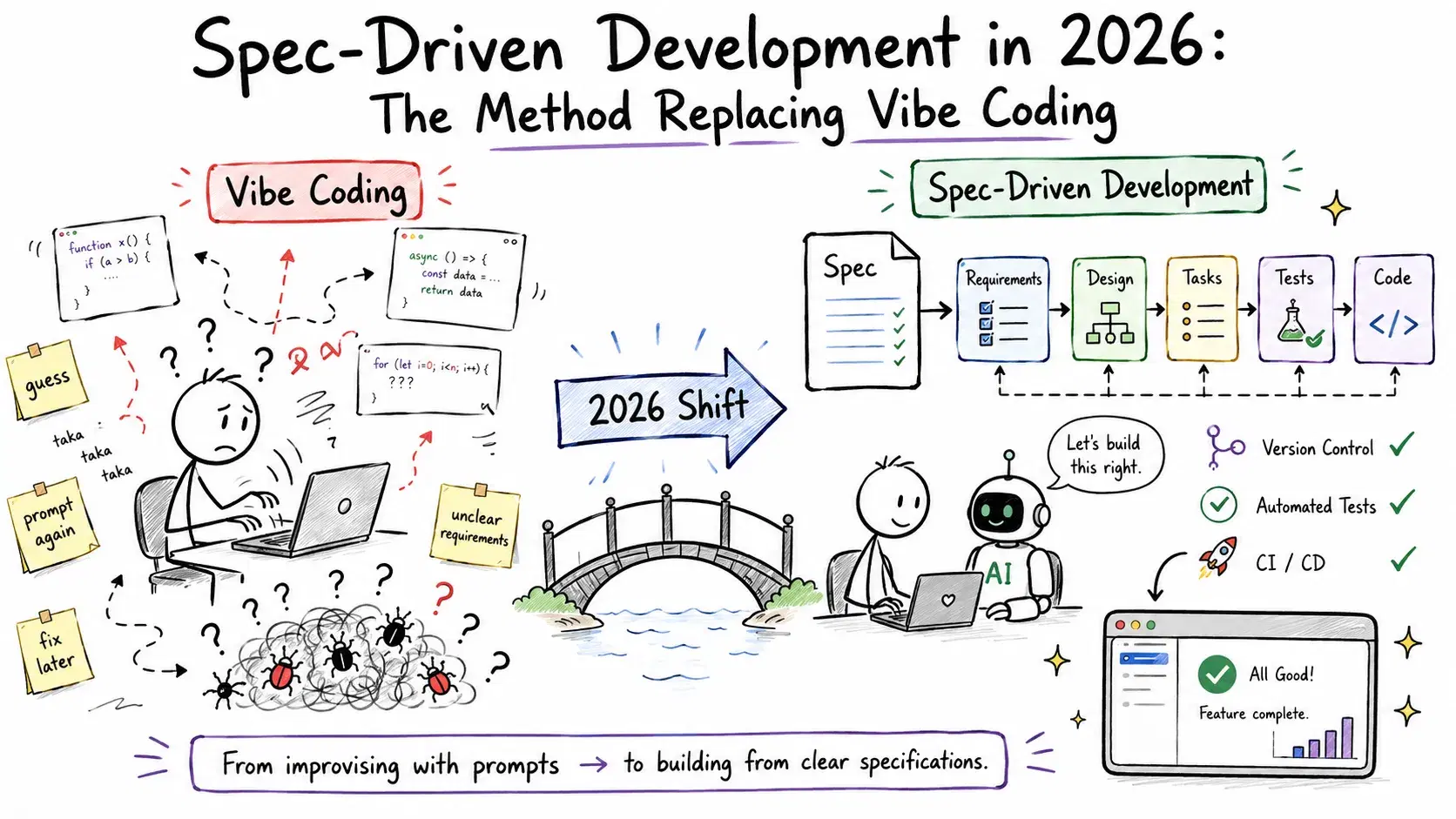
Andrej Karpathy coined "vibe coding" in February 2025 and the term stuck. A year later he walked it back: the vibe coding era is ending, he said. We are entering agentic engineering - orchestrating agents against detailed specifications, not hoping a prompt lands somewhere useful.
The numbers back it: early adopters of spec-driven workflows report 3-10x higher first-pass success rates from AI agents on non-trivial tasks. GitHub's Spec Kit crossed 111,000 stars by June 2026 and has since passed 132,000, hitting 1.0 on August 21, 2026 after a year of 0.x releases. AWS launched Kiro - a ground-up IDE replacement for Amazon Q Developer - built entirely around specs as the unit of work. DeepLearning.AI launched a dedicated "Spec-Driven Development with Coding Agents" short course taught by Google's Sandeep Dinesh - a reliable signal that a methodology has crossed from experimental to mainstream.
This is not hype cycling to the next thing. It is the inevitable consequence of AI agents becoming capable enough that the bottleneck shifted from "can the agent code?" to "does the agent know what to build?"
Why Vibe Coding Breaks at Scale
Vibe coding works for small, self-contained tasks. "Add a dark mode toggle" - fine, the agent figures it out. "Build a multi-tenant billing system with usage-based pricing" - the prompt is massively underspecified, the agent makes reasonable assumptions, and six hours of generated code later you have something that almost works and nobody fully understands.
Three failure modes appear consistently once teams scale AI-assisted coding:
Intent drift: The model picks reasonable defaults that differ from what the team actually wanted. No one caught it because the code looked correct.
Hallucinated interfaces: The agent invented an API method, a configuration key, or a database column that does not exist. It compiled. It failed at runtime.
Context collapse: On tasks spanning multiple sessions or multiple files, the agent loses track of decisions made earlier and contradicts itself. The longer the project, the worse this gets.
SDD addresses all three by forcing the spec to be written before any code generation begins. You cannot drift from an intent that was written down, reviewed, and approved. You cannot hallucinate an interface that was explicitly specified. You cannot forget an architectural decision recorded in a design document.
For larger organizations, these workflows can also become part of broader custom generative AI development services for enterprises, where agentic coding, system integration, testing, and production deployment are designed around existing engineering requirements and infrastructure.
The Core Idea: Spec as Source of Truth
In traditional development, code is the source of truth. Comments, docs, and tickets try to explain what the code does and why.
In SDD, the spec is the source of truth. Code is what the build step produces from that spec - the same way a .c file compiles to a binary. If the code diverges from the spec, the spec wins and the code gets regenerated. If the spec changes, the code gets regenerated.
This sounds extreme. In practice it means two things:
- You spend more time at the start writing requirements in structured natural language
- AI agents work with dramatically fewer wrong assumptions, which means dramatically fewer rewrites
The spec documents have converged across tools to a common set:
| Document | Content |
|---|---|
requirements.md | What the feature must do - user stories, acceptance criteria |
design.md | How it will be built - architecture, data model, API contracts |
tasks.md | Ordered implementation steps that agents execute one at a time |
AGENTS.md / steering | Project-wide conventions, do-not-touch paths, test commands |
GitHub Spec Kit: The Open-Source Starting Point
GitHub Spec Kit is the easiest entry point. 132,000+ GitHub stars (v1.0.2 as of August 2026), 30+ agent integrations, ships as a set of slash commands that work with any major coding agent (Copilot, Claude Code, Gemini CLI, OpenCode, Cursor, and more).
Install it by copying the .github/instructions/ folder from the repo into your project. Then run the phases in order:
- Establish project principles -
/speckit.constitution - Write the product requirement -
/speckit.specify - Fill in ambiguity with clarifying questions -
/speckit.clarify - Generate a technical implementation plan -
/speckit.plan - Break the plan into discrete tasks -
/speckit.tasks - Execute - agent implements task by task -
/speckit.implement - Verify cross-artifact consistency -
/speckit.analyze
Each phase produces a document. Each document is committed to version control. The .clarify step is the one most developers skip and later regret - it surfaces assumptions and edge cases before the agent touches a single file.
A practical example for a feature: "Add webhook delivery with retry logic."
After /speckit.specify:
text# Webhook Delivery ## Goal Deliver events to registered endpoints with guaranteed at-least-once delivery. ## Requirements - POST to customer-registered URL within 500ms of event creation - Retry on failure: 1s, 5s, 30s, 5min, 30min (exponential backoff) - Mark as failed after 5 unsuccessful attempts - Store delivery attempts with status in webhook_deliveries table - Expose delivery history via GET /api/webhooks/{id}/deliveries
After /speckit.clarify (agent-generated questions, human-answered):
textQ: Should failed webhooks be retryable manually from the dashboard? A: Yes, add a "Retry" button to the webhook delivery detail view. Q: What happens to events for a deleted webhook endpoint? A: Immediately cancel any pending retries. Do not deliver. Q: Is there a timeout per delivery attempt? A: 10 seconds. Return failure on timeout.
That clarify step turns an ambiguous brief into a spec that an agent can implement without guessing. The difference in output quality is significant.
AWS Kiro: SDD Built Into the IDE
Kiro (launched internationally May 7, 2026) takes SDD further by making it the default workflow in the IDE itself. Where Spec Kit is a set of prompts you layer onto existing tools, Kiro is an editor where specs are first-class objects.
One distinctive feature: when you describe a feature in Kiro, the agent transforms your prompt into a formal requirements document using EARS notation (Easy Approach to Requirements Syntax) - an aerospace-grade format originally developed for safety-critical systems. Vague prompts become structured, testable statements like "The system shall POST to the customer endpoint within 500ms WHEN an event is created."
Pricing: Free tier (50 credits), Pro $20/month (1,000 credits), Pro+ $40/month (2,000 credits), Pro Max $100/month (5,000 credits), Power $200/month (10,000 credits). Overages at $0.04 per additional credit. Note: Amazon Q Developer reaches end-of-support on April 30, 2027 - teams on Q Developer IDE plugins should plan the Kiro migration before that date.
Kiro's workflow centers on three core files in .kiro/specs/:
text.kiro/ specs/ requirements.md # EARS-format requirements design.md # Architecture and component design tasks.md # Ordered implementation checklist steering/ product.md # What this product does and why structure.md # Codebase layout and conventions tech.md # Tech stack decisions
The steering documents are Kiro's equivalent of AGENTS.md - but split into three purpose-specific files that agents reference on every action. tech.md prevents the agent from reaching for the wrong library. structure.md prevents it from creating files in the wrong place. product.md grounds every decision in the actual goal.
A useful workflow shortcut: type #spec in the Kiro chat to reference your spec files directly without navigating the file tree. Long-running commands like npm run dev also start automatically in the background so the agent does not block on dev server startup.
Kiro also ships autopilot hooks - agents that watch for specific events (file saved, test failed, PR opened) and automatically run checks against the spec. If generated code drifts from requirements.md, an autopilot hook flags the divergence before it reaches review.
Kiro runs on AWS Bedrock and has deep IAM integration - useful for teams already inside the AWS ecosystem. For teams not on AWS, Spec Kit with Claude Code or OpenCode delivers most of the same methodology with less infrastructure overhead.
Applying SDD Without a Dedicated Tool
You do not need Spec Kit or Kiro to adopt this workflow. The methodology works with any agent using plain Markdown files and discipline.
Minimal SDD setup for any project:
- Create a
.specs/directory in your repo - Write
requirements.mdbefore starting any new feature - Ask your agent to generate
design.mdfrom the requirements and review it before approving - Break the design into numbered tasks in
tasks.md - Have the agent implement one task at a time, checking off each before moving to the next
The numbered task list is important. Agents working from "implement the whole feature" make different (worse) decisions than agents working from "implement task 3: create the webhook_deliveries table migration." Smaller scope = fewer assumptions = fewer rewrites.
text# tasks.md ## Webhook Delivery Feature - [x] 1. Create webhook_deliveries database migration - [x] 2. Add WebhookDeliveryService with retry scheduling logic - [ ] 3. Wire delivery service to event creation hook - [ ] 4. Implement GET /api/webhooks/{id}/deliveries endpoint - [ ] 5. Add retry button to webhook detail UI - [ ] 6. Write integration tests for retry backoff sequence
Check off tasks as they complete. The agent sees the checklist in context and knows exactly where it is in the plan.
When SDD Is Worth the Setup Cost
SDD adds time at the beginning. The constitution + specify + clarify phase takes 30-60 minutes for a non-trivial feature. That cost only makes sense in specific situations:
Use SDD when:
- The feature spans more than 3 files or more than one session
- Multiple developers (or agents) need to work on the same feature
- The requirements involve edge cases that are not obvious from the happy path
- You are building something with security, billing, or data integrity implications
Skip SDD when:
- It is a truly isolated, well-understood change ("rename this variable everywhere")
- You are prototyping something that will likely be thrown away
- The whole task fits in one agent context window with no ambiguity
The break-even is roughly: if you expect the agent to need more than two correction cycles, write a spec. If you expect it to get it right in one shot, prompt and review.
Related DevToolLab Tools
- Diff Checker - Compare generated code against your spec requirements to catch drift before it merges
- Regex Tester - Test patterns you include in steering documents for file exclusion rules
- Markdown Editor - Write and preview
requirements.mdanddesign.mdspec files - JSON Formatter - Validate structured JSON schemas referenced in your design documents
- YAML Formatter - Format OpenAPI specs and config files that belong in your design docs
Conclusion
Spec-Driven Development is not waterfall with a coat of AI paint. It is a tight loop - specify, clarify, plan, implement, verify - where specs are living documents updated as requirements evolve, and agents execute against them continuously. The spec is always the source of truth; the code always follows from it.
The vibe coding era was productive because it proved agents can write code. The SDD era is productive because it gives agents something worth building. That shift - from "generate code" to "generate the right code" - is what the 132,000+ stars and 1.0 release on Spec Kit, and the AWS Kiro launch, are both betting on.
Related Guides
- Best AI Agent Frameworks in 2026 - the orchestration layer that runs the agents SDD gives specs to
- Best Background Coding Agents in 2026 - long-running agents that benefit most from a spec instead of a single prompt
- Best CLI AI Coding Agents in 2026 - where Spec Kit's slash commands actually run
- Claude Code Git Worktrees: Run 5 AI Agents in Parallel - parallelizing multiple agents against the same task list