
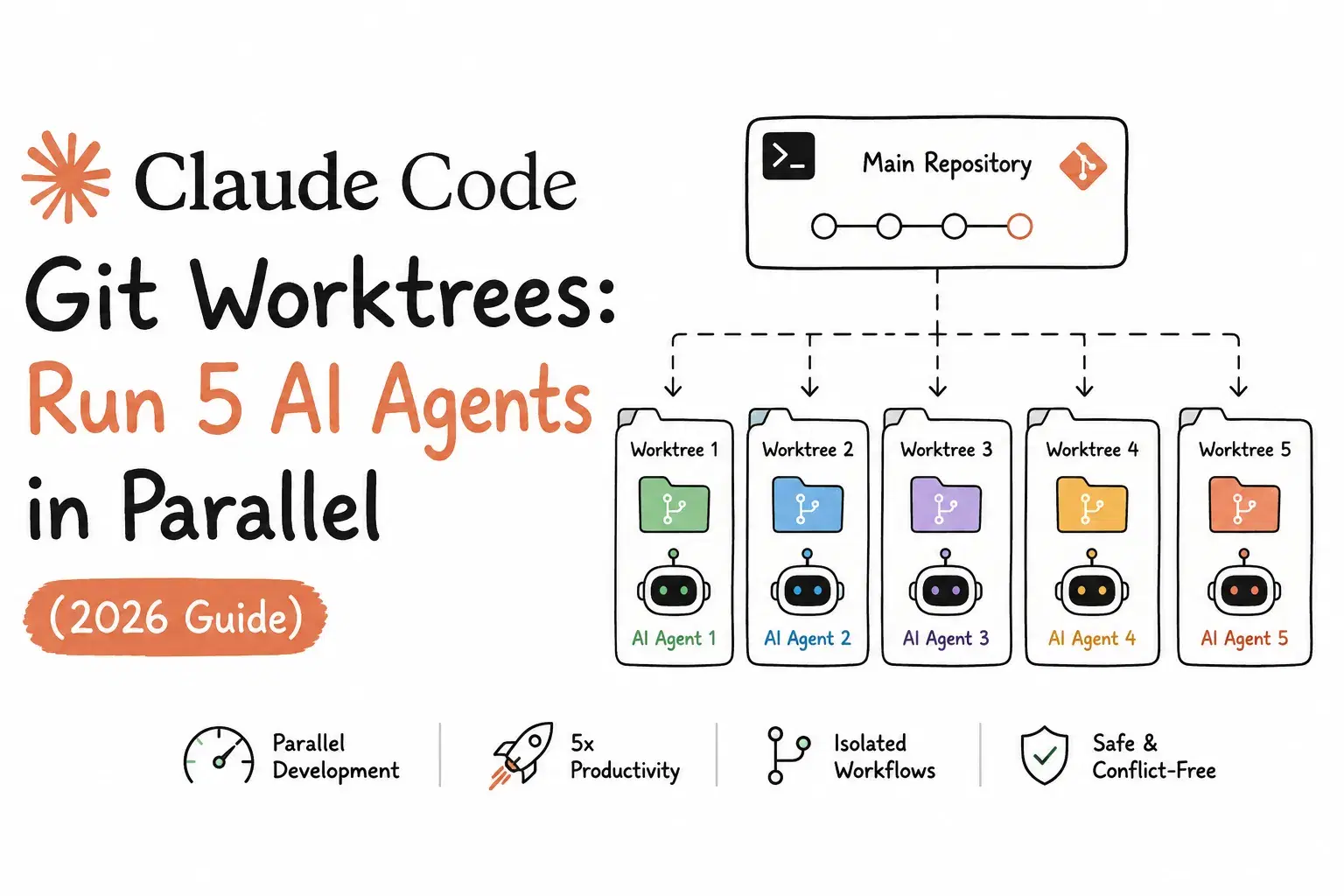
Boris Cherny, the engineer who created Claude Code, posted a tip list on X in February 2026 with one item at the top: "Spin up 3-5 git worktrees at once, each running its own Claude session in parallel. It's the single biggest productivity unlock, and the top tip from the team." (x.com/bcherny). A few days earlier, on the Claude Code Threads account, Anthropic had announced why that tip was suddenly practical for everyone: native --worktree support in the CLI, a feature the desktop app already had.
That shipped as Claude Code v2.1.49 in February 2026. It's still actively maintained: the changelog entry for v2.1.218, dated July 22, 2026 (yesterday, as of this writing), fixes a bug where worktree-isolated subagents could redirect git commands into the shared checkout via git -C or GIT_DIR. This is a feature that's still moving, and most of the guides written back in February and March don't reflect what it does today.
This post covers what a worktree actually buys you, the exact commands and config for running several Claude Code sessions on one repository without them colliding, and the behavior changes from the last few months worth knowing before you rely on it.
Why One Working Directory Doesn't Work for Parallel Agents
Run two Claude Code sessions in the same checkout and ask one to build a feature while the other fixes a bug, and you get a race: both sessions read and write the same files on disk, git status shows a blend of two unrelated changes, and whichever session commits last silently overwrites what the other one wrote to a shared file. Branching helps with version control, but it doesn't help with two processes editing the same files on the same file system at the same time.
A git worktree fixes the actual problem: it's a second working directory checked out from the same repository, on its own branch, with its own files on disk, sharing only the .git history and remote. Two Claude Code sessions, each pointed at its own worktree, can edit, run tests, and commit independently. Nothing collides because nothing overlaps.
Three Ways to Run Claude in Parallel (and When Each One Applies)
Worktrees are one option among a few the Claude Code docs describe for running things in parallel, and they solve a different problem than the other two:
| Approach | What it isolates | Best for |
|---|---|---|
| Worktrees | File edits (separate directory, separate branch) | Independent, unrelated tasks: a feature and a bugfix that shouldn't touch the same files |
| Subagents | Nothing by default; can add isolation: worktree | Delegating a sub-task within one session while the main thread keeps context |
| Agent teams | Coordination across multiple sessions | A single goal that's naturally split into coordinated pieces |
If you've read our guide on building an MCP server in Python or our post on setting up Claude Code skills, this is the missing piece for scaling a workflow past one task at a time: which of these three actually fits what you're doing before you reach for any of them.
How to Start Claude Code in a Worktree
Pass --worktree (or the short form -w) with a name:
claude --worktree feature-auth
By default this creates the worktree under .claude/worktrees/feature-auth/ at your repository root, on a new branch named worktree-feature-auth, and starts Claude inside it. Run the same command with a different name in a second terminal to start an independent session; if you skip the name, Claude generates one for you, like bright-running-fox.
Two things to know before your first run:
- Workspace trust applies. If you haven't run Claude in that directory before, an interactive
--worktreerun exits with an error asking you to runclaudethere once to accept the trust dialog first. Non-interactive runs with-pskip this check. - A worktree is a fresh checkout. Dependencies aren't installed and gitignored files like
.envaren't there. Add.claude/worktrees/to your.gitignore(the docs call this out explicitly) so the worktree contents don't show up as untracked files in your main checkout, and either run your project's setup manually inside the new directory or use.worktreeincludebelow to carry secrets over automatically.
Carrying Secrets Into New Worktrees: .worktreeinclude
A fresh worktree checkout won't have your .env, .env.local, or any other gitignored file you need at runtime. Rather than copying them by hand every time, drop a .worktreeinclude file in your project root, written in .gitignore syntax:
.env
.env.local
config/secrets.json
Claude Code copies anything that matches a pattern here and is already gitignored, so tracked files never get duplicated. This applies to every worktree Claude creates through git: --worktree sessions, subagent worktrees, and parallel desktop-app sessions. Once your worktree exists, the Env File Diff Checker is a quick way to confirm the copied .env in your new worktree actually matches the one in your main checkout, and the .gitignore Generator is worth a pass if your .claude/worktrees/ entry (or your framework's default ignore rules) needs updating.
Branching From a Pull Request
To review or extend an open PR in its own isolated worktree, pass the PR number prefixed with # (quote it so your shell doesn't treat # as a comment):
claude --worktree "#1234"
Claude Code fetches pull/1234/head from origin and checks it out at .claude/worktrees/pr-1234.
Choosing the Base Branch
New worktrees branch from your repository's default branch on the remote by default, matching a clean tree. Set worktree.baseRef to "head" in your .claude/settings.json when you want a worktree (typically one isolating a subagent) to inherit your current local commits and feature-branch state instead:
{
  "worktree": {
    "baseRef": "head"
  }
}
Run this through the JSON Validator before saving if you're hand-editing settings.json alongside other keys, since a trailing comma here is an easy way to silently break your whole config. One detail worth knowing: worktree.baseRef only accepts "fresh" or "head", not an arbitrary branch name. To start a worktree from a specific existing branch, create it with git worktree add directly (see the manual section below).
Isolating Subagents With Worktrees
Beyond the top-level --worktree flag, a custom subagent can run in its own worktree automatically by adding isolation: worktree to its frontmatter:
markdown--- name: refactorer description: Applies mechanical refactors across many files isolation: worktree --- Apply the requested refactor across every affected file, then run the tests and report the results.
Claude Code removes the subagent's temporary worktree automatically once it finishes without changes; if it left changes behind, the worktree stays on disk until a periodic sweep can safely remove it. That sweep respects your cleanupPeriodDays setting and never touches a worktree with unpushed commits or untracked files, and it never removes anything created by a manual --worktree run.
What Happens When You Exit
For an interactive session, Claude checks the worktree before it closes:
- Clean worktree, unnamed session - removed automatically, branch and all.
- Clean worktree, named session - Claude asks first, so you can keep it for later.
- Worktree has changes - Claude prompts you to keep or remove; removing deletes the directory, the branch, and everything in it.
Non-interactive runs with -p never hit this prompt, so their worktrees are left behind. Clean those up yourself:
git worktree remove path/to/worktree --force
What's Changed Since February
This feature has iterated fast, and it's worth knowing what's different now versus when the first wave of tutorials was written:
- v2.1.206 (July 9, 2026):
EnterWorktree(the tool Claude uses when you ask it to "work in a worktree" mid-session) now asks for confirmation before entering a worktree outside your project's.claude/worktrees/directory. Before this, Claude could enter any existing worktree path without asking. - v2.1.208: Reopening a worktree by reusing its name now correctly resets to the default branch when it's fully merged and clean, instead of always reopening at its old tip.
- v2.1.210: A lock left behind by a killed background session no longer stays stuck forever; the periodic sweep now releases it.
- v2.1.211: Permission approvals ("Yes, don't ask again" for a Bash command) granted inside a worktree session now save to the main checkout's
.claude/settings.local.json, so the approval applies across every worktree of that repo and survives the worktree being removed. Previously it was saved inside the worktree itself and lost when the worktree was deleted. - v2.1.203 (July 7, 2026): Fixed Bash failing with "argument list too long" in repositories that had accumulated many git worktrees, and fixed worktree-isolated subagents that were sometimes running shell commands in the parent checkout instead of their own worktree.
- v2.1.212: Worktree creation now refuses to proceed if
.claude,.claude/worktrees, or the worktree directory itself is a symlink, closing a path where a committed symlink could let worktree creation write files outside the repository. - v2.1.218 (July 22, 2026): Fixed worktree-isolated subagents redirecting git into the shared checkout via
git -C,--git-dir, or theGIT_DIR/GIT_WORK_TREEenvironment variables - a real isolation gap for anyone relying onisolation: worktreeto keep a subagent's git operations contained.
If you set up worktrees back in February or March and haven't touched the config since, it's worth updating and re-reading the official worktrees documentation - several of these are meaningful behavior changes, not just bug fixes.
Managing Worktrees Manually
--worktree covers the common case, but sometimes you need to check out a specific existing branch or put the worktree somewhere outside .claude/worktrees/. Plain git handles that:
Bash# Create a worktree on a new branch git worktree add ../project-feature-a -b feature-a # Create a worktree from an existing branch git worktree add ../project-bugfix bugfix-123 # Start Claude inside it cd ../project-feature-a claude # List every worktree attached to this repo git worktree list # Remove one when you're done git worktree remove ../project-feature-a
This is also the path to take if you're running a different AI coding tool alongside Claude Code and want the same file isolation. Our roundup of CLI AI coding agents covers a few that follow the same pattern by hand.
How to Run Your First Parallel Claude Code Session
- Check your version. Run
claude --version. You need v2.1.49 or later for native worktree support; anything from the last few months is fine, but see the changelog notes above if you're on something older. - Ignore the worktree directory. Add a
.claude/worktrees/line to your project's.gitignoreso worktree contents never show up as untracked files in your main checkout. - Start your first worktree session. In one terminal:
claude --worktree feature-auth. - Start a second, independent session. In a new terminal, from the same repo root:
claude --worktree bugfix-login. Both sessions now have their own directory and branch. - Bring over any local secrets. If your project needs a
.envfile to run, add a.worktreeincludelisting it once, and every future worktree gets it automatically. - Install dependencies in each worktree. A worktree is a fresh checkout, so run your normal setup (
npm install,pip install -r requirements.txt, etc.) inside each one before asking Claude to run tests. - Work both sessions in parallel, then exit each when done. Claude prompts you to keep or remove a worktree that has uncommitted work, so you won't lose anything by accident.
Related DevToolLab Tools
- .gitignore Generator - Add a
.claude/worktrees/rule (and your framework's other ignores) in seconds. - Env File Diff Checker - Confirm a
.worktreeinclude-copied.envactually matches your main checkout before you debug a "works in one worktree, not the other" issue. - JSON Validator - Catch a stray comma before it breaks your
.claude/settings.jsonworktree.baseRefconfig. - Bash Script Generator - Scaffold the shell aliases developers use to jump between named worktrees without retyping
cd .claude/worktrees/...every time. - Diff Checker - Compare what changed between two worktree branches before you merge either one.
- MCP Server Config Generator - Since project-scoped plugins and MCP servers configured from your main checkout also load inside every worktree, this is the fastest way to double-check that config before you rely on it in a parallel session.
Conclusion
The pitch behind git worktrees in Claude Code isn't complicated: one working directory per parallel task, so file edits from an unrelated session can never land where they don't belong. What's easy to miss is that Anthropic has kept shipping meaningful changes to this feature every few weeks since February, from confirmation prompts on EnterWorktree to how permission approvals and locks behave, right through a subagent isolation fix that landed yesterday. If you're already running Claude Code on more than one task at a time without worktrees, start with the seven steps above. If you set this up months ago, it's worth a few minutes to check the changelog against your setup before you assume nothing has changed.