
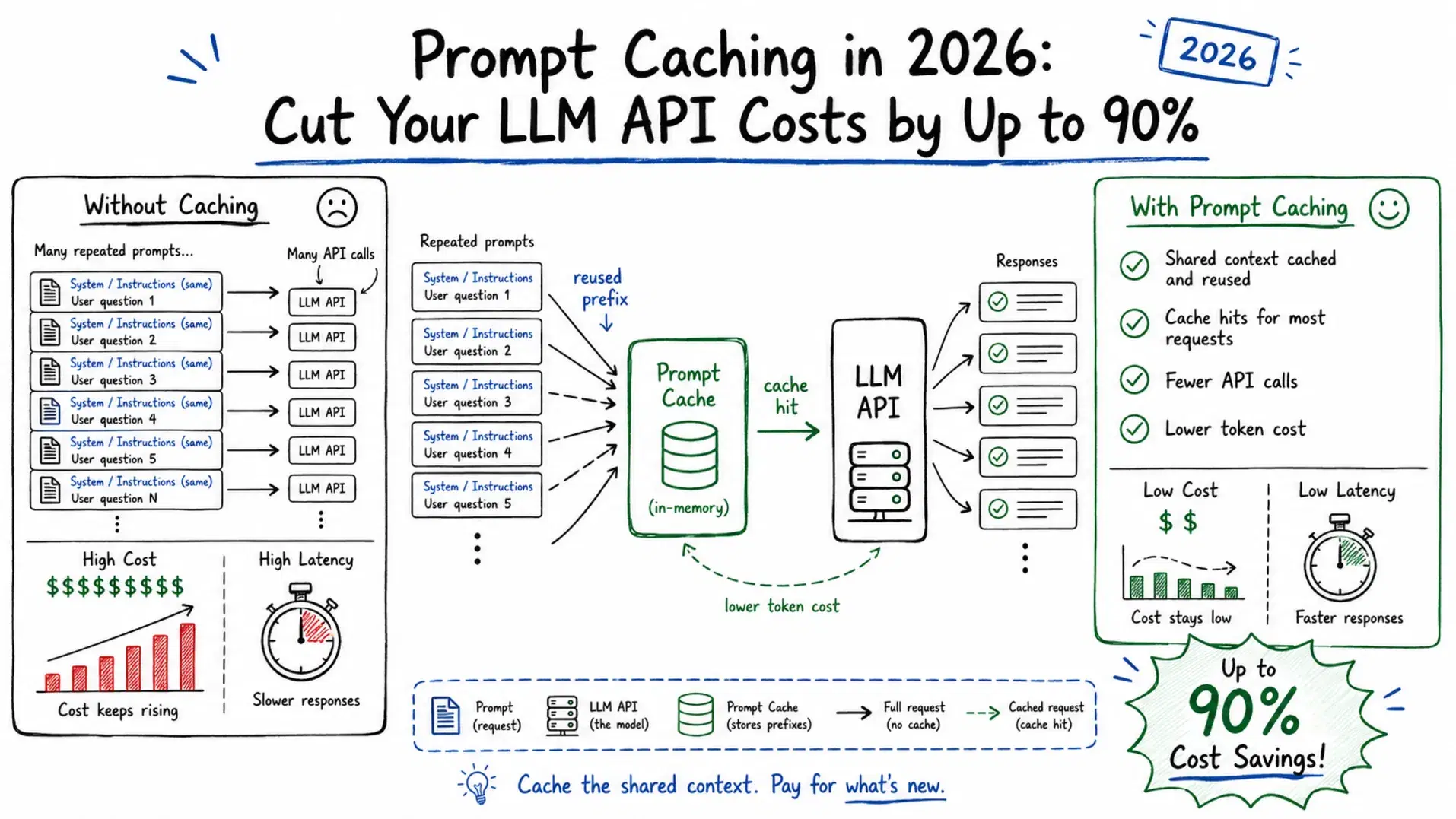
A typical RAG support bot sends the same 8,000-token system prompt and document set with every user message, and pays for those tokens again each time. On Claude Opus 5.5, at $4 per million input tokens, that repeated context costs $32 for every 1,000 messages. Read from the prompt cache at $0.20 per million, the same tokens cost $1.60, which is 95% less.
Every major provider supports prompt caching in 2026, but the prices stopped being uniform this year. As of October 22, 2026, Anthropic's cache read discount ranges from 90% to 97.5% depending on the model, OpenAI now charges for cache writes on GPT-5.6 and later, and Google bills hourly storage for explicit Gemini caches. The numbers below come from each provider's own pricing page, checked October 22, 2026.
What Is Prompt Caching?
When an LLM processes your prompt, it computes attention key-value (KV) tensors for every token. Prompt caching stores those computed tensors server-side so that if your next request starts with the same prefix, the model skips recomputing them and loads the cached result directly. The output is unaffected; only the prefill step is shortcut. Anthropic's documentation says caching cuts both cost and latency, with improved time-to-first-token on long documents.
The Ordering Rule - Get This Wrong and Nothing Caches
Before touching any code, understand this rule: static content must come before dynamic content in your prompt.
Caching works by matching a prefix. The moment the prefix diverges from the cached version, nothing after that point can be cached. Claude renders a request as tools, then system, then messages, so the order that caches well is:
- Tool definitions (static)
- System prompt (static)
- Retrieved documents or knowledge base (semi-static)
- Few-shot examples (static)
- Conversation history (dynamic)
- Current user message (dynamic)
The most common mistake is a system prompt that includes a timestamp, request ID, or user-specific greeting. A single variable string at the top means 0% cache hits. Move all dynamic content to the end, after everything static.
Claude Prompt Caching: cache_control, Pricing and TTL
Claude caches what you mark. Add "cache_control": {"type": "ephemeral"} to the last static content block, or put a single top-level cache_control field on the request and let the API place the breakpoint for you. The default lifetime is 5 minutes; "ttl": "1h" buys an hour at a higher write price. Every cache hit refreshes the timer at no extra cost.
Claude Prompt Caching Pricing (October 2026)
Anthropic's pricing page, per million tokens on the Claude API:
| Model | Base input | 5-minute write | 1-hour write | Cache read | Read discount | Minimum prefix |
|---|---|---|---|---|---|---|
| Claude Fable 5.1 | $10.00 | $12.50 | $20.00 | $0.25 | 97.5% | 512 tokens |
| Claude Opus 5.5 | $4.00 | $5.00 | $8.00 | $0.20 | 95% | 512 tokens |
| Claude Sonnet 5.5 | $2.00 | $2.50 | $4.00 | $0.10 | 95% | 512 tokens |
| Claude Haiku 5.5 | $0.10 | $0.125 | $0.20 | $0.01 | 90% | 512 tokens |
| Claude Sonnet 4.6 | $3.00 | $3.75 | $6.00 | $0.30 | 90% | 1,024 tokens |
| Claude Haiku 4.5 | $1.00 | $1.25 | $2.00 | $0.10 | 90% | 4,096 tokens |
Writes cost 1.25x the base input price for the 5-minute cache and 2x for the 1-hour cache. Anthropic's own rule of thumb is that caching pays off after one cache read on the 5-minute duration and after two on the 1-hour duration. Two pricing details catch people. Claude Haiku 5.5's rates apply to prompts up to 100,000 tokens; a longer prompt, counting cache reads and writes, bills the whole request at $0.50 input and $0.05 cache read. And US-only inference through inference_geo multiplies every price, cache reads included, by 1.1 on Claude 4.6 and later. Prompt caching also stacks with the 50% Batch API discount.
Pythonimport anthropic client = anthropic.Anthropic() KNOWLEDGE_BASE = open("product_docs.md").read() # identical on every call def ask(question: str) -> str: response = client.messages.create( model="claude-opus-5-5", max_tokens=16000, system=[ {"type": "text", "text": "You are a support assistant for Acme's billing API."}, {"type": "text", "text": KNOWLEDGE_BASE, "cache_control": {"type": "ephemeral"}}, ], messages=[{"role": "user", "content": question}], ) u = response.usage print(f"write={u.cache_creation_input_tokens} read={u.cache_read_input_tokens} uncached={u.input_tokens}") # current Claude models can return a thinking block before the text return next(block.text for block in response.content if block.type == "text") ask("How do I refund a charge?") ask("Can I change a customer's billing date?")
On the first call, cache_creation_input_tokens carries the cached prefix and cache_read_input_tokens is 0. On the next call within the TTL the numbers flip. If both stay at 0, the prefix is below the model's minimum, which fails silently with no error. If every call shows a write and no read, something in the prefix changes between requests.
OpenAI Prompt Caching: Automatic, Now With Write Fees
OpenAI still caches automatically: no marker, no flag. What changed is the bill. According to OpenAI's prompt caching guide, on GPT-5.6 and later a cache write costs 1.25x the uncached input rate for the default 30-minute minimum lifetime, and 2.5x if you request a 12-hour lifetime in the Responses API. Reads cost 0.1x input, or 0.05x on GPT-6.1 Sol. The minimum cacheable prompt is 1,024 tokens. Earlier models keep the old arrangement: implicit caching only, no write charge, and a prompt_cache_retention setting that defaults to 24h for organizations without Zero Data Retention.
OpenAI Cached Input Pricing (October 2026)
OpenAI's pricing page, standard processing, per million tokens:
| Model | Input | Cached input | 30-minute write | 12-hour write |
|---|---|---|---|---|
| gpt-6-astra | $10.00 | $1.00 | $12.50 | $25.00 |
| gpt-6.1-sol | $2.00 | $0.10 | $2.50 | $5.00 |
| gpt-6-sol | $2.00 | $0.20 | $2.50 | $5.00 |
| gpt-6-luna | $0.10 | $0.01 | $0.125 | $0.25 |
| gpt-5.5 (under 272K context) | $5.00 | $0.50 | none | none |
| gpt-5.4 (under 272K context) | $2.50 | $0.25 | none | none |
The Batch tier halves the input, cached input and 30-minute write prices, and OpenAI charges 10% more on regional data residency endpoints for models released on or after March 5, 2026.
Pythonfrom openai import OpenAI client = OpenAI() LONG_SYSTEM_PROMPT = open("product_docs.md").read() # 1,024+ tokens, identical on every call response = client.responses.create( model="gpt-6.1-sol", input=[ {"role": "developer", "content": LONG_SYSTEM_PROMPT}, {"role": "user", "content": "How do I refund a charge?"}, ], prompt_cache_options={"ttl": "30m"}, # default; "12h" costs 2.5x to write ) details = response.usage.input_tokens_details print(f"read={details.cached_tokens} write={details.cache_write_tokens} total={response.usage.input_tokens}")
cache_write_tokens is the new field to watch: on GPT-5.6 and later, a request that writes a large prefix and never gets read back costs more than sending it uncached.
Google Gemini - Implicit and Explicit Context Caching
Gemini offers two mechanisms. Implicit caching is on by default for Gemini 2.5 and newer, needs no code, and passes on savings when a request happens to hit, with no guarantee that it will. Explicit caching lets you create a named cache object, reference it by name, and get a guaranteed discount, but it is a beta feature on Gemini 3 and 2.5 models only: Gemini 4 Argon and later support implicit caching alone. The minimum prompt is 4,096 tokens on current models (2,048 on Gemini 2.5), and an explicit cache lives 1 hour unless you set a TTL.
Gemini Context Caching Pricing (October 2026)
Google's pricing page, paid tier, per million tokens. Both models run introductory prices that double on the dates shown:
| Model | Input | Cache read | Storage | Price change |
|---|---|---|---|---|
| Gemini 4 Argon | $2.00 | $0.10 | none (implicit only) | $4.00 and $0.20 from December 1, 2026 |
| Gemini 3.8 Flash | $0.75 | $0.075 | $0.50 per M tokens per hour | $1.50, $0.15 and $1.00 from January 1, 2027 |
Storage is the catch with explicit caches: a 100,000-token Gemini 3.8 Flash cache costs $0.05 for every hour it exists at today's rate, whether or not anyone reads it.
Pythonfrom google import genai from google.genai import types client = genai.Client() LARGE_DOCUMENT = open("product_docs.md").read() cache = client.caches.create( model="gemini-3.8-flash", config=types.CreateCachedContentConfig( system_instruction="You are a code review assistant.", contents=[LARGE_DOCUMENT], ttl="3600s", ), ) response = client.models.generate_content( model="gemini-3.8-flash", contents="Review the refund handler for missing idempotency keys.", config=types.GenerateContentConfig(cached_content=cache.name), ) print(response.usage_metadata.cached_content_token_count) client.caches.delete(name=cache.name) # storage bills by the hour until you delete it
How Much Prompt Caching Saves: The Break-Even Hit Rate
Caching saves money only when enough requests read what was written, because a write costs more than plain input. The share of requests that must hit the cache is (write price - input price) / (write price - read price). For Claude Opus 5.5 that is 20.8% on the 5-minute cache and 51.3% on the 1-hour cache; for GPT-6.1 Sol it is 20.8% at 30 minutes and 61.2% at 12 hours. Below that hit rate, caching costs more than sending everything uncached.
Back to the support bot: at a 95% hit rate on Claude Opus 5.5, the 8,000-token prefix costs $3.52 per 1,000 messages ($0.19 in reads plus $0.25 in writes per million prefix tokens, times 8 million) instead of $32, an 89% saving even after paying for every miss. To run the same arithmetic with your own prompt sizes, traffic and hit rate, use the Prompt Caching Calculator, which carries these list prices for current Claude and OpenAI models and has a custom mode for Gemini.
Provider Comparison
| Feature | Anthropic Claude | OpenAI | Google Gemini |
|---|---|---|---|
| How it turns on | cache_control marker or top-level automatic caching | Automatic; explicit breakpoints on GPT-5.6+ | Implicit by default; explicit cache objects on Gemini 3 and 2.5 |
| Cache read price | 0.1x input (0.05x Opus 5.5 and Sonnet 5.5, 0.025x Fable 5.1) | 0.1x input (0.05x GPT-6.1 Sol) | Per-model list price |
| Cache write price | 1.25x (5 min), 2x (1 hour) | 1.25x (30 min), 2.5x (12 hours) on GPT-5.6+ | Implicit: none; explicit: hourly storage |
| Minimum prompt | 512 tokens on 5.x models, up to 4,096 on older ones | 1,024 tokens | 4,096 tokens (2,048 on 2.5) |
| Cache lifetime | 5 minutes or 1 hour, refreshed on each hit | 30-minute or 12-hour minimum | Explicit: 1 hour default, configurable |
| Stacks with Batch API | Yes | Yes | Yes |
Quick decision guide:
- Already on OpenAI GPT-6: you are caching already. Watch
cache_write_tokens, keep the 30-minute default, and pick 12 hours only for prefixes reused across long gaps. - On Claude with long system prompts or RAG docs: add
cache_controlto the static blocks and watchcache_read_input_tokens. - On Gemini 3.8 Flash for large-document analysis: use explicit caching for the guaranteed discount and delete caches after use.
Open-Source Tools to Reduce LLM Costs Further
Prompt caching handles repeated prefixes. These tools attack costs from different angles: compressing what you send, caching semantically similar responses, and routing requests to cheaper models. Licenses were checked against each repository on October 22, 2026.
| Tool | What it does | Best for | License |
|---|---|---|---|
| Headroom | Compresses context before the LLM call | Agent loops, long tool outputs | Apache 2.0 |
| LLMLingua-2 | Small-model token scoring and removal | Long retrieved documents | MIT |
| RouteLLM | ML-trained router: easy queries go to cheap models | Mixed-difficulty workloads | Apache 2.0 |
| Bifrost | High-throughput Go gateway with semantic cache | High-RPS services, multi-provider | Apache 2.0 |
| LiteLLM | Model routing, budget enforcement | Multi-model apps, cost caps | MIT (outside enterprise/) |
| GPTCache | Self-hosted semantic cache that skips the LLM on similar queries | FAQ bots, repeated questions | MIT |
| OpenProvence | Sentence-level pruning for RAG context | RAG pipelines with noisy retrieval | MIT |
| Redis LangCache | Managed semantic cache via REST API | Teams that want no infra to run | Managed Redis Cloud service, in preview |
| tiktoken | Exact token counting pre-request | Cost estimation, cache threshold checks | MIT |
| Langfuse | Cost observability per trace | Finding which pipeline is the problem | MIT (outside ee/) |
If you run LiteLLM, check your version: SafeDep reported that release 1.107.0 on PyPI carried a credential stealer and backdoor on October 21, 2026, before PyPI removed it. The v1.107.0, latest, main-latest and main-stable Docker images carried it too between 11:46 and 14:20 UTC that day. Version 1.106.2 is clean.
Recommended stack by workload:
- Simple chatbot: prompt caching + LiteLLM (routing + budget cap) + Langfuse (visibility)
- High-traffic service: prompt caching + Bifrost (gateway with semantic cache)
- RAG pipeline: OpenProvence (prune retrieved docs) + prompt caching + Headroom
- Mixed-difficulty queries: RouteLLM (route easy to cheap) + prompt caching on the cheap model
Best Use Cases
- RAG applications - Multiple users querying the same knowledge base means the same retrieved documents get cached across requests. Each hit cuts the price of that document block by 90% or more, depending on the model.
- Long-context agents - A ReAct-style agent with 20 tool definitions and a planning prompt burns significant input tokens per step. Cache the static portion and every agent step gets cheaper.
- Multi-turn chatbots - Cache the system prompt and fixed product context. Only new conversation turns bill at full rate.
- Code review pipelines - Cache the codebase once and run multiple analysis passes (security, style, docs) against it. This is what Gemini's explicit caching was built for.
Common Gotchas
- Changing tools breaks the whole Claude cache. Anthropic's invalidation table lists tool definitions as invalidating everything, while changes to thinking or effort settings,
tool_choiceand images invalidate the message part of the cache. - Different models do not share caches. A
claude-sonnet-5-5cache cannot be hit byclaude-opus-5-5. - Parallel requests do not read each other's cache. A Claude cache entry becomes readable only after the first response starts, so fire one request, wait for its first token, then send the rest.
- Short prompts fail silently. A prefix below the minimum (512 to 4,096 tokens on Claude, 1,024 on OpenAI, 4,096 on current Gemini models) is processed without caching and without an error.
- Claude caches are per workspace on the Claude API. The same prompt split across two workspaces writes two separate cache entries.
- Gemini storage costs accumulate. For occasional batch jobs, delete the explicit cache immediately after use.
Which Caching Setup to Use
Start with the provider you are already using and measure before you tune. On Claude, mark the static blocks and keep the 5-minute TTL if requests arrive less than five minutes apart; reach for the 1-hour TTL only when gaps are longer, because its break-even hit rate is roughly double. On OpenAI GPT-6, caching is already on, so the work is keeping the prefix byte-identical and watching cache_write_tokens. On Gemini 4 Argon you get implicit caching only; on Gemini 3.8 Flash, explicit caching buys a guaranteed discount for the price of hourly storage.
Whichever you pick, check the usage fields the day after you ship. Static content first, dynamic content last: get that right and most of your input tokens bill at the cache read price.
Related DevToolLab Tools
- Prompt Caching Calculator - compare monthly cost with and without caching for any Claude or OpenAI model and find your break-even hit rate.
- AI Token Counter - check that a system prompt clears the 512, 1,024 or 4,096-token minimum before you expect a cache hit.
- LLM Token Cost Calculator - price the uncached part of each request, input and output, once caching has taken the prefix.
- Diff Checker - paste two rendered prompts side by side to find the one changed byte that keeps turning hits into misses.
Related Guides
- How LLM Tokenization Works - why the same text costs a different number of tokens on each model.
- GPT-6 Astra Explained - the OpenAI model whose cache writes now cost $12.50 per million tokens.
- OpenRouter Provider Routing - routing across providers without throwing away each provider's cache.
- Best LLM Gateways and API Routers - the gateway layer where caching, routing and budget caps usually live.