
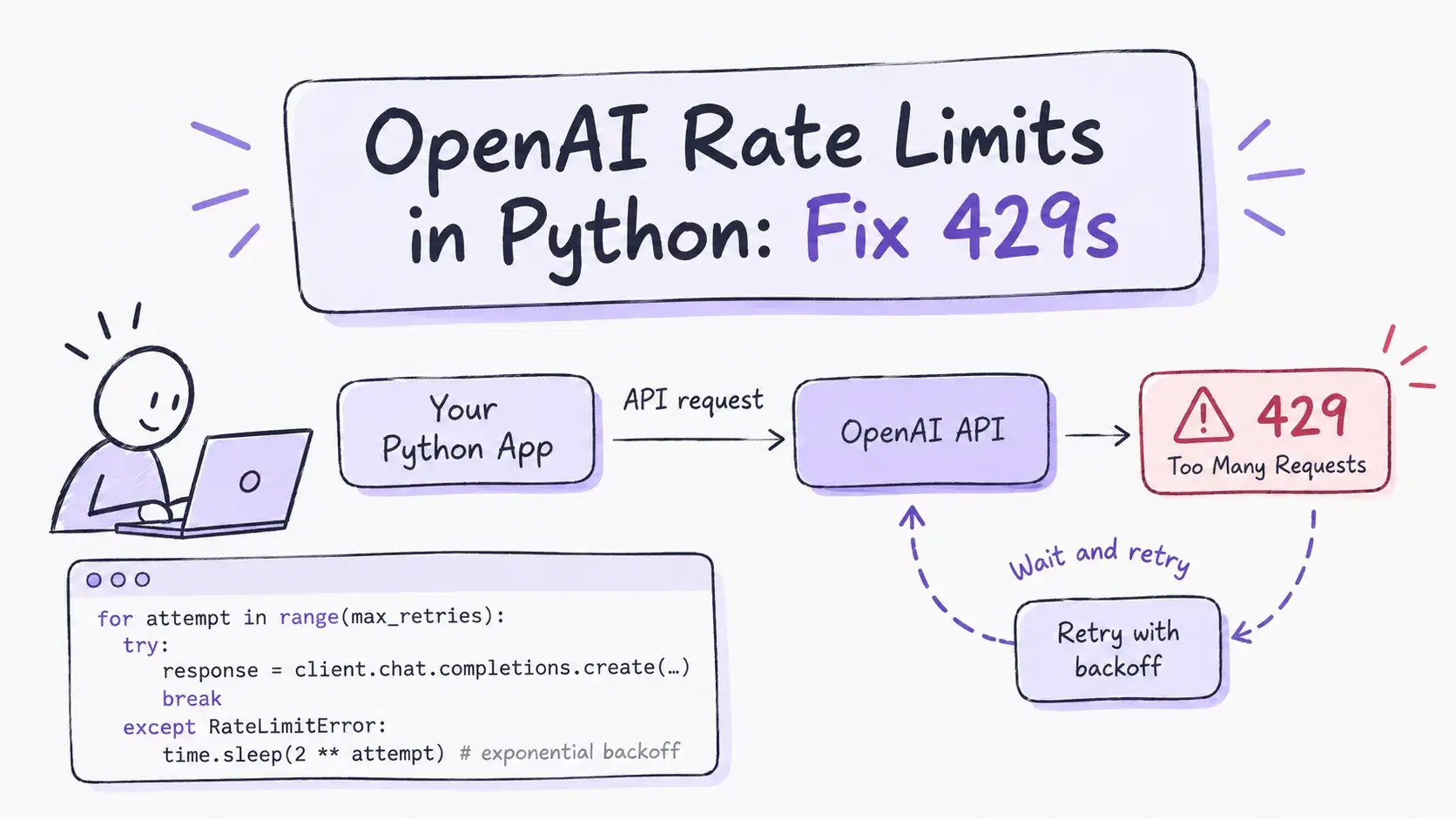
Any app that sends enough requests to the OpenAI API will get HTTP 429 with the message "Rate limit reached for requests". This happens most often during traffic spikes and long batch jobs. If the code does not handle the error, users get failed responses and batch jobs stop halfway.
This guide shows three ways to handle OpenAI rate limits in Python. The first is the retry logic built into the OpenAI SDK. The second is your own retry loop with exponential backoff. The third is a fallback that sends the request to the same model through a second provider when retries are not enough. All code below was run, and every example shows the real code and its real output.
What a 429 error means
OpenAI limits how much each organization can send per minute and per day. The limits are counted in several units at once.
- RPM and RPD mean requests per minute and per day
- TPM and TPD mean tokens per minute and per day
- IPM means images per minute for image models
You get a 429 when any one of them runs out. The limits depend on your usage tier. New accounts start with low limits, and the tier goes up automatically as your total spend grows. The exact numbers for your account are on the Limits page of the OpenAI dashboard.
Not every 429 is a rate limit. OpenAI returns the same status when your account has run out of credits or reached its monthly spend limit. The error code in this case is insufficient_quota instead of rate_limit_exceeded. Retries do not fix it. Only a top up, a higher spend limit or another provider does. In the Python SDK both cases raise RateLimitError, and you can tell them apart by e.code.
OpenAI's rate limit guide also says that unsuccessful requests count toward your per-minute limit. So if your code resends a failed request right away in a loop, it stays over the limit longer.
How to reproduce a 429 on purpose
To test retry code, you need a 429 error. Getting one from the real API is slow and costs money. You would have to send hundreds of requests, and you still could not choose the moment when the limit starts.
So the examples below use a small local server that acts like the OpenAI API. For the first few requests it returns a 429 error with the same headers as OpenAI. After that it returns a normal answer. You choose how many requests fail.
The OpenAI SDK sends requests to the address in the OPENAI_BASE_URL environment variable. If it points to the local server, the scripts talk to the local server. If you remove it, the same scripts talk to the real OpenAI API. The code stays the same.
Python# mock_openai.py # A local stand-in for the OpenAI API that returns 429 errors on demand. import os, time from fastapi import FastAPI from fastapi.responses import JSONResponse app = FastAPI() FAIL_FIRST = int(os.environ.get("FAIL_FIRST", "3")) calls = 0 @app.post("/v1/chat/completions") def chat(body: dict): global calls calls += 1 headers = { "x-ratelimit-limit-requests": "500", "x-ratelimit-remaining-requests": "0" if calls <= FAIL_FIRST else "499", "x-ratelimit-reset-requests": "2s", "x-ratelimit-limit-tokens": "200000", "x-ratelimit-remaining-tokens": "199970", "x-ratelimit-reset-tokens": "9ms", } if calls <= FAIL_FIRST: headers["retry-after"] = "1" return JSONResponse(status_code=429, headers=headers, content={"error": { "message": "Rate limit reached for requests", "type": "requests", "code": "rate_limit_exceeded"}}) return JSONResponse(headers=headers, content={ "id": "chatcmpl-mock", "object": "chat.completion", "created": int(time.time()), "model": body["model"], "choices": [{"index": 0, "finish_reason": "stop", "message": {"role": "assistant", "content": "ok"}}], "usage": {"prompt_tokens": 12, "completion_tokens": 1, "total_tokens": 13}})
Install the packages and start the server. With FAIL_FIRST=3 the first three requests fail.
Bashpip install openai fastapi uvicorn FAIL_FIRST=3 uvicorn mock_openai:app --port 8001 # in a second terminal export OPENAI_BASE_URL=http://localhost:8001/v1 export OPENAI_API_KEY=sk-test
Step 1. Read the rate limit headers
Every OpenAI response carries headers that show how close you are to the limit. If you check them, you can slow down before you get a 429.
| Header | What it shows |
|---|---|
x-ratelimit-limit-requests | Requests allowed in the current window |
x-ratelimit-remaining-requests | Requests left before the limit |
x-ratelimit-reset-requests | Time until the request limit resets |
x-ratelimit-limit-tokens | Tokens allowed in the current window |
x-ratelimit-remaining-tokens | Tokens left before the limit |
x-ratelimit-reset-tokens | Time until the token limit resets |
retry-after | Seconds to wait before a retry, sent with a 429 |
The SDK does not show headers by default. To read them, call the method through with_raw_response.
Python# read_headers.py import os from openai import OpenAI client = OpenAI(base_url=os.environ.get("OPENAI_BASE_URL"), api_key=os.environ["OPENAI_API_KEY"]) raw = client.chat.completions.with_raw_response.create( model="gpt-5.4-mini", messages=[{"role": "user", "content": "Reply with one word: ok"}], ) for name in ["x-ratelimit-limit-requests", "x-ratelimit-remaining-requests", "x-ratelimit-reset-requests", "x-ratelimit-limit-tokens", "x-ratelimit-remaining-tokens", "x-ratelimit-reset-tokens"]: print(f"{name:<32} {raw.headers.get(name)}") completion = raw.parse() print("answer:", completion.choices[0].message.content)
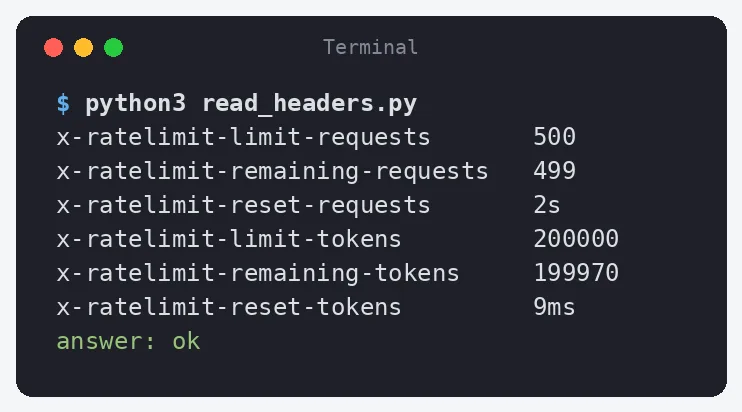
The values in this screenshot come from the local server. On a real account the numbers depend on your usage tier and the model.
In a production job you can log x-ratelimit-remaining-tokens and pause the queue when it drops below the size of your next batch.
Step 2. Use the SDK's built-in retries
The OpenAI Python SDK already retries a 429 twice by default with a short exponential backoff. It also retries connection errors and 408, 409 and 5xx responses. For many apps it is enough to raise max_retries.
Python# sdk_retries.py import os, time from openai import OpenAI client = OpenAI(base_url=os.environ.get("OPENAI_BASE_URL"), api_key=os.environ["OPENAI_API_KEY"], max_retries=5) start = time.time() completion = client.chat.completions.create( model="gpt-5.4-mini", messages=[{"role": "user", "content": "Reply with one word: ok"}], ) print(f"success after {time.time() - start:.1f}s:", completion.choices[0].message.content)
With OPENAI_LOG=info the SDK prints each retry. Here is the run against the local server with three failing requests.
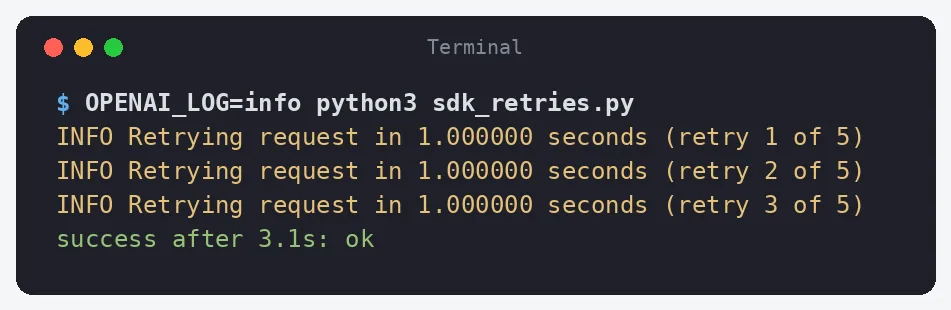
The SDK waited one second before each retry because the server sent retry-after: 1. The fourth request succeeded. This approach gives you little control. You cannot log each failure in your own format, cap the total wait time or change what happens after the last retry.
Step 3. Write your own exponential backoff
After a 429 error, sending the same request again right away does not help. The limit has not reset yet, and the failed request also counts toward it. The code has to wait before the next attempt.
Exponential backoff doubles the wait after each failed attempt. The first wait is 1 second, the second is 2 seconds and the third is 4 seconds. Short waits come first because the limit often resets quickly. If it does not, the waits get longer and the code sends fewer requests that would fail anyway.
The code also adds a small random delay to each wait. This is called jitter. It matters when many workers hit the limit at the same time. If each of them waits exactly 1 second, they all send the next request at the same moment and get another 429. With jitter one worker waits 1.05 seconds, another waits 1.18 seconds and another waits 1.22 seconds. Their requests reach the API at different times.
Sometimes the server says how long to wait in the retry-after header. The code below uses that value when it is longer than its own delay. After five failed attempts it stops and raises the error, so a request never waits forever. It also stops at once when the error code is insufficient_quota, because more waiting will not add money to the account.
Python# backoff.py import os, random, time from openai import OpenAI, RateLimitError # max_retries=0 turns off the SDK's built-in retries so we control them client = OpenAI(base_url=os.environ.get("OPENAI_BASE_URL"), api_key=os.environ["OPENAI_API_KEY"], max_retries=0) def create_with_backoff(max_attempts=5, base_delay=1.0, max_delay=30.0, **kwargs): for attempt in range(1, max_attempts + 1): try: return client.chat.completions.create(**kwargs) except RateLimitError as e: # an empty balance also returns 429, waiting will not help if e.code == "insufficient_quota" or attempt == max_attempts: raise retry_after = e.response.headers.get("retry-after") delay = min(max_delay, base_delay * 2 ** (attempt - 1)) if retry_after: delay = max(delay, float(retry_after)) delay += random.uniform(0, delay * 0.25) # jitter print(f"attempt {attempt}: 429, waiting {delay:.2f}s") time.sleep(delay) start = time.time() completion = create_with_backoff( model="gpt-5.4-mini", messages=[{"role": "user", "content": "Reply with one word: ok"}], ) print(f"success after {time.time() - start:.1f}s:", completion.choices[0].message.content)
max_retries=0 on the client turns off the retries built into the SDK. Without it, each attempt in your loop would include two more retries from the SDK, and the code would send three times more requests.
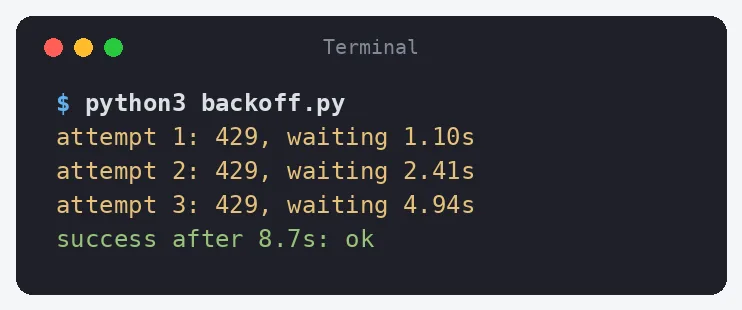
In this run the first three requests got a 429. The code waited 1.10 seconds, then 2.41 seconds, then 4.94 seconds. The fourth request succeeded 8.7 seconds after the start.
Compared with Step 2, this version gives you more control. You can write each failure to your own log, cap each wait with max_delay and decide what happens after the last attempt.
Step 4. Fall back to a second provider
Retries help when the limit resets within seconds. They do not help when you have used up your daily quota, when the account returns insufficient_quota or when a user is waiting and 30 seconds of backoff is too long. In these cases the request has to go somewhere else.
The simplest fallback keeps the same model and changes only the route. AI/ML API serves OpenAI models through an OpenAI-compatible endpoint, so the fallback client is the same SDK with a different base_url and key. Model IDs there start with openai/. You can find the exact ID for each model in the list of OpenAI models on AI/ML API.
Python# fallback.py import os from openai import OpenAI, RateLimitError, APIConnectionError primary = OpenAI(base_url=os.environ.get("OPENAI_BASE_URL"), api_key=os.environ["OPENAI_API_KEY"], max_retries=2) fallback = OpenAI(base_url="https://api.aimlapi.com/v1", api_key=os.environ["AIMLAPI_KEY"], max_retries=2) PROVIDERS = [ ("openai", primary, "gpt-5.4-mini"), ("aimlapi", fallback, "openai/gpt-5.4-mini"), ] def create_with_fallback(messages): for name, client, model in PROVIDERS: try: completion = client.chat.completions.create(model=model, messages=messages) return name, completion except (RateLimitError, APIConnectionError) as e: print(f"{name}: {type(e).__name__}, trying next provider") raise RuntimeError("all providers failed") name, completion = create_with_fallback( [{"role": "user", "content": "Reply with one word: ok"}] ) print(f"answered by {name} ({completion.model}):", completion.choices[0].message.content)
To test it, restart the local server with FAIL_FIRST=1000 so the primary provider always returns 429, and set the AIMLAPI_KEY environment variable.
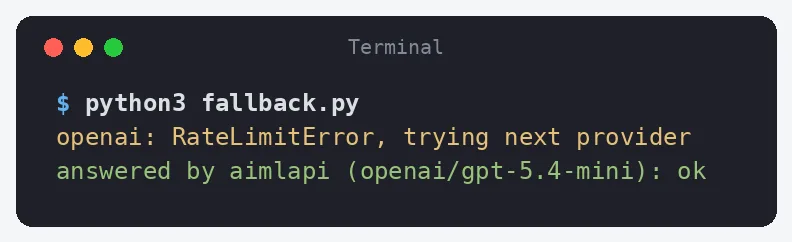
The primary client used its two built-in retries and raised RateLimitError. Then the same request went to openai/gpt-5.4-mini on the second provider, which answered. The calling code did not change, because create_with_fallback returns a normal completion object.
Check two things before you use a fallback in production.
- Use the same model on both routes. If the fallback uses a different model, test that its answers are good enough for your prompts.
- Keep the retries on the primary client low, one or two is enough. Otherwise the user waits for the full backoff before the fallback even starts.
How to hit fewer rate limits
- Set
max_tokensclose to the real answer size. OpenAI counts the requested maximum toward your token limit, not only the tokens the model actually generates. - Send batch work through the Batch API. Jobs that can wait up to 24 hours run against a separate and higher limit.
- Cache repeated requests. If the same prompt comes in often, store the answer and skip the API call.
- Send simple requests to a smaller model. Limits are set per model, so a classification step on a mini model does not use the quota of your main model.
Conclusion
A 429 from the OpenAI API is either a rate limit or an empty balance, and only the first one is fixed by waiting. Wait and retry with exponential backoff, and use the retry-after header if it is present. The OpenAI Python SDK already retries 429, 408, 409, 5xx and connection errors twice by default, so for many apps raising max_retries is enough; write your own loop when you need your own logging, a cap on the wait and a clean stop on insufficient_quota. If you hit the limit often, lower max_tokens, spread requests over time, move batch jobs to the Batch API or add a fallback provider.
Related DevToolLab Tools
- Exponential Backoff Calculator - see every wait in a backoff schedule, with jitter and a max delay cap, before you pick the base_delay and max_attempts for a retry loop.
- Rate Limit Header Analyzer - paste the x-ratelimit and retry-after headers from a real 429 response and see how much quota is left and when it resets.
- HTTP Status Codes Reference - look up 429 next to the 408, 409 and 5xx codes the OpenAI SDK also retries, and what each one means.
- AI Token Counter - count the tokens in a prompt so you can size max_tokens and estimate how fast a batch job will use up its TPM limit.
Related Guides
- Rate Limiting Algorithms: 5 Compared - the token bucket and sliding window logic on the server side that produces the 429s this guide handles.
- Best LLM Gateways and API Routers - move retries and provider fallback out of your code and into a gateway once you call more than one model.
- How LLM Tokenization Works - why the same prompt costs a different number of tokens against your TPM limit on different models.
- OpenAI Agents API: What You Actually Get - the next step up from raw chat completions, with the same rate limits underneath.