
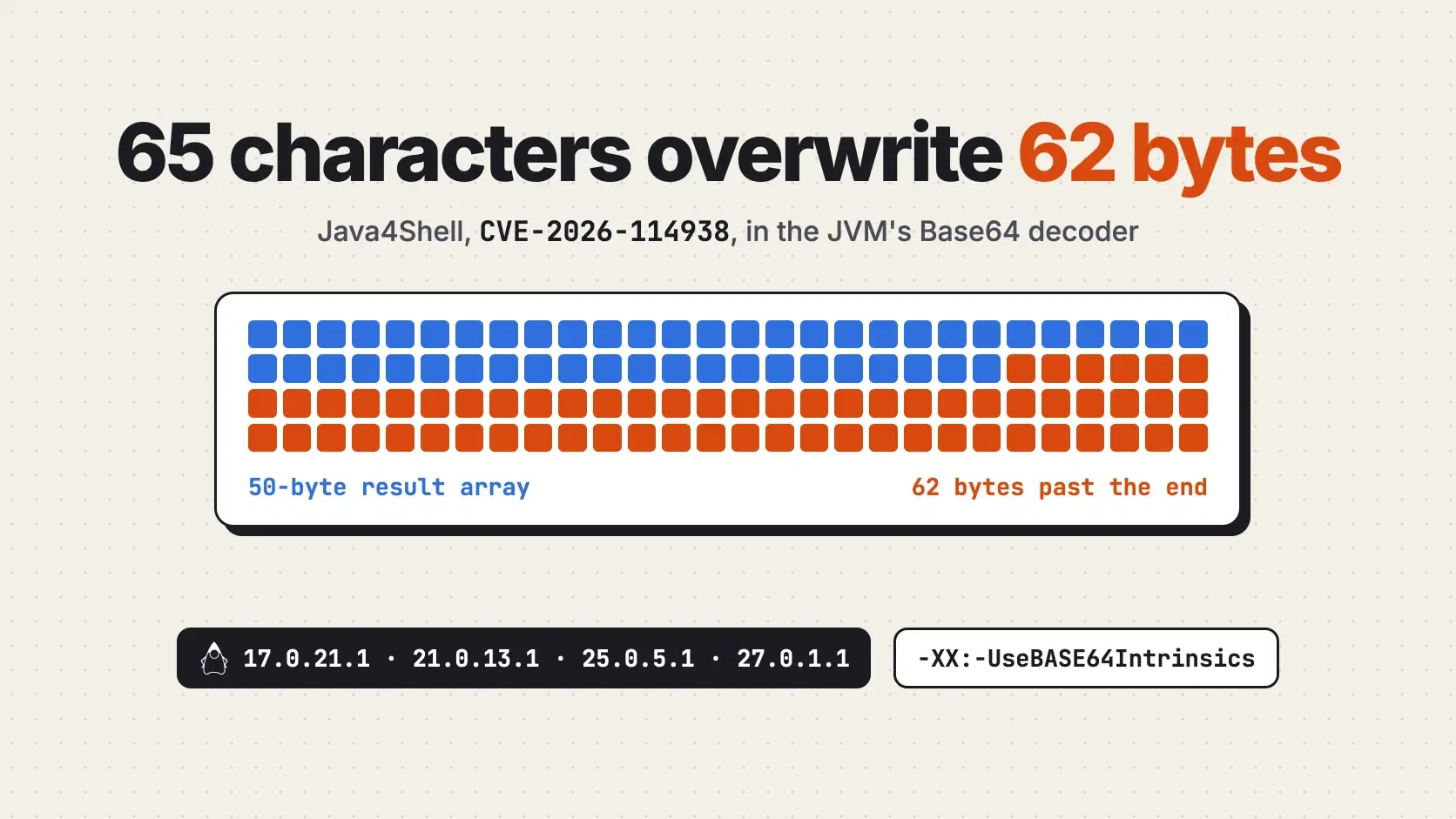
To fix Java4Shell, install a Java build released on or after November 17, 2026 (OpenJDK 17.0.21.1, 21.0.13.1, 25.0.5.1 or 27.0.1.1, or your vendor's equivalent) and restart every JVM that uses it. The bug, CVE-2026-114938, is a heap overwrite in the Base64 decoder of the x86-64 HotSpot JVM. It only runs on x86-64 processors with AVX-512 VBMI, so ARM64 CPUs are not affected, according to Calif, the firm that disclosed it. If you cannot patch today, start the JVM with -XX:-UseBASE64Intrinsics.
The difficulty is finding the Java. It hides inside applications, appliances and container images, where the JDK may not appear as a separate item in any software inventory, which is the first thing CISA's November 17 alert tells defenders to check. Calif says OpenJDK 17.0.6 and newer is affected, along with Amazon Corretto, Eclipse Temurin, Microsoft Build of OpenJDK, Azul Zulu, BellSoft Liberica, SAP SapMachine, Red Hat OpenJDK, Oracle OpenJDK, Oracle Java SE and Oracle GraalVM for JDK. As of the November 25, 2026 catalog, CVE-2026-114938 is not on CISA's Known Exploited Vulnerabilities list, and Calif says it is holding back its product-specific exploits.
What Java4Shell Does Inside the JVM
One malformed Base64 string overwrites memory next to the decoded output. Calif's write-up shows the trigger: 64 A characters followed by a single =, or 128 A characters plus = on older OpenJDK 17. Once the code is hot, HotSpot's C2 compiler uses an x86-64 Base64 intrinsic, a routine built on AVX-512 instructions. Calif found that it miscalculates the store mask for the padded tail: for the 65-character input the decoder allocates a 50-byte result, the output length underflows, the mask comes out as all ones and the intrinsic writes 64 bytes starting at offset 48, which leaves 62 bytes past the end of the array. Java rejects the input afterward, but neighboring objects may already be corrupted.
Whether that becomes code execution depends on the application. Calif says there is no universal exploit: each target needs a decoder route, a way to read memory back and a heap layout. It reports remote code execution without credentials against Keycloak, Atlassian Jira and Confluence, JFrog Artifactory, Jenkins and PingFederate in default configurations, and with credentials against Apache Kafka, Solr, Elasticsearch, Gerrit and Spinnaker. Apache Shiro's advisory note shows how ordinary the path can be: Shiro's CookieRememberMeManager decodes the remember-me cookie with java.util.Base64, so a request handled that way may be vulnerable. Shiro stresses that this does not make every deployment exploitable, because exposure depends on the Java runtime, the CPU and whether the application reaches the decoder.
Oracle's own advisory calls the component "Compiler" and rates the flaw 8.1 under CVSS 3.1 with high attack complexity, while Calif scores it 9.2 Critical under CVSS 4.0. The Corretto changelog lists the same CVE under hotspot/compiler. These are one bug described from two angles, and neither score changes what you do.
Check Whether the Hardware Qualifies
The vulnerable code only runs on x86-64 CPUs that have AVX-512 VBMI, which Calif lists as Intel Xeon Ice Lake, Sapphire Rapids, Emerald Rapids and Granite Rapids, and AMD EPYC and Ryzen on Zen 4 or newer. Calif's check for Linux prints the four required flags, and all four must appear:
Bashgrep -m1 '^flags' /proc/cpuinfo | tr ' ' '\n' | grep -E '^(avx512f|avx512bw|avx512vbmi|bmi2)$'
Empty output means this CPU does not qualify. Calif says ARM64 CPUs, a family that includes AWS Graviton and Apple silicon, are not affected, and the Shiro team says ARM64 systems are not known to be affected. Patch them anyway, because a vulnerable jar can be redeployed on a different CPU tomorrow.
Find Every JVM That Runs
Start with what is running, then with what is installed. Every running JVM answers jcmd, which prints the exact build behind a process ID:
jcmd -l
jcmd 1229 VM.version
On the Mac that wrote this guide, the second command printed Java HotSpot(TM) 64-Bit Server VM version 24+36-3646. Run both as the user that owns the service, because a JVM from another user will not appear. For installed copies, search the disk and then every image:
Bashsudo find / -type f -name java -perm -u+x 2>/dev/null docker run --rm --entrypoint java YOUR_IMAGE -version
Treat anything that bundles Java as a seperate inventory item: application servers, CI controllers, search engines and identity providers. Check the vendor's own advisory for those, because the JDK inside them is the vendor's to ship. The Dockerfile Linter flags :latest and untagged base images that hide which Java you are actually pulling.
Patch Each Distribution
The fixed upstream OpenJDK builds are tagged jdk-17.0.21.1+2, jdk-21.0.13.1+2, jdk-25.0.5.1+2 and jdk-27.0.1.1+4, and Calif says OpenJDK and Oracle released their fixes on November 17, 2026. For OpenJDK-based builds, look for the extra .1 in the version. These are the vendors whose own pages I confirmed as of November 26, 2026:
| Vendor | Fixed version | Source |
|---|---|---|
| Amazon Corretto 17 | 17.0.21.1.2 | Corretto 17 changelog |
| Amazon Corretto 21 | 21.0.13.1.2 | Corretto 21 changelog |
| Amazon Corretto 25 | 25.0.5.1.2 | Corretto 25 changelog |
| Amazon Corretto 27 | 27.0.1.1.4 | Corretto 27 changelog |
| Eclipse Temurin 17, 21, 25, 27 | 17.0.21.1+2, 21.0.13.1+2, 25.0.5.1+2, 27.0.1.1+4 (published November 18) | temurin17, 21, 25, 27 |
| Ubuntu 24.04 openjdk-21 | 21.0.13.1+2-1~24.04.1 | Ubuntu tracker |
| Ubuntu 24.04 openjdk-17 | 17.0.21.1+2-1~24.04.1 | Ubuntu tracker |
| Oracle Java SE | November 17 Critical Security Patch Update | Oracle advisory |
Oracle lists Java SE 8u511b33-perf, 17.0.21.0.3, 21.0.13.0.3, 25.0.5.0.3 and 27.0.1.0.3 as affected and points to its November 17 patch update; confirm the exact fixed build number in Oracle's advisory for your release. I did not confirm fixed builds for Microsoft Build of OpenJDK, Azul Zulu, BellSoft Liberica, SAP SapMachine or Red Hat OpenJDK, so check each vendor's own security page. Ubuntu marks its openjdk-8 packages Not affected on every release, and lists fixed openjdk-17, openjdk-21 and openjdk-25 packages for 22.04 as well as 24.04.
On Ubuntu, upgrade the runtime package you use and then restart the services that load it (untested here, copied from Ubuntu's package names):
Bashsudo apt update sudo apt install --only-upgrade openjdk-21-jre-headless apt list --installed 2>/dev/null | grep openjdk
For Docker, a floating tag only helps after you pull it, because Compose and docker build reuse the cached layer:
docker compose build --pull
docker compose up -d
Restart, Then Verify the Process
Patching the package does not change a JVM that is already running. Restart every Java service, then run jcmd <pid> VM.version against the new process and confirm the build number matches the fixed release. A container is the same: redeploy it from the rebuilt image rather than updating inside it.
If You Cannot Patch Today
Calif documents two JVM flags that switch the vulnerable path off. -XX:-UseBASE64Intrinsics disables hardware-accelerated Base64, and -XX:UseAVX=2 disables AVX-512 for the whole JVM. To apply one to every JVM that starts in a shell or service environment without editing each launch script, set it in JAVA_TOOL_OPTIONS:
Bashexport JAVA_TOOL_OPTIONS="-XX:-UseBASE64Intrinsics" java -version
The JVM prints Picked up JAVA_TOOL_OPTIONS: -XX:-UseBASE64Intrinsics before the version, which is how you know it took effect. For a running process, jcmd <pid> VM.flags -all | grep UseBASE64Intrinsics shows false when the flag is active, and true when the process still runs with the default. A process only reads the option at startup, so restart it first.
Use the UseAVX flag only on x86-64. On our ARM JDK 24, java -XX:UseAVX=2 -version stopped with Unrecognized VM option 'UseAVX=2' and Error: Could not create the Java Virtual Machine, which is the failure Calif warns about for OpenJDK on ARM. CISA adds compensating controls for the gap: validate Base64 input at the application boundary, enforce input-size limits and restrict unauthenticated access. Calif notes that request-body buffering in a proxy removes some of its grooming profiles but is not a general mitigation.
Test a Runtime Safely
Calif published a bounded Java trigger whose writes stay inside a real 4096-byte array. It warms the decoder 200,000 times, decodes the 65-character input and checks whether 62 bytes at offsets 50 to 111 changed. On an affected JDK it prints REPRODUCED. We ran it on Oracle JDK 24 on an Apple M3 Pro, where it printed:
textruntime=24+36-3646 vm=Java HotSpot(TM) 64-Bit Server VM rejected=true changed=0 first=-1 last=-1 NOT REPRODUCED
That is the expected result on ARM and on any patched runtime. We had no AVX-512 VBMI machine to see REPRODUCED, so we cannot show the vulnerable side, and a NOT REPRODUCED on a host without the CPU flags above proves nothing about the same jar on another host.
Common Errors and Warning Signs
Unrecognized VM option 'UseAVX=2'. You applied an x86-only flag to an ARM JVM. Switch to -XX:-UseBASE64Intrinsics, which both architectures accept.
Picked up JAVA_TOOL_OPTIONS in every log. It is informational, not an error, and it appears on every JVM start, so remove the variable once the patch is in.
A JVM crash with no clear cause. CISA's guidance asks you to monitor for unexpected JVM crashes and rogue runtimes, because a failed exploit attempt can end the process. Calif also found that a user hit the bug in the wild in June and reported it, so a crash can be an accidental trigger and not an attack. Keep any hs_err_pid*.log file and compare timestamps against your access logs. Pasting a stack trace into the Stack Trace Parser groups the frames quickly.
When Not to Rely on This
A mitigation flag is not the fix, and a clean log is not proof, because a corrupting write can land without any message. Runtimes outside the vendor lists, such as an old bundled JDK in an appliance, may never get a patch, and that is a reason to replace them, not to wait. If a decoder route in your app accepts user data, assume an attacker can reach it.
Conclusion
Java4Shell is fixed in the Java runtime, not in your application's code. Install the builds released from November 17 onward, restart every JVM and verify with jcmd that the process runs the new build. Until then, -XX:-UseBASE64Intrinsics closes the demonstrated path on x86-64 hosts.
Today's order of work: patch internet-facing systems first, as CISA says, starting with the products Calif showed unauthenticated exploits against (Jenkins, Keycloak, Jira, Confluence, Artifactory and PingFederate); set JAVA_TOOL_OPTIONS on anything you cannot restart in a maintenance window this week; rebuild containers with --pull; and ask each vendor for the Java version inside any appliance you cannot rebuild yourself. Check the hardware last: it tells you how urgent a host is, and it definately does not tell you whether the host is safe.
Related DevToolLab Tools
- Base64 Encoder Decoder - decode a suspicious cookie or header value to see what a request actually carried.
- Dockerfile Linter - catch untagged and
:latestJava base images so a rebuild ships the patched runtime. - Stack Trace Parser - group the frames of a JVM crash log to find a repeating failure.
- Website Technology Detector - find which of your sites run Java-based stacks before you start patching.
Related Guides
- PHP2Shell: How to Check and Patch PHP - the same runtime-below-the-app problem, in PHP.
- Nginx HTTP/2 RCE: How to Check and Patch - the other server flaw this month.
- Base64 Encoding Explained - how the format the bug lives in works.
- CVE-2026-98432: Check and Patch Linux - another kernel-level check with exact commands.