
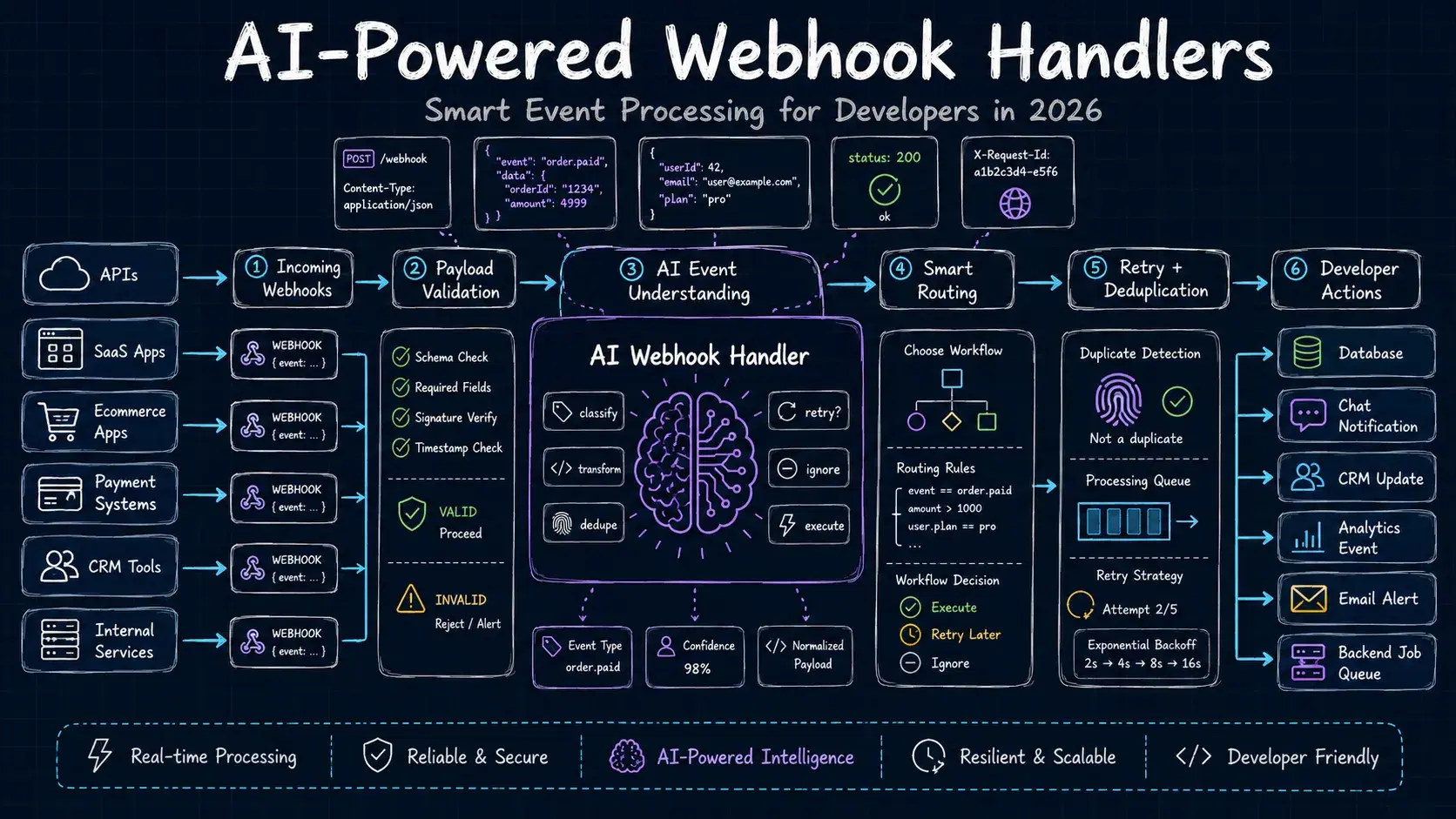
Most webhook handlers are just tall stacks of if-else checks. An event arrives, you match its type field, call the right function, return 200. This works until it does not - until a third-party changes their payload shape, adds an undocumented field, or sends a free-text reason that you have to manually parse to decide what to do.
In 2026, there is a better approach for the messy parts: use an LLM as the decision layer. Not for everything - simple event routing still belongs in code. But for classification of ambiguous payloads, structured extraction from free-form fields, automated responses, and anomaly detection, a small LLM call can replace hundreds of lines of brittle parsing logic.
This guide covers four practical patterns with working Node.js and Python examples. By the end you will know when to reach for AI in a webhook pipeline and when to leave it in a plain function.
Why Webhook Handlers Break
The average production webhook handler is surprisingly fragile. Three common failure modes:
Payload schema drift. Third-party APIs evolve. A status field that used to be "active" now arrives as "ACTIVE" or "enabled". A field you depended on gets renamed. Since webhooks are push-based, you find out about the change when your handler starts throwing exceptions, not before.
Free-text fields. Payment providers often include a failure_reason as a human-readable string. Shipping APIs send a notes field. Support tools include a description. Any logic that branches on these strings is a maintenance burden.
Multi-event complexity. A GitHub webhook can fire 50+ different event types. A Stripe webhook has over 200. Routing logic that covers every combination becomes hard to read and harder to test. Missed cases go to a catch-all that does nothing.
AI addresses all three - not by replacing the handler, but by adding an interpretation layer before your business logic runs.
Pattern 1: Event Classification with an LLM
When a webhook payload arrives with a vague or inconsistent event type, ask the LLM to classify it before your code branches on it.
Pythonimport anthropic import json client = anthropic.Anthropic() CATEGORIES = [ "payment_success", "payment_failure", "subscription_created", "subscription_cancelled", "user_created", "user_deleted", "order_shipped", "order_returned", "unknown", ] def classify_webhook_event(payload: dict) -> str: prompt = f"""Classify this webhook payload into exactly one of these categories: {", ".join(CATEGORIES)} Payload: {json.dumps(payload, indent=2)} Return only the category name, nothing else.""" message = client.messages.create( model="claude-haiku-4-5-20251001", max_tokens=20, messages=[{"role": "user", "content": prompt}], ) category = message.content[0].text.strip().lower() return category if category in CATEGORIES else "unknown" # Usage payload = { "evt_type": "CHRG_FAILED", "reason": "Insufficient funds", "amount": 4999, "currency": "USD", } event_type = classify_webhook_event(payload) print(event_type) # -> "payment_failure"
Use claude-haiku-4-5-20251001 here - it is fast and cheap for classification tasks (fractions of a cent per call). Haiku handles ambiguous payload shapes, unfamiliar field names, and inconsistent casing without you maintaining a mapping table.
The returned category maps directly to your existing handler functions:
Pythonhandlers = { "payment_failure": handle_payment_failure, "subscription_cancelled": handle_churn, "order_returned": handle_return, } handler = handlers.get(event_type) if handler: handler(payload)
When to use it: Classification makes sense when you receive webhooks from multiple providers with different field naming conventions, or when the type field is missing, inconsistent, or encoded in a non-obvious format.
When to skip it: If your provider sends a clean, stable event_type field with a finite set of known values, plain if-else is faster, cheaper, and equally reliable.
Pattern 2: Structured Extraction from Free-Text Fields
Some webhook payloads contain human-written text in fields like notes, reason, description, or message. Extracting structured data from these with regex is brittle. An LLM handles it in one call.
JavaScriptimport Anthropic from "@anthropic-ai/sdk"; const client = new Anthropic(); async function extractShippingDetails(webhookPayload) { const notes = webhookPayload.delivery_notes || ""; const response = await client.messages.create({ model: "claude-haiku-4-5-20251001", max_tokens: 200, messages: [ { role: "user", content: `Extract structured data from this shipping note. Return valid JSON only. Note: "${notes}" Return a JSON object with these fields (use null if not mentioned): { "requires_signature": boolean, "leave_with_neighbour": boolean, "safe_place": string or null, "delivery_instructions": string or null, "fragile": boolean }`, }, ], }); try { return JSON.parse(response.content[0].text); } catch { return null; } } // Example const payload = { order_id: "ORD-8821", delivery_notes: "Leave with neighbour if not in. Fragile - handle with care. No signature needed.", }; const details = await extractShippingDetails(payload); console.log(details); // { // requires_signature: false, // leave_with_neighbour: true, // safe_place: null, // delivery_instructions: "Leave with neighbour if not in", // fragile: true // }
This is more reliable than a list of regex patterns, degrades gracefully when notes are vague, and takes about 150ms end-to-end with Haiku.
For extraction tasks, prompt the model to return JSON and parse it directly. If you need guaranteed structure, use the Anthropic SDK's tool use feature to enforce a schema at the API level:
Pythontools = [ { "name": "extract_shipping_details", "description": "Extract delivery instructions from the note", "input_schema": { "type": "object", "properties": { "requires_signature": {"type": "boolean"}, "leave_with_neighbour": {"type": "boolean"}, "safe_place": {"type": ["string", "null"]}, "delivery_instructions": {"type": ["string", "null"]}, "fragile": {"type": "boolean"}, }, "required": ["requires_signature", "leave_with_neighbour", "fragile"], }, } ] response = client.messages.create( model="claude-haiku-4-5-20251001", max_tokens=200, tools=tools, tool_choice={"type": "auto"}, messages=[{"role": "user", "content": f'Extract from: "{notes}"'}], ) # The model is forced to call the tool - no JSON parsing needed result = response.content[0].input
Tool use guarantees the response matches your schema. The model will retry internally if the output does not conform, so you do not need to handle malformed JSON.
Pattern 3: Auto-Generate Webhook Responses
Some webhooks expect a structured response in the reply body - Slack interactive components, Stripe payment confirmations with custom messages, or chatbot platforms. Instead of hardcoding response strings, generate them dynamically.
JavaScriptimport Anthropic from "@anthropic-ai/sdk"; const client = new Anthropic(); // Slack webhook handler - expects a response with a message export async function handleSlackCommand(req, res) { const { command, text, user_name } = req.body; // Verify Slack signature first (always do this) if (!verifySlackSignature(req)) { return res.status(401).send("Unauthorized"); } const response = await client.messages.create({ model: "claude-sonnet-4-6", max_tokens: 300, system: "You are a helpful assistant responding to Slack slash commands. Be concise - Slack messages should be under 200 words. Respond directly without pleasantries.", messages: [ { role: "user", content: `User ${user_name} ran command ${command} with input: "${text}"`, }, ], }); const reply = response.content[0].text; // Slack expects this response format return res.json({ response_type: "in_channel", text: reply, }); }
This lets you build Slack bots, GitHub comment bots, and similar integrations where the response content depends on the incoming payload - without a separate response-generation system.
Latency note: Slack requires a response within 3 seconds or it shows an error to the user. For any AI call that might take longer, Slack recommends sending an immediate acknowledgment and posting the full response asynchronously:
JavaScriptexport async function handleSlackCommand(req, res) { const { response_url, text, user_name } = req.body; // Acknowledge immediately res.json({ text: "Working on it..." }); // Generate and send the real response async const aiResponse = await generateResponse(user_name, text); await fetch(response_url, { method: "POST", headers: { "Content-Type": "application/json" }, body: JSON.stringify({ text: aiResponse, replace_original: true }), }); }
Pattern 4: Anomaly Detection on Webhook Streams
For high-volume webhook streams - payment events, user activity, API usage - you can run anomaly detection to surface unusual patterns before they become incidents.
Pythonimport anthropic import json from datetime import datetime, timedelta client = anthropic.Anthropic() def detect_webhook_anomalies(recent_events: list[dict]) -> dict: # Summarize the event stream for the model summary = { "window": "last 15 minutes", "total_events": len(recent_events), "event_types": {}, "error_rate": 0, "sample_errors": [], } errors = [e for e in recent_events if e.get("status") in ("failed", "error")] summary["error_rate"] = round(len(errors) / max(len(recent_events), 1), 3) summary["sample_errors"] = [e.get("reason", "") for e in errors[:5]] for event in recent_events: t = event.get("type", "unknown") summary["event_types"][t] = summary["event_types"].get(t, 0) + 1 prompt = f"""Analyze this webhook event stream summary for anomalies. Stream summary: {json.dumps(summary, indent=2)} Historical baseline: - Average error rate: 0.02 (2%) - Normal event mix: payment_success 60%, subscription events 25%, user events 15% - Expected volume: 50-150 events per 15-minute window Identify any anomalies. Return JSON: {{ "anomalies_detected": boolean, "severity": "none" | "low" | "medium" | "high", "findings": ["list of findings"], "recommended_action": "string" }}""" response = client.messages.create( model="claude-haiku-4-5-20251001", max_tokens=300, messages=[{"role": "user", "content": prompt}], ) return json.loads(response.content[0].text) # Usage result = detect_webhook_anomalies(recent_events) if result["anomalies_detected"] and result["severity"] in ("medium", "high"): send_alert( channel="#incidents", message=f"Webhook anomaly ({result['severity']}): {result['findings']}", )
This works well as a scheduled check (every 5-15 minutes) rather than per-event. Batching the analysis means the LLM call cost stays negligible even at high webhook volumes.
The key is giving the model a baseline to compare against. Without it, every spike looks like an anomaly. Embed your normal error rates and volume ranges directly in the prompt.
Cost and Rate Limit Considerations
AI calls add latency and cost to your webhook pipeline. A few things to keep in mind:
Use the cheapest model that works. For classification and simple extraction, Haiku (claude-haiku-4-5-20251001) handles almost everything and costs about 20x less than Sonnet. Reserve Sonnet for complex reasoning tasks or response generation where quality matters.
Cache classification results. If the same webhook payload structure comes in repeatedly (same provider, same event type), cache the classification result keyed by payload shape. Many webhook event types arrive in predictable batches.
Pythonimport hashlib import json classification_cache = {} def get_cache_key(payload: dict) -> str: # Key on the structure and type fields, not dynamic values signature = {k: type(v).__name__ for k, v in payload.items()} signature["type"] = payload.get("type", "") return hashlib.md5(json.dumps(signature, sort_keys=True).encode()).hexdigest() def classify_with_cache(payload: dict) -> str: key = get_cache_key(payload) if key in classification_cache: return classification_cache[key] result = classify_webhook_event(payload) classification_cache[key] = result return result
Protect against slow AI calls. Webhook endpoints need to respond quickly. Always add a timeout on your AI call and fall back to a default handler:
Pythonimport asyncio async def classify_with_timeout(payload: dict, timeout_seconds: float = 2.0) -> str: try: result = await asyncio.wait_for( asyncio.to_thread(classify_webhook_event, payload), timeout=timeout_seconds, ) return result except asyncio.TimeoutError: return "unknown" # fall back to catch-all handler
Run AI processing asynchronously for non-critical enrichment. If you only need the AI result for logging or analytics (not for deciding what action to take), queue the AI call for background processing and return 200 immediately.
Production Checklist
Before shipping an AI-backed webhook handler:
- Verify webhook signatures before any processing. Every major provider includes a signature header (Stripe's
Stripe-Signature, GitHub'sX-Hub-Signature-256). Validate it before passing the payload anywhere. - Implement idempotency. Webhooks get retried on delivery failure. Store processed event IDs and skip duplicates.
- Set AI call timeouts. 2 seconds is a safe upper bound for Haiku; adjust based on your SLA.
- Add a fallback for AI failures. If the LLM call errors or times out, route to a catch-all handler instead of returning a 5xx.
- Log AI decisions. Store the classification/extraction result alongside the raw payload so you can audit and improve prompts over time.
- Monitor error rates. Sudden spikes in "unknown" classifications often mean the upstream provider changed their payload format.
Testing Your Webhook Handlers
Before deploying, you need a reliable way to fire test payloads at your handler. DevToolLab's Webhook Receiver gives you a unique URL that captures every request with full headers, body, and timing. Use it to:
- Record real webhook payloads from each provider you integrate with
- Replay those payloads against your local handler during development
- Verify your AI classification handles edge cases in the real payload shapes
Related DevToolLab Tools
- Webhook Receiver - Capture and inspect live webhook payloads from any provider
- JSON Formatter - Pretty-print webhook payloads to find the fields you need to parse
- JSON Viewer - Explore deeply nested webhook payloads as a collapsible tree
- Base64 Decoder - Decode Stripe webhook signatures and JWT tokens inline
- Diff Checker - Compare two webhook payload versions to spot schema changes from providers
- cURL Command Generator - Build test webhook requests to fire at your handler
Conclusion
Most webhook handlers break on schema drift, free-text fields, or if-else trees that grow with every new provider event. An LLM layer fixes those messy parts, classification, extraction, response generation, anomaly detection, without touching the clean parts. Keep stable event types in a plain switch statement and save the AI calls for the cases rules can't handle.
At fractions of a cent per call with Haiku, the cost is low and the maintenance payoff is fast.