
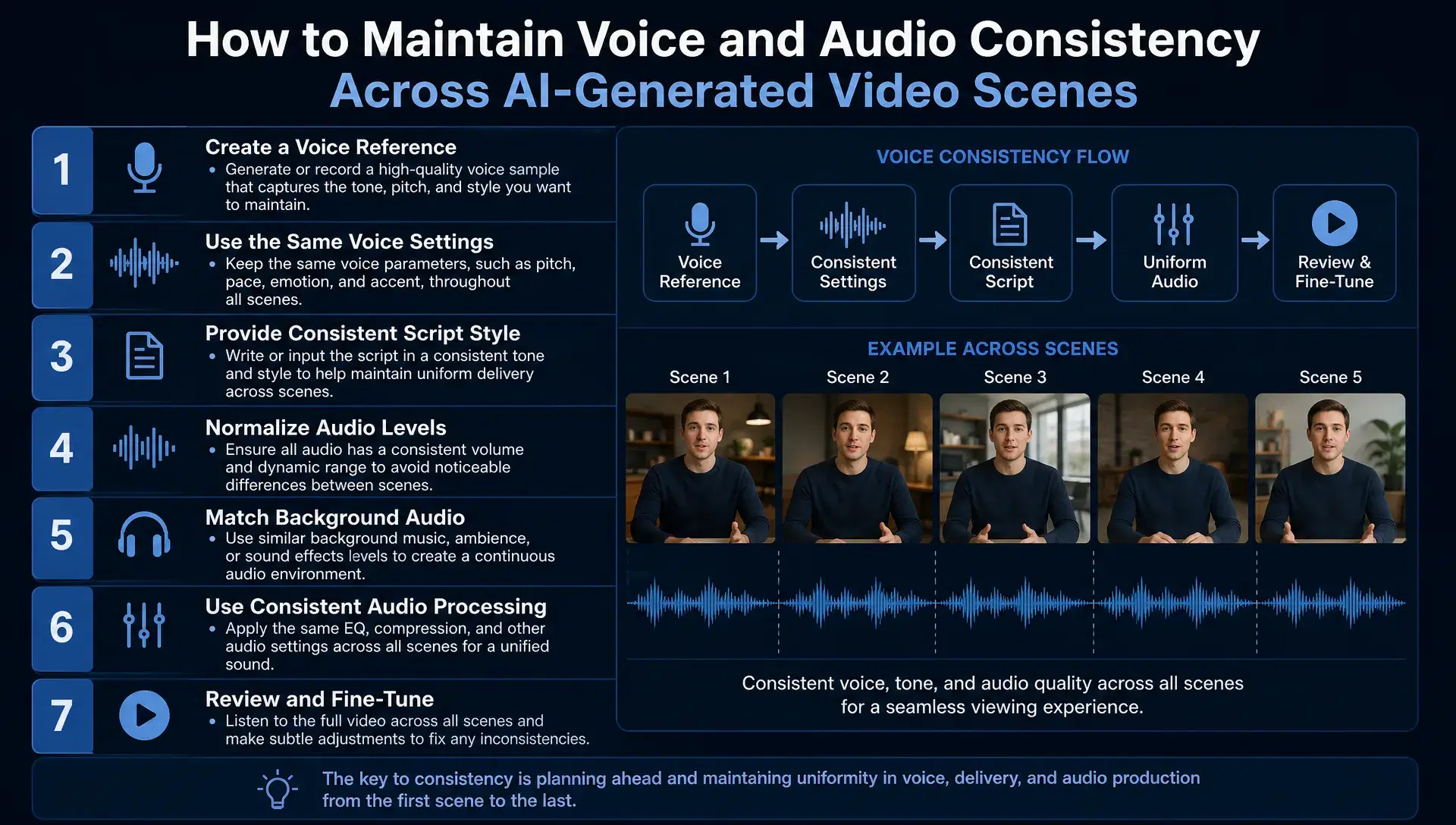
A voice that shifts slightly between scenes is a quieter problem than a character's face changing, but it's just as noticeable once a viewer's ear catches it. The tone flattens out. The pacing speeds up in one scene and drags in the next. A narrator who sounded warm and confident in scene one sounds thinner and more synthetic by scene eight. None of it is a single dramatic failure, but a video built from independently generated scenes tends to drift this way by default, the same way a character's appearance does, just harder to point at directly.
This isn't a rare glitch, it's what happens when each scene's audio gets generated as its own separate attempt, without a shared reference the model returns to every time that voice speaks again.
Why audio drift is easy to miss until it's already a pattern
A viewer notices a face changing almost instantly, since human perception is finely tuned to faces specifically. Voice drift is subtler: a slightly different pace, a marginally different tone, a cadence that doesn't quite match, none of it registers as an obvious error the way a visual mismatch does. That's exactly what makes it dangerous, since it can accumulate across an entire project before anyone flags it as a problem, by which point every scene needs to be redone rather than just the next one.
invideo agent treats audio the same way it treats a locked character reference: as something established once and carried forward, rather than something regenerated independently every time a scene needs narration or dialogue.
Establish the voice with more than a short sample
A voice cloned or generated from a very short sample tends to hold up fine on simple, predictable phrasing and drift noticeably the moment a scene calls for something unusual, an unfamiliar word, a sudden change in emotional register, a longer, more complex sentence. The sample a voice gets built from needs to cover enough range that the model has actually learned the voice's real character, not just its most common patterns.
This matters more the longer a project runs. A voice that sounds perfectly stable across three short scenes can start drifting by scene ten if the original sample never gave the model enough material to generalize from in the first place.
Lock the voice at the same point a character gets locked
Once a project establishes a voice, that first locked instance becomes the reference every later scene needs to match, the same principle that applies to a character's visual reference sheet. A persistent context engine is what makes that possible in practice: invideo agent can hold a locked voice in memory across an entire project, so a narrator or character's voice in scene twelve is generated against the same reference as scene one, rather than being reconstructed independently each time.
Skipping this step, treating each scene's audio as its own fresh generation instead of a continuation of an established voice, is the audio equivalent of letting a character's face drift scene by scene. It's just quieter, which is exactly why it goes unnoticed for longer.
Match levels and room tone as a separate pass from the voice itself
A voice can stay perfectly consistent in tone and pacing and still sound inconsistent across scenes if the levels and acoustic space around it aren't matched too. A scene recorded or generated with slightly more volume, or a subtly different sense of room ambience, reads as a different recording environment even when the voice itself is technically the same.
This is worth treating as its own step rather than assuming voice consistency automatically solves it: normalizing loudness to one consistent target across every scene, and matching ambience when a line has to be replaced or re-recorded later, closes a gap a locked voice reference alone doesn't cover.
Plan for localization before it becomes a separate project
A voice's consistency problem gets harder the moment a video needs to exist in more than one language, since a straightforward dub or a new voiceover in another language easily ends up sounding like a different person delivering the same lines. Rather than treating localization as an entirely separate production pass, the more reliable approach plans what has to change (the language) against what has to stay the same (the voice's identity) from the start.
invideo agent handles this directly: it plans what has to change versus stay the same across a translation, auto-translates the script, generates lip-synced voiceover, and uses voice cloning to keep the same voice consistent across every language version, so a character or narrator sounds like the same person in a second language rather than being replaced by a generic localized voice. This sits on top of the platform's routing across whichever of its 200+ integrated models fits a given scene, including Veo 3.1, Sora 2, Kling 3.0, Seedance 2.0, Runway, PixVerse, Hailuo, WAN, Recraft, GPT Image 2.0, and Nano Banana, so the voice reference carries consistently regardless of which model renders the visuals for that scene.
Common mistakes when maintaining voice and audio consistency
Building a voice reference from too short a sample. A brief sample holds up on predictable phrasing but drifts the moment a scene needs something the model never generalized from in the first place.
Treating each scene's audio as an independent generation. Without a locked voice as the reference point, small inconsistencies in tone and pacing accumulate scene by scene, more quietly than visual drift but just as real.
Assuming a consistent voice automatically means consistent levels. Loudness and room tone are a separate problem from the voice's tone and pacing, and need their own normalization pass across scenes.
Treating localization as an entirely separate production run. A new-language voiceover generated without reference to the original voice's identity tends to sound like a different person, even when the words are accurately translated.
Not noticing drift until many scenes are already generated. Because audio drift is subtler than visual drift, it often goes unflagged until an entire project needs a second pass, rather than catching it after the first few scenes.
Conclusion
Keeping a voice consistent across AI-generated scenes comes down to treating it with the same discipline a locked character reference gets, established once from a sample with real range, held as a standing reference every later scene generates against, and never left to drift quietly because no single scene sounds obviously wrong on its own. Level and room tone matching, and a localization plan built alongside the original narration rather than bolted on afterward, close the gaps that voice consistency alone doesn't cover.
None of this requires catching the problem after it's already spread across a finished project. It requires deciding, before the first scene generates, that the voice is something to be established and carried forward rather than something each new scene reconstructs on its own.