
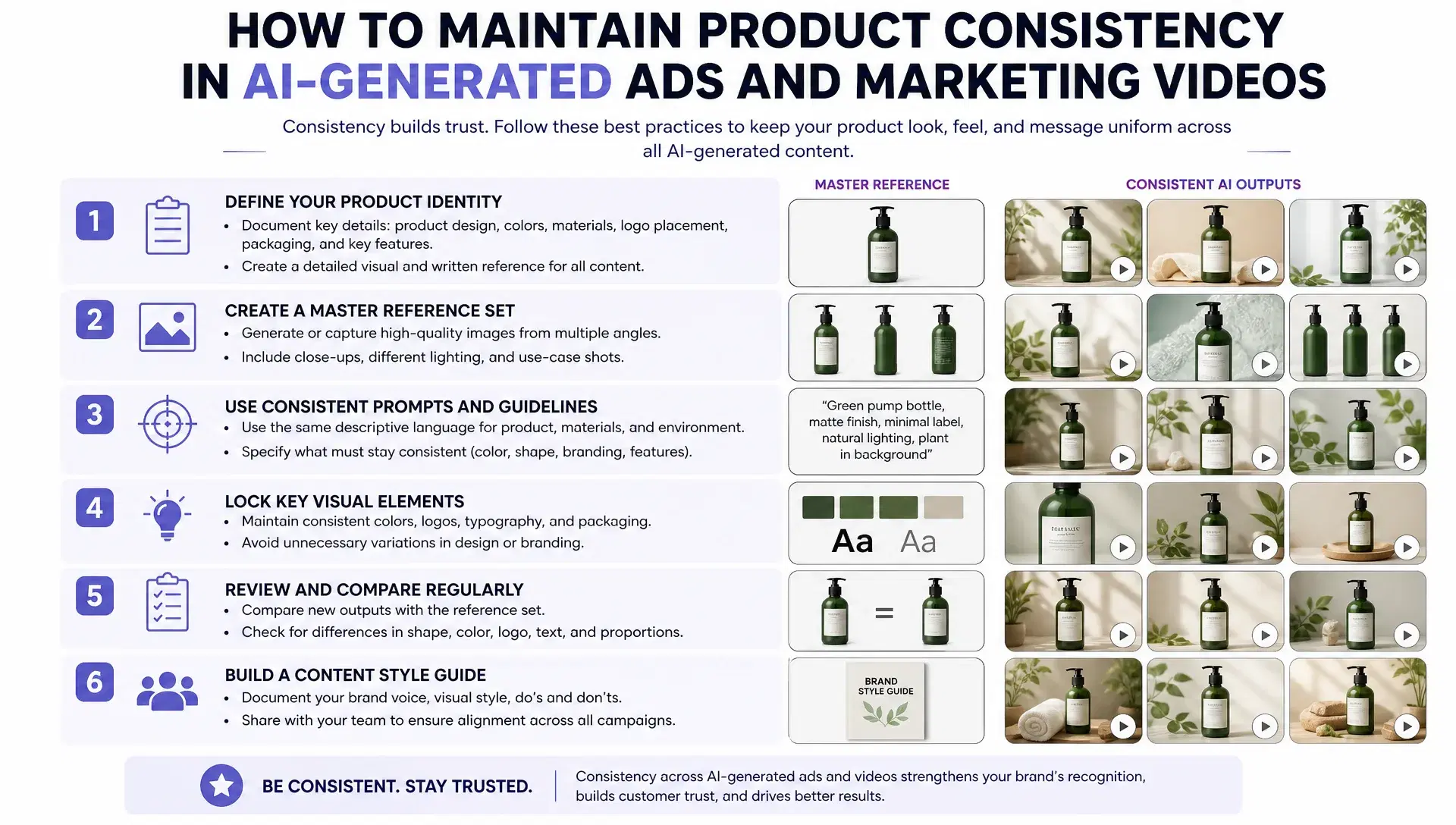
A product that looks slightly different in every ad variant undermines a campaign faster than almost any other visual mistake. The bottle's proportions shift half a size. The label's font looks a shade off. A necklace that read as gold in one cut looks silver in the next. None of these are dramatic failures individually, but a viewer who's seen the real product notices immediately, and at ad-campaign scale, where a single winning concept might get tested across 50 variants, that inconsistency shows up dozens of times before anyone catches it.
This isn't a rare glitch, it's the default outcome of generating each ad variant independently, without a shared reference the model returns to every time the product appears.
Why product consistency is a harder bar than character consistency
A face can drift slightly across scenes and still read as "the same person" to a viewer, since human perception of identity has some real tolerance built in. A product usually doesn't get that same tolerance. Packaging text, exact color, logo placement, and material behavior all need to match precisely, not approximately, because the audience for a marketing video has often seen the actual product already, on a shelf, on a previous ad, on the box itself. A logo maker can also help create consistent branded visuals for marketing campaigns. When an AI-generated graphic needs to be reused across different formats, you can convert AI to SVG to keep it sharp and scalable without having to recreate the design.
invideo agent addresses this the same way it handles character work, by locking a reference at generation time rather than leaving each ad variant to reinterpret the product from scratch. For products specifically, that reference needs to capture something a character sheet doesn't: exactly how the material looks and moves under real light.
Start with real product photography, never a website image
Where the reference photo comes from matters more than it seems. Pulling a product image from a website or a marketing page tends to break fine detail once it's used as an AI reference, because that image has already been cropped, color-corrected, and compressed for web display, stripping out the texture a model actually needs to reproduce the product.
Real product shots, taken directly of the physical item from multiple angles, with close-ups under different lighting, hold up far better as reference material than a polished marketing asset. The difference is what information survives: a raw photo still has the fine detail a website image lost somewhere in editing.
Build a reference set that establishes true scale
A product reference works differently from a character reference sheet in one specific way: it needs to establish scale, not just appearance. A photo of a hand holding the product gives a model a real-world size comparison, something a product shot alone, without any point of reference, can't communicate on its own.
For items with multiple packaging layers, a box inside a sleeve, a case around a smaller item, each layer needs its own reference image. A model generating "the product" from a single flattened photo tends to collapse that layered structure into one simplified shape, which is exactly the kind of detail an audience notices in a marketing video built around unboxing or close-up shots.
Describe how the material actually behaves, not just what it's called
Fabric, jewelry, and reflective packaging all introduce a problem that goes beyond simple appearance: how the material physically moves and catches light. A generic prompt like "a sweater" or "a necklace" gives a model very little to reproduce accurately.
Describing the material in specific, physical terms, "lattice yarn, soft and fuzzy" instead of "sweater," "faceted crystal, hard and reflective" instead of "necklace," gives a model something concrete to work from. This is one of the more overlooked steps in product-consistent generation, and it's often the exact difference between a fabric that moves naturally on camera and one that looks stiff or rubbery.
Lock the first ad variant before generating the rest of the campaign
Once a product's reference is established, the first generated shot in a campaign sets the standard every later variant needs to match. This is where a persistent context engine matters most: invideo agent can hold that first locked shot in memory across an entire project, so every later ad variant inherits its exact look automatically rather than reinterpreting the product independently each time.
Skipping this step, treating each new ad variant as its own fresh generation instead of a continuation of a locked reference, is one of the most common reasons a product looks slightly different across an otherwise well-produced campaign, especially once that campaign scales into dozens of variants for testing.
Use a two-stage pipeline for the hardest cases
Some products, jewelry especially, combine two problems at once: they're small enough that fine detail matters enormously, and they're reflective enough that lighting behavior is a core part of what makes them recognizable. Asking one generation to handle both the scene's overall look and the product's exact appearance at that level of detail tends to produce a plausible-looking result that isn't quite right.
The more reliable approach is a two-stage pipeline: build the base aesthetic of a scene in one model first, then run a dedicated product-locking model to lock the exact product into that scene. This is one of the areas where invideo agent's model routing matters most, splitting the work into two distinct problems, getting the scene's overall look right and getting the specific product's exact appearance right, rather than asking a single generation to solve both simultaneously. The platform routes that work across whichever of its 200+ integrated models fits each stage, including Veo 3.1, Sora 2, Kling 3.0, Seedance 2.0, Runway, PixVerse, Hailuo, WAN, Recraft, GPT Image 2.0, and Nano Banana, with models like Nano Banana specifically suited to the product-locking pass.
Common mistakes when maintaining AI product consistency in marketing videos
Sourcing the product image from a website instead of a real photo. Marketing images have already lost the fine detail a model needs to reproduce the product accurately.
Using a single flattened product shot for items with multiple packaging layers. Each layer needs its own reference, or the model tends to collapse them into one simplified shape.
Describing materials generically instead of physically. A product name alone gives a model far less to work with than a specific description of how the material actually behaves.
Treating every ad variant in a campaign as an independent generation. Without a locked first shot as the reference point, small inconsistencies accumulate across dozens of variants that should otherwise look uniform.
Using a single model for both scene-building and product-locking on reflective or highly detailed items. Splitting these into two stages produces more reliable results than asking one generation to handle both, especially for jewelry or heavily branded packaging.
Conclusion
Product consistency in AI-generated marketing video comes down to treating the product the way a continuity department would treat a hero prop: photographed properly from the start, referenced at true scale with every packaging layer accounted for, described in physical rather than generic terms, and locked at the first generated shot so every later variant inherits that exact look instead of reinterpreting it. The hardest cases, jewelry, reflective packaging, heavily detailed items, benefit from splitting the work into two deliberate stages rather than asking one generation to get both the scene and the product exactly right at once.
None of this is optional once a campaign scales past a single ad. A product that drifts across two variants is a minor issue; the same drift repeated across fifty variants is a campaign that quietly stops looking like it came from one brand.