
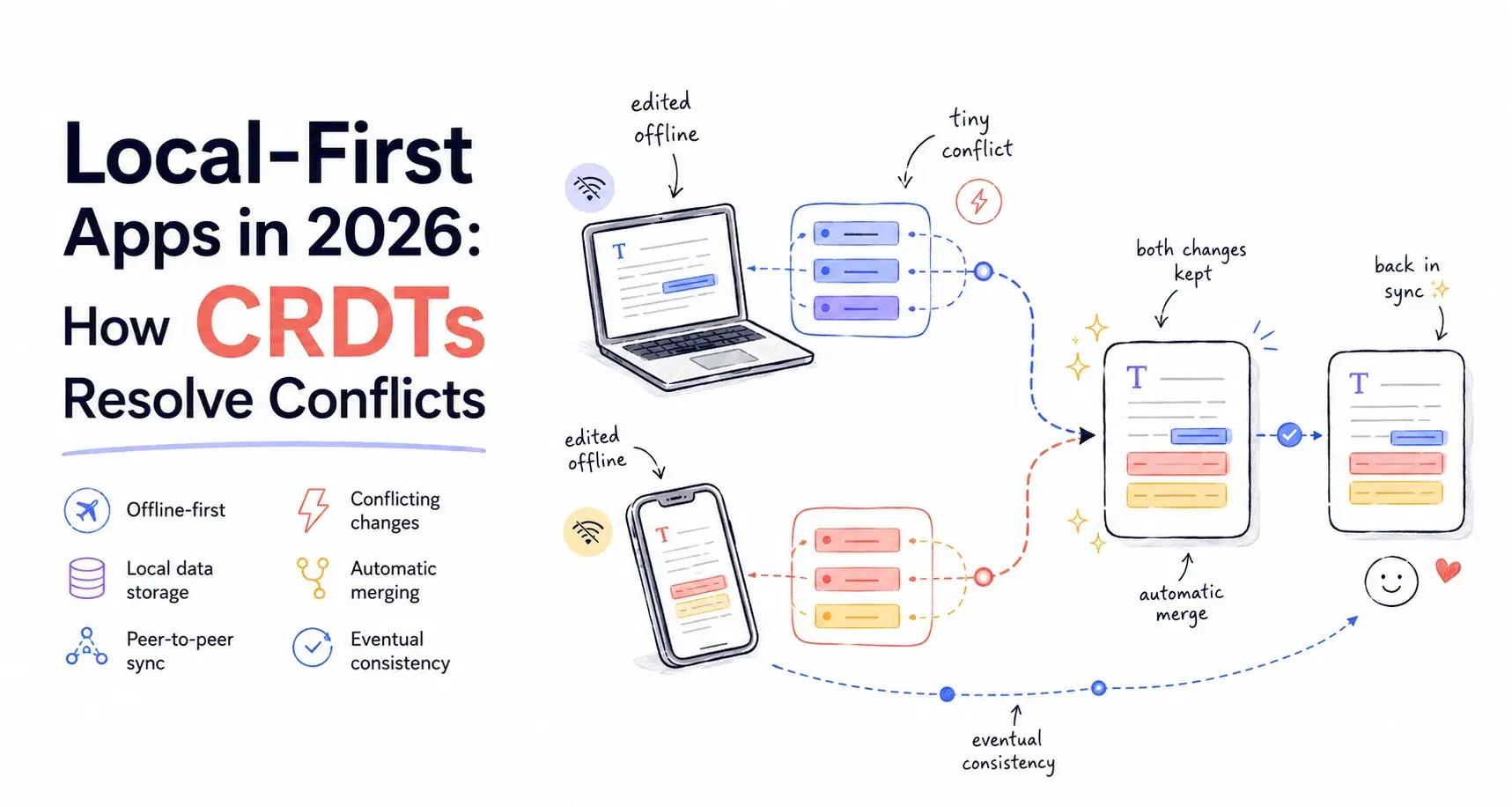
Two of the bigger names in the "local-first" sync engine space made moves in 2026 that most write-ups on the topic haven't caught up to yet. ElectricSQL quietly rebranded to Electric and now describes itself as "the first agent platform built on sync," pointed at AI agent state rather than just offline web apps. PowerSync kept its head down and shipped, and now lists production users like 7-Eleven and Stanley Black & Decker on its site. Neither of those facts changes the underlying technology, but they're a good signal that the "sync engine" category ElectricSQL's founder called the defining trend of 2026 is past the hype-cycle stage and into "companies are actually running this" territory.
This post skips the philosophy and gets straight to the mechanics: what a CRDT (Conflict-free Replicated Data Type) actually does when two offline devices edit the same data, with real code you can run and real output, not a hand-wavy diagram. Then it covers where a full sync engine like Electric or PowerSync fits versus just using a CRDT library directly.
What "Local-First" Actually Means
The term comes from a 2019 paper by Martin Kleppmann, Adam Wiggins, Peter van Hardenberg, and Mark McGranaghan at Ink & Switch, presented at ACM's Onward! conference. The core idea: your app should work instantly and fully offline because it reads and writes to local storage first, and it should sync to other devices and collaborators in the background, without a central server being the source of truth or a single point of failure.
That second part is the hard one. If two people (or two devices belonging to the same person) edit the same document while both are offline, whose edit wins when they reconnect? A CRDT is a data structure specifically designed so that two independent copies can be merged and always converge to the same result, deterministically, with no server arbitrating and no manual conflict resolution UI.
Two Ways to Build This
You have two real options, and they solve different problems:
| Approach | What it is | Use when |
|---|---|---|
| CRDT library (Yjs, Automerge) | A data structure you embed directly in your app; you wire up your own storage and network transport | Collaborative editing, rich text, whiteboards, anything with fine-grained concurrent edits |
| Sync engine (Electric, PowerSync, Zero) | A backend service plus client SDK that syncs a real database (usually Postgres) down to local SQLite or a reactive client store | You already have a Postgres-backed app and want offline reads/writes without redesigning your data layer |
The rest of this guide focuses on the CRDT side first, because that's the part you can actually run and see for yourself in two minutes.
How a CRDT Actually Merges Data
Yjs is the most widely used CRDT library in production JavaScript apps (it powers collaborative editing in Jupyter, and tools built on Tiptap and ProseMirror). Install it and run this locally, no server or account needed:
npm install yjs
Here's the scenario: two laptops start with an empty shared to-do list, then go offline and each add different items.
js// demo.mjs import * as Y from 'yjs' const laptopA = new Y.Doc() const laptopB = new Y.Doc() const todosA = laptopA.getMap('todos') const todosB = laptopB.getMap('todos') todosA.set('buy-milk', { done: false }) todosA.set('walk-dog', { done: true }) todosB.set('buy-milk', { done: false }) todosB.set('call-dentist', { done: false }) console.log('Laptop A before merge:', todosA.toJSON()) console.log('Laptop B before merge:', todosB.toJSON()) // This is what a sync provider does over the network: exchange // each replica's update and apply it to the other. Y.applyUpdate(laptopB, Y.encodeStateAsUpdate(laptopA)) Y.applyUpdate(laptopA, Y.encodeStateAsUpdate(laptopB)) console.log('Laptop A after merge:', todosA.toJSON()) console.log('Laptop B after merge:', todosB.toJSON())
Running node demo.mjs against yjs 13.6.31 produces:
textLaptop A before merge: { 'buy-milk': { done: false }, 'walk-dog': { done: true } } Laptop B before merge: { 'buy-milk': { done: false }, 'call-dentist': { done: false } } Laptop A after merge: { 'buy-milk': { done: false }, 'walk-dog': { done: true }, 'call-dentist': { done: false } } Laptop B after merge: { 'buy-milk': { done: false }, 'call-dentist': { done: false }, 'walk-dog': { done: true } }
Both replicas end up with all three items. Nobody wrote merge logic. One real gotcha worth knowing: the key order in the printed objects differs between A and B, because a Y.Map's iteration order reflects each replica's own merge history, not a canonical order. If you compare two replicas with a naive JSON.stringify(), you'll get a false mismatch. Sort the entries before comparing, or compare values, not string output.
The part that actually matters: conflicting edits
Disjoint keys merging cleanly isn't the interesting case. What happens when both laptops edit the same key while offline?
js// conflict.mjs todosA.set('buy-milk', { done: true, note: 'got it at the corner store' }) todosB.set('buy-milk', { done: true, note: 'oat milk this time' }) Y.applyUpdate(laptopB, Y.encodeStateAsUpdate(laptopA)) Y.applyUpdate(laptopA, Y.encodeStateAsUpdate(laptopB)) console.log('A after merge:', todosA.get('buy-milk')) console.log('B after merge:', todosB.get('buy-milk'))
Run that and one note wins outright, the other is silently gone. Which one wins isn't something you control directly: Yjs breaks ties on concurrent writes to the same key using each replica's internal client ID, which new Y.Doc() assigns randomly. Running the snippet above 20 times in a row, "corner store" won some runs and "oat milk" won others, roughly at random. What never changed across all 20 runs: A and B always agreed with each other.
textrun 1: A= oat milk this time B= oat milk this time run 2: A= got it at the corner store B= got it at the corner store run 3: A= oat milk this time B= oat milk this time
That's the actual guarantee a CRDT gives you: deterministic convergence on some single answer, not a "smart" or predictable conflict resolution. The honest tradeoff is real, though: whichever note loses is just gone, with no warning and no merge conflict for a human to resolve. For a shopping list that's fine. For two people editing the same paragraph of a contract, you'd want field-level granularity (edit different properties, or use Yjs's text type, which merges character-level insertions instead of overwriting a whole object) rather than one JSON blob per key.
Making It Actually Persist and Sync
The demo above runs entirely in memory. A real app needs local persistence (so a page refresh doesn't lose data) and a transport (so two browsers actually exchange updates). Yjs splits both into separate packages:
npm install yjs y-indexeddb y-webrtc
jsimport * as Y from 'yjs' import { IndexeddbPersistence } from 'y-indexeddb' import { WebrtcProvider } from 'y-webrtc' const ydoc = new Y.Doc() // Persists to the browser's IndexedDB, survives refresh and offline restarts const persistence = new IndexeddbPersistence('todo-list', ydoc) // Syncs peer-to-peer between browser tabs/devices in the same "room" const provider = new WebrtcProvider('todo-list-room', ydoc) const todos = ydoc.getMap('todos') todos.observe(() => { console.log('todos changed:', todos.toJSON()) })
That's a working offline-first, multi-device sync setup with no backend server at all (y-webrtc uses public signaling servers by default; self-host your own for production). If you'd rather sync through a server you control instead of peer-to-peer, swap WebrtcProvider for y-websocket's WebsocketProvider pointed at your own endpoint.
Where a Full Sync Engine Fits Instead
If your app is already backed by Postgres and you want offline reads and writes without rearchitecting around Yjs documents, a sync engine handles the database side of the problem instead:
| Sync engine | Syncs | License / pricing |
|---|---|---|
| Electric (formerly ElectricSQL) | Postgres → clients over HTTP/JSON, using Postgres logical replication | Apache 2.0, open protocol |
| PowerSync | Postgres, MongoDB, MySQL, or SQL Server → client-side SQLite | Source-available self-hosted, or hosted with a free tier |
| Zero (Rocicorp) | Postgres → a reactive client-side store via a custom query engine (ZQL) | Open-source and self-hostable, or hosted from $30/month |
These are a bigger commitment than a CRDT library because you're adopting their sync protocol for your whole data layer, but you get offline-capable reads and writes against a schema you already have, instead of designing a new document model. Electric's 2026 pivot toward AI agents is worth watching if you're building anything where an agent needs to read live, syncing application state rather than a one-shot API call.
Decision Framework
Use Yjs or Automerge directly if you're building collaborative editing, whiteboards, or any UI with fine-grained concurrent edits to the same content, text, drawings, structured documents.
Use a sync engine (Electric, PowerSync, or Zero) if you have an existing Postgres-backed app and want offline support without redesigning your data model around CRDTs.
Skip local-first entirely if your app is read-heavy, rarely used offline, and the complexity of a merge model doesn't buy you anything a normal REST API with optimistic UI updates couldn't already do more simply.
Related DevToolLab Tools
A few tools that come up constantly when you're actually debugging sync logic: the JSON diff tool for comparing two replicas' state after a merge to confirm they actually converged, the diff checker for spotting exactly what changed in a text-based CRDT field before and after a sync, the ULID generator for when you need sortable, collision-resistant IDs for records created offline across multiple devices, the Unix timestamp converter for reading the logical clocks and timestamps embedded in sync metadata, and the JSON formatter for making a dumped Y.Doc snapshot readable while you're debugging.
Conclusion
A CRDT's actual job is narrow and well-defined: given two divergent copies of the same data, produce one merged result, and guarantee every replica lands on the same answer without a coordinator. The demo above is the whole trick, tested and printed, not theoretical. Where it gets real is deciding whether that's a problem you have. If you're building anything collaborative or offline-capable, start with the two-laptop test above before you pick a library, then decide whether you need Yjs's document model or a full sync engine sitting in front of a database you already run.