
Running Postgres for an application with uneven traffic is an awkward fit for the provisioned model, where you rent an instance by the hour whether or not anyone is querying it. That gets more awkward the moment you want a separate database per preview branch, per test run, or per AI agent.
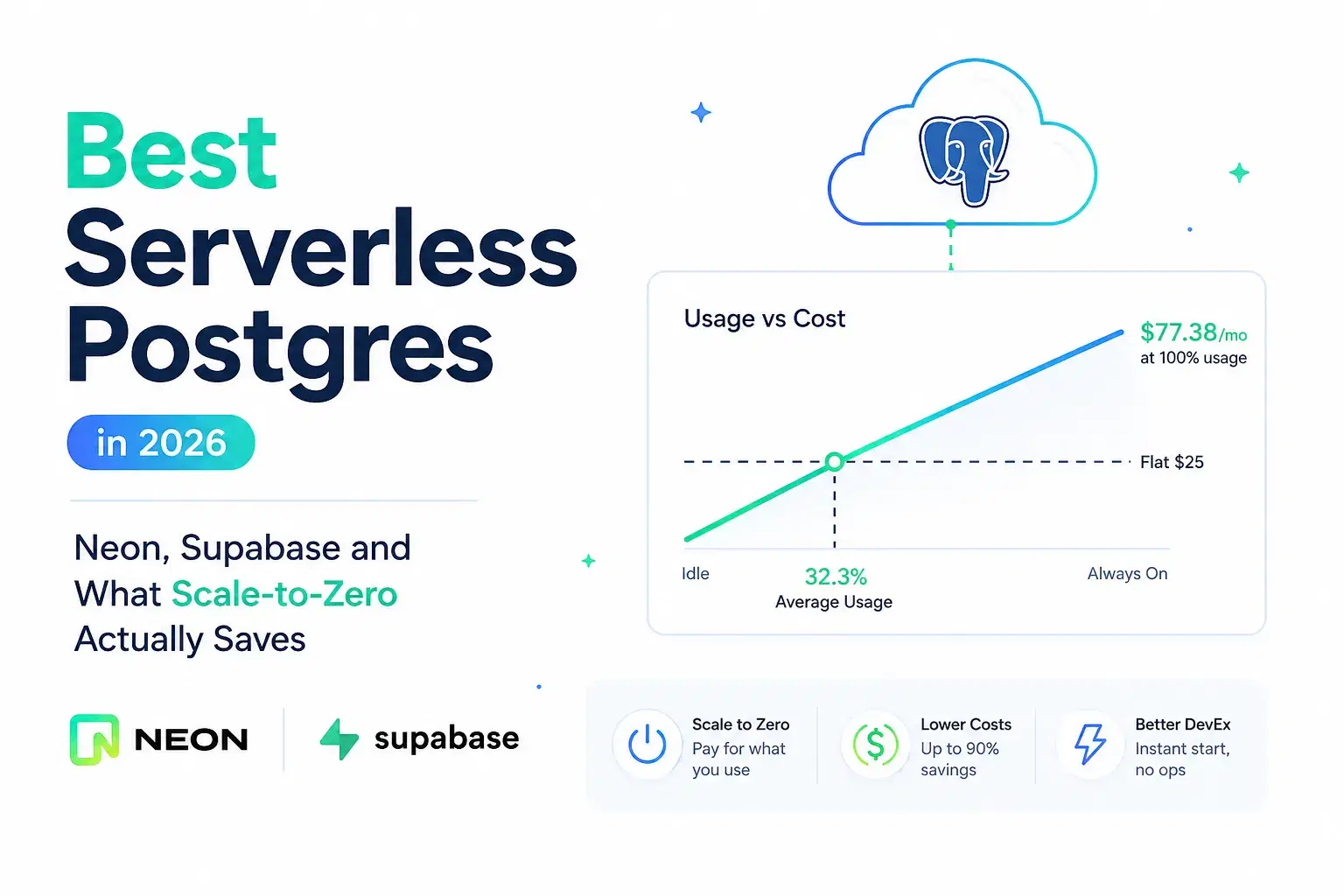
Which is the pitch for serverless Postgres, and the numbers now back it: Neon bills $0.106 per compute-hour on its Launch plan with no monthly minimum, and a suspended database costs exactly $0. Run the arithmetic and that beats a flat $25 a month right up until your database is busy about a third of the time.
Neon is also the project whose open-source repository has landed four commits in all of 2026, one of which changed a README link. Both facts matter, and most comparisons mention neither. Every price and repository detail below came from the vendor's own page or the GitHub API in August 2026.
What Serverless Actually Buys You
Three things, and only the first is really about cost.
Scale to zero. Compute suspends when idle and bills nothing while suspended. This is the entire economic argument, and whether it pays depends on a utilization number you can calculate.
Separated storage and compute. Storage persists while compute comes and goes, which is what makes suspend-and-resume viable at all rather than a cold restore from backup.
Branching. A copy-on-write database branch per pull request, seeded with real data, without provisioning a second instance. For most teams this is the feature that actually changes the workflow, more than the bill.
The Crossover Is Arithmetic
The interesting question is not whether scale-to-zero is cheaper. It is where the line sits. That is a short calculation from both vendors' published rates.
JavaScript// When does Neon's usage billing beat a flat monthly plan? const HOURS_PER_MONTH = 730 // 365 * 24 / 12 const NEON_LAUNCH_CU_HOUR = 0.106 // neon.com/pricing, Aug 2026 const SUPABASE_PRO_MONTH = 25 // supabase.com/pricing, Aug 2026 const neonMonthly = (cu, utilization) => cu * HOURS_PER_MONTH * utilization * NEON_LAUNCH_CU_HOUR const breakEven = (cu) => SUPABASE_PRO_MONTH / (cu * HOURS_PER_MONTH * NEON_LAUNCH_CU_HOUR) console.log(`always-on 1 CU: $${neonMonthly(1, 1).toFixed(2)}/mo`) for (const u of [0.05, 0.1, 0.25, 0.5, 1]) { console.log(` ${String(Math.round(u * 100)).padStart(3)}% utilization: $${neonMonthly(1, u).toFixed(2)}`) } console.log(`\nbreak-even vs a flat $${SUPABASE_PRO_MONTH}/mo plan: ${(breakEven(1) * 100).toFixed(1)}% utilization`)
textalways-on 1 CU: $77.38/mo 5% utilization: $3.87 10% utilization: $7.74 25% utilization: $19.34 50% utilization: $38.69 100% utilization: $77.38 break-even vs a flat $25/mo plan: 32.3% utilization
So a database that is genuinely busy 236 hours out of a 730-hour month costs the same either way. Below that, usage billing wins and keeps winning: a preview branch that wakes up for ten minutes per pull request is rounding-error cheap. Above it, an always-on 1 CU instance runs $77.38 a month, which is three times the flat plan.
One honest caveat on that comparison. Supabase Pro at $25 includes 8 GB of disk, 250 GB of egress, auth, object storage and the rest of the platform, so it is a backend product rather than a database line item. The crossover is still the right way to think about compute, but do not read it as "Supabase is cheaper above 32 percent" without adding what you would otherwise pay for the other pieces.
Neon
Neon is a database, full stop, and the pricing is the most aggressive in this space after the Databricks acquisition.
Free: $0, 100 CU-hours and 0.5 GB storage per project, scale-to-zero after 5 minutes and not disableable. Hitting a limit suspends compute rather than billing you.
Launch: no monthly minimum, purely usage based at $0.106 per CU-hour and $0.35 per GB-month. Scale-to-zero after 5 minutes, and you can turn it off.
Scale: no minimum, $0.222 per CU-hour and the same $0.35 per GB-month, with the suspend delay configurable from 1 minute to never.
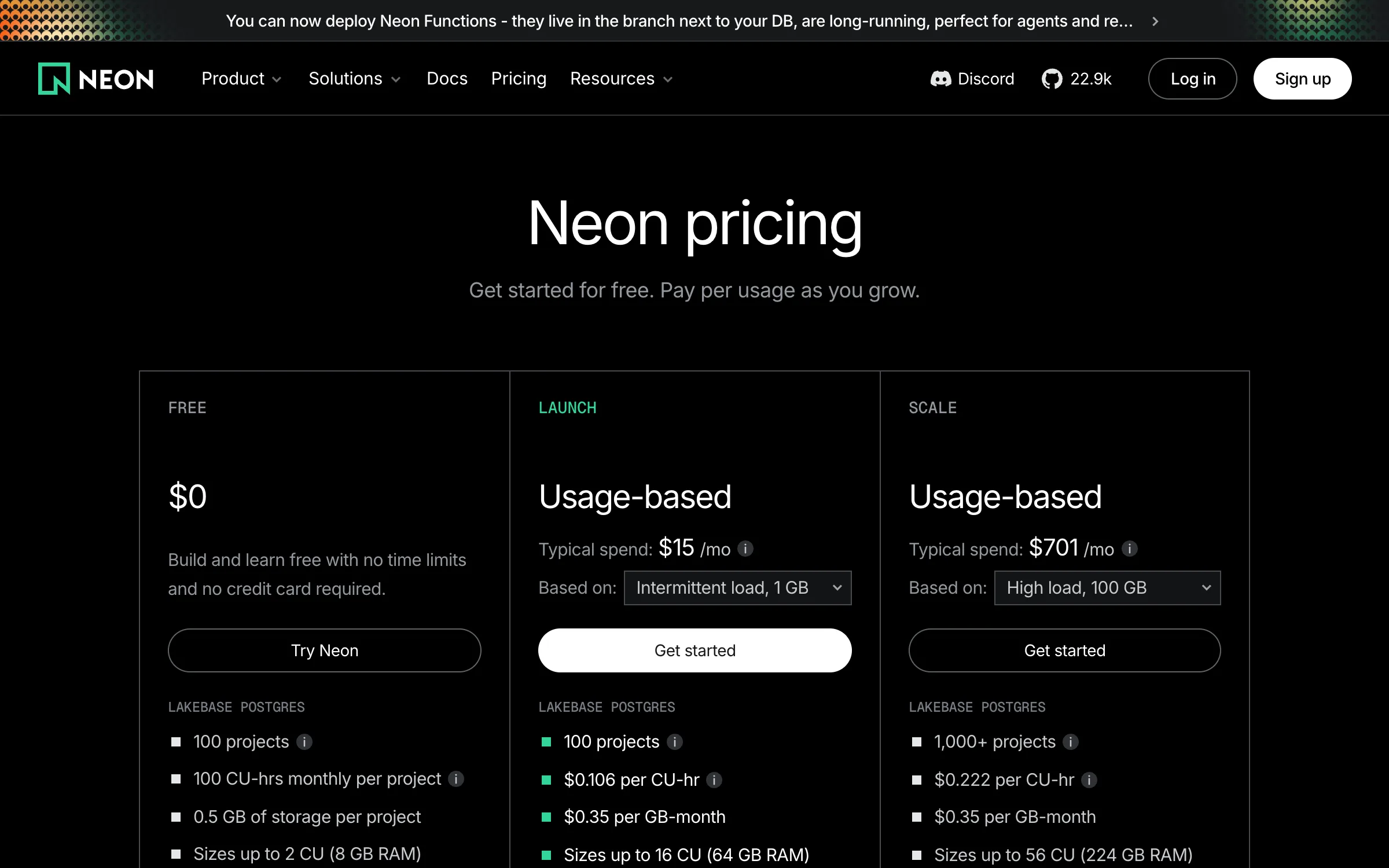
The removal of the monthly minimum is the part worth noticing. A paid Neon project that sits idle all month genuinely costs nothing for compute, which makes per-branch and per-environment databases a rounding error rather than a line item you have to justify.
Databricks announced its intent to acquire Neon on May 14, 2025 for roughly $1 billion, and the deal closed that month. The stated rationale is worth reading if you are wondering why the prices went down: Databricks said around 80 percent of databases on Neon were being created by AI agents rather than people. Agents spin up a database, use it briefly and abandon it, which is a workload that only makes sense on per-second billing with a zero floor.
The Open Source Footnote Nobody Checks
neondatabase/neon is Apache 2.0 with about 22,900 stars, and roundups list it as the open-source option. That is true and increasingly beside the point.
The commit history tells a blunter story. Four commits have landed on main in all of 2026: May 25, March 25, February 18, and a January 15 change that updated a README logo and swapped neon.tech links for neon.com. The most recent tagged release is from July 2025, thirteen months ago. There are 294 open issues and 258 open pull requests. The repository is not archived and nobody has announced anything, but the public codebase has clearly stopped tracking the hosted product.
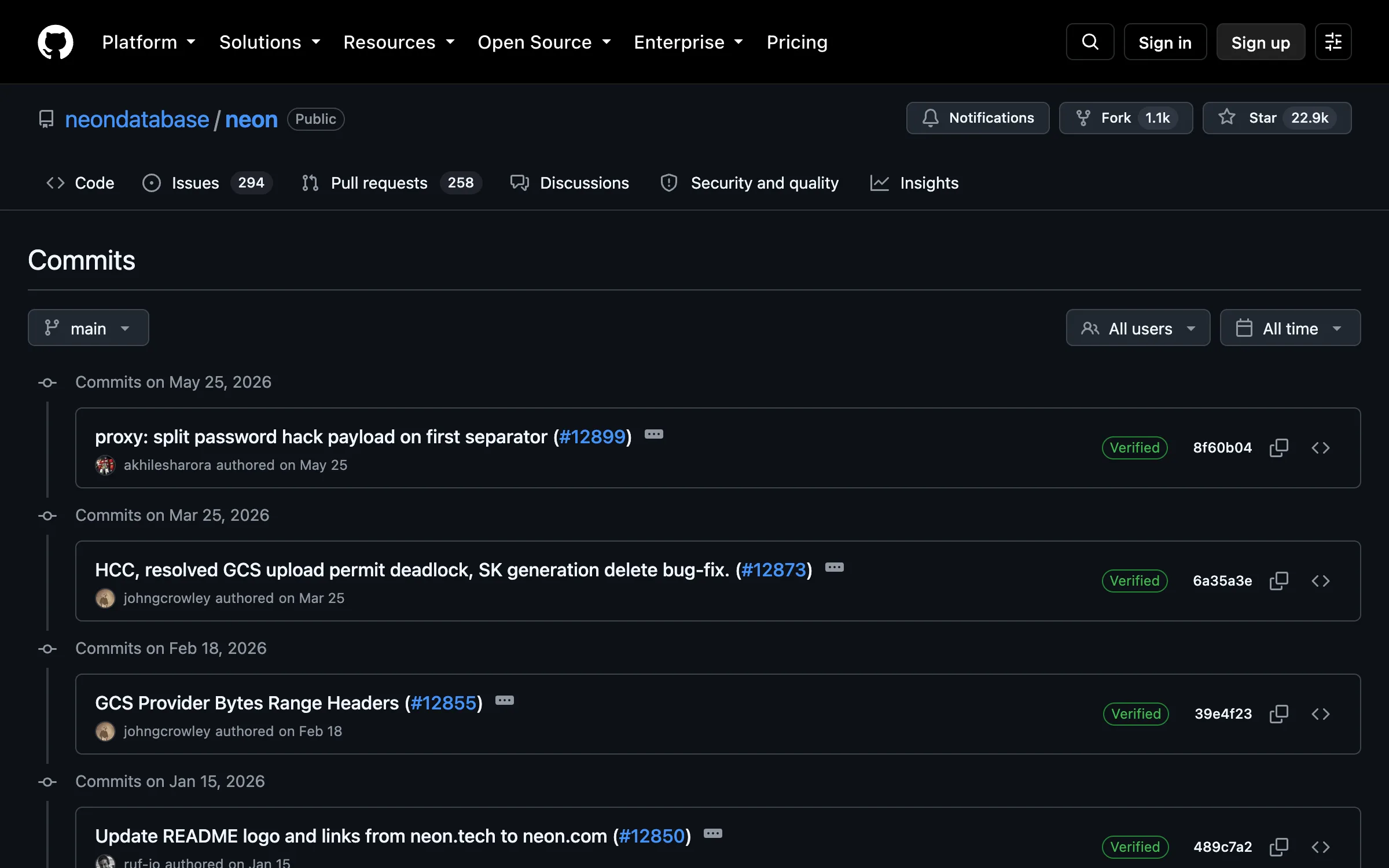
Compare supabase/supabase, which has about 108,000 stars, the same Apache 2.0 license, and a push on the day this was written.
The practical read: use Neon as the excellent managed service it is, and do not build a plan around self-hosting it or around upstream fixes landing on your schedule. If running the thing yourself is a hard requirement, that requirement points somewhere else.
Supabase
Supabase is not really a competitor to Neon so much as a different product category that contains a Postgres.
Free: $0, 500 MB database, 5 GB egress, up to two active projects, paused after one week of inactivity.
Pro: $25 a month, 8 GB disk with overage at $0.125 per GB, 250 GB egress then $0.09 per GB, and a Micro compute instance included in the base price.
Team: $599 a month. Enterprise: quoted.
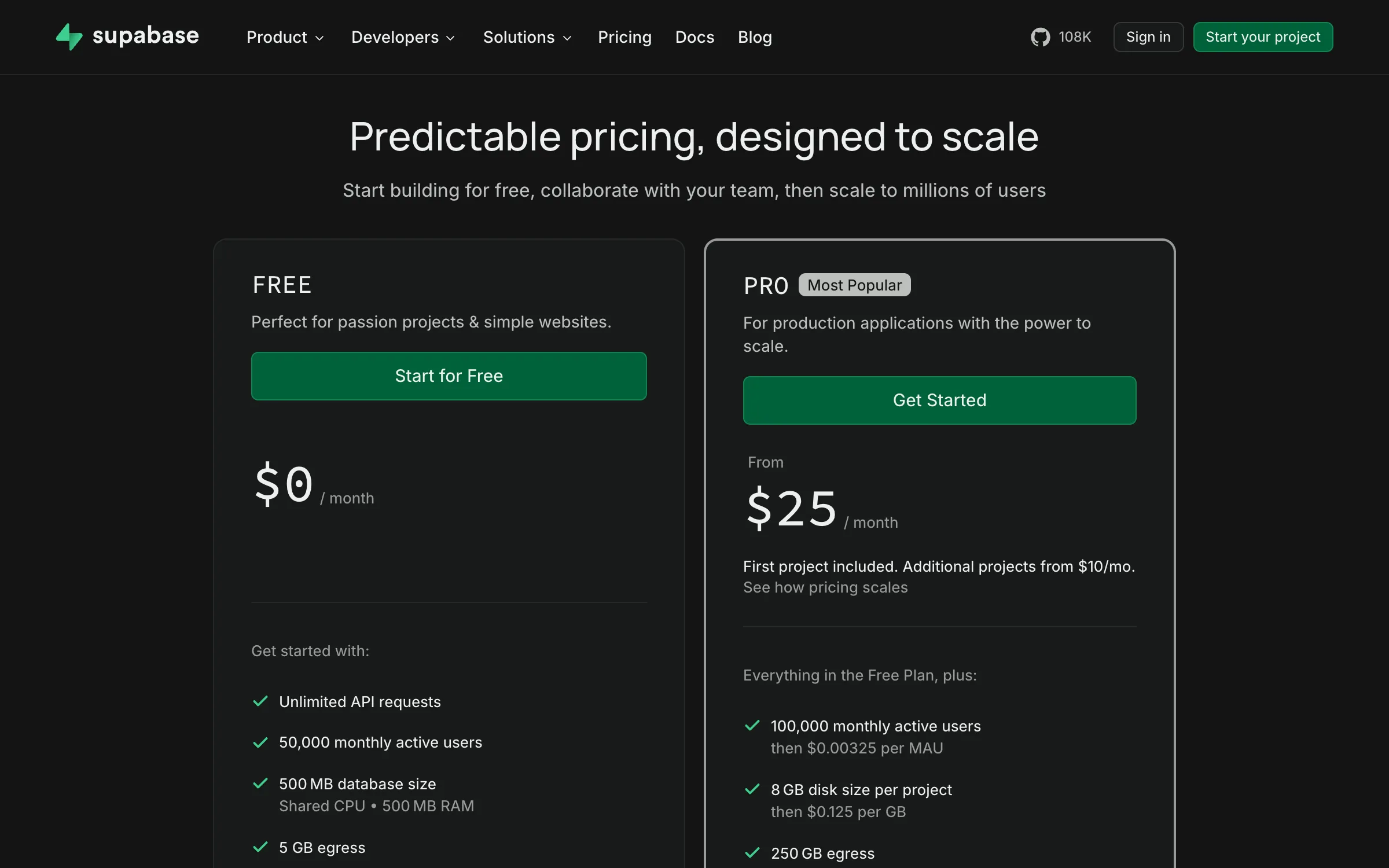
The pause behavior is the one to plan around. Free projects stop after a week of inactivity, which is fine for a side project and a problem for a demo you show a client once a month. On paid plans the database stays up, which also means it bills continuously: there is no scale-to-zero on Supabase Pro, so the flat fee is the floor rather than a cap.
What you get for that is everything around the database. Auth, row-level security wired into it, object storage, realtime subscriptions, edge functions and a generated REST layer. If you would otherwise assemble those from three vendors, comparing it to a bare database on compute price alone gets the wrong answer.
Quick Comparison
| Neon | Supabase | |
|---|---|---|
| What it is | Postgres, unbundled | Backend platform with Postgres |
| Free tier | 100 CU-hours, 0.5 GB | 500 MB, 5 GB egress, 2 projects |
| Free tier idle | Suspends after 5 min, resumes | Paused after 1 week inactivity |
| Paid entry | No minimum, $0.106/CU-hour | $25/month flat |
| Storage | $0.35/GB-month | 8 GB included, then $0.125/GB |
| Scale to zero on paid | Yes, $0 while suspended | No |
| License | Apache 2.0 | Apache 2.0 |
| Repo activity | 4 commits in 2026 | Pushed the day this was written |
How to Pick
Per-branch or per-preview databases: Neon, and it is not close. No minimum, zero cost while suspended, and branching is the native workflow rather than a bolt-on.
Agent or batch workloads that spike and vanish: Neon, for the same reason Databricks bought it.
You need auth, storage and realtime too: Supabase, and stop comparing compute rates. Pricing out the pieces separately is the only honest comparison.
Steady traffic above roughly a third utilization: either, but run your own version of the arithmetic above with your actual CU size before assuming usage billing is cheaper.
Self-hosting is a hard requirement: neither of these on the strength of their repos alone. Supabase is genuinely active, so it is the safer of the two, but check that the components you need are the ones being maintained.
Wiring It Up Without Surprises
- Measure utilization before choosing a billing model. Take a week of database CPU-active time from your current instance and divide by the hours in that week. That single number decides which pricing shape wins.
- Sanity-check the connection string before debugging anything else. Pooled and direct endpoints differ, and serverless providers hand you both. Our Connection String Parser breaks a URI into host, port, database, user and parameters so you can see which endpoint and which
sslmodeyou actually pasted. - Use a pooled connection from serverless functions. A function that opens a direct connection per invocation will exhaust Postgres connection slots long before it exhausts your budget.
- Pick time-ordered primary keys. Random UUIDv4 keys fragment B-tree indexes and hurt insert performance at volume. Our UUID v7 Generator produces timestamp-prefixed IDs that keep inserts sequential.
- Keep migrations readable in review. Our SQL Formatter normalizes generated migration SQL so a diff shows what changed rather than how the ORM chose to wrap lines.
- Do not schedule a keepalive ping. Cron-ing a query every five minutes to avoid cold starts converts your usage bill into an always-on bill, which is the one mistake that makes scale-to-zero cost more than a flat plan. If you do need scheduled work, size the interval deliberately with our Cron Expression Generator.
- Budget the resume latency, not just the price. A suspended database has to wake up. That is fine for a preview branch and not fine on a user-facing path with a tight p99.
Conclusion
The arithmetic is the part to keep: usage billing beats a flat $25 plan below about 32 percent utilization, and an always-on 1 CU instance is $77.38 a month. Preview branches, agent workloads and staging environments sit far below that line, which is why per-branch databases stopped being a luxury.
Neon is the better database and Supabase is the better platform, and comparing them on compute price alone will mislead you in whichever direction you were already leaning. The one thing worth checking yourself is the open-source claim: both are Apache 2.0, but only one of the two repositories has seen meaningful activity this year, and that matters if your plan involves ever running the thing yourself.
Related DevToolLab Tools
- Connection String Parser - Break a Postgres URI into host, port, user and parameters to confirm which endpoint you pasted.
- UUID v7 Generator - Time-ordered primary keys that keep inserts sequential instead of fragmenting the index.
- SQL Formatter - Normalize generated migration SQL so review diffs show real changes.
- Cron Expression Generator - Size scheduled jobs deliberately, since a five-minute keepalive undoes scale-to-zero.
Related Guides
- Best Vector Databases - when the workload is embeddings rather than rows
- Best AI Code Execution Sandboxes - the other per-agent resource that has to scale to zero
- Best Infrastructure as Code Tools - provisioning these environments repeatably
- SQL Formatting Best Practices - conventions that keep migrations reviewable
Prices and repository activity change quickly. Check the Neon and Supabase pricing pages and the repos before committing.